Sarrera
The Generic Staff Fingerprint Check-in Machine Q-A26 is an advanced biometric time attendance system designed for efficient employee management and enhanced security. This device utilizes state-of-the-art fingerprint recognition technology to ensure accurate tracking of staff check-ins and check-outs, eliminating issues like 'buddy punching'. It features a high-resolution fingerprint sensor, a user-friendly LCD interface, and robust data storage capabilities for attendance records and payroll processing.
Paketearen edukia
- Staff Fingerprint Check-in Machine Q-A26
- Elikatze-moldagailua
- Muntatzeko hardwarea (torlojuak, hormako takoak)
- Erabiltzailearen eskuliburua (dokumentu hau)
- Battery (as per specifications)
Konfigurazio Argibideak
- Deskargatzea: Carefully remove all components from the packaging. Inspect the device for any signs of damage.
- Potentzia-konexioa: Connect the provided power adapter to the machine's power input port and then plug it into a standard electrical outlet. The device should power on automatically.
- Hasierako konfigurazioa: Upon first power-on, the device may prompt you to set the date, time, and language. Follow the on-screen instructions using the keypad and LCD interface.
- Muntatzea (aukerakoa): If wall-mounting, choose a suitable location. Use the provided mounting hardware to secure the device firmly to a wall at an accessible height. Ensure the power cable can reach the outlet without strain.
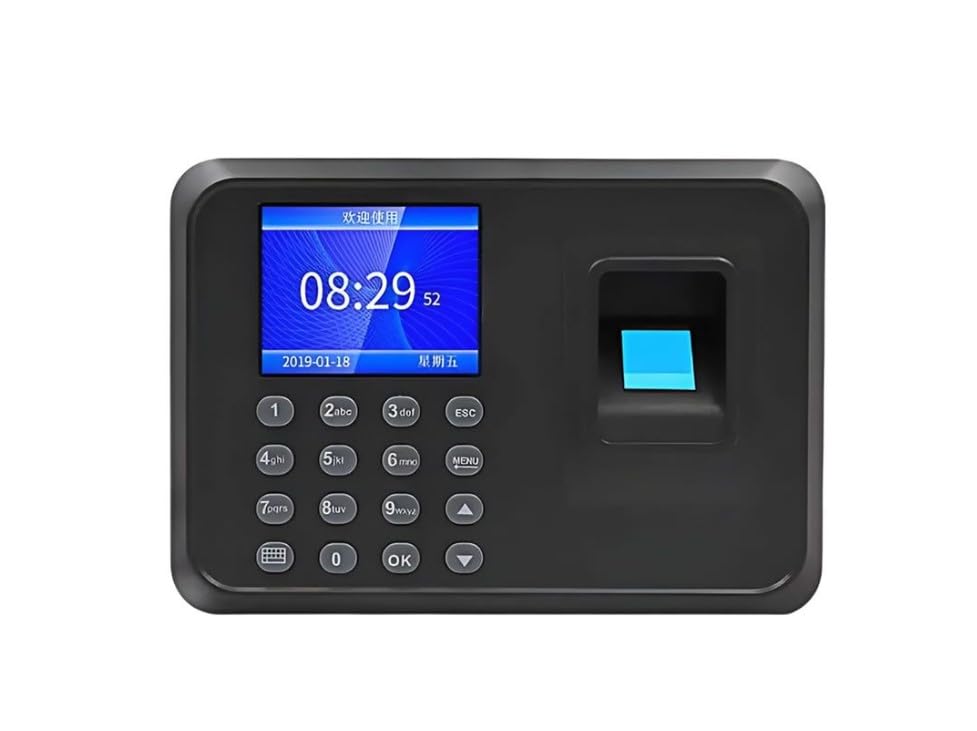
Image: User interacting with the fingerprint scanner on the Q-A26 device.
Funtzionamendu-argibideak
1. Enrolling Fingerprints
- Sarbide menua: Press the 'MENU' button (or equivalent, refer to on-screen prompts) to enter the main menu. You may need administrator privileges or a password.
- Navigate to User Management: Use the arrow keys to navigate to 'User Management' or 'Enroll User' and press 'OK'.
- Add New User: Select 'Add User' and enter the employee ID.
- Erregistratu hatz-marka: Select 'Enroll Fingerprint'. Place the employee's finger firmly on the scanner. The device will prompt you to lift and place the finger multiple times (typically 3 times) for accurate registration.
- Gorde: Confirm and save the user's information. Repeat for all employees.
2. Sarrera/Irteera Erregistroa
- Egonean modua: Ensure the device is in standby mode, displaying the current time.
- Place Finger: Instruct the employee to place their registered finger firmly on the fingerprint scanner.
- Berrespena: The device will display a confirmation message (e.g., "Thank You" or employee ID) upon successful recognition. A voice prompt may also confirm the action.
3. Accessing Attendance Records
- Sarbide menua: Enter the main menu as an administrator.
- Navigate to Data Management: Select 'Data Management' or 'Attendance Records'.
- View/Download: Ahal duzu view records directly on the device or download them via USB (if supported) for further processing. Refer to the device's on-screen options for specific download procedures.
Mantentzea
- Sentsorea garbitzea: Regularly clean the fingerprint sensor with a soft, dry, lint-free cloth. Avoid using abrasive cleaners or liquids directly on the sensor.
- Garbiketa orokorra: Wipe the device's exterior with a slightly damp cloth. Ensure no moisture enters the device.
- Ingurumen-baldintzak: Keep the device in a dry environment, away from direct sunlight, extreme temperatures, and excessive dust.
- Datuen babeskopia: Periodically back up attendance data to an external storage device or computer to prevent data loss.
Arazoak konpontzea
| Arazoa | Kausa posiblea | Irtenbidea |
|---|---|---|
| Gailua ez da pizten. | Korronte-egokitzailea ez dago konektatuta edo akastuna; korronte-hartunearen arazoa. | Check power connections. Try a different power outlet. Ensure the power adapter is functioning correctly. |
| Hatz-marka ez da ezagutzen. | Finger not placed correctly; sensor is dirty; fingerprint not enrolled; finger condition (wet, dry, damaged). | Ensure the finger covers the entire sensor. Clean the sensor. Re-enroll the fingerprint if necessary. Ensure finger is clean and dry. |
| Data/ordu okerra bistaratzen da. | Settings not configured or battery backup for clock is low. | Access the system settings via the menu and correct the date and time. |
| Cannot access menu. | No administrator privileges; incorrect password. | Ensure you are using an administrator account. Verify the administrator password. |
Zehaztapenak
| Ezaugarri | Xehetasuna |
|---|---|
| Eredua | Q-A26 |
| Marka | Generikoa |
| Fabrikatzailea | CM |
| Produktuaren neurriak (L x W x H) | 22 x 22 x 18 cm |
| Dakarten osagaiak | Bateria |
| Eskuragarri dagoen lehen data | 4ko uztailaren 2024a |
| Hatz-markak hautematea | High-resolution sensor for secure and fast identification. |
| Interfazea | Intuitive LCD screen and keypad. |
| Datuak biltegiratzea | Capable of storing thousands of fingerprint templates and attendance records. |
Bermea eta Laguntza
Information regarding specific warranty terms for the Generic Staff Fingerprint Check-in Machine Q-A26 is not provided in the product details. Please refer to your purchase documentation or contact the retailer for warranty details.
For technical support or further assistance, please contact the manufacturer or your point of purchase. Ensure you have your product model number (Q-A26) and purchase details available when seeking support.
- Fabrikatzailea: CM
- ASIN: B0D8TN8FFN


