
Next YE-65GFSG8-QLED
Next YE-65GFSG8-QLED 65-inch UHD 4K QLED Google TV User Manual
Model: YE-65GFSG8-QLED
1. Sarrera
Eskerrik asko erosketagatik.asing the Next YE-65GFSG8-QLED 65-inch UHD 4K QLED Google TV. This manual provides essential information for setting up, operating, and maintaining your new television. Please read it thoroughly before use and keep it for future reference.

1.1. irudia: Aurrealdea view of the Next YE-65GFSG8-QLED 65-inch QLED Google TV.
2. Segurtasun informazioa
Please observe the following safety precautions to prevent damage and ensure safe operation:
- Ez jarri telebista euri edo hezetasunera.
- Ez blokeatu aireztapen baoak.
- Ziurtatu konexio elektrikoetarako lurreratze egokia dagoela.
- Keep the TV away from direct sunlight, heat sources, and open flames.
- Erabili telebistarekin batera datorren elikatze-kablea soilik.
- Ez saiatu telebista zeuk konpontzen. Konponketa guztiak langile kualifikatuei eskatu.
- Jarri telebista gainazal egonkor eta lau batean edo muntatu ondo horman.
3. Paketearen edukia
Egiaztatu elementu guztiak paketean daudela:
- Next YE-65GFSG8-QLED 65-inch UHD 4K QLED Google TV
- Urruneko Kontrola
- Elikatze kablea
- Erabiltzailearen eskuliburua (dokumentu hau)
- Telebista-euskarriaren osagaiak (hala badagokio)
- Screws for Stand Assembly (if applicable)
4. Konfigurazioa
4.1. Stand Assembly (Optional)
Telebista horman muntatuko ez baduzu, jarri euskarria honela:
- Kontu handiz jarri telebista aurpegia behera gainazal leun eta garbi batean, pantaila kaltetu ez dadin.
- Lerrokatu euskarriaren osagaiak telebistaren behealdeko muntaketa-zuloekin.
- Lotu euskarria emandako torlojuak erabiliz. Ez estutu gehiegi.
- Kontu handiz altxa telebista gainazal egonkor batean zutik jarri.
4.2. Gailuak konektatzea
Konektatu kanpoko gailuak telebistaren atzealdeko portu egokietara.
4.1. irudia: Atzekoa view of the TV with connection ports labeled.
- HDMI (3 ports, one with ARC): Connect Blu-ray players, game consoles, set-top boxes, etc. Use the HDMI (ARC) port for audio return channel functionality with compatible sound systems.
- USB (2 ataka): Konektatu USB biltegiratze gailuak multimedia erreproduzitzeko edo software eguneratzeko.
- DVB-S / DVB-T (TV 1, TV 2): Connect satellite (DVB-S) or terrestrial (DVB-T) antenna cables for broadcast TV reception.
- CI Module: Insert a Conditional Access Module (CAM) for encrypted digital TV services.
- Mini AV-IN: Connect older devices using an AV adapter cable (not always included).
- Irteera optikoa: Konektatu soinu-barra edo audio-hargailu batera audio digitalaren irteerarako.
- Ethernet: Konektatu Ethernet kable bat kable bidezko internet konexioa lortzeko.
4.3. Energia-konexioa
Plug the power cord into the TV's power input, then into a wall outlet. The TV will enter standby mode.
5. Funtzionamendu-argibideak
5.1. Lehen aldiz konfiguratzen
When you power on the TV for the first time, follow the on-screen instructions to:
- Hautatu zure hizkuntza eta eskualdea.
- Connect to a Wi-Fi network or use the wired Ethernet connection.
- Hasi saioa zure Google kontuarekin Google TV funtzioetara sartzeko.
- Scan for available TV channels (if using antenna/satellite).

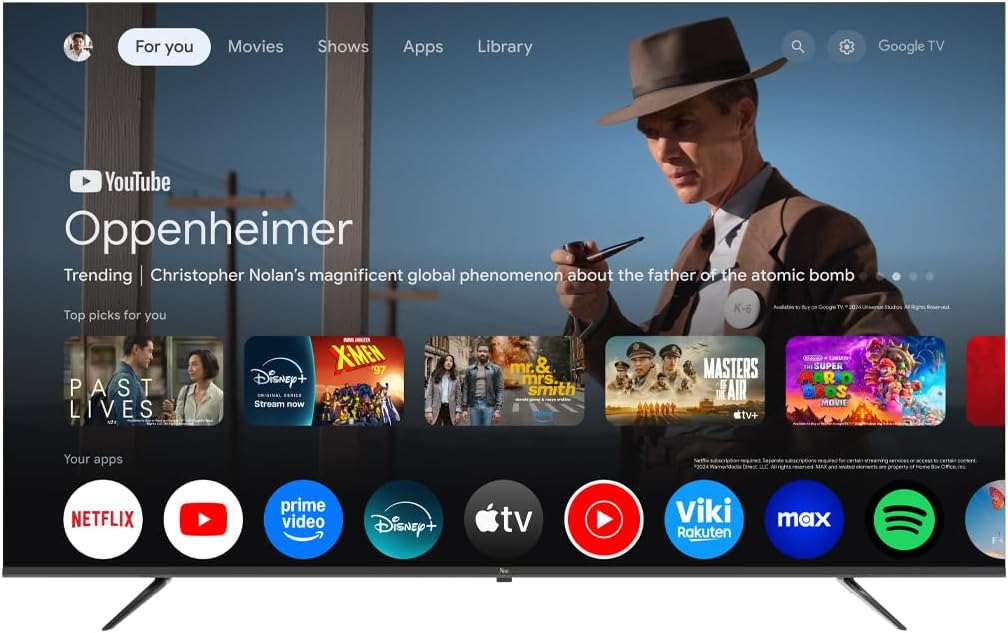
Image 5.1: Google TV interface on the Next QLED TV.
5.2. Google TV-ren ezaugarriak
Your TV runs on Google TV, providing access to a wide range of content and smart features:
- Gomendio pertsonalizatuak: Get suggestions based on your viewhistoria.
- Ahots kontrola: Use the built-in Google Assistant via the remote control to search for content, control smart home devices, and more.
- Aplikaziorako sarbidea: Download and stream from popular services like YouTube, Netflix, Disney+, and more via the Google Play Store.
- Chromecast integratua: Igorri edukia zure gailu mugikor bateragarrietatik zuzenean telebistara.
5.3. QLED pantaila-teknologia
The QLED display technology in your TV offers enhanced picture quality:
- Kolore biziak: Quantum Dot technology produces a wider color gamut and higher color saturation.
- Distira handia: Experience brighter images with improved contrast.
- HDR euskarria: High Dynamic Range (HDR) content delivers greater detail in both bright and dark scenes.

Image 5.2: Visual representation of QLED technology's enhanced color saturation.

Image 5.3: Visual representation of HDR technology's improved dynamic range.
5.4. Urruneko kontrola
The included remote control allows you to navigate the TV's interface, adjust settings, and access smart features. Refer to the remote control diagram (if available in the physical manual) for specific button functions.
5.5. Produktua amaitu daview Bideoa
Ikusi bideo hau laburpen bat egitekoview of the Next QLED Google TV's key features, including QLED technology, Ultra HD quality, Google TV integration, and frameless design.
5.1. bideoa: Amaitu daview of Next QLED Google TV features.
6. Mantentzea
Zure telebistaren iraupena eta errendimendu optimoa bermatzeko:
- Pantaila garbitzea: Garbitu pantaila astiro-astiro zapi leun eta pelusik gabeko batekin. Orban egoskorrak izanez gero, erabili pantailarako garbiketa-soluzio espezifikoa zapian aplikatuta, ez zuzenean pantailan.
- Armairua garbitzea: Erabili zapi leun eta lehor bat telebistaren armairua garbitzeko. Ez erabili garbitzaile edo disolbatzaile urratzailerik.
- Aireztapena: Ziurtatu aireztapen-irekiduretatik hautsik eta oztoporik gabe daudela gehiegi berotzea saihesteko.
- Itzali: Disconnect the TV from the power outlet during electrical storms or when it will be unused for extended periods.
7. Arazoak
Telebistarekin arazoak badituzu, jo ezazu ohiko irtenbide hauetara:
| Arazoa | Irtenbide posiblea |
|---|---|
| Botererik ez | Egiaztatu elikatze-kablea telebistara eta hormako entxufera ondo konektatuta dagoen. Ziurtatu entxufea funtzionatzen duela. |
| Ez dago irudirik, baina soinua badago | Egiaztatu sarrera-iturri zuzena hautatuta dagoela. Egiaztatu kanpoko gailuetarako kable-konexioak. |
| Soinurik ez, baina irudia badago | Egiaztatu bolumen maila eta isilarazteko egoera. Ziurtatu audio kableak behar bezala konektatuta daudela. Egiaztatu telebistako audio irteeraren ezarpenak. |
| Urruneko kontrola ez dabil | Ordeztu bateriak. Ziurtatu ez dagoela oztoporik urrutiko agintearen eta telebistaren IR sentsorearen artean. |
| Irudiaren kalitate eskasa | Check antenna/cable connections. Adjust picture settings (brightness, contrast, sharpness). Ensure the source content is high quality. |
| Ezin da wifira konektatu | Restart your router. Ensure the Wi-Fi password is correct. Move the TV closer to the router or use a wired Ethernet connection. |
Irtenbide hauek probatu ondoren arazoa konpontzen ez bada, jarri harremanetan bezeroarentzako arreta-zerbitzuarekin.
8. Zehaztapenak
Key technical specifications for the Next YE-65GFSG8-QLED 65-inch UHD 4K QLED Google TV:
| Ezaugarri | Xehetasuna |
|---|---|
| Eredua | YE-65GFSG8-QLED |
| Pantailaren tamaina | 65 hazbete (165 cm) |
| Bistaratzeko Teknologia | QLED |
| Ebazpena | 4K UHD (Ultra Definizio Handia) |
| Freskatze tasa | 60 Hz |
| Sistema eragilea | Google TV |
| Konektibitatea | Bluetooth, Ethernet, HDMI (3 ports), USB (2 ports), Wi-Fi |
| Aspektu-erlazioa | 16:9 |
| Produktuaren neurriak (L x W x H) | 27.8S x 144.6Z x 88.9A cm |
| Produktuaren pisua | 16.3 kilogramo |
| Dakarten osagaiak | Urruneko Kontrola |
| Ezaugarri Berezia | Markorik gabeko diseinua |
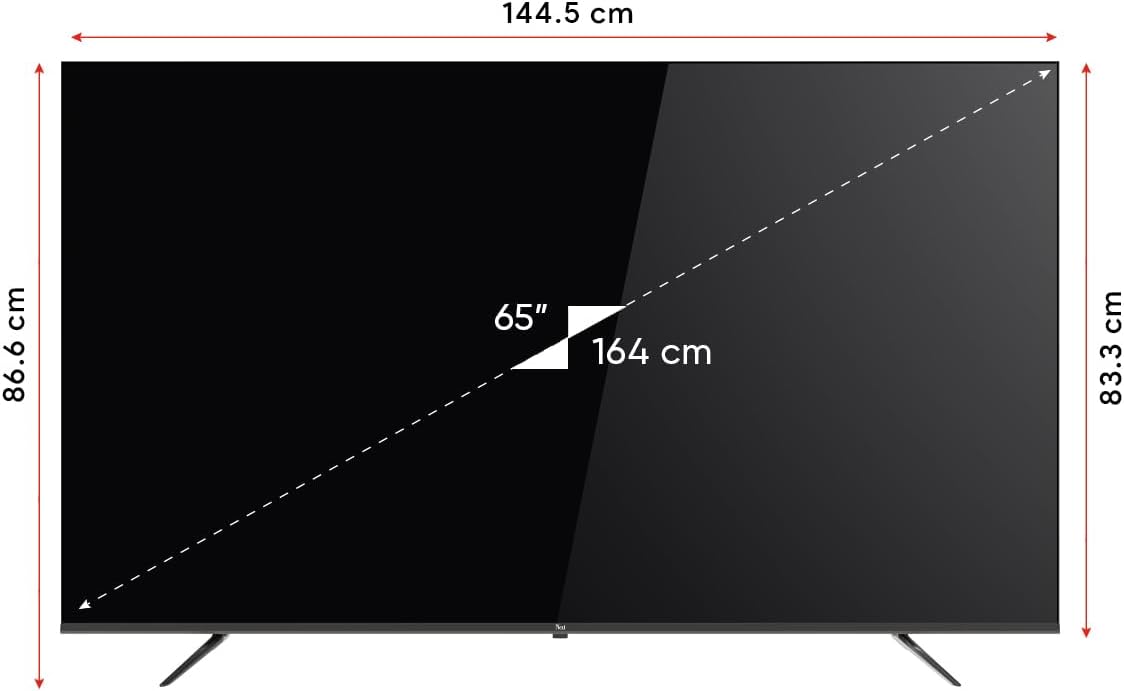
Image 8.1: TV dimensions (144.5 cm width, 86.6 cm height, 65" / 164 cm diagonal).
9. Bermea eta Laguntza
Your Next YE-65GFSG8-QLED TV comes with a manufacturer's warranty:
- Berme Epea: 2 Years Manufacturer Warranty.
- Laguntza: For technical assistance, warranty claims, or further inquiries, please refer to the contact information provided in your warranty card or visit the official Next webgunea.
Ask a question about this manual
Ask about setup, troubleshooting, compatibility, parts, safety, or missing instructions. Manuals+ will review the question and use this page’s manual context to help answer it.