
1. Sarrera
Thank you for choosing the Hama DR2002BT Digital Radio. This device offers a comprehensive audio experience with FM, DAB/DAB+ digital radio reception, and Bluetooth connectivity. Its user-friendly design, featuring large buttons and a clear 4.3-inch TFT color display, makes it suitable for all users. This manual will guide you through the setup, operation, and maintenance of your new digital radio.
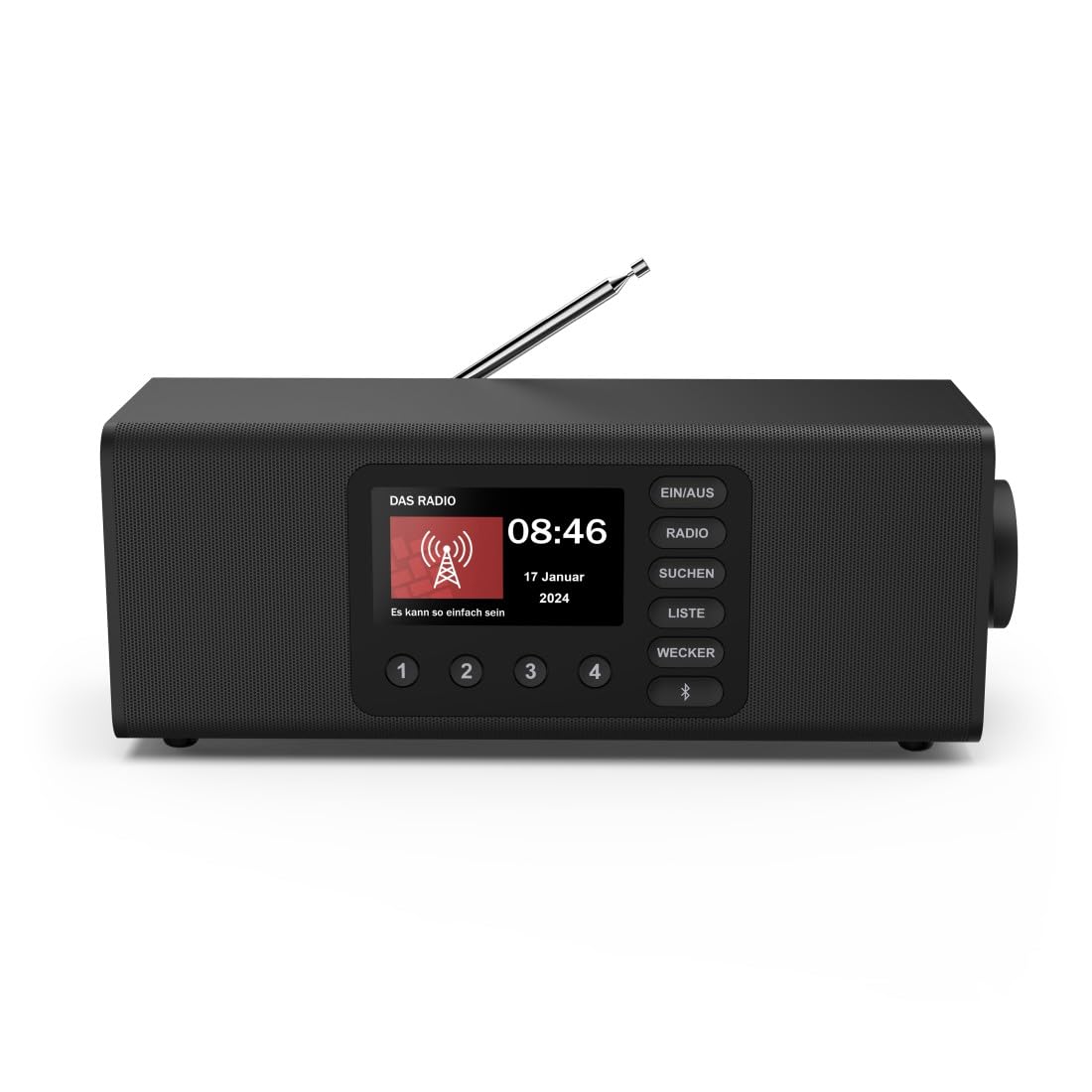
Irudia: Aurrealdea view of the Hama DR2002BT Digital Radio, showcasinbere pantaila eta kontrol botoiak erabiliz.
2. Segurtasun informazioa
Mesedez, irakurri arretaz segurtasun-argibide hauek gailua erabili aurretik. Gorde eskuliburu hau etorkizunean erreferentzia gisa.
- Ez jarri gailua hezetasunean, eurian edo muturreko tenperaturetan.
- Saihestu gailua bero-iturrietatik gertu edo eguzki-argia zuzenean jartzen.
- Ez ireki gailua casing. Repairs should only be performed by qualified personnel.
- Erabili emandako korronte-egokigailua soilik.
- Ziurtatu aireztapen egokia gailuaren inguruan.
3. Paketearen edukia
Egiaztatu elementu guztiak bertan daudela paketea desegiten duzunean:
- Hama DR2002BT Digital Radio
- Elikatze-moldagailua
- Erabiltzailearen eskuliburua
4. Produktua amaitu daview
4.1 Aurrealdeko panelaren kontrolak eta pantaila

Image: Front panel of the radio highlighting the display and control buttons, with icons for Bluetooth, DAB+, and Alarm functions.
The front panel features a 4.3-inch TFT color display, large control buttons, and a rotary knob for easy navigation and selection. Key buttons include:
- EIN/AUS (ON/OFF): Gailua piztu edo itzaltzen du.
- IRRATIA: Switches between FM and DAB/DAB+ modes.
- SUCHEN (SEARCH): Initiates station scanning.
- LISTE (LIST): Accesses the list of available stations.
- WECKER (ALARM): Alarma ezarpenak konfiguratzen ditu.
- Bluetooth botoia: Bluetooth parekatze modua aktibatzen du.
- Aurrezarritako botoiak (1-4): Gordetako gogoko irratietarako sarbide azkarra.
- Rotary Knob (LAUTSTÄRKE/NAVIGIEREN): Controls volume and navigates menus.
4.2 Atzeko panelaren konexioak
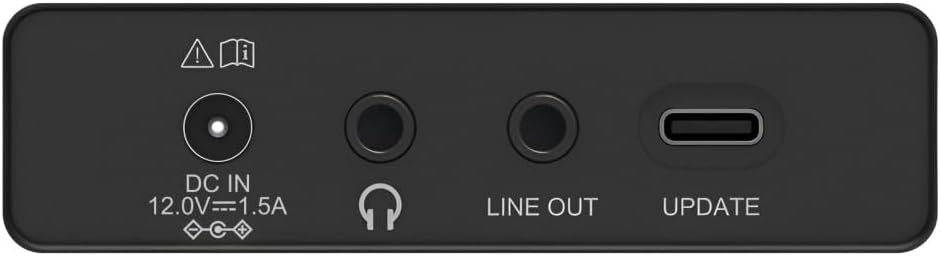
Image: Close-up of the rear panel showing the DC IN, Headphone, Line Out, and UPDATE (USB-C) ports.
Atzeko panelak konexio aukera ezinbestekoak eskaintzen ditu:
- DC IN 12.0V --- 1.5A: Power input for the external adapter.
- Aurikularretarako Jack (3.5 mm): Entzun pribaturako.
- LERROA: Kanpoko konexiorako audio irteera ampargitzaileak edo bozgorailuak.
- UPDATE (USB-C): Firmware eguneratzeetarako.
- Antena teleskopikoa: For FM and DAB/DAB+ reception.

Irudia: Atzealdea view of the Hama DR2002BT Digital Radio with its telescopic antenna extended for optimal signal reception.
5. Konfigurazioa
5.1 Energia-konexioa
- Konektatu emandako energia-egokitzailea DC IN irratiaren atzealdeko ataka.
- Entxufatu korronte egokitzailea korronte-hartune egoki batean.
- The radio will power on automatically or enter standby mode.
5.2 Antenaren kokapena
For optimal FM and DAB/DAB+ reception, fully extend the telescopic antenna. Position the radio near a window if reception is poor.
5.3 Initial Setup (First Use)
Upon first power-on, the radio may guide you through an initial setup process, including language selection and an automatic DAB station scan. Follow the on-screen prompts.
6. Funtzionamendu-argibideak
6.1 Piztu/Itzali
Sakatu EIN/AUS botoia irratia piztu edo itzaltzeko.
6.2 DAB/DAB+ Irrati Modua
- Sakatu IRRATIA botoia DAB modua hautatzeko.
- If this is the first time in DAB mode or if you want to rescan, press SUCHEN to perform a full scan for available stations.
- Use the rotary knob to navigate through the station list. Press the knob to select a station.
- To view the station list, press the ZERDATU botoia.
6.3 FM Irrati modua
- Sakatu IRRATIA botoia FM modua hautatzeko.
- Sakatu SUCHEN to automatically scan for the next available FM station.
- Alternatively, use the rotary knob to manually tune to a frequency.
6.4 Aurrezarpenak gordetzea eta berreskuratzea
The radio allows you to store up to 4 favorite stations using the dedicated preset buttons (1-4).
- Tune to the desired station (DAB or FM).
- Press and hold one of the preset buttons (1-4) until the display confirms the station has been saved.
- To recall a preset station, simply press the corresponding preset button (1-4).
6.5 Bluetooth funtzionamendua

Irudia: Aurrealdea view of the radio with Bluetooth and stereo speaker icons, indicating its wireless audio streaming capability.
The Hama DR2002BT can stream audio from your smartphone, tablet, or laptop via Bluetooth 5.0.
- Press the Bluetooth button on the front panel to enter Bluetooth pairing mode. The display will show a pairing indicator.
- Kanpoko gailuan (smartphone-a, tableta), gaitu Bluetooth-a eta bilatu eskuragarri dauden gailuak.
- Select "Hama DR2002BT" from the list of devices to pair.
- Once paired, you can play audio from your device, and it will be output through the radio's speakers.
6.6 Alarma-erlojuaren funtzioa

Image: A person waking up with the Hama DR2002BT Digital Radio placed on a bedside table, illustrating its alarm clock functionality.
The radio features two independent alarm settings.
- Sakatu WECKER button to access alarm settings.
- Use the rotary knob to select Alarm 1 or Alarm 2.
- Configure the alarm time, source (buzzer or radio station), and repetition (once, daily, weekdays, weekends, or specific days).
- Press the rotary knob to confirm each setting.
- To quickly activate/deactivate an alarm, press the WECKER button and use the rotary knob to toggle the alarm status.

Image: A person interacting with the Hama DR2002BT Digital Radio, demonstrating its ease of use for setting functions like alarms or tuning stations.
7. Mantentzea
To ensure the longevity and optimal performance of your Hama DR2002BT Digital Radio, follow these maintenance guidelines:
- Garbiketa: Use a soft, dry, lint-free cloth to clean the exterior of the radio. Do not use abrasive cleaners, waxes, or solvents.
- Hautsa: Regularly dust the device to prevent accumulation in vents and ports.
- Biltegiratzea: If storing the radio for an extended period, disconnect it from the power supply and store it in a cool, dry place.
- Antena: Handle the telescopic antenna carefully to avoid bending or breaking.
8. Arazoak
If you encounter issues with your radio, refer to the following common problems and solutions:
| Arazoa | Kausa posiblea | Irtenbidea |
|---|---|---|
| Botererik ez | Korronte-egokitzailea ez dago konektatuta; Korronte-hartune akastuna | Egiaztatu korronte-egokitzailearen konexioa; Saiatu beste entxufe batekin. |
| Irrati-harrera eskasa (DAB/FM) | Antenna not extended; Weak signal area; Interference | Fully extend the telescopic antenna; Reposition the radio (e.g., near a window); Perform a new station scan. |
| Bluetooth parekatzeak huts egin du | Bluetooth not enabled on external device; Radio not in pairing mode; Device too far | Ensure Bluetooth is on and visible on your device; Press the Bluetooth button on the radio; Move devices closer (within 10m). |
| Soinurik ez | Volume too low; Mute activated; Incorrect source selected | Increase volume using the rotary knob; Check if mute is active; Ensure the correct mode (DAB, FM, Bluetooth) is selected. |
| Alarma ez da jotzen | Alarm not activated; Incorrect alarm time/day set | Verify alarm is enabled in settings; Check alarm time and repetition settings. |
9. Zehaztapenak

Image: Diagram showing the dimensions of the Hama DR2002BT Digital Radio: 35 cm (width), 12.5 cm (depth), and 13 cm (height).
| Ezaugarri | Xehetasuna |
|---|---|
| Modelo zenbakia | DR2002BT (00054298) |
| Harrera | DAB, DAB+, FM |
| Bluetooth bertsioa | 5.0 |
| Irteerako potentzia (RMS) | 10 W (Stereo) |
| Bistaratzea | 4.3 hazbeteko TFT koloretako pantaila |
| Konexioak | 3.5mm Jack (Headphone), USB-C (Update), Line Out, DC IN |
| Elikatze Hornidura | Kanpoko korronte egokitzailea |
| Neurriak (W x D x H) | 35 x 12.5 x 13 cm |
| Pisua | 1788 gramo |
| Materiala | Plastikoa |
| Kolorea | Beltza |
| Ezaugarri gehigarriak | Alarm Function (2 alarms), Direct Selection Keys |
10. Bermea eta Laguntza
Hama GmbH & Co KG provides a warranty for this product. Please refer to the warranty card included in your package or visit the official Hama webwebgunean bermearen baldintza zehatzak ikusteko.
For technical support, troubleshooting assistance, or spare parts, please contact Hama customer service or visit their webgunea. EBn ordezko piezen eskuragarritasuna 7 urtez bermatuta dago.
- Fabrikatzailea: Hama GmbH & Co KG
- Jatorrizko herrialdea: Alemania
- EBko ordezko piezen erabilgarritasuna: 7 Urte