
FNIRSI FNIRSI-GC-02
FNIRSI Geiger Counter Nuclear Radiation Detector User Manual
Model: FNIRSI-GC-02
Marka: FNIRSI
Sarrera
The FNIRSI-GC-02 Geiger Counter is a portable nuclear radiation detector designed for precise measurement of Gamma (γ), X-ray, and Beta (β) radiation. Featuring an IPS display, rechargeable battery, and multiple dosage units, this device provides real-time monitoring and cumulative dose tracking for various environments. Its compact design and user-friendly interface make it an essential tool for personal safety, industrial applications, and environmental monitoring.

Irudia: Aurrealdea view of the FNIRSI-GC-02 Geiger Counter, showing its IPS display and control buttons.
Konfigurazio Gida
1. Unboxing eta Hasierako Ikuskapena
Carefully remove the Geiger Counter from its packaging. Inspect the device for any visible damage. Ensure all accessories, including the charging cable and hanging rope, are present.

Image: Contents of the FNIRSI-GC-02 package, including the device, hanging rope, charging cable, and instruction manual.
2. Gailua kargatzea
The FNIRSI-GC-02 is equipped with a built-in 850mAh rechargeable lithium battery. For optimal performance, fully charge the device before first use.
- Konektatu emandako USB kargatzeko kablea gailuaren kargatzeko atakara.
- Konektatu USB kablearen beste muturra USB elikatze-egokitzaile estandar batera (ez dago barne) edo ordenagailuaren USB atakara.
- The battery indicator on the IPS display will show charging status. A full charge typically takes up to 6 hours.
- Disconnect the charger once the battery is full to prolong battery life.

Image: Close-up of the FNIRSI-GC-02 showing the USB-C charging port and the charging process.
Funtzionamendu-argibideak
1. Piztu/Itzali
- Pizteko, eduki sakatuta Ados/Pizteko botoia (center button with power symbol) until the display illuminates.
- Itzaltzeko, luze sakatu Ados/Pizteko botoia pantaila itzali arte.
2. Pantaila ulertzea
The IPS display provides real-time radiation readings and various operational parameters.

Image: The FNIRSI-GC-02 display showing real-time cumulative value, current alarm value, and cumulative alarm value, along with icons for X-ray and Y-ray detection.
- Real-time Cumulative Value: Displays the current radiation dose rate (e.g., uSv/h).
- Current Alarm Value: Shows the set threshold for immediate radiation alerts.
- Cumulative Alarm Value: Shows the set threshold for total accumulated radiation alerts.
- Bateria adierazlea: Uneko bateriaren maila bistaratzen du.
- Ordua: Shows the elapsed monitoring time.
3. Navigating Menus and Settings
Erabili nabigazio botoiak (Up, Behera, Ezkerra, Eskuin, OK, Ezarpenak) to adjust device parameters.
- Sakatu Ezarpenak botoia (gear icon) to enter the settings menu.
- Erabili Up eta Behera botoiak menuko aukeren artean nabigatzeko.
- Sakatu OK aukera bat hautatzeko edo ezarpen bat berresteko.
- Sakatu Ezkerreko botoia (back arrow) to return to the previous menu or the main screen.
4. Setting Alarm Thresholds
The device supports audible and visual alarms when radiation levels exceed preset limits.
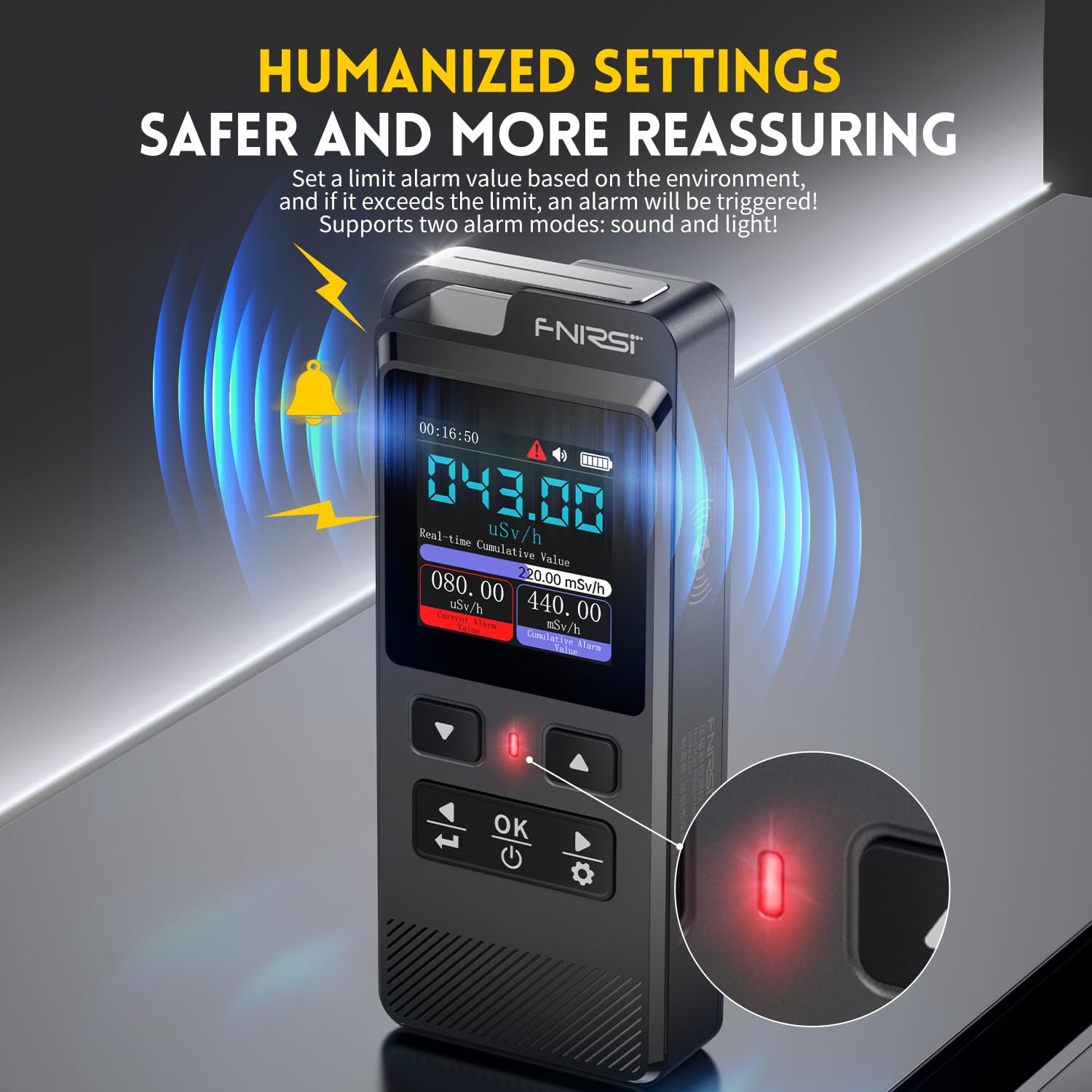
Image: The FNIRSI-GC-02 displaying an alarm state with a flashing red light and audible alert icon, indicating radiation levels have exceeded the set limit.
- Sartu Ezarpenen menua.
- Nabigatu Alarma ezarpenak.
- Egokitu Current Alarm Value (dose rate) and Cumulative Alarm Value (total dose) using the Up eta Behera botoiak.
- Confirm settings with the Ados botoia.
5. Jarraipen moduak
The device offers multiple monitoring interfaces for detailed analysis.
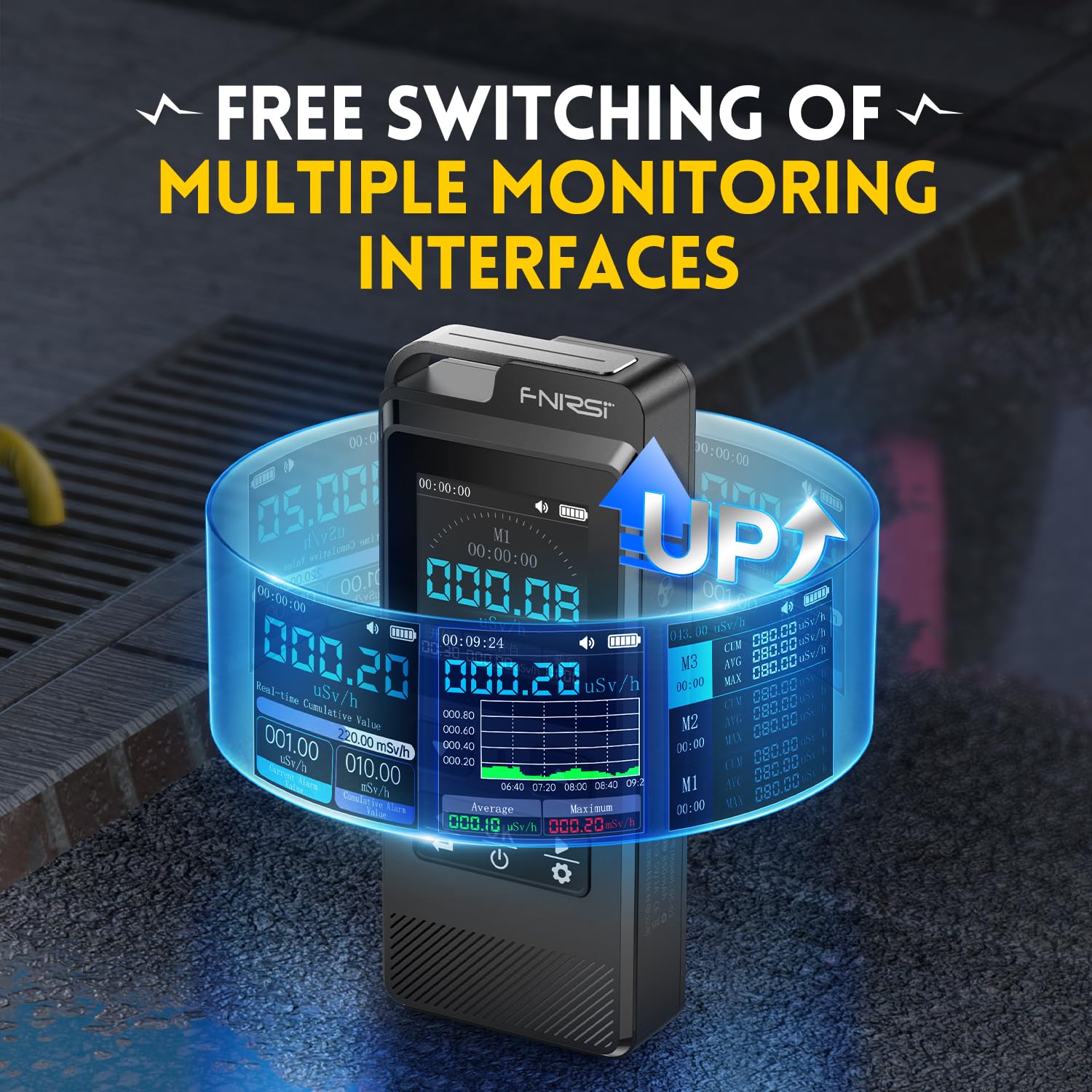
Image: The FNIRSI-GC-02 displaying various monitoring interfaces, including a real-time graph of radiation levels over time, and different data views.
- From the main screen, use the Left/Right buttons to switch between different display modes, such as real-time numerical display, historical graph, and cumulative data views.
6. Auto Sleep Funtzioa
To conserve battery, the device features an auto-sleep function.

Image: The FNIRSI-GC-02 settings menu showing the auto-sleep option, with adjustable sleep times from 5 to 60 minutes.
- urtean Ezarpenen menua, nabigatu Loaren ezarpenak.
- Enable or disable the sleep function and set the desired inactivity time before the device enters sleep mode.
Mantentzea
1. Garbiketa
Gailuaren errendimendua eta itxura mantentzeko:
- Garbitu kanpoaldea zapi leun eta lehor batekin.
- Do not use abrasive cleaners, solvents, or strong chemicals, as these may damage the casing edo pantaila.
- Ziurtatu likidorik ez dela sartzen gailuaren ataketan edo irekiduretan.
2. Bateria zaintzea
The built-in lithium polymer battery requires proper care for longevity:
- Kargatu berriro gailua bateriaren adierazleak bateria baxua erakusten duenean.
- Saihestu bateria maiz erabat deskargatzea.
- If storing the device for an extended period, charge it to approximately 50% and recharge every few months to prevent deep discharge.
- Use only the provided charging cable or a compatible high-quality USB cable.
3. Biltegiratzea
Store the Geiger Counter in a cool, dry place, away from direct sunlight, extreme temperatures, and high humidity. Keep it away from strong magnetic fields and corrosive substances.
Arazoak konpontzea
| Arazoa | Kausa posiblea | Irtenbidea |
|---|---|---|
| Gailua ez da pizten. | Bateria agortuta dago. | Kargatu gailua gutxienez 30 minutuz. |
| Gailua ez da pizten. | Pizteko botoia ez da behar bezain denbora luzez sakatu. | Press and hold the OK/Power button for 3-5 seconds. |
| Irakurketa okerrak. | Beste gailu elektroniko batzuek eragindako interferentziak. | Eremu elektromagnetiko indartsuetatik urrundu. |
| Irakurketa okerrak. | Device not calibrated (unlikely for user). | Contact customer support if issues persist after basic troubleshooting. |
| Alarma ez da jotzen. | Alarm volume is off or too low. | Check alarm settings in the menu and adjust volume. |
| Alarma ez da jotzen. | Radiation level below alarm threshold. | Verify the alarm threshold settings. |
| Pantaila izoztuta edo ez du erantzuten. | Softwarearen aldi baterako akatsa. | Perform a soft reset by holding the power button until the device restarts, or let the battery drain and recharge. |
Zehaztapenak
Image: Detailed diagram showing the dimensions of the FNIRSI-GC-02 and a table of its technical specifications.
| Ezaugarri | Xehetasuna |
|---|---|
| Modelo zenbakia | FNIRSI-GC-02 |
| Produktuaren neurriak | 106.5 x 44.5 x 25 mm (4.1 x 1.8 x 1 hazbete) |
| Pisua | 4.66 ontza |
| Detekzio Erradiazio Mota | Ionizing radiation (γ-rays, X-rays, β-rays) |
| Detector | Energia konpentsazio GM hodia (Geiger kontagailuaren hodia) |
| Dosi Egungo Tasa | 0.00-100000 μSv/h (10 mSv/h) |
| Dosi-baliokide metatua | 0.00 μSv-500.0 mSv |
| Energia sorta | 48 KeV-1.5 Me V ≤±30% (for 137Cs) |
| Sentikortasuna | 80 CPM/μSv (for Co-60) |
| Dosage Units | μSv/h, μGy/h, mR/h, CPS, CPM |
| Bateria mota | 1 litio-polimeroko bateria (barne) |
| Bateria Edukiera | 850 mAh |
| Alarma metodoa | Argia, Soinua |
| Onartutako hizkuntzak | txinera, ingelesa, errusiera, alemana, japoniera, portugesa, gaztelania, koreera |
Erabilera eszenatokiak

Image: Visual representation of various environments where the FNIRSI-GC-02 can be used, including daily living, industrial, medical, and personal protection scenarios.
- Daily Living Environment: Detection of radiation from suspected sources like imported products, jewelry, and building materials.
- Industrial Environment: Monitoring in nuclear waste sites, radiation source transportation, mining plants, steel recycling, and metallurgy.
- Medical Environment: Use in radiology, CT, CR, DR, blood irradiation equipment, and with radioactive nuclides or iodine drugs.
- Babes pertsonala: Occupational health, customs, medical staff, pregnant women, and general personal safety.
Bermea eta Laguntza
FNIRSI products are manufactured to high quality standards. For specific warranty information, please refer to the warranty card included with your product or visit the official FNIRSI website. If you encounter any issues or require technical assistance, please contact FNIRSI customer support through their official channels.
For the latest support information and FAQs, please visit the FNIRSI denda Amazonen.
Ask a question about this manual
Ask about setup, troubleshooting, compatibility, parts, safety, or missing instructions. Manuals+ will review the question and use this page’s manual context to help answer it.