
1. Produktua amaitu daview
The Maidesite EL2 Pro Art Electric Standing Desk is designed to enhance your workspace with its innovative features and ergonomic benefits. This manual provides essential information for assembly, operation, maintenance, and troubleshooting to ensure safe and efficient use of your desk.
Ezaugarri nagusiak:
- Innovative Elliptical Design: The EL2 Pro Art features a unique elliptical leg design with smooth, curved lines, offering a refined aesthetic that complements modern office and home environments. This design also enhances safety by reducing impact from accidental bumps, making it ideal for households with children or pets.
- Powerful Dual Motor System: Constructed from high-quality steel, the desk boasts a robust dual-motor system with an impressive load capacity of 180KG, ensuring stability even with heavy equipment.
- Fast and Quiet Operation: Enjoy a lifting speed of 35mm/s for quick and smooth transitions between sitting and standing positions. The dual motors operate quietly at less than 45dB, ensuring a comfortable and undisturbed environment.
- Ukipen-panela intuitiboa: The easy-to-use touch panel includes four programmable memory presets for automatic height adjustment, an integrated anti-collision sensor for safety, a child lock function, and a convenient USB charging port.
- Sedentary Alarm & Cable Management: The exclusive Maidesite "sedentary alarm" reminds you to change your posture regularly. A cable management tray and side hooks help keep your workspace tidy and organized.
2. Segurtasun informazioa
Mesedez, irakurri eta ulertu segurtasun-jarraibide guztiak muntatu eta erabili aurretik. Jarraibide hauek ez jarraitzeak lesioak edo produktua kaltetu dezake.
- Ziurtatu torlojuak eta torlojuak ondo estututa daudela erabili aurretik.
- Do not overload the desk beyond its maximum weight capacity of 180KG.
- Istripuak saihesteko, mantendu haurrak eta maskotak mahaitik urrun funtzionatzen ari den bitartean.
- The anti-collision sensor is designed to prevent damage, but always be aware of your surroundings when adjusting the desk height.
- Ez jarri likidorik zuzenean kontrol-panelean edo osagai elektrikoen ondoan.
- Before using the desk, always perform a reset operation as described in the operating instructions.
3. Paketearen edukia
Muntaketa hasi aurretik, egiaztatu osagai guztiak daudela eta kalterik gabe daudela. Piezarik falta edo kaltetuta badago, jarri harremanetan bezeroarentzako arreta-zerbitzuarekin.

3.1 Irudia: Gainetikview mahaiko osagaiak muntatzeko.
The package typically includes the desk frame components, control panel, power adapter, and necessary hardware for assembly. Please refer to the detailed parts list in your physical instruction manual for specific quantities and identifiers.
4. Konfigurazioa eta Muntaketa
Follow these steps to assemble your Maidesite EL2 Pro Art Electric Standing Desk. It is recommended to have two people for assembly, especially when handling the desktop.
4.1 Muntaketa bideo gida
For a visual guide, please refer to the following assembly videos. While not all videos may be specific to the EL2 Pro Art model, they demonstrate general standing desk assembly principles.
Video 4.1: This video demonstrates the assembly process for a standing desk frame, similar to the Maidesite EL2 Pro Art. It shows step-by-step instructions for putting together the frame components.
Video 4.2: This video provides a general guide for assembling a standing desk, demonstrating common steps and techniques that may apply to the Maidesite EL2 Pro Art frame.
4.2 Mahaigainaren bateragarritasuna

Figure 4.1: Compatible desktop sizes for the EL2 Pro Art frame.
The EL2 Pro Art frame is compatible with desktop sizes ranging from 100-220cm in length, 60-100cm in width, and over 2cm in thickness.
5. Funtzionamendu-argibideak
Your Maidesite EL2 Pro Art desk is equipped with an intuitive control panel for easy height adjustment and smart features.
5.1 Initial Setup (Reset Operation)
Before first use or after a power interruption, a reset operation is required:
- Press and hold the "Down" arrow button until the desk reaches its lowest position and then slightly rises.
- Askatu botoia. Mahaia berrezarri eta erabiltzeko prest dago orain.
5.2 Altuera doitzea
- Use the "Up" and "Down" arrow buttons on the control panel to manually adjust the desk height.
- The current height is displayed on the LCD screen.
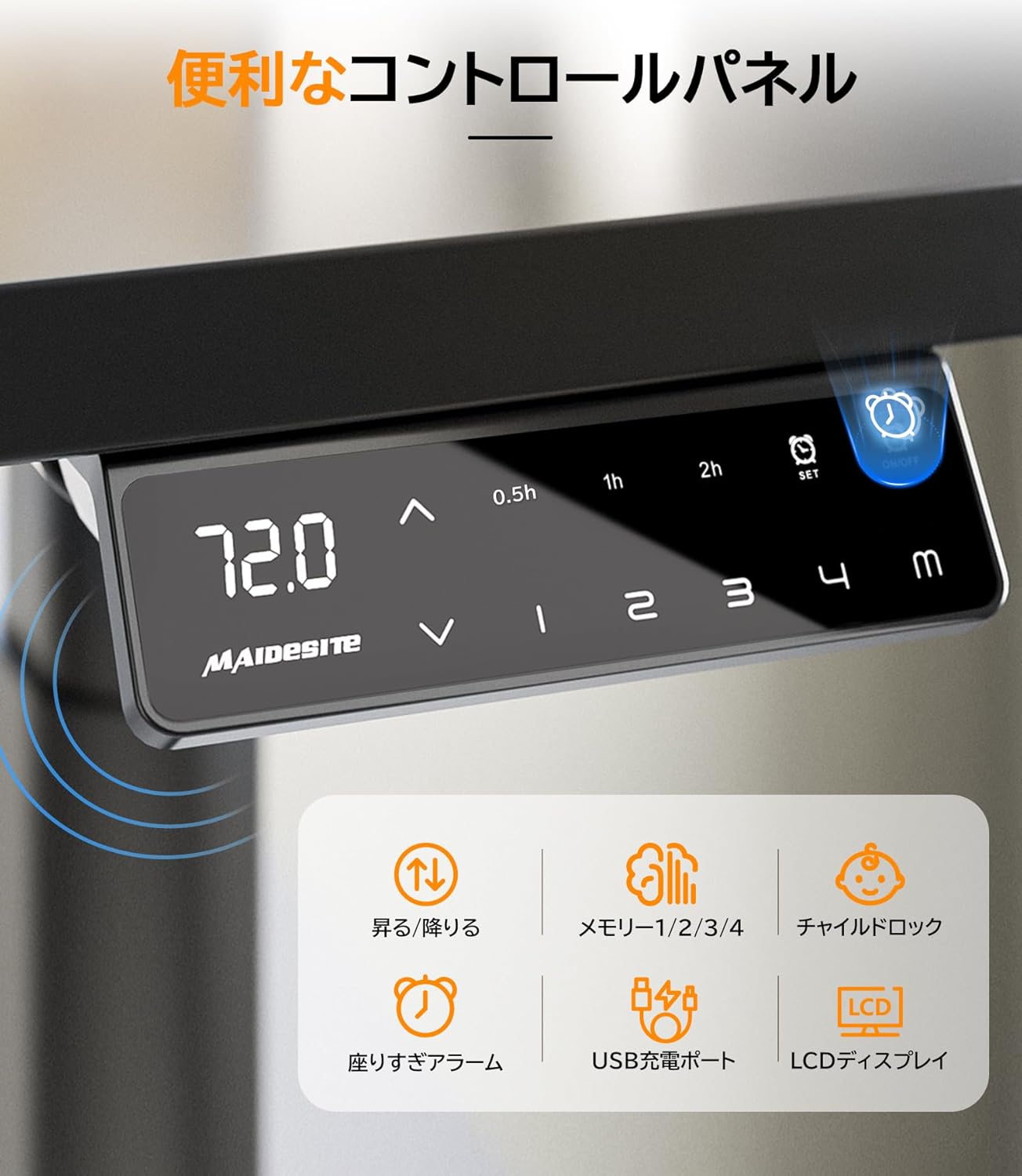
Figure 5.1: Control panel with various functions.
5.3 Memoria aurrezarpenak
Kontrol panelak lau altuera ezarpen hobetsi gordetzeko aukera ematen dizu:
- Egokitu mahaia nahi duzun altuerara.
- Press the "M" button, then press one of the numbered buttons (1, 2, 3, or 4) to save the current height to that preset.
- Gordetako altuera berreskuratzeko, sakatu dagokion zenbakidun botoia. Mahaia automatikoki mugituko da posizio horretara.

Figure 5.2: Setting and recalling memory presets.
5.4 Talkaren aurkako sistema
The desk is equipped with an anti-collision sensor. If an obstacle is detected during height adjustment, the desk will automatically stop and retract slightly to prevent damage.
Video 5.1: This video showcases key features of a standing desk, including smooth height adjustment and the anti-collision safety function, which are also present in the Maidesite EL2 Pro Art.

Figure 5.3: Anti-collision feature in action.
5.5 Haurrentzako blokeoa
Activate the child lock feature to prevent accidental height adjustments, especially in households with young children. Refer to your physical manual for specific instructions on activating and deactivating the child lock.

Figure 5.4: Child lock feature for enhanced safety.
5.6 Sedentary Alarm
The sedentary alarm can be set to remind you to change your posture at regular intervals (e.g., every 0.5, 1, or 2 hours). This promotes movement and helps maintain a healthy work routine.

Figure 5.5: Sedentary alarm setting on the control panel.
5.7 USB kargatzeko ataka
A convenient USB charging port is integrated into the control panel, allowing you to easily charge your devices while working.
6. Mantentzea
Regular maintenance ensures the longevity and optimal performance of your Maidesite EL2 Pro Art desk.
- Garbiketa: Garbitu mahaiaren gainazala eta markoa oihal leun eta lehor batekinamp oihal. Saihestu akabera kaltetu dezaketen garbitzaile edo disolbatzaile urratzaileak.
- Ikuskapenak: Aldian-aldian egiaztatu torloju eta konexio guztiak ondo estututa daudela ziurtatzeko. Beharrezkoa bada, berriro estutu.
- Kableen kudeaketa: Ensure cables are neatly organized using the provided cable management tray and hooks to prevent tangles and damage.
- Pisuaren banaketa: Distribute weight evenly on the desktop to maintain stability and prevent strain on the motors.

Figure 6.1: Organized cables using the cable management tray.
7. Arazoak
Zure mahaiarekin arazorik baduzu, jarraitu arazoak konpontzeko ohiko urrats hauek:
- Mahaia mugitzen ez da: Check all cable connections, including the power cord, motor cables, and control panel cable. Ensure the desk is plugged into a working power outlet. Perform a reset operation (see Section 5.1).
- Mugimendu irregularra: Ensure the desk is on a level surface. Check for any obstructions under the desk. Perform a reset operation.
- Pantailan agertzen diren errore kodeak: Refer to your physical instruction manual for a list of error codes and their corresponding solutions. Often, a reset operation can resolve minor errors.
- Anti-collision sensor too sensitive/not working: Check for any debris or obstructions around the sensor area. If the issue persists, contact customer support.
Urrats hauek arazoa konpontzen ez badute, jarri harremanetan bezeroarentzako arreta-zerbitzuarekin laguntza gehiago jasotzeko.
8. Zehaztapenak
| Ezaugarri | Zehaztapena |
|---|---|
| Modelo zenbakia | KP87T-290300 |
| Altuera doitzeko tartea | 72-120 cm |
| Width Extension Range | 100-180 cm |
| Altxatzeko Abiadura | 35 mm/s |
| Karga Ahalmena | 180 KG |
| Zarata Maila | < 45 dB |
| Mahaigaineko luzera bateragarria | 100-220 cm |
| Mahaigaineko zabalera bateragarria | 60-100 cm |
| Compatible Desktop Thickness | 2 cm edo gehiago |
| Markoaren materiala | Kalitate handiko altzairua |
| Kontrol panela | Touch panel with 4 memory presets, sedentary alarm, child lock, USB port |
9. Bermea eta Laguntza
Maidesite prioritizes customer satisfaction and offers a comprehensive warranty and support for your product.
9.1 5-Year Free Warranty
Your Maidesite EL2 Pro Art Electric Standing Desk comes with a 5-year free warranty. This warranty covers manufacturing defects and ensures peace of mind regarding the quality and durability of your product.
9.2 Bezeroarentzako laguntza
For any missing parts, product issues, or technical assistance, please do not hesitate to contact our customer support team.
- Posta elektronikoa: amzservicejp1@maidesite.com
Please provide your purchase details and a clear description of the issue when contacting support to facilitate a quicker resolution.