
1. Sarrera
Eskerrik asko erosketagatik.asing the VOKSUN S450 Vintage 3-Speed Turntable. This manual provides essential information for the safe and efficient operation of your new record player. Please read it thoroughly before use and retain it for future reference.
2. Segurtasun-argibide garrantzitsuak
- Irakurri arretaz argibide hauek.
- Gorde jarraibide hauek etorkizuneko erreferentzia izateko.
- Kontuan izan abisu guztiei.
- Jarraitu argibide guztiak.
- Ez erabili aparatu hau uraren ondoan.
- Garbitu zapi lehor batekin bakarrik.
- Ez blokeatu aireztapen-irekidurak. Instalatu fabrikatzailearen argibideen arabera.
- Ez instalatu bero-iturri inongo ondoan, esate baterako, erradiadoreak, bero-erregistroak, sukaldeak edo beste aparatu batzuk (barne ampberoa sortzen duten argitzaileak).
- Babestu korronte-kablea oinez ibiltzetik edo atxilotzetik, batez ere entxufeetan, erosotasun-harguneetan eta aparatutik irteten diren puntuetan.
- Erabili soilik fabrikatzaileak zehaztutako eranskinak/osagarriak.
- Deskonektatu aparatu hau tximista-ekaitzetan edo denbora luzez erabiltzen ez duzunean.
- Jarri zerbitzu-zerbitzu guztiak zerbitzu-pertsonal kualifikatuari. Zerbitzua behar da aparatua edozein modutan hondatu denean, hala nola, elikatze-kablea edo entxufea hondatuta dagoenean, likidoa isuri denean edo objektuak aparatura erori direnean, aparatua euria edo hezetasuna jasan duenean, ez du normalean funtzionatzen. , edo erori egin da.
3. Paketearen edukia
Ziurtatu elementu guztiak bertan daudela eta egoera onean daudela paketea despaketatzean:
- VOKSUN S450 Turntable Unit
- Elikatze-moldagailua
- Erabiltzailearen eskuliburua
4. Produktua amaitu daview
The VOKSUN S450 is a vintage-style 3-speed turntable designed for versatile audio playback. It features a belt-drive system, built-in stereo speakers, Bluetooth connectivity, AM/FM radio, AUX input, headphone output, and RCA output.
Aurrealdea eta Goikoa View

Irudia: Aurrealdea eta goialdea view of the VOKSUN S450 turntable, showcasing its wooden finish and the record platter.
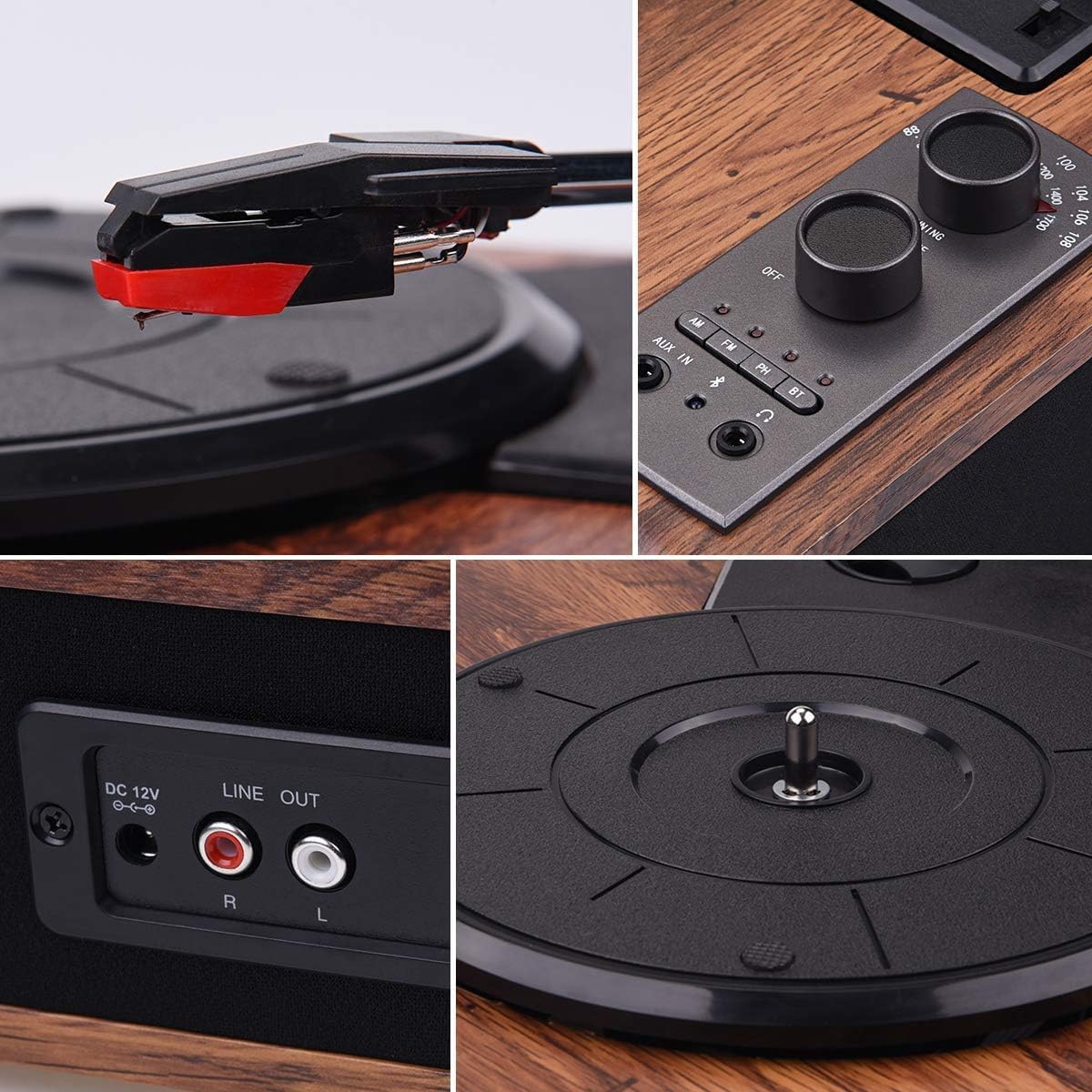
Image: Close-up of the control panel, showing the power/volume knob, tuning knob, mode selection buttons (AM, FM, AUX IN, BT), and headphone jack.
Atzeko panela

Image: Rear panel of the turntable, highlighting the DC 12V power input and the Stereo RCA Line Out connectors (Red for Right, White for Left).
Bozgorailu integratuak

Irudia: Albokoa view of the turntable, illustrating the integrated stereo speakers.
5. Konfigurazioa
- Lekua: Jarri biragailua gainazal egonkor eta lau batean, eguzki-argitik, bero-iturrietatik eta hauts edo bibrazio gehiegirik urrun.
- Potentzia-konexioa: Connect the supplied power adapter to the DC 12V input port on the rear of the turntable. Plug the other end into a suitable wall outlet.
- Stylus Protector: Carefully remove the clear plastic stylus protector from the needle before first use.
- Platter Setup: Ensure the platter is correctly seated on the spindle. If a belt is separate, ensure it is correctly placed around the motor pulley and the inner rim of the platter.
6. Funtzionamendu-argibideak
6.1 Binilozko diskoak erreproduzitzea
- Piztu: Biratu pizteko/bolumenaren botoia erlojuaren orratzen noranzkoan unitatea pizteko.
- Aukeratu modua: Press the 'PH' button to select Phono mode.
- Lekuaren erregistroa: Kontu handiz jarri binilozko disko bat bira-mahaiaren gainean.
- Hautatu Abiadura: Adjust the speed switch (located near the tonearm base) to match the record's speed (33-1/3, 45, or 78 RPM).
- Igogailu besoa: Astiro-astiro altxa besoa seinaleztapen palanka erabiliz.
- Besoaren posizioa: Move the tonearm over the desired track of the record.
- Beheko besoa: Slowly lower the tonearm onto the record using the cueing lever. The music will begin to play.
- Doitu bolumena: Use the Power/Volume knob to adjust the sound level.
- End of Play: When the record finishes, the tonearm will automatically return to its rest position (auto-stop function). Lift the tonearm and return it to its rest clip manually if needed.

Image: A hand carefully lowering the tonearm onto a spinning vinyl record.
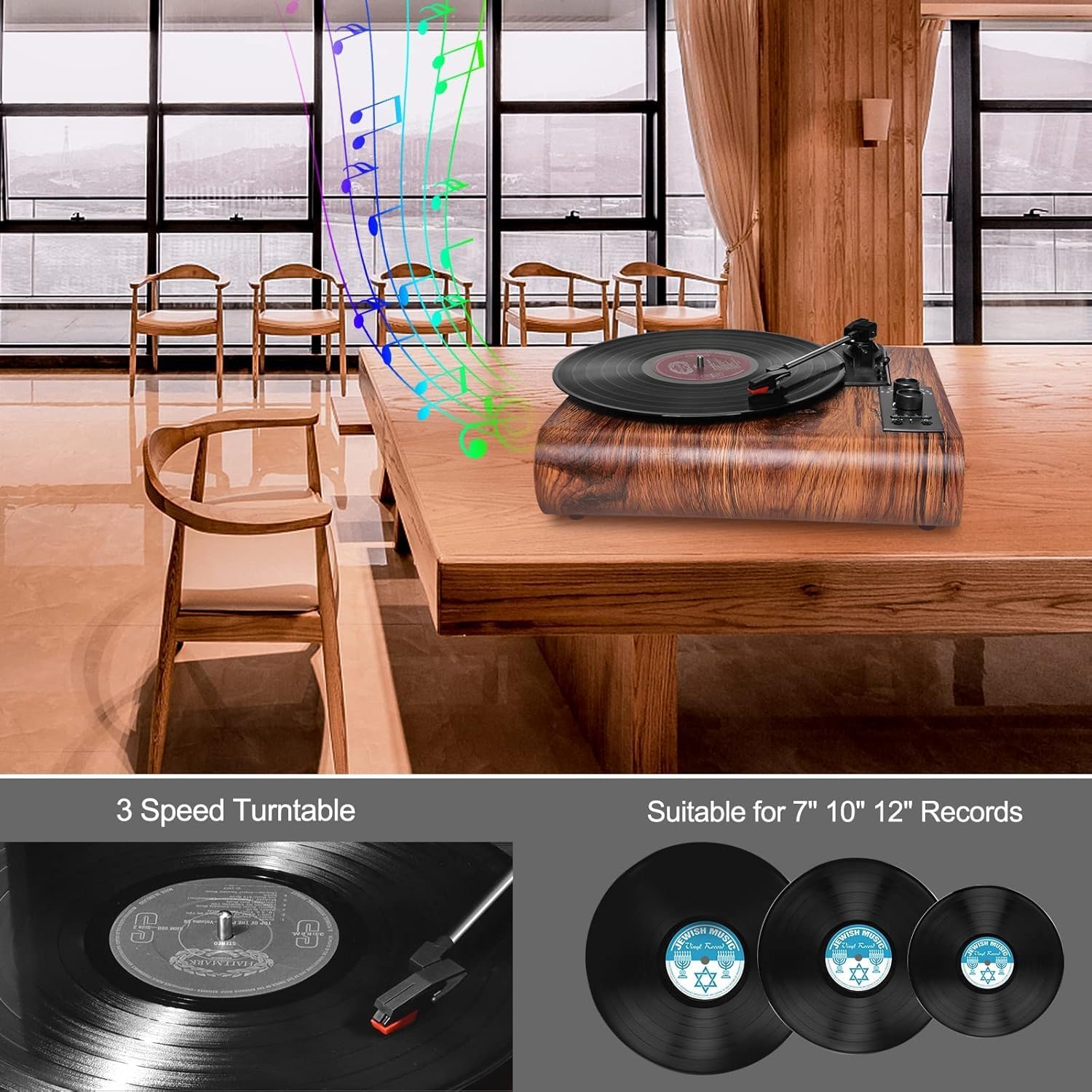
Image: Illustration showing three common vinyl record sizes: 7-inch (45 RPM), 10-inch (45 RPM), and 12-inch (33-1/3 RPM).
6.2 Bluetooth modua
- Aukeratu modua: Press the 'BT' button to select Bluetooth mode. The Bluetooth indicator light will flash.
- Parekatu gailua: On your external Bluetooth device (smartphone, tablet, etc.), enable Bluetooth and search for 'VOKSUN TURNTABLE'. Select it to pair.
- Berrespena: Once successfully paired, the Bluetooth indicator light will stop flashing and remain solid.
- Erreproduzitu musika: You can now play music from your device through the turntable's speakers.

Image: A smartphone displaying its Bluetooth settings, showing a successful connection to 'VOKSUN TURNTABLE'.
6.3 AM/FM irratia
- Aukeratu modua: Press the 'AM' or 'FM' button to select the desired radio band.
- Sintonizazio-estazioa: Use the 'TUNING' knob to scan for radio stations.
- Doitu bolumena: Use the Power/Volume knob to adjust the sound level.

Image: A person relaxing and listening to the VOKSUN S450 turntable, which is playing radio content.
6.4 AUX sarrera
- Aukeratu modua: Press the 'AUX IN' button to select AUX input mode.
- Konektatu gailua: Konektatu kanpoko audio gailu bat (adibidez, MP3 erreproduzitzailea, CD erreproduzitzailea) AUX IN atakara 3.5 mm-ko audio kable bat erabiliz (ez dago barne).
- Erreproduzitu musika: Play audio from your connected device. The sound will be output through the turntable's speakers.
6.5 Entzungailuen irteera
- Konektatu entzungailuak: Plug your headphones into the 3.5mm headphone jack on the control panel.
- Entzute pribatua: Audio will be routed to your headphones for private listening. The built-in speakers will be muted.

Image: A person enjoying music from the turntable using wired headphones for private listening.
6.6 RCA Irteera
- Konektatu kableak: Use an RCA cable (not included) to connect the 'LINE OUT' ports (Red for Right, White for Left) on the rear of the turntable to the corresponding input ports on an external ampargitzaile edo bozgorailu elektrikoak.
- Kanpoko audioa: This allows you to output the turntable's audio to a larger sound system for enhanced listening.

Image: The VOKSUN S450 turntable connected to a pair of external speakers using RCA cables, demonstrating the Line Out functionality.
7. Mantentzea
7.1 Unitatea garbitzea
- Garbitu unitatearen kanpoaldea zapi leun eta lehor batekin.
- Ez erabili produktu kimiko gogorrak, garbiketa-disolbatzaileak edo garbigarri indartsuak.
7.2 Estiletoa garbitzea
- Use a soft brush (not included) to gently clean the stylus, brushing from back to front.
- Avoid touching the stylus with your fingers.
7.3 Erregistroen Zaintza
- Handle records by their edges to avoid fingerprints and dirt.
- Store records in their sleeves in a cool, dry place.
- Clean records regularly with a dedicated record cleaning kit (not included).
8. Arazoak
| Arazoa | Kausa posiblea | Irtenbidea |
|---|---|---|
| Botererik ez | Korronte-egokitzailea ez dago konektatuta edo entxufea ez dabil. | Ziurtatu korronte-egokitzailea ondo konektatuta dagoela unitatera eta funtzionatzen duen entxufe batera. |
| Bozgorailuen soinurik ez | Volume too low; incorrect mode selected; headphones connected. | Increase volume; select correct mode (PH, BT, AM, FM, AUX IN); disconnect headphones. |
| Erregistro-saltzea | Dirty or scratched record; dirty stylus; turntable not level. | Clean record; clean stylus; ensure turntable is on a level surface. |
| Bluetootha ez da konektatzen | Turntable not in Bluetooth mode; device too far; device already connected to another unit. | Ensure turntable is in BT mode; move device closer; disconnect from other devices and try again. |
| Irrati-harrera eskasa | Seinale ahula; interferentziak. | Adjust the unit's position; extend the antenna (if applicable, not specified but common for AM/FM). |
9. Zehaztapenak
- Modelo zenbakia: S450
- Marka: VOKSUN
- Abiadurak: 33-1/3, 45, 78 bira/min
- Erregistroaren tamainak: 7", 10", 12"
- Motor mota: Gerrikoa
- Larrua: Ruby Needle
- Hizlariak: 2 x 5W bozgorailu estereo
- Bluetootha: Version 5.0 (Range: up to 10m)
- Irratia: AM/FM Analog Stereo Radio
- Sarrerak: AUX In (3.5mm)
- Irteerak: RCA Line Out, Headphone Jack (3.5mm)
- Energia iturria: Kable elektrikoa
- liburukiatage: 100 Volt
- Energia-kontsumoa: 5 Watt
- Estiloa: Vintage
- Kolorea: Brown (Wood Noyer)
10. Bermea eta laguntza
VOKSUN products are manufactured to the highest quality standards. For warranty information or technical support, please refer to the contact details provided with your purchase or visit the official VOKSUN website. Please have your model number (S450) and purchase date ready when contacting support.