
1. Sarrera
Welcome to the instruction manual for your OTL Technologies Pokémon Pikachu Kids Wireless Headphones, Model PK1315. This guide provides essential information on how to set up, operate, maintain, and troubleshoot your new headphones. Please read this manual carefully to ensure safe and optimal use of the product.
2. Produktua amaitu daview
Ezaugarri nagusiak:
- Haririk gabeko konektagarritasuna: Bluetooth 5.3 for a stable and reliable connection up to 10 meters.
- Child-Safe Volume Control: Integrated volume limiter with a sensitivity of 85.95 dB to protect young ears.
- Smart Touch Kontrolak: Easily manage music playback (play/pause), answer/end calls, and activate voice assistant with simple touches.
- Diseinu erosoa: Soft earcups and an adjustable headband ensure a comfortable fit for extended wear.
- Audioa partekatzea: Includes a sharing cable to allow two headphones to listen to the same audio source simultaneously.
- Tolesgarria eta arina: Compact design for easy portability and storage, weighing only 160 grams (5.6 ounces).
- Mikrofono integratua: For hands-free calls and online interactions.
Design & Components:
The headphones feature a vibrant yellow design with iconic Pikachu graphics, making them appealing for children. The earcups are cushioned for comfort, and the headband is adjustable to fit various head sizes. The foldable structure allows for convenient storage and transport.

Figure 1: OTL Technologies Pokémon Pikachu Kids Wireless Headphones. A pair of bright yellow over-ear headphones featuring a Pikachu design on the earcups and black accents.
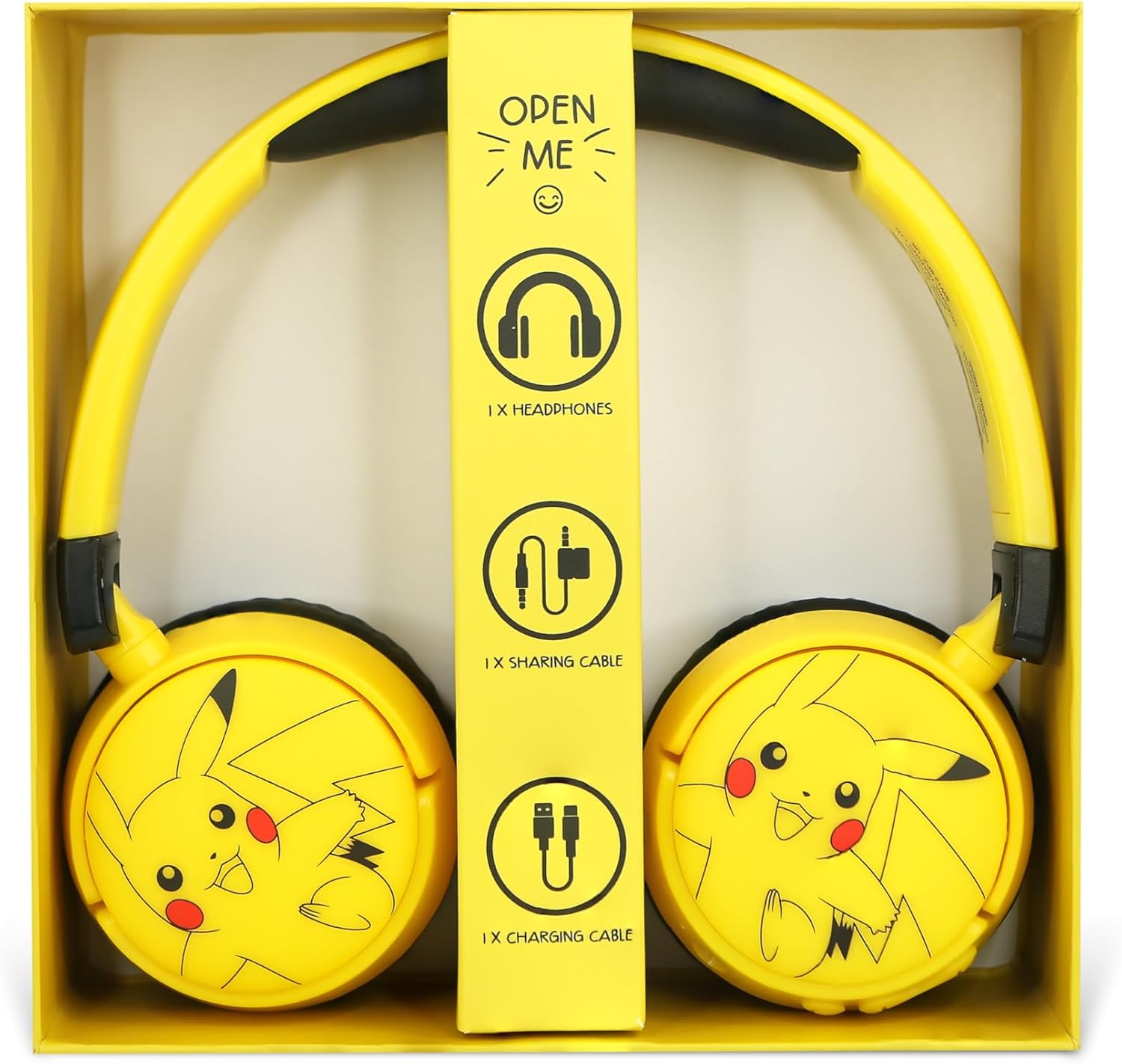
Figure 2: Box Contents. An open box revealing the headphones, a sharing cable, and a charging cable, along with an 'Open Me' tab.
3. Konfigurazioa
3.1 Hasierako karga
- Before first use, fully charge the headphones. Connect the included charging cable to the charging port on the headphone earcup.
- Connect the other end of the charging cable to a compatible USB power source (e.g., computer USB port, USB wall adapter).
- The charging indicator light will illuminate. Charging takes approximately 1.5 hours.
- Guztiz kargatuta dagoenean, adierazle-argia aldatu edo itzali egingo da. Deskonektatu kargatzeko kablea.

Figure 3: Charging Port and Volume Limit Switch. A detailed view of the headphone earcup showing the micro-USB charging port and a switch for adjusting volume limits (85dB and 95dB).
3.2 Bluetooth parekatzea
- Ziurtatu entzungailuak itzalita daudela.
- Press and hold the Power button until the LED indicator light flashes blue and red, indicating pairing mode.
- Zure audio gailuan (telefono adimenduna, tableta, ordenagailua), gaitu Bluetooth eta bilatu eskuragarri dauden gailuak.
- Select "PK1315" or a similar name from the list of devices.
- Once paired, the LED indicator light will turn solid blue or flash blue slowly.
- The headphones will auto-pair with the last connected device upon power-on for future use.
4. Funtzionamendu-argibideak
4.1 Piztu/Itzali
- Piztu: Press and hold the Power button until the LED indicator light illuminates.
- Itzali: Press and hold the Power button until the LED indicator light turns off.
4.2 Ukipen-kontrol adimendunak
The headphones feature intuitive touch controls on the earcups:
- Erreproduzitu/Pausatu: Single tap on the designated touch area.
- Hurrengo ibilbidea: Double tap on the designated touch area.
- Aurreko pista: Triple tap on the designated touch area.
- Deia erantzun/amaitu: Dei batean behin sakatu erantzuteko, dei batean behin sakatu amaitzeko.
- Aktibatu Ahots Laguntzailea: Sakatu eta eutsi ukipen-eremuari 2 segundoz.

Figure 4: Headphone Controls. The side of the headphone earcup with clearly visible control buttons for power, play/pause, and volume adjustment.
4.3 Bolumen kontrola
The headphones are designed with a child-safe volume limiter. Use the physical switch on the earcup to select between 85dB and 95dB maximum volume levels to protect your child's hearing.
4.4 Audioa partekatzea
To share audio with another pair of headphones:
- Connect the included audio sharing cable to the designated sharing port on your OTL Technologies Pikachu headphones.
- Connect the other end of the sharing cable to the audio input jack of a second pair of headphones.
- Both headphones will now receive audio from the primary connected device.

Figure 5: Audio Sharing Cable. A yellow audio sharing splitter cable with two 3.5mm jacks, designed to connect two headphones to a single audio source.
5. Kargatzea
The headphones are equipped with a rechargeable Lithium Polymer battery. A full charge provides up to 6 hours of playtime. Standby time is up to 180 hours. Refer to section 3.1 for charging instructions.
6. Mantentzea
- Garbiketa: Erabili oihal leun eta lehor bat entzungailuak garbitzeko. Saihestu produktu kimiko gogorrak edo material urratzaileak erabiltzea.
- Biltegiratzea: When not in use, store the headphones in a cool, dry place. Utilize the foldable design for compact storage to prevent damage.
- Bateria zaintzea: To prolong battery life, avoid fully discharging the headphones frequently. Charge regularly, even if not in constant use.

Figure 6: Foldable Design. The headphones folded inwards, demonstrating their compact design for easy portability and storage.
7. Arazoak
- Potentziarik gabe: Ensure the headphones are charged. Connect to a power source and allow sufficient charging time.
- Soinurik ez: Check if the headphones are properly paired with your device. Ensure the volume on both the headphones and the connected device is turned up. Verify the audio source is playing.
- Parekatzeko arazoak: Turn off Bluetooth on your device and then turn it back on. Restart the headphones and attempt pairing again. Ensure no other devices are actively trying to connect.
- Audio kalitate eskasa: Ensure the headphones are within the 10-meter Bluetooth range of the connected device. Check for interference from other wireless devices.
8. Zehaztapenak
| Ezaugarri | Zehaztapena |
|---|---|
| Ereduaren izena | PK1315 |
| Marka | OTL Teknologiak |
| Konektibitate Teknologia | Haririk gabeko (Bluetooth) |
| Bluetooth bertsioa | 5.3 |
| Bluetooth barrutia | Gehienez 10 metro |
| Maiztasun Erantzuna | 20-20 kHz |
| Sentikortasuna | 85.95 dB (with volume limiter) |
| Jolas ordua | Gehienez 6 ordu |
| Egonean Denbora | Gehienez 180 ordu |
| Kargatzeko Denbora | Gutxi gorabehera. 1.5 ordu |
| Bateria Edukiera | 30 mAh / side x 2 (Lithium Polymer) |
| Kontrol-metodoa | Ukitu |
| Dakarten osagaiak | Headphones, Charging Cable, Audio Sharing Cable |
| Elementuaren pisua | 160 gramo (5.6 ontza) |
| Produktuaren neurriak | 6.3 x 2.76 x 6.69 hazbete |
9. Segurtasun informazioa
- Entzumenaren babesa: Always use the built-in volume limiter to protect children's hearing. Prolonged exposure to loud sounds can cause permanent hearing damage.
- Itosteko arriskua: Keep small parts, such as cables, away from young children to prevent choking hazards.
- Gainbegiratzea: Adult supervision is recommended when children are using headphones, especially in environments where situational awareness is crucial.
- Garbiketa: Do not immerse the headphones in water or other liquids. Clean only with a dry cloth.
- Bateriaren segurtasuna: Do not attempt to replace the battery yourself. Do not expose the headphones to extreme temperatures or direct sunlight.
10. Bermea eta Laguntza
For warranty information, technical support, or service inquiries, please refer to the contact details provided on the product packaging or visit the official OTL Technologies webgunea. Gorde erosketaren egiaztagiria bermearen erreklamazioetarako.