This manual provides detailed instructions for the proper setup, operation, and maintenance of your Timex UFC Kick TW2V86700 Men's Digital Watch. Please read this manual thoroughly to ensure optimal performance and longevity of your timepiece.
Figure 1: Timex UFC Kick TW2V86700 watch on a wrist, displaying the digital time.
Erlojuaren osagaiak eta botoiak
Familiarize yourself with the watch's buttons and display features. While specific button labels may vary, typical digital watch functions include:
MODUA/EZARPENA: Used to cycle through different modes (Time, Stopwatch, Alarm) and to enter setting modes.
HASI / GELDITU: Used to start/stop functions like the stopwatch or to adjust values during setting.
RESET/LAP: Used to reset functions or to view lap times.
LIGHT/INDIGLO: Atzeko argia aktibatzen du argi gutxiko baldintzetan ikusgarritasuna bermatzeko.
In time setting mode, you may be able to toggle between 12-hour (with AM/PM indicator) and 24-hour formats using the HASI/GELDITU botoia orduko digituak keinuka ari direnean.
Funtzionamendu-argibideak
Kronometroa erabiliz
Sakatu MODUA button until the stopwatch mode is displayed.
Itzuli-denborak grabatzeko, sakatu RESET/LAP while the stopwatch is running. The lap time will display briefly before returning to the running total.
Alarma ezartzea eta erabiltzea
Sakatu MODUA botoia sakatu alarma modua bistaratu arte.
Sakatu HASI/GELDITU ordua doitzeko, orduan RESET/LAP minutuetara pasatzeko.
Sakatu HASI/GELDITU minutuak doitzeko.
Sakatu MODUA berresteko eta irteteko.
To activate/deactivate the alarm, typically a specific button combination or a dedicated button in alarm mode is used. Refer to the on-screen indicators for alarm status.
Using the Indiglo Night-Light
Sakatu ARGIA button (often located on the top left or front of the watch) to illuminate the display for a few seconds.
Mantentzea
Erlojua garbitzea
Erlojua garbitzeko, zapi leun batekin garbituamp cloth. Avoid using harsh chemicals or abrasive materials, as these can damage the watch case or strap. For plastic straps, mild soap and water can be used. Ensure the watch is dry before storage.
Uraren Erresistentzia
The Timex UFC Kick TW2V86700 watch has a water resistance rating of 100 meters (10 ATM). This means it is suitable for swimming, showering, and snorkeling. Ez sakatu botoirik erlojua uretan murgilduta dagoen bitartean, as this can compromise the water resistance seal. Avoid exposing the watch to extreme temperature changes.
Bateria ordezkatzea
When the display dims or functions become erratic, it may be time to replace the battery. Battery replacement should ideally be performed by a qualified watch technician to ensure proper sealing and maintain water resistance. Refer to the watch back for battery type information (e.g., CR2032).
3. Irudia: Atzealdea view of the watch, showing the stainless steel case back with engravings including water resistance and model number.
Arazoak konpontzea
Arazoa
Kausa posiblea
Irtenbidea
Pantaila hutsik edo ilun dago.
Bateria baxua edo hilda.
Ordeztu bateria.
Denbora ez da zehatza.
Time needs to be reset; watch was exposed to strong magnetic fields.
Reset the time and date according to the "Setting Time and Date" section. Avoid strong magnetic fields.
Botoiek ez dute erantzuten.
Watch may be in a locked mode; internal malfunction.
Try pressing all buttons to see if any respond. If not, a battery replacement or professional service may be required.
Ura erlojuaren barruan.
Urarekiko erresistentzia arriskuan (adibidez, botoiak ur azpian sakatuta, zigilua hondatuta).
Eraman erlojua berehala teknikari kualifikatu batengana ikuskatu eta konpontzeko, kalte gehiago saihesteko.
Zehaztapenak
Ezaugarri
Xehetasuna
Modelo zenbakia
TW2V86700
Marka
TIMEX
Bistaratzeko mota
Digitala
Ikusi mugimendu mota
Kuartzoa
Kasu Materiala
Altzairu herdoilgaitza
Banda Material Mota
Plastikoa
Bandaren kolorea
Beltza
Lotura mota
Buklea
Kristal mota
Beira minerala
Kasuaren Diametroa
51 milimetro
Kasuen lodiera
16.5 milimetro
Bandaren Zabalera
22 milimetro
Elementuaren pisua
163 gramo
Uraren Erresistentzia
100 metro (10 kutxazain automatiko)
Ezaugarri gehigarriak
Second Hand, Indiglo Night-Light
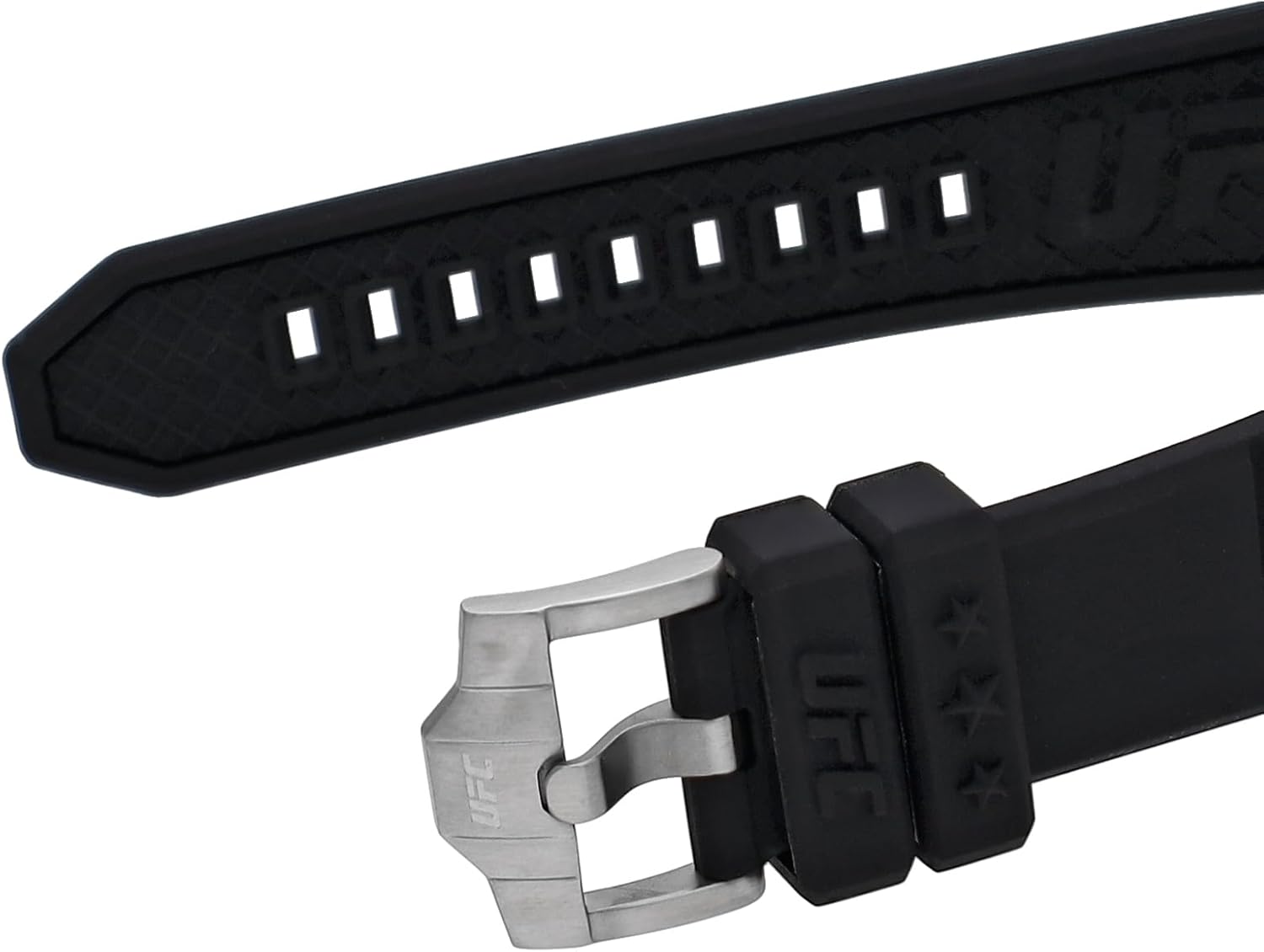
Figure 4: Detail of the watch strap and buckle, featuring the UFC logo.
Bermea eta Laguntza
Bermearen informazioa
Your Timex watch is covered by a manufacturer's warranty. For specific details regarding the warranty period, coverage, and terms, please refer to the warranty card included with your purchase or visit the official Timex webgunea. Gorde erosketaren egiaztagiria bermearen erreklamazioetarako.
Bezeroarentzako Arreta
Should you require assistance with your Timex UFC Kick TW2V86700 watch, including repairs or technical support, please contact Timex customer service. Contact information can typically be found on the official Timex webgunean edo erlojuarekin batera emandako dokumentazioan.
Ask a question about this manual
Ask about setup, troubleshooting, compatibility, parts, safety, or missing instructions. Manuals+ will review the question and use this page’s manual context to help answer it.