
Sarrera
This manual provides detailed instructions for the safe and effective use of your CINCOM Handheld Controller, model CM-010A. Please read this manual thoroughly before operating the device and retain it for future reference. This controller is designed for use with compatible CINCOM massagers.
Produktua amaituview
The CINCOM Handheld Controller CM-010A is an intuitive device designed to manage the functions of your CINCOM massager. It features a power button, intensity control, and mode selection for a customized massage experience.

1. irudia: Aurrealdea view of the CINCOM Handheld Controller. This image highlights the main control buttons: the circular Power Button at the top, the triangular Intensity Control Button below it (with 3 intensity levels indicated), and the 'M' Mode Button at the bottom (with 2 modes indicated). The controller is shown held in a hand, illustrating its ergonomic design.
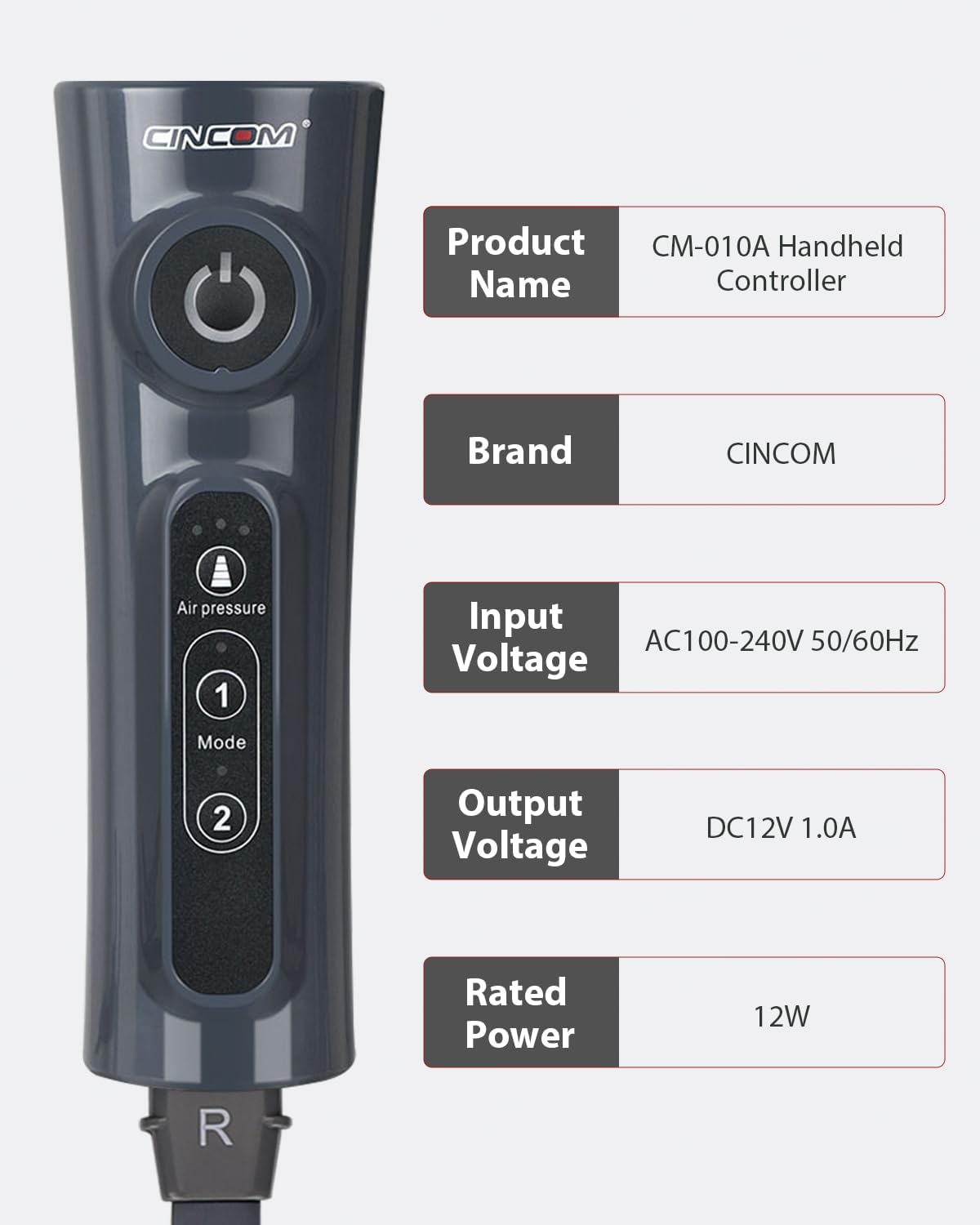
2. irudia: Aldea view of the CINCOM Handheld Controller displaying key product specifications. Details include Product Name: CM-010A Handheld Controller, Brand: CINCOM, Input Voltage: AC100-240V 50/60Hz, Output Voltage: DC12V 1.0A, and Rated Power: 12W. This provides essential electrical and identification information for the device.
Konfigurazioa
- Kontrolatzailea deskonprimitu: Carefully remove the CINCOM Handheld Controller from its packaging. Inspect for any signs of damage.
- Connect to Massager: Locate the connection port on your compatible CINCOM massager. Insert the connector cable from the handheld controller firmly into this port. Ensure a secure connection.
- Potentzia-konexioa: Connect the power adapter (if separate) to the controller and then plug the adapter into a standard electrical outlet (AC100-240V 50/60Hz).
- Hasierako piztea: Press the Power Button on the controller to turn on the device. The indicator lights should illuminate.

3. irudia: This image demonstrates the CINCOM Handheld Controller in use with a CINCOM leg massager. It shows a person comfortably seated, holding the controller, with the massager cuffs applied to their legs. This illustrates the typical setup and application of the controller with its intended device.
Funtzionamendu-argibideak
Follow these steps to operate your CINCOM Handheld Controller:
- Piztu/Itzali: Sakatu Pizteko botoia (circular button at the top) to turn the massager on or off.
- Aukeratu modua: Sakatu Modu botoia (labeled 'M' or with numbers 1 and 2) to cycle through the available massage modes. The controller offers 2 distinct modes.
- Doitu Intentsitatea: Sakatu Intensity Control Button (triangular button) to adjust the massage intensity. There are 3 intensity levels available. Pressing the button will cycle through these levels.
- Saioaren iraupena: The massager typically operates for a preset duration. Refer to your specific massager's manual for details on session length.
- Erabili ondoren: Once your session is complete, press the Power Button to turn off the massager. Disconnect the power adapter from the outlet.
Mantentzea
- Garbiketa: Disconnect the controller from the power source and massager before cleaning. Wipe the surface of the controller with a soft, dry cloth. Do not use abrasive cleaners or immerse the controller in water.
- Biltegiratzea: Store the controller in a cool, dry place, away from direct sunlight and extreme temperatures. Keep it away from children and pets.
- Kableen zainketa: Avoid bending or twisting the connection cable excessively. Do not pull the cable to disconnect; always grasp the plug.
Arazoak konpontzea
| Arazoa | Kausa posiblea | Irtenbidea |
|---|---|---|
| Kontrolagailua ez da pizten. |
|
|
| Massager not responding to controller. |
|
|
| Intensity or mode buttons not working. |
|
|
Zehaztapenak
| Produktuaren izena | CM-010A Handheld Controller |
| Marka | CINCOM |
| Modelo zenbakia | CM-010A |
| Sarrera boltage | AC100-240V 50/60Hz |
| Irteera boltage | DC12V 1.0A |
| Potentzia nominala | 12W |
| Produktuaren neurriak | 2.68 x 1.9 x 8.01 hazbete |
| Elementuaren pisua | 11.3 ontza |
| Ezaugarri Berezia | Urruneko Kontrola |
| Kolorea | Grisa |
| Onartutako gailuen gehienezko kopurua | 1 |
| Gailu bateragarriak | Masajea |
Bermea eta Laguntza
For warranty information and customer support, please refer to the documentation included with your primary CINCOM massager unit or visit the official CINCOM webgunea. Gorde erosketa-agiria erosketaren frogagiri gisa berme-erreklamazioetarako.
Fabrikatzailea: CINCOM
Lehen eskuragarri dagoen data: 26ko uztailaren 2024a