1. Sarrera
The Generic T45-HAI Core Alignment Fusion Splicer Kit is engineered for precise fiber optic welding and splicing, ensuring reliable and seamless cable connections. This manual provides essential information for the safe and efficient operation, maintenance, and troubleshooting of your T45-HAI device.
Key features of the T45-HAI include:
- Fast Splicing: Achieves splicing in approximately 7 seconds.
- Beroketa azkarra: Heat shrinkable tube heating completes in approximately 18 seconds.
- Interfaze intuitiboa: Features a 4.3-inch high-definition capacitive touchscreen for user-friendly operation.
- Bateriaren iraupen hedatua: Built-in modular lithium battery supports up to 330 cycles of splicing and heating.
- Low Splicing Loss: Achieves an average splicing loss of 0.01dB.
- Diseinu iraunkorra: Designed to be explosion-proof, drop-resistant, waterproof, and dustproof, adapting to various environmental conditions.
2. Zer dago kutxan
Upon unboxing your T45-HAI Core Alignment Fusion Splicer Kit, please verify that all components are present and in good condition:
- T45-HAI Core Alignment Fusion Splicer
- Fiber Cleaver (e.g., FC-30)
- Fiber Strippers (for jacket and coating)
- Korronte egokitzailea/kargagailua
- Alcohol Dispenser Bottle
- Garbiketa-zapiak
- Bero-utzigarrizko mahukak
- Eramateko zorroa
- Erabiltzailearen eskuliburua

Image: The complete T45 Core Alignment Fusion Splicer Kit, including the splicer, cleaver, strippers, and other essential accessories, neatly arranged.
3. Konfigurazioa
Follow these steps to set up your T45-HAI Fusion Splicer for operation:
- Kit-a deskonprimitu: Carefully remove all components from the carrying case. The case itself can be used as a stable work platform.
- Piztu: Connect the power adapter to the splicer and a power outlet, or ensure the internal battery is charged. Press the power button to turn on the device.
- Hizkuntza ezarpenak: If necessary, navigate to the 'Settings' menu on the touchscreen to select your preferred language. The T45-HAI supports multiple languages.
- Lekua: Place the splicer on a stable, clean, and level surface. Ensure adequate lighting for precise fiber handling.

Image: The T45 Fusion Splicer displaying its 4.3-inch HD capacitive touchscreen GUI, showing various operational modes and settings.
4. Funtzionamendu-argibideak
This section outlines the general procedure for performing a fiber optic fusion splice using the T45-HAI.
4.1. Fiber Preparation
- Cut Fiber Jacket: Use professional fiber strippers to carefully remove the outer jacket of the fiber optic cable to expose the bare fiber.
- Clean Fiber: Apply a small amount of isopropyl alcohol to a lint-free wipe and gently clean the stripped fiber to remove any coating residue.
- Place Heat Shrinkable Tube: Slide a heat shrinkable tube onto one of the prepared fibers. Ensure it is positioned far enough from the end to not interfere with the cleaving and splicing process.
- Cleave Fiber: Place the cleaned fiber into the fiber cleaver (e.g., FC-30). Follow the cleaver's instructions to achieve a precise, clean, and perpendicular fiber end-face. Repeat for the second fiber.
Image: A user demonstrating the use of fiber strippers and a fiber cleaver to prepare a fiber optic cable for splicing.
4.2. Splicing Process
- Load Fibers: Open the splicer's wind protector and carefully place the two prepared fibers into the V-grooves of the splicer. Ensure the fiber ends are positioned correctly for alignment.
- Initiate Splicing: Close the wind protector. The splicer will automatically begin the alignment process. Once aligned, the fusion process will start, typically completing in 7 seconds.
- Review Ejuntura: After splicing, the device will display the estimated splice loss (e.g., 0.01dB). Visually inspect the splice on the screen for any imperfections.
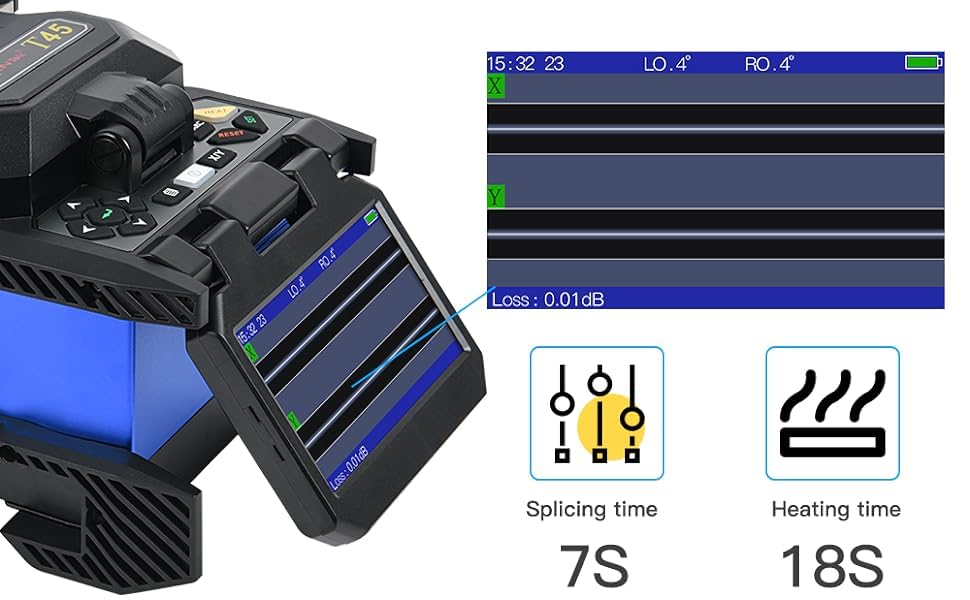
Image: The T45 Fusion Splicer's display showing the fiber alignment process and the resulting splice loss of 0.01dB.
4.3. Heat Shrinking
- Position Tube: Carefully open the wind protector and move the heat shrinkable tube over the spliced joint, centering it over the splice point.
- Bero uzkurdura: Place the fiber with the positioned tube into the heating oven. Close the oven lid. The heating process will automatically begin and typically completes in 18 seconds.
- Hoztea: Once heating is complete, remove the fiber from the oven and allow it to cool naturally. Do not bend the fiber until the heat shrink tube has fully cooled and hardened.

Image: The T45 Fusion Splicer's heating oven with a fiber and heat shrinkable tube in place, ready for the heating cycle.
4.4. Fiber Compatibility
The T45-HAI Fusion Splicer is suitable for various fiber types, including:
- Zuntz biluzik
- 0.9mm fiber cable
- 3.0mm jump cable
- FTTH drop cable

Image: The T45 Fusion Splicer demonstrating its compatibility with various fiber types, including bare fiber, 0.9mm fiber cable, 3.0mm jump cable, and FTTH drop cable.
4.5. Product Introduction Video
Video: An introductory video demonstrating the features and basic operation of the T45 Fusion Splicer, including unboxing, setup, and the splicing process.
5. Mantentzea
Regular maintenance ensures the longevity and optimal performance of your T45-HAI Fusion Splicer.
- Garbiketa: Regularly clean the V-grooves, electrodes, and objective lenses with a cotton swab and isopropyl alcohol. Ensure no dust or fiber debris accumulates.
- Elektrodoen ordezkapena: The electrodes have a limited lifespan (approximately 4000 splices). Replace them when the splicer indicates or when splice quality degrades. Refer to the 'Maintain' section in the splicer's menu for guidance.
- Bateria zaintzea: Charge the battery regularly. For long-term storage, ensure the battery is partially charged (around 50%) to preserve its lifespan.
- Software eguneraketak: Egiaztatu fabrikatzailearena website for any available software updates to ensure your splicer has the latest features and performance enhancements.
6. Arazoak
This section addresses common issues you might encounter with your T45-HAI Fusion Splicer.
- High Splice Loss:
- Ensure fiber ends are perfectly clean and properly cleaved.
- Check electrode condition; replace if worn or dirty.
- Verify fiber type settings match the fibers being spliced.
- Fiber Not Cleaving Properly:
- Inspect the cleaver blade for damage or dullness; replace if necessary.
- Ensure correct cleaving technique and proper fiber placement in the cleaver.
- Splicer Not Powering On:
- Egiaztatu bateriaren karga-maila.
- Verify power adapter connection.
- Pantailak ez du erantzuten:
- Perform a touchscreen calibration via the 'Settings' menu.
- Berrabiarazi gailua.
For persistent issues, please refer to the 'Information' or 'Maintain' sections within the splicer's menu or contact customer support.
7. Zehaztapenak
| Ezaugarri | Zehaztapena |
|---|---|
| Ereduaren izena | T45-HAI |
| Marka | Generikoa |
| Splicing Denbora | 7 segundo |
| Berotze Denbora | 18 segundo |
| Splicing-galera | 0.01dB (average) |
| Bistaratzea | 4.3-inch HD Capacitive Touchscreen |
| Bateria Edukiera | Supports 330 times of splicing and heating |
| Elektrodoaren bizitza | Approx. 4000 splices |
| Elementuaren pisua | 24.6 kilo |
| Paketearen neurriak | 20 x 14 x 12 hazbete |
| Barruko/Kanpoko erabilera | Barruan, Kanpoan |
| Fabrikatzailea | DECAAT |
8. Bermea eta Laguntza
The Generic T45-HAI Core Alignment Fusion Splicer Kit comes with a standard manufacturer's warranty. Please retain your proof of purchase for warranty claims.
For technical support, service, or warranty inquiries, please contact the seller or manufacturer directly. Contact information can typically be found on the product packaging or the seller's webgunea.


