1. Segurtasun-argibide garrantzitsuak
When using electrical appliances, basic safety precautions should always be followed to reduce the risk of fire, electric shock, and injury to persons. Please read all instructions carefully before operating this appliance.
- Irakurri argibide guztiak: Familiarize yourself with the appliance's operation before first use.
- Segurtasun elektrikoa: Do not immerse the power cord, plugs, or the main housing in water or other liquids to prevent electric shock.
- Haurrak: Gainbegiratzea beharrezkoa da aparaturen bat umeek edo umeen ondoan erabiltzen dutenean.
- Azalera beroak: Surfaces may become hot during use. Always use oven mitts or heat-resistant gloves when handling hot components.
- Aireztapena: Do not block any air vents. Ensure adequate space (at least 4 inches) around the appliance for proper air circulation.
- Lekua: Jarri tresna gainazal egonkor eta beroarekiko erresistente batean, hormetatik eta beroarekiko sentikorrak diren beste materialetatik urrun.
- Deskonektatu erabiltzen ez duzunean: Deskonektatu beti tresna entxufetik erabiltzen ez duzunean eta garbitu aurretik. Utzi guztiz hozten manipulatu edo gorde aurretik.
- Kablea/entxufea kaltetuta: Ez erabili aparaturik kablea edo entxufea hondatuta dagoenean, edo aparatuak gaizki funtzionatzen duenean edo nolabait hondatu ondoren.
- Aurreikusitako erabilera: Erabili tresna etxeko helbururako soilik.
2. Produktua amaitu daview
The Generic SC30 6L Digital Air Fryer Oven is designed for efficient and versatile cooking. It features a large capacity, digital controls, and a non-stick cooking surface for healthier meal preparation.
Funtsezko osagaiak:
- Unitate nagusia: Berogailu elementua eta haizagailua gordetzen ditu.
- Cooking Basket/Pot: Removable container for food, featuring a PTFE non-stick coating.
- Kontrol panel digitala: Touch-sensitive interface for setting time, temperature, and selecting presets.
- Aire irteerak: Located at the rear and bottom for proper airflow.
- Handle/Release Button: For safe handling and removal of the cooking basket.
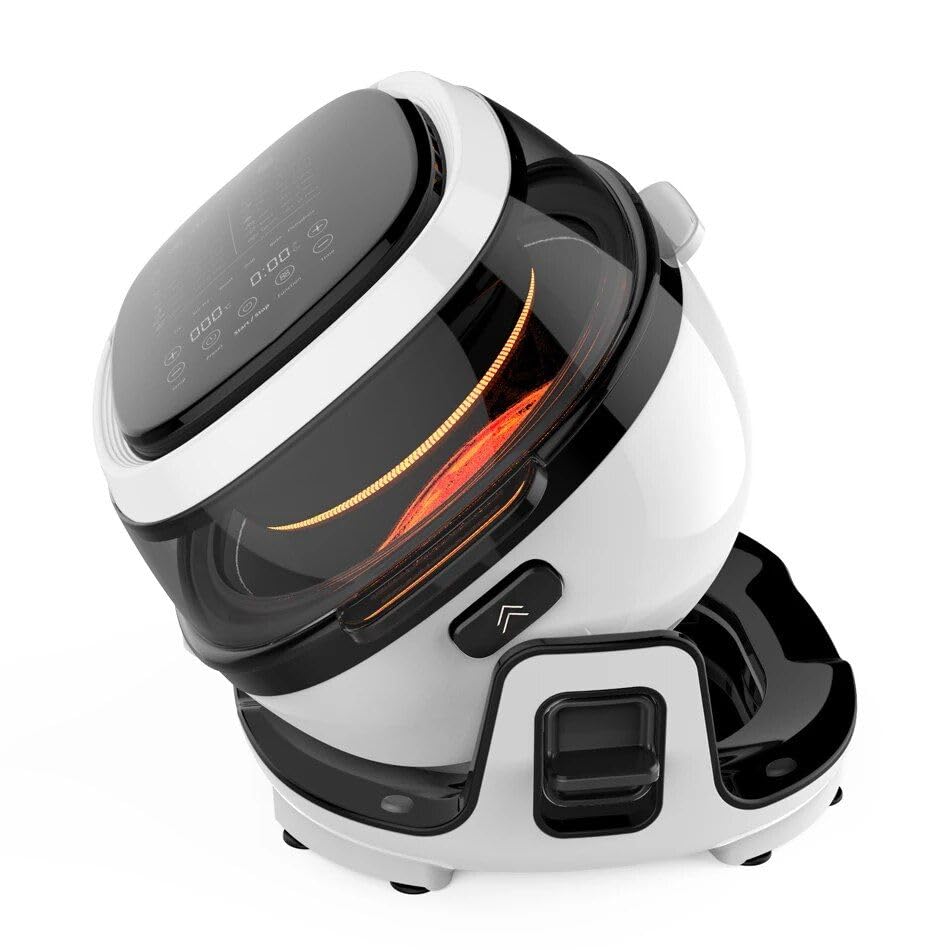
2.1. irudia: Orokorrean view of the Generic SC30 6L Digital Air Fryer Oven, showing its tilted position and digital display.
3. Konfigurazioa
Before using your air fryer oven for the first time, follow these steps:
- Desegin: Kontu handiz kendu ontziratzeko material guztiak, pegatinak edo etiketak barne.
- Garbitu: Garbitu iragarkiarekin aparatuaren kanpoaldeaamp cloth. Wash the cooking basket/pot and any accessories with warm, soapy water. Rinse thoroughly and dry completely.
- Lekua: Place the main unit on a stable, level, heat-resistant surface. Ensure there is at least 4 inches (10 cm) of clear space around the back and sides of the appliance for proper ventilation. Do not place it directly under cabinets.
- Lehen erabilera zikloa: To eliminate any manufacturing odors, it is recommended to run the air fryer empty for about 10-15 minutes at 350°F (175°C) before cooking food. A slight odor may be present, which is normal.

Figure 3.1: The air fryer oven placed on a kitchen counter, ready for use.
4. Funtzionamendu-argibideak
Operating your Digital Air Fryer Oven is straightforward with its intuitive touch control panel.
Oinarrizko funtzionamendua:
- Janaria prestatu: Place your ingredients into the cooking basket/pot. Do not overfill; ensure there is enough space for air to circulate.
- Saskia sartu: Slide the cooking basket securely into the main unit.
- Piztu: Entxufatu elikatze-kablea lurrera konektatutako entxufe elektriko batera. Pantaila digitala piztuko da.
- Ezarri Tenperatura eta Denbora: Use the touch controls to adjust the desired cooking temperature and time. Refer to cooking guides for recommended settings.
- Select Preset (Optional): The appliance may have preset functions for common foods. Select a preset if available and desired.
- Hasi sukaldatzen: Sakatu Hasi/Pausatu botoia sukaldaritza-zikloa hasteko.
- Janaria astindu/biratu: For even cooking, some recipes may require shaking or turning the food halfway through the cooking time. Carefully remove the basket, shake/turn, and reinsert. The appliance will resume cooking.
- Janaria kendu: Once the cooking cycle is complete, the appliance will beep. Carefully remove the cooking basket using oven mitts.
- Zerbitzatu: Transfer cooked food to a serving dish.
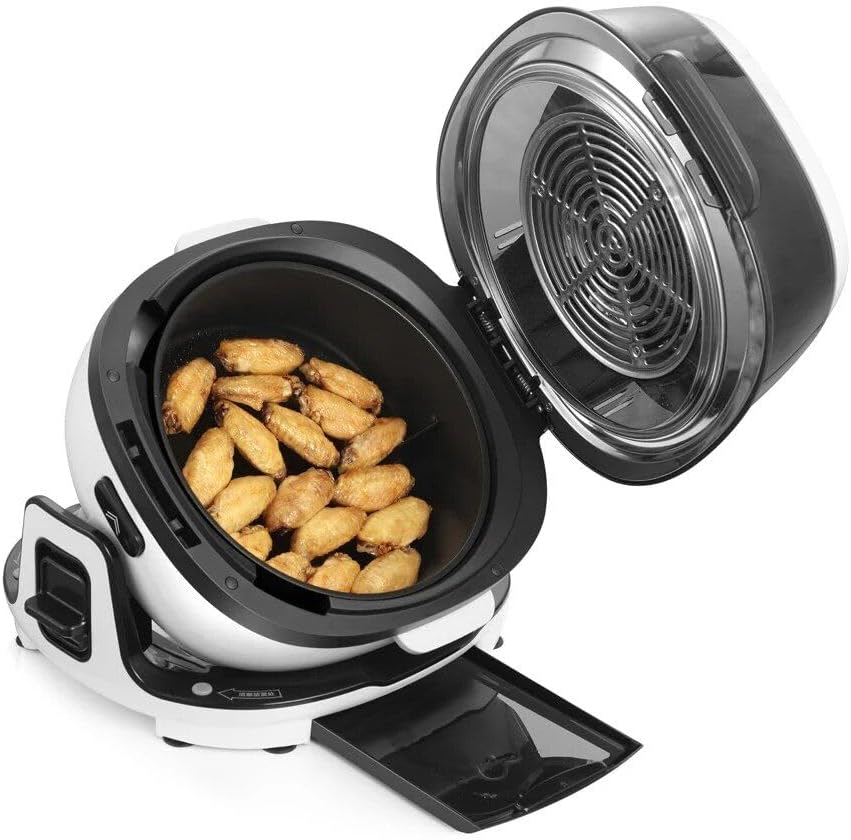
Figure 4.1: The cooking basket containing chicken wings, demonstrating food placement and capacity.
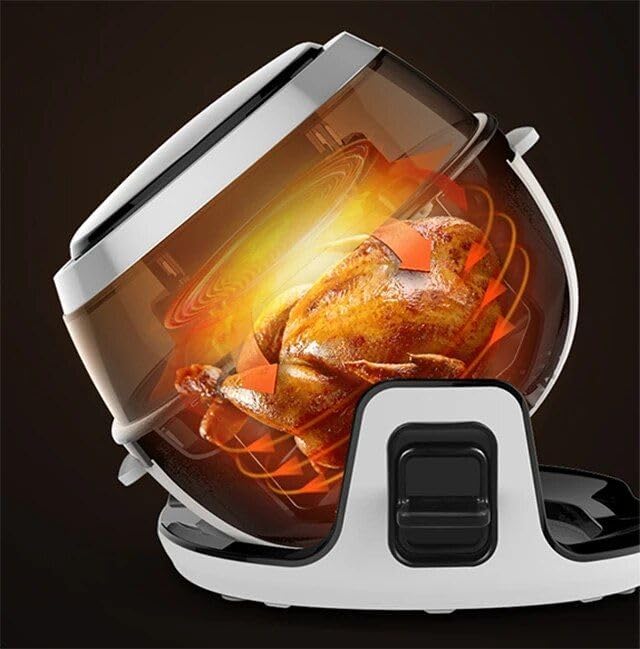
Figure 4.2: The air fryer oven in a tilted position, illustrating its capability to cook larger items like a whole chicken.
5. Mantentzea eta Garbiketa
Regular cleaning ensures optimal performance and extends the life of your air fryer oven.
- Deskonektatu eta hoztu: Deskonektatu beti aparatua eta utzi guztiz hozten garbitu aurretik.
- Clean Cooking Basket/Pot: Wash the cooking basket/pot and any accessories with warm, soapy water. Use a non-abrasive sponge or cloth to protect the PTFE non-stick coating. Rinse thoroughly and dry completely. Note: The cooking basket/pot is NOT dishwasher safe.
- Garbitu kanpoaldea: Garbitu unitate nagusiaren kanpoaldea iragarkiarekinamp Ez erabili garbitzaile urratzaile gogorrik edo urratzailerik.
- Barnealde garbia: If necessary, wipe the interior of the main unit with a damp oihal bat. Ziurtatu urik ez dela sartzen osagai elektrikoetan.
- Biltegiratzea: Behin garbi eta lehor dagoenean, gorde tresna leku fresko eta lehor batean.
6. Arazoak
If you encounter issues with your air fryer oven, refer to the following common problems and solutions:
| Arazoa | Kausa posiblea | Irtenbidea |
|---|---|---|
| Aparatua ez da pizten. | Ez dago konektatuta; entxufea matxuratuta dago. | Ziurtatu kablea ondo konektatuta dagoela funtzionatzen duen entxufe batera. Egiaztatu etengailua. |
| Janaria ez da uniformeki prestatzen. | Saskia gehiegi beteta dago; janaria ez da astindu/irauli. | Ez bete saskia gehiegi. Astindu edo buelta eman janaria erdi-egosita dagoenean. |
| Kea zuria aparatutik zetorren. | Aurreko erabileraren koipe-hondakinak; janari koipetsuak prestatzea. | Clean the cooking basket and interior thoroughly after each use. For fatty foods, drain excess fat during cooking. |
| Janaria ez da kurruskaria. | Too much moisture; not enough oil (if desired). | Pat food dry before air frying. Lightly brush or spray food with oil for extra crispiness. |
7. Zehaztapenak
Technical details for the Generic SC30 6L Digital Air Fryer Oven:
- Eredua: SC30
- Edukiera: 6 litro
- Produktuaren neurriak: 15.15" L x 13.89" W x 13.66" H
- Irteera Wattage: 1500 Watt
- liburukiatage: 120 Volt
- Kontrol-metodoa: Ukitu
- Materiala: Plastic, PTFE (for cooking surfaces)
- Elementuaren pisua: Gutxi gorabehera 16.8 kilo
- Ezaugarri berezia: BBQ parrilla
- Ontzi-garbigailuan segurua: No (for cooking basket/pot)
8. Bermea eta Laguntza
This product is covered by a limited warranty. For specific warranty terms and conditions, please refer to the documentation provided at the time of purchase or contact your retailer. For technical support or service inquiries, please reach out to the customer service department of your retailer or the manufacturer.


