
Sarrera
The Wireless Express Sing-Along Bling Karaoke Microphone and Stereo Speaker is a versatile 2-in-1 device designed for entertainment. It combines a microphone with a Bluetooth speaker, allowing users to sing along to music from various compatible devices. This manual provides essential information for setup, operation, and maintenance of your device.
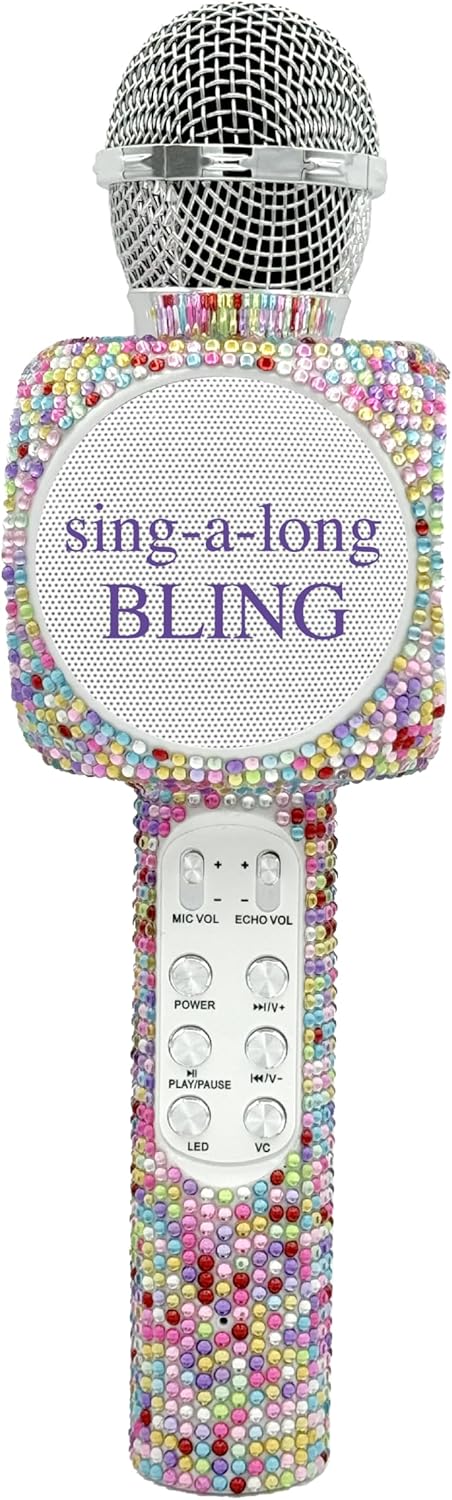
The Sing-Along Bling Karaoke Microphone, featuring its unique Confetti Bling design.
Ezaugarri nagusiak
- 2-en-1 diseinua: Combines a microphone and a Bluetooth stereo speaker for integrated audio and vocal performance.
- Bluetooth konexioa: Easily connects wirelessly to smartphones, tablets, and computers (Android & Apple compatible) for streaming music.
- LED argi dinamikoak: Features dazzling LED lights that enhance the karaoke experience.
- Soinu efektuak: Includes echo effects and voice changers for varied vocal styles.
- Kontrol integratuak: Offers convenient buttons for volume control, track skipping (previous/next), and recording.
- Diseinu eramangarria: Compact and lightweight, suitable for both indoor and outdoor use.
- Bateria kargagarria: Powered by a battery for wireless operation.
- SD txartelaren zirrikitua: Allows for playback from an SD card.
- Entzungailuen kablea: Provides an option for private listening or monitoring.

Bat baino gehiagoview of the microphone's features, highlighting its Bluetooth capability, voice changer, LED lights, portability, and rechargeable battery.
Konfigurazio Gida
1. Mikrofonoa kargatzea
- Locate the Micro USB charging port on the microphone.
- Connect the provided charging cable to the microphone and a compatible USB power source (e.g., computer, USB wall adapter).
- The LED indicator will show charging status (refer to product-specific LED behavior for details, usually red for charging, off/blue for full).
- Lehenengo erabilera baino lehen, utzi denbora nahikoa karga osoa egiteko.
2. Piztu/Itzaltzea
- To power on, press and hold the Power button (usually marked with a power symbol) until the device activates and the LED lights illuminate.
- To power off, press and hold the Power button again until the device shuts down.
3. Bluetooth parekatzea
- Ensure the microphone is powered on and in pairing mode (indicated by a flashing LED light, often blue).
- Zure telefonoan, tabletan edo ordenagailuan, gaitu Bluetooth eta bilatu eskuragarri dauden gailuak.
- Select "WE-BLING-MIC" or a similar device name from the list.
- Once paired, the microphone will usually emit an audible confirmation and the LED light will become solid.
Funtzionamendu-argibideak
1. Oinarrizko Kontrolak
- Bolumen kontrola: Use the "VOL+" and "VOL-" buttons to adjust the overall speaker volume.
- Mikrofonoaren bolumena: Use the "MIC VOL" slider or buttons to adjust your vocal volume.
- Oihartzun efektua: Use the "ECHO VOL" slider or buttons to add or reduce echo to your voice.
- Musika erreprodukzioa:
- Erreproduzitu/Pausatu: Press the "PLAY/PAUSE" button.
- Aurreko pista: Press the "PREV" button.
- Hurrengo ibilbidea: Press the "NEXT" button.
- LED argiak: Press the "LED" button to cycle through different light modes or turn them off.
- Ahots-aldatzailea: Press the "VC" button to activate and cycle through various voice changing effects.
2. Singing with Music
Once connected via Bluetooth, open your preferred karaoke app or music streaming service on your device. Play a song, and the music will stream through the microphone's speaker. You can then sing into the microphone, adjusting your vocal volume and echo as desired.
3. Zure emanaldia grabatzea
The microphone supports recording. Connect an audio cable from the microphone's audio output to your recording device (e.g., smartphone with a recording app). Alternatively, some karaoke apps may allow direct recording through the Bluetooth connection.
4. Using the SD Card Slot
Insert a compatible SD card loaded with MP3 files into the designated slot. The microphone will automatically detect and begin playing music from the SD card. Use the music playback controls to manage tracks.
Demonstration of a similar wireless microphone's sound quality and features in a car environment, including FM radio connectivity and various sound modes. This video is provided by a seller and offers insights into potential usage scenarios and audio performance.
Mantentzea
- Garbiketa: Use a soft, dry cloth to clean the exterior of the microphone. Do not use harsh chemicals or abrasive cleaners.
- Biltegiratzea: Store the microphone in a cool, dry place away from direct sunlight and extreme temperatures. If a carrying case is provided, utilize it for protection during storage and transport.
- Bateria zaintzea: Bateriaren iraupena luzatzeko, saihestu bateria maiz erabat deskargatzea. Kargatu gailua aldizka, denbora luzez erabiltzen ez baduzu ere.
Arazoak konpontzea
| Arazoa | Irtenbidea |
|---|---|
| Mikrofonoa ez da pizten. | Ziurtatu bateria kargatuta dagoela. Konektatu kargatzeko kablea eta saiatu berriro. |
| Ezin da Bluetooth bidez parekatu. | Make sure the microphone is in pairing mode (flashing LED). Ensure Bluetooth is enabled on your device and it's within range. Try restarting both devices. |
| Bozgorailuaren soinurik ez. | Check the volume levels on both the microphone and your connected device. Ensure the microphone is properly paired. |
| Echo/Voice Changer not working. | Ensure the "ECHO VOL" or "VC" functions are activated and adjusted to an audible level. |
Zehaztapenak
| Ezaugarri | Xehetasuna |
|---|---|
| Marka | Haririk gabeko Express |
| Modelo zenbakia | WE-BLING-MIC |
| Konektibitate Teknologia | Bluetootha |
| Energia iturria | Bateriaren bidez |
| Materiala | Plastic And Metal |
| Hardware Plataforma | Karaoke Machine, Smartphone, Tablet |
| Elementuaren pisua | 1.46 kilo |
| Paketearen neurriak | 15.04 x 5.71 x 3.7 hazbete |
| Eredu polarra | Norabide bakarrekoa |
| Mikrofonoaren forma-faktorea | Eskukoa |
| Ezaugarri Berezia | Bolumen kontrola |
| Konektore mota | Mikro USBa |
Kutxan dagoena
- Sing-Along Bling Bluetooth Karaoke Mikrofonoa
- Kargatzeko kablea
Bermea eta Laguntza
For warranty information or technical support, please refer to the product packaging or contact Wireless Express customer service directly. Contact details can typically be found on the manufacturer's official webgunean edo produktuaren dokumentazioan.