
1. Sarrera
Welcome to the user manual for your MAIDeSITe EL2 Pro Art Adjustable Height Desk Frame. This manual provides essential information for the safe assembly, operation, and maintenance of your desk frame. Please read it thoroughly before use and retain it for future reference.
Ezaugarri nagusiak
- Oval Leg Design: Unique elliptical leg construction for enhanced aesthetics and stability.
- Powerful Dual-Motor System: Ensures stable and durable operation with a lifting speed of 35 mm/s.
- Karga-ahalmen handia: 180 kg-rainoko pisua onartzen du.
- Funtzionamendu isila: Noise level below 45 decibels for a peaceful work environment.
- Altuera Erregulagarria: Range from 72 cm to 120 cm to suit various user preferences.
- Extensible Width: Accommodates tabletops from 100 cm to 220 cm in length and 60 cm to 100 cm in width.
- Kontrol-panela adimenduna: Features 4 memory presets, a sit-stand reminder, child safety lock, and a convenient USB charging port.
- Talkaren aurkako sistema: Built-in sensor detects obstacles and stops movement to prevent damage.
- Customized Accessories: Includes 4 lockable universal wheels and metal cable management supports.

The MAIDeSITe EL2 Pro Art Adjustable Height Desk Frame, showcasing its modern design and functionality in a bright office environment.
2. Segurtasun-argibide garrantzitsuak
Funtzionamendu segurua bermatzeko eta lesioak edo kalteak saihesteko, jarraitu segurtasun-jarraibide hauek:
- Irakurri arretaz argibide guztiak muntatu eta erabili aurretik.
- Mantendu haurrak eta maskotak mahaitik urrun funtzionamenduan zehar.
- Ensure there are no obstacles in the desk's path during height adjustment.
- Do not overload the desk. Adhere to the maximum load capacity of 180 kg.
- Ez eseri edo zutik mahai gainean.
- Keep all electrical components dry and away from liquids.
- Regularly check all screws and connections to ensure they are tight.
- Utilize the built-in anti-collision system and child safety lock features for added security.
- Erabili emandako energia-egokitzailea eta osagaiak soilik.
3. Paketearen edukia
Please check the package contents against the list below. If any items are missing or damaged, contact customer support.
- Desk Leg Columns (x2)
- Crossbar/Frame Support
- Oinak (x2)
- Kontrol Kutxa
- Kontrol panel adimenduna
- Korronte egokitzailea eta kablea
- Cable Management Compartment
- Kable Loturak
- Lockable Universal Wheels (Casters) (x4)
- Muntaketa-osagaiak (torlojuak, azkoinak, etab.)
- Erabiltzailearen eskuliburua
4. Muntaketa eta konfigurazioa
Assembly of the MAIDeSITe EL2 Pro Art desk frame is designed to be straightforward. A screwdriver is the primary tool required (not included). It is recommended that one person performs the assembly, which typically takes about 1 hour.
Muntatzeko urratsak:
- Deskonprimitu osagaiak: Kontu handiz atera pieza guztiak paketetik eta jarri gainazal garbi eta lau batean.
- Attach Feet to Leg Columns: Securely fasten the feet to the bottom of each leg column using the provided hardware.
- Assemble Crossbar: Connect the crossbar sections to form the main frame.
- Mount Leg Columns to Crossbar: Attach the leg columns to the assembled crossbar.
- Kontrol-kutxa eta motorrak instalatu: Mount the control box and connect the motor cables to the respective leg columns and the control box.
- Kontrol panela erantsi: Secure the smart control panel to the underside of your chosen desktop (desktop not included).
- Mahaigaina muntatu: Carefully place your desktop onto the assembled frame and secure it using appropriate screws (ensure screw length is suitable for your desktop to avoid piercing through).
- Kableen kudeaketa instalatu: Attach the cable management compartment and use cable ties to organize wires.
- Install Casters (Optional): If desired, replace the standard leveling feet with the provided lockable universal wheels.
- Konektatu energia: Plug the power adapter into the control box and then into a power outlet.

This diagram illustrates the main components of the desk frame, highlighting the ease of assembly. It shows the two leg columns, the crossbar, and the control unit, indicating that assembly can be completed efficiently.
5. Funtzionamendua
The MAIDeSITe EL2 Pro Art desk frame features an intuitive smart control panel for easy height adjustment and personalized settings.
Kontrol panelaren funtzioak
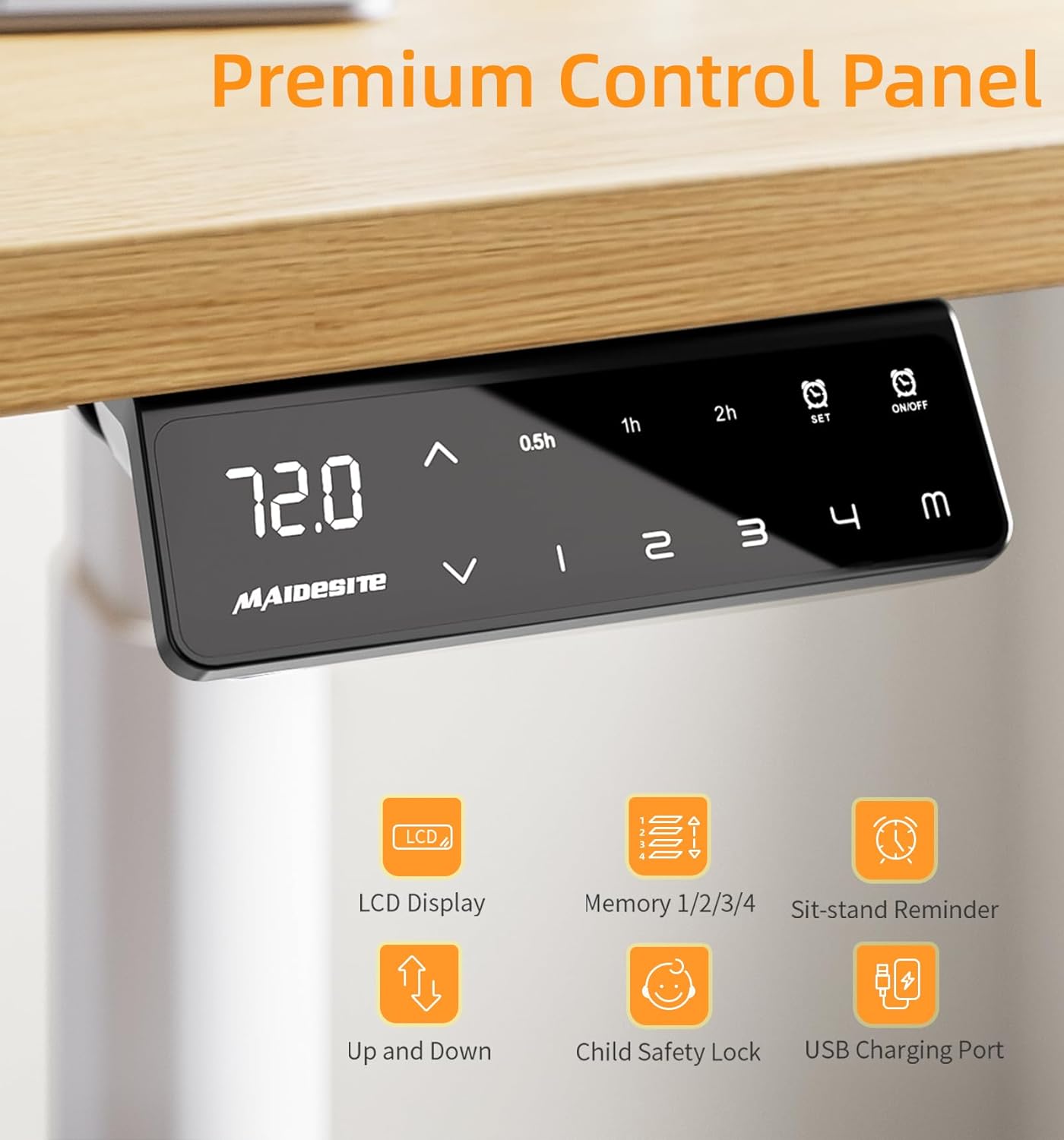
The smart control panel features an LCD display showing the current height. It includes up/down arrows for adjustment, four memory preset buttons (1, 2, 3, 4), a 'SET' button, a timer for sit-stand reminders (0.5h, 1h, 2h), and an On/Off button. A USB charging port is also integrated.
- Altuera doitzea: Erabili Gora (▲) eta Behera (▼) arrows to smoothly raise or lower the desk to your desired height. The current height is displayed on the LCD screen.
- Memoria aurrezarpenak (1, 2, 3, 4):
To save a height: Adjust the desk to your preferred height, then press the EZARTU button followed by one of the number buttons (1, 2, 3 edo 4). The height is now saved.
To recall a height: Simply press the corresponding number button (1, 2, 3 edo 4), and the desk will automatically move to the saved position. - Sit-Stand Reminder (0.5h, 1h, 2h): Press the timer button to activate a reminder to change your working position after 0.5, 1, or 2 hours. This promotes healthier work habits.
- Haurren segurtasun blokeoa: Activate this feature to prevent accidental adjustments, ensuring safety in environments with children. Consult the full manual for specific activation/deactivation steps.
- USB kargatzeko ataka: A convenient USB port is integrated into the control panel for charging your electronic devices.
Talkaren aurkako sistema
The desk frame is equipped with a built-in anti-collision system. This sensor detects obstacles in the desk's path during height adjustment and automatically stops or reverses movement to prevent damage to the desk or objects, and to ensure user safety.

This image demonstrates the anti-collision feature. As the desk lowers, it detects an object (a plant pot) and automatically reverses direction to avoid impact, safeguarding items and users.
6. Zainketa eta Mantentzea
Proper care and maintenance will extend the life of your MAIDeSITe EL2 Pro Art desk frame.
- Garbiketa: Wipe down the desk frame surfaces with a soft, damp oihal. Saihestu garbitzaile urratzaileak, produktu kimiko gogorrak edo disolbatzaileak erabiltzea, hauek akabera kaltetu baitezakete.
- Ikuskapenak: Periodically check all screws, bolts, and connections to ensure they are secure. Tighten any loose fasteners.
- Osagai elektrikoak: Keep the control box, motors, and power adapter dry. Do not expose them to water or excessive moisture.
- Kableen kudeaketa: Regularly check and organize cables to prevent tangling or damage, especially during height adjustments.
7. Arazoak konpontzeko gida
If you encounter any issues with your desk frame, refer to the following common problems and their solutions. For persistent issues, please contact customer support.
| Arazoa | Kausa posiblea | Irtenbidea |
|---|---|---|
| Mahaia ez da mugitzen edo ez da kontrolei erantzuten. | No power, loose connection, child safety lock active. | Check if the power cable is securely plugged into the wall outlet and the control box. Ensure the child safety lock is deactivated. Try unplugging and replugging the power for a system reset. |
| Mahaia modu irregularrean mugitzen da edo zarata ezohikoak egiten ditu. | Overload, loose components, obstruction. | Reduce the weight on the desk to below 180 kg. Check all assembly screws for tightness. Ensure there are no obstructions in the lifting mechanism. |
| Error code displayed on control panel. | Sistemaren matxura, sentsore arazoa. | Note the error code and refer to the comprehensive manual (if available) or contact customer support for specific guidance. Often, a power cycle (unplugging for 30 seconds and replugging) can resolve temporary errors. |
| Talkaren aurkako sistema maizregi aktibatzen da. | Sensitivity setting, minor obstructions. | Ensure the area around the desk is clear. Some control panels allow adjustment of anti-collision sensitivity; consult the full manual for instructions. |
8. Zehaztapen Teknikoak
Below are the detailed technical specifications for the MAIDeSITe EL2 Pro Art Adjustable Height Desk Frame:
| Ezaugarri | Balioa |
|---|---|
| Modelo zenbakia | EL2 Pro Art |
| Marka | MAIDESITE |
| Gutxieneko Altuera | 72 cm |
| Gehienezko Altuera | 120 cm |
| Extendable Width | 100 cm - 180 cm |
| Compatible Tabletop Length | 100 cm - 220 cm |
| Compatible Tabletop Width | 60 cm - 100 cm |
| Altxatzeko Mekanismoa | Electric, Dual Motor |
| Altxatzeko Abiadura | 35 mm/s |
| Zarata Maila | <45 dB |
| Gehienezko Karga Edukiera | 180 kg |
| Produktuaren neurriak (L x W x H) | 60 x 180 x 120 cm (at max extension) |
| Produktuaren pisua | 26 kg |
| Ezaugarri bereziak | Height adjustable, dual motor, oval leg design, 4 memory controls, anti-collision system, USB port, cable management, casters |
| Gomendatutako Muntaketa Pertsonak | 1 |
| Muntatzeko gomendatutako tresnak | Bihurkin (ez dago barne) |

This image visually represents the robust capabilities of the desk frame, emphasizing its 180kg weight capacity, long service life, and incredible stability.
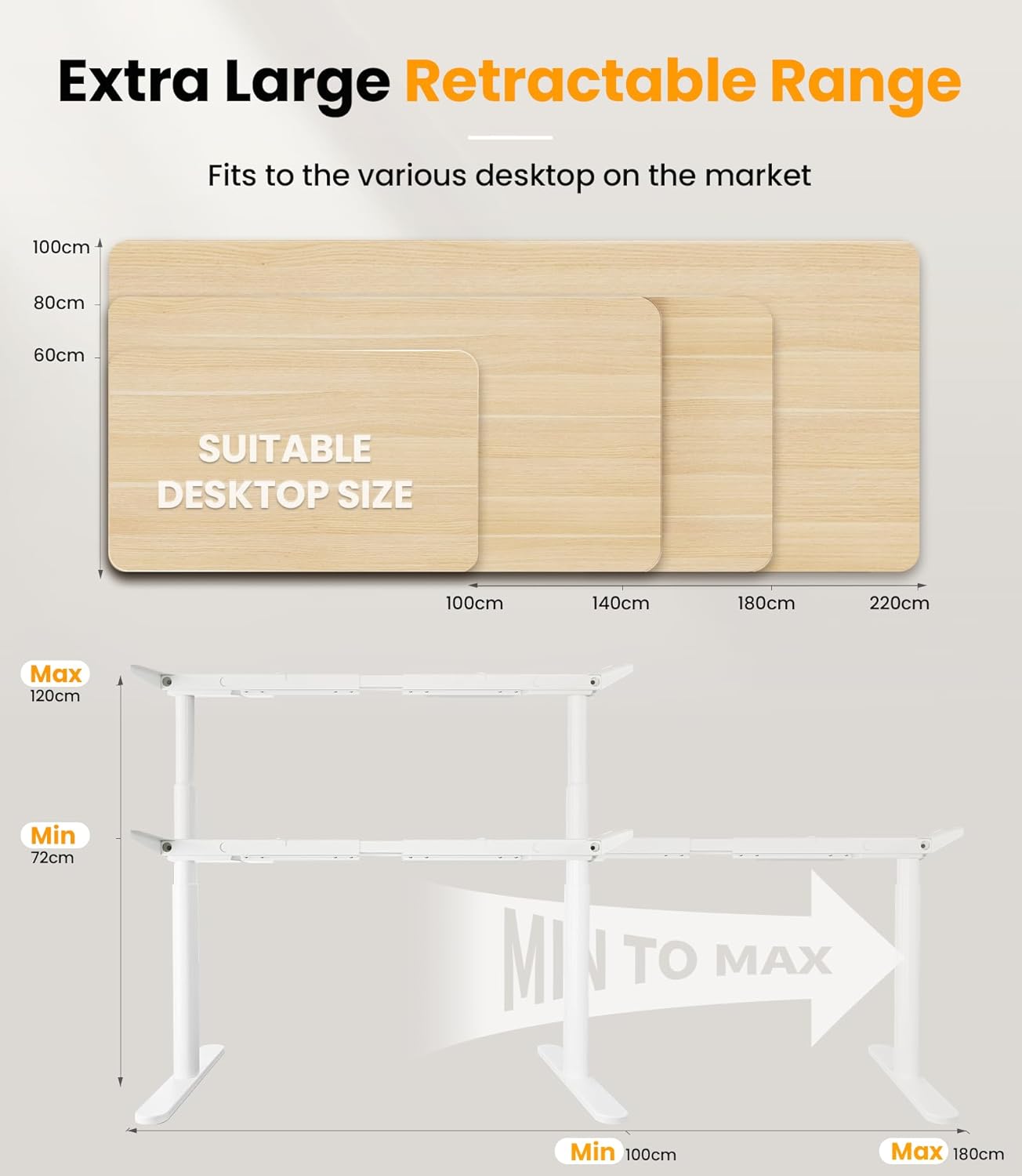
This diagram shows the desk frame's height adjustability from a minimum of 72cm to a maximum of 120cm. It also illustrates the extensible width from 100cm to 180cm, accommodating various desktop sizes.
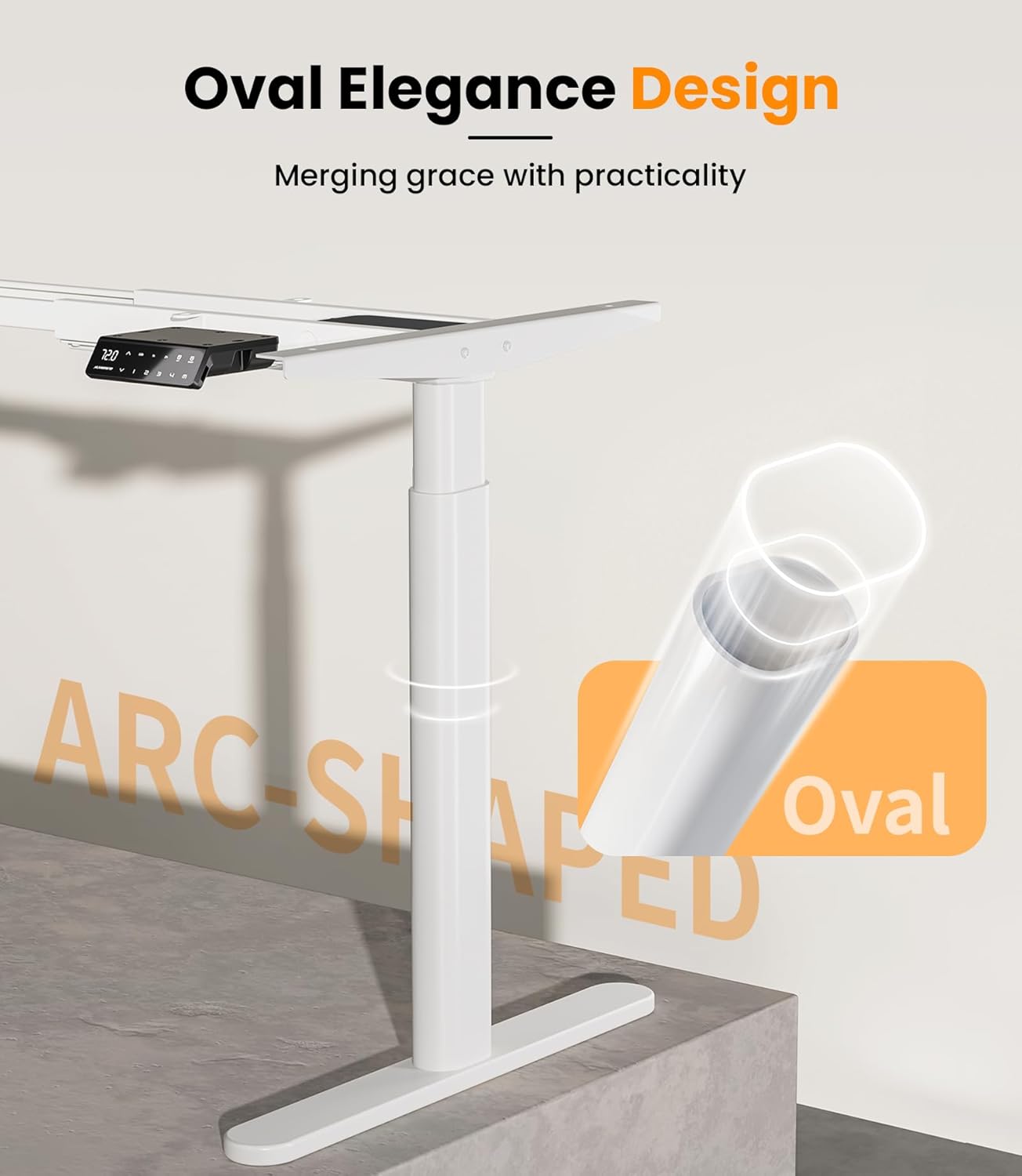
This image highlights the unique oval elegance design of the desk frame's legs, combining aesthetic appeal with practical stability.

This graphic shows the dual-motor mechanism, emphasizing its fast lifting speed of 35mm/s and quiet operation at less than 45dB.
9. Bermea eta bezeroarentzako laguntza
The MAIDeSITe EL2 Pro Art Adjustable Height Desk Frame comes with a 5 urteko berme mugatua, kalitatea eta fidagarritasuna bermatuz.
For technical assistance, warranty claims, or any questions regarding your product, please contact MAIDeSITe customer support. Please have your model number (EL2 Pro Art) and purchase information ready when contacting support.
For the most up-to-date support information and contact details, please visit the official MAIDeSITe webgunea.