
SainSmart Space PI
Creality Space PI Filament Dryer Box User Manual
Modeloa: Espazio PI
Sarrera
The Creality Space PI Filament Dryer Box is designed to enhance 3D printing quality by effectively removing moisture from various filament types. This device features a built-in fan, a 3.7-inch touch screen, and 360° PTC heating technology to ensure optimal drying conditions for your 3D printing filaments.
Proper filament drying prevents common printing issues such as stringing, clogging, poor adhesion, and layer shifting, leading to improved print reliability and quality.
Produktuaren Ezaugarriak
- PTC 360° Hot-air Heating System: Ensures quick and even heating with a built-in fan for 360° circulation of hot air, effectively drying moisture-laden filaments.
- PTC Berokuntza Teknologia Aurreratua: Utilizes an 80W PTC heater for uniform drying, offering a durable, energy-efficient, and eco-friendly solution.
- 3.7 hazbeteko LCD ukipen-pantaila: Provides easy operation and real-time monitoring of temperature, humidity, and drying countdown.
- Smart Time Control: Customizable 48-hour timer function for thorough drying. Includes a power-off memory function to retain settings after power interruptions.
- Versatile Filament Compatibility: Supports up to 12 types of filaments, including PLA, PETG, ABS, Nylon, PLA-CF, PA-CF, ASA. Adjustable temperature range from 45°C to 70°C. Compatible with 1.75mm, 2.85mm, and 3mm diameter filaments.
Paketearen edukia
- Creality Space PI Filament Dryer
- Elikatze-moldagailua
- Erabiltzailearen eskuliburua (dokumentu hau)
Konfigurazio Argibideak
- Unpack the Dryer: Carefully remove the Creality Space PI Filament Dryer from its packaging. Inspect for any damage.
- Lekua: Place the dryer on a stable, flat surface near your 3D printer, ensuring adequate ventilation around the unit.
- Potentzia-konexioa: Connect the provided power adapter to the dryer's power input port and then plug it into a suitable power outlet.
- Harizpia kargatzen:
- Open the lid of the dryer.
- Place your filament spool(s) onto the rollers inside the dryer. The dryer can accommodate two standard spools.
- If printing directly from the dryer, feed the filament through one of the PTFE tube openings located at the top front of the unit. Ensure the silicone plug is properly seated when not in use to maintain a sealed environment.
- Itxi estalkia ongi.

Image: The Creality Space PI Filament Dryer Box with a filament spool loaded, showing the main unit and display.
Funtzionamendu-argibideak
- Piztu: Jarri unitatearen atzealdean dagoen etengailua 'ON' posiziora. LCD ukipen-pantaila piztuko da.
- Ukipen-pantaila erabiliz: The 3.7-inch LCD touch screen displays real-time temperature, humidity, and drying countdown.

Image: The LCD touch screen showing drying countdown, real-time temperature, and real-time humidity.
- Selecting Filament Type and Settings:
- The dryer offers one-key preset temperature settings for 12 different filament types.
- You can also manually adjust the temperature between 45°C and 70°C and the drying time from 0 to 48 hours using the on-screen controls.
- Refer to the recommended settings table below for common filament types:
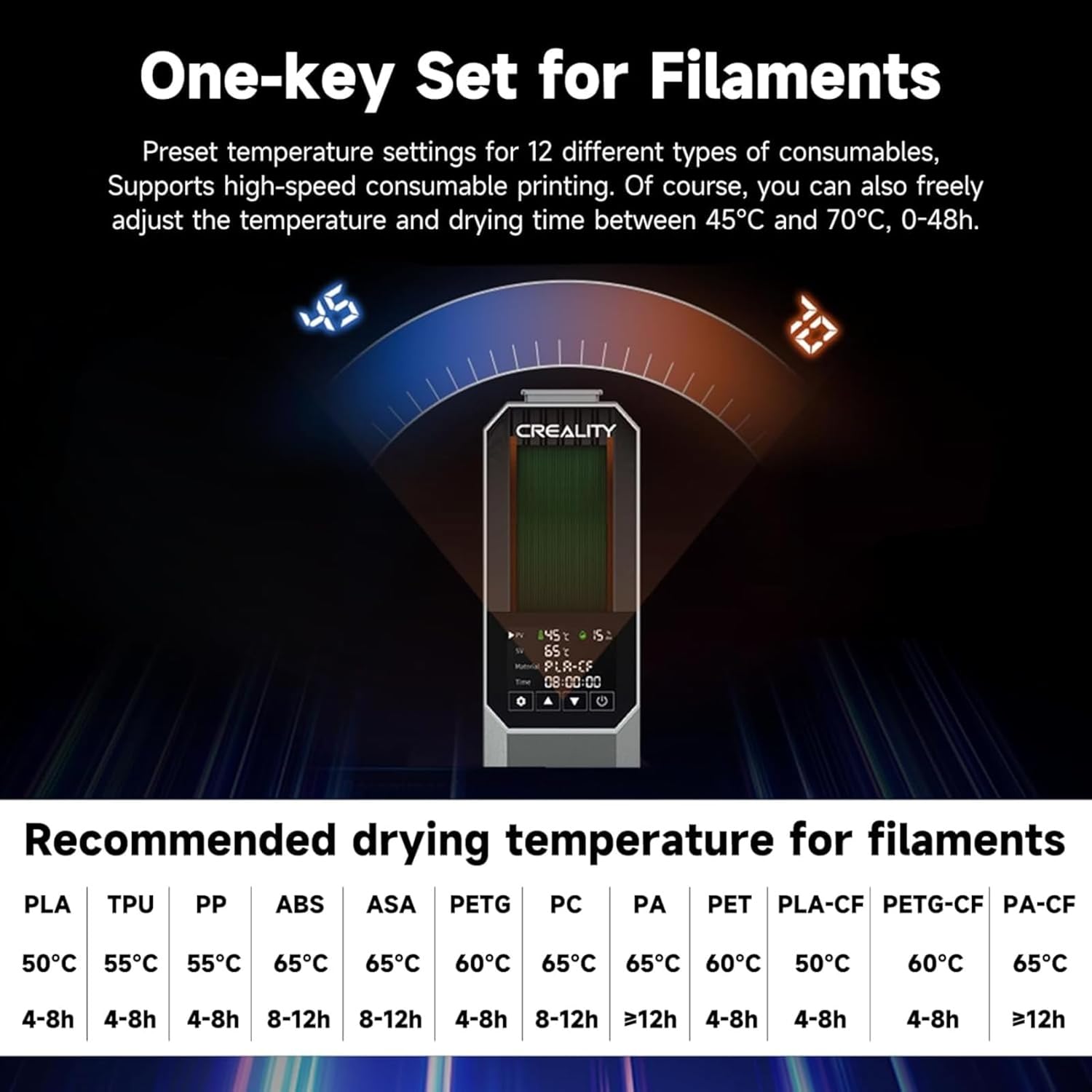
Image: Recommended drying temperatures and times for different filament types.
Recommended Drying Settings Filamentu mota Tenperatura Lehortze Denbora PLA 50°C 4-8h TPU 55°C 4-8h PP 55°C 4-8h ABS 65°C 8-12h ASA 65°C 8-12h PETG 60°C 4-8h PC 65°C 8-12h PA 65°C > 12h PET 60°C 4-8h PLA-CF 50°C 4-8h PETG-CF 60°C 4-8h PA-CF 65°C > 12h - Lehortzen hasi: Once settings are configured, initiate the drying process. The dryer will begin heating and circulating air.
- Itzaltze-memoria funtzioa: Potentzia bat izanez gerotage, the dryer will remember your last material and temperature settings, allowing for quick resumption of drying once power is restored.

Image: Depiction of the 360° hot-air heating system circulating air around the filament spool.

Image: The power-off memory function retaining settings after a power cycle.
Mantentzea
- Garbiketa: Ensure the device is powered off and unplugged before cleaning. Use a soft, dry cloth to wipe the exterior. Avoid using abrasive cleaners or solvents.
- Lehorgailua: The dryer may contain desiccant packets. While the device actively heats, these packets primarily help maintain dryness when the unit is off. Replace desiccant packets periodically if they become saturated.
- Biltegiratzea: Denbora luzez erabiltzen ez baduzu, gorde lehorgailua leku fresko eta lehor batean.
Arazoak konpontzea
- Problem: Filament is still wet after drying.
- Irtenbidea: Ensure the drying temperature and time are appropriate for the filament type. Some highly hygroscopic filaments (e.g., Nylon, PC) may require longer drying times (e.g., >12 hours) or higher temperatures. Verify the lid is securely closed and the silicone plugs for the filament outlets are in place when not actively feeding filament to prevent moisture re-entry.
- Problem: Dryer is not heating.
- Irtenbidea: Check if the power cable is securely connected and the power switch is in the 'ON' position. Ensure the power outlet is functional. If the issue persists, contact customer support.
- Problem: Filament jams when feeding through the outlet.
- Irtenbidea: Ensure the filament is properly aligned with the PTFE tube opening. Some users have reported that the rubber grommet on the top may not secure the PTFE tubing sufficiently. Consider printing or acquiring a more secure PTFE quick plug and port if this becomes a recurring issue.

Image: Visual comparison demonstrating the improved print quality achieved with dried filament.
Zehaztapenak
| Ezaugarri | Xehetasuna |
|---|---|
| Eredua | Espazioko PI |
| Produktuaren neurriak | 7.87"S x 11.81"Z x 3.93"A (20 x 30 x 10 cm) |
| Elementuaren pisua | 3.7 libra (1.68 kg) |
| Berokuntza Teknologia | PTC 360°-ko aire beroko berogailua |
| Berogailu Potentzia | 80W |
| Tenperatura tartea | 45°C - 70°C |
| Tenporizadorearen funtzioa | 0-48 ordu |
| Bistaratzea | 3.7 hazbeteko LCD ukipen-pantaila |
| Harizpien diametroaren bateragarritasuna | 1.75 mm, 2.85 mm, 3 mm |
| Materiala | ABS |
| Kolorea | Grisa |
| Fabrikatzailea | SainSmart |

Image: The dryer demonstrating compatibility with multiple filament diameters (1.75mm and 2.85mm).
Bermea eta Laguntza
For detailed warranty information, please refer to the warranty card included with your product or visit the official SainSmart webgunea. Berme-baldintzek normalean fabrikazio-akatsak estaltzen dituzte erosketa-datatik aurrerako denbora-tarte jakin batean.
If you encounter any issues or require technical assistance, please contact SainSmart customer support through their official webgunea edo zure produktuaren dokumentazioan emandako harremanetarako informazioa.
Fabrikatzailea: SainSmart