
1. Sarrera
This manual provides essential information for the proper setup, operation, and maintenance of your Azeyou 10.1-inch Android 14 Tablet, model AT1016U5. Please read this manual thoroughly before using your device to ensure optimal performance and safety.

1.1. irudia: Aurrealdea eta atzealdea view of the Azeyou 10.1-inch Android 14 Tablet.
2. Segurtasun informazioa
Zure gailuari kalterik edo zuri edo besteei lesiorik ez eragiteko, jarraitu neurri hauek:
- Ez jarri tableta tenperatura altuen, eguzki-argiaren eraginpean edo hezetasun handiaren eraginpean.
- Saihestu tableta erortzea edo kolpe gogorren eraginpean jartzea.
- Use only the charger and accessories provided or approved by Azeyou.
- Mantendu tableta uretatik eta beste likido batzuetatik urrun.
- Do not attempt to disassemble or repair the tablet yourself. Contact customer support for assistance.
- Tokiko araudien arabera bota tableta eta bateria arduraz.
3. Paketearen edukia
Egiaztatu elementu guztiak paketean daudela:
- 1x Azeyou Android 14 Tablet
- 1x TYPE C Cable
- 1x Tablet Adaptor
- 1x Erabiltzailearen eskuliburua

Image 3.1: Contents included in the Azeyou Tablet package.
4. Produktua amaitu daview
Familiarize yourself with the physical components and controls of your Azeyou Tablet.
4.1. Physical Layout

Image 4.1: Diagram showing the location of ports and buttons on the Azeyou Tablet.
- Pizteko/Blokeatzeko botoia: Press to turn on/off the tablet or to lock/unlock the screen.
- Bolumen-botoiak: Doitu audioaren bolumena.
- Berrezarri estenopea: Use a thin pin to reset the device if it becomes unresponsive.
- USB C motako ataka: Kargatzeko eta datuak transferitzeko.
- Mikro SD txartelaren zirrikitua: Insert a Micro SD card for expandable storage (up to 1TB, not included).
- Kamera: Aurreko (5MP) eta atzeko (8MP) kamerak argazki eta bideo deietarako.
- Hizlariak: Dual multimedia box speakers for audio output.
4.2. Ezaugarri nagusiak
- Sistema eragilea: Android 14
- Prozesadorea: 2.0 GHz Octa-Core Processor (Allwinner A523)
- Pantaila: 10.1-inch IPS Touch Screen, 1280x800 resolution
- Memoria: 8GB RAM (4GB physical + 4GB virtual)
- Biltegiratzea: 128 GB-ko ROMa, TF txartelaren bidez 1 TB-raino zabaldu daitekeena
- Bateria: 6000mAh litio-polimeroa
- Konektibitatea: Wi-Fi 6 (802.11a/b/g/n/ac), Bluetooth 5.0
- Kamerak: 5MP aurrealdea, 8MP atzekoa
- Gehigarriak: GMS certified, Widevine L1 support

Image 4.2: Visual representation of the tablet's core features including OS, memory, cameras, and connectivity.
5. Konfigurazioa
5.1. Bateria kargatzea
Before first use, fully charge the tablet. Connect the provided USB Type-C cable to the tablet's charging port and the other end to the tablet adaptor. Plug the adaptor into a power outlet. The charging indicator will show the charging status. A full charge typically takes approximately 1.5 hours.
5.2. Piztu/Itzaltzea
- Pizteko: Press and hold the Power/Lock button until the Azeyou logo appears on the screen.
- Itzaltzeko: Press and hold the Power/Lock button until the power options menu appears. Select "Power off" and confirm.
- Berrabiarazteko: From the power options menu, select "Restart."
5.3. Hasierako konfigurazioa
Lehen aldiz piztean, jarraitu pantailan agertzen diren argibideei tableta konfiguratzeko:
- Hautatu zure hizkuntza.
- Konektatu Wi-Fi sare batera.
- Sign in with your Google account or create a new one. This is necessary to download apps from the Google Play Store.
- Review eta baldintzak eta zehaztapenak onartu.
- Segurtasunerako, konfiguratu pantailaren blokeoa (PINa, eredua edo pasahitza).
5.4. Mikro SD txartel bat sartzea
To expand storage, insert a Micro SD card (not included) into the Micro SD card slot. Gently push the card until it clicks into place. Ensure the tablet is powered off before inserting or removing the card.
6. Funtzionamendu-argibideak
6.1. Android 14 nabigatzen
Your tablet runs on Android 14, offering enhanced privacy controls and a user-friendly interface. Use touch gestures to navigate:
- Sakatu: Hautatu elementu bat.
- Pasatu hatza: Pantailetan edo zerrendetan zehar joan.
- Pixka bat: Irudiak handitu edo txikitu eta web orrialdeak.
- Prentsa luzea: Sartu testuinguru-menuetara edo mugitu ikonoak.
6.2. Wi-Fi eta Bluetooth konexioa
Access the Quick Settings panel by swiping down from the top of the screen to enable or disable Wi-Fi and Bluetooth. For detailed settings, go to Ezarpenak > Sarea eta internet or Ezarpenak > Konektatutako gailuak.
6.3. Installing Applications
The Google Play Store is pre-installed. Tap the Play Store icon to browse and download applications. A Google account is required for this process.
6.4. Kameraren erabilera
Open the Camera app to take photos or record videos. The tablet features a 5MP front camera and an 8MP rear camera. Tap the screen to focus and press the shutter button to capture.

6.1 irudia: Adibideaamples of camera usage and dual camera setup on the Azeyou Tablet.
6.5. Display and Eye Protection
The 10.1-inch IPS display offers a 1280x800 resolution. It includes low blue light technology to reduce eye strain. Adjust display settings under Ezarpenak > Pantaila.

Image 6.2: The 10.1-inch IPS display of the Azeyou Tablet.
6.6. Baterien kudeaketa
The 6000mAh battery provides approximately 6 hours of mixed usage. To optimize battery life, reduce screen brightness, disable Wi-Fi/Bluetooth when not in use, and close unused applications.

Image 6.3: Battery capacity and estimated usage times for the Azeyou Tablet.
7. Mantentzea
7.1. Tableta garbitzea
Use a soft, lint-free cloth to clean the screen and body of the tablet. Do not use abrasive cleaners or solvents, as they may damage the surfaces.
7.2. Software eguneraketak
Aldian-aldian egiaztatu sistemaren eguneraketak zure tabletak azken funtzioak eta segurtasun-adabakiak dituela ziurtatzeko. Joan honera Ezarpenak > Sistema > Sistemaren eguneraketa.
7.3. Biltegiratze kudeaketa
Garbitu beharrezkoak ez direnak aldizka files and uninstall unused apps to maintain optimal performance. You can manage storage under Ezarpenak > Biltegiratzea.
8. Arazoak
Tabletarekin arazoak badituzu, jo ezazu honako ohiko irtenbide hauetara:
| Arazoa | Irtenbidea |
|---|---|
| Tableta ez da pizten | Ensure the battery is charged. Connect the charger and wait a few minutes before attempting to power on again. If unresponsive, use a thin pin to press the Reset pinhole. |
| Pantailak ez du erantzuten | Restart the tablet by holding the Power/Lock button. If unresponsive, use the Reset pinhole. |
| Ezin da wifira konektatu | Ensure Wi-Fi is enabled in settings. Check if the router is working correctly. Try forgetting the network and reconnecting. |
| Aplikazioak huts egiten ari dira edo motel doaz | Close background applications. Clear app cache (Settings > Apps > [App Name] > Storage & cache). Ensure sufficient storage space. Restart the tablet. |
| Bateria azkar agortzen da | Reduce screen brightness. Disable Wi-Fi, Bluetooth, and GPS when not in use. Close unused apps. Check battery usage in Settings > Battery. |
If the problem persists, please contact Azeyou customer support for further assistance.
9. Zehaztapenak
Detailed technical specifications for the Azeyou 10.1-inch Android 14 Tablet (Model AT1016U5).
| Ezaugarri | Zehaztapena |
|---|---|
| Modelo zenbakia | AT1016U5 |
| Sistema eragilea | Android 14 |
| Prozesadorea | Octa-Core (Allwinner A523), 2 GHz |
| RAM | 8 GB (4 GB fisikoa + 4 GB birtuala) |
| Barne Biltegiratzea | 128 GB |
| Biltegiratze zabalgarria | Up to 1 TB via Micro SD card (not included) |
| Pantailaren tamaina | 10.1 hazbete |
| Pantailaren bereizmena | 1280x800 IPS |
| Atzeko kamera | 8 MP |
| Aurrealdeko kamera | 5 MP |
| Bateria Edukiera | 6000 mAh litio-polimeroa |
| Bateriaren batez besteko iraupena | 6 Hours (mixed usage) |
| Haririk gabeko konexioa | Wi-Fi 6 (802.11a/b/g/n/ac) |
| Bluetootha | Bluetooth 5.0 |
| Neurriak (LxWxH) | 9.5 x 6.3 x 0.32 hazbete |
| Elementuaren pisua | 1.68 kilo |
| Kolorea | Grisa |
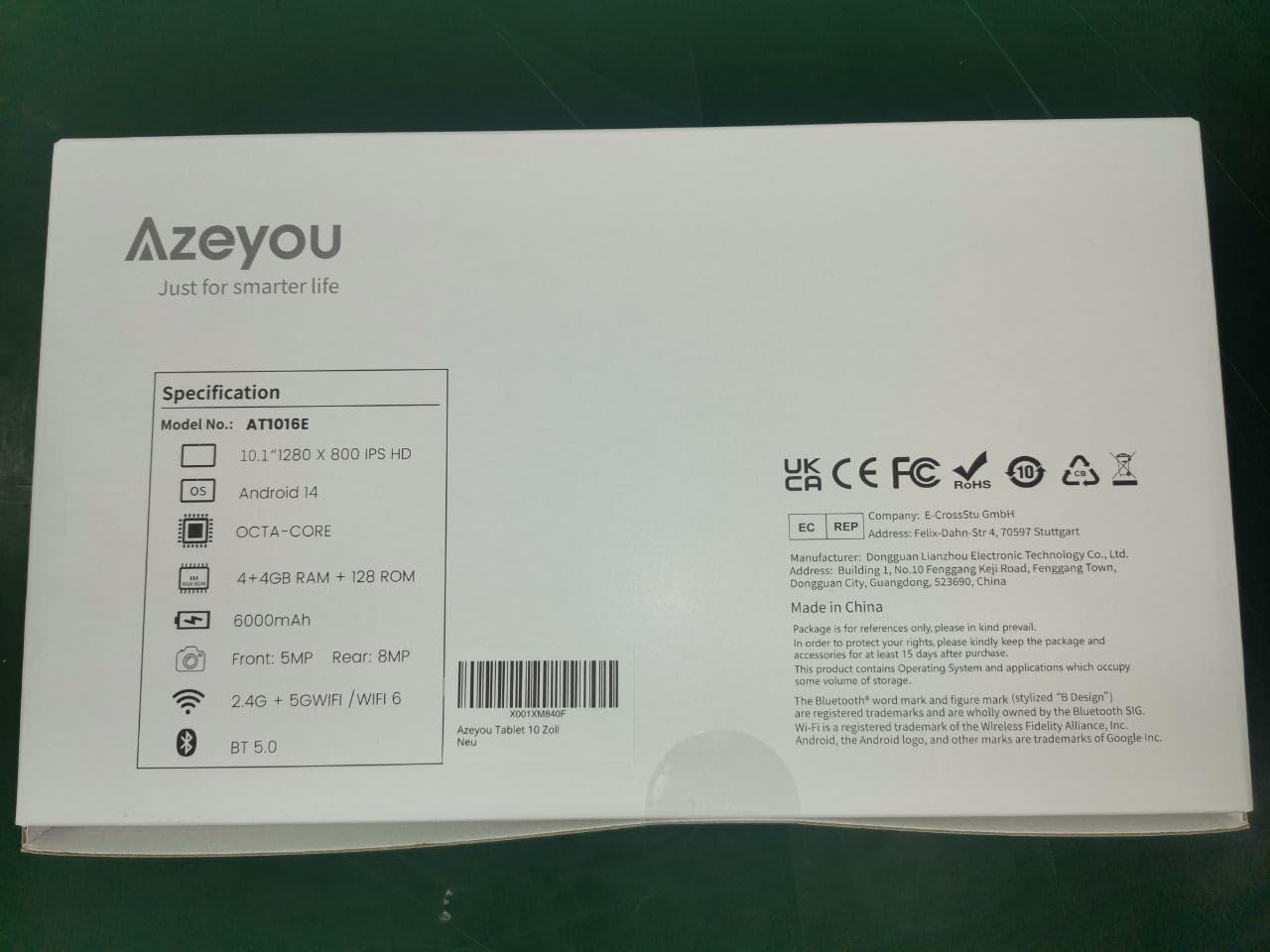
Image 9.1: Back of the product packaging displaying key specifications.
10. Bermea eta Laguntza
Your Azeyou Tablet is covered by a manufacturer's warranty. For specific warranty terms and conditions, please refer to the documentation included with your purchase or visit the official Azeyou website. For technical support, troubleshooting assistance, or warranty claims, please contact Azeyou customer service.
Informazio eta laguntza gehiago aurki dezakezu hemen: Azeyou Brand Store.