
OMTech LYF-30JW(S)
OMTech 30W MOPA Fiber Laser Engraver with Rotary Axis
Model: LYF-30JW(S) - User Manual
1. Sarrera
This manual provides essential instructions for the safe and efficient operation, setup, and maintenance of your OMTech 30W MOPA Fiber Laser Engraver with Rotary Axis, Model LYF-30JW(S). Please read this manual thoroughly before operating the machine to ensure proper usage and to prevent damage or injury.
The OMTech 30W MOPA Fiber Laser Engraver is designed for precise and high-speed marking and engraving on various materials, including metals and certain plastics. It features a robust 30W JPT fiber laser source, a 5.9"x5.9" (150x150mm) work area, and comes with a rotary axis for cylindrical object engraving.
2. Segurtasun-argibideak
WARNING: This is a Class 2 laser product. Always wear appropriate laser safety glasses when operating the machine. Never look directly into the laser beam.
- Ensure the machine is properly grounded before use.
- Operate the laser engraver in a well-ventilated area to dissipate fumes and debris.
- Mantendu lan-eremua material sukoietatik urrun.
- Ez utzi makina arretarik gabe funtzionatzen ari den bitartean.
- Larrialdietako gelditzeko botoiaren kokapena eta funtzioa ezagutu.
- Only trained personnel should operate or maintain the machine.
- Avoid placing reflective materials in the laser path without proper precautions.
3. Produktuaren osagaiak
The OMTech 30W MOPA Fiber Laser Engraver system includes the main laser unit, a rotary axis attachment, and necessary cables and software.

Image 3.1: The OMTech 30W MOPA Fiber Laser Engraver with the rotary axis accessory.
3.1 Main Laser Unit
- Laser Head (Galvo Scanner): Directs the laser beam.
- Lan plataforma: The base where materials are placed for engraving.
- Kontrol-panela: Includes power switch, emergency stop, and key switch.
- Focusing Column: Adjustable column for setting the correct focal distance.
- Dual Red Dot Locators: Aids in precise material positioning and focusing.
3.2 Rotary Axis
The included rotary axis allows for engraving on cylindrical or irregularly shaped objects.

Image 3.2: The laser engraver shown with the rotary axis connected, ready for cylindrical object engraving.
4. Konfigurazio gida
4.1 Kutxatik ateratzea eta kokapena
- Kontu handiz kendu osagai guztiak ontzitik.
- Place the laser engraver on a stable, level surface in a well-ventilated area.
- Ensure adequate space around the machine for operation and maintenance.
4.2 Konexio elektrikoa
- Connect the power cable to the machine and a grounded electrical outlet.
- Ziurtatu liburukiatage makinaren eskakizunekin bat dator.
4.3 Software-instalazioa
The engraver is compatible with LightBurn and EZCad software. Install the software on your computer using the provided media or by downloading the latest version from the official OMTech webgunea.
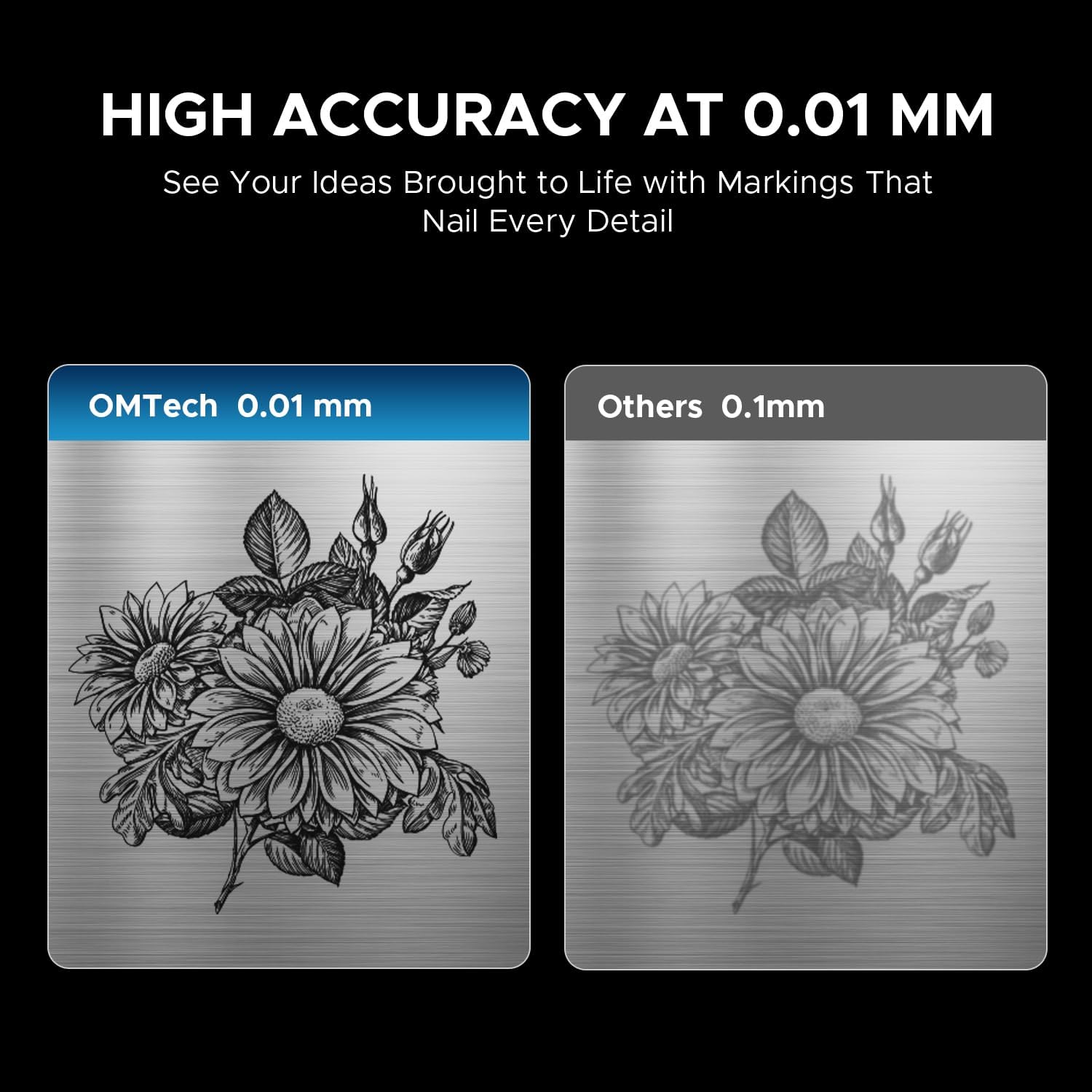
Image 4.1: The laser engraver connected to a computer, illustrating software compatibility and setup.
4.4 Rotary Axis Connection (Optional)
- If using the rotary axis, connect its cable to the designated port on the main laser unit.
- Securely mount the rotary axis to the work platform if required for your application.
5. Funtzionamendu-argibideak
5.1 Piztea
- Insert the key into the key switch and turn it to the 'ON' position.
- Sakatu pizteko botoi nagusia.
- The machine will initialize.
5.2 Materialen prestaketa eta kokapena
Ensure your material is clean and free of obstructions. Place the material securely on the work platform or within the rotary axis chuck.
5.3 Laserra fokatzea
Use the dual red dot locators to achieve the correct focal distance. Adjust the height of the laser head until the two red dots converge into a single, sharp point on the material surface. This ensures optimal engraving quality and depth.
5.4 Software Operation (LightBurn/EZCad)
- Launch the engraving software (LightBurn or EZCad) on your computer.
- Import or create your design.
- Set engraving parameters such as power, speed, frequency, and pulse width according to your material and desired effect. Refer to the software's user manual for detailed parameter guidance.
- Aurreview the engraving path to confirm positioning.
5.5 Grabatu prozesua
- Ensure all safety precautions are in place, including wearing laser safety glasses.
- Initiate the engraving job from the software.
- Monitor the engraving process. In case of any issue, press the emergency stop button immediately.
- Once complete, wait for the laser to stop before removing the engraved material.
5.6 Material bateragarriak
The OMTech 30W MOPA Fiber Laser Engraver is suitable for marking and engraving a wide range of materials:

5.1 irudia: Adibideaamples of materials that can be engraved with the OMTech MOPA Fiber Laser.
- Metals: Brass, Gold, Silver, Aluminum, Titanium, Tungsten, Stainless Steel.
- Other Materials: Brick, Tile, Marble, Granite.
5.7 Engraving Performance
The machine offers high speed and precision for various applications.

Image 5.2: Illustration of the high engraving speed capability of fiber lasers compared to other laser types.

5.3 irudia: Adibideaample of engraving depth, demonstrating the machine's capability for multi-pass cutting up to 0.8 mm.

Image 5.4: Visual comparison highlighting the 0.01 mm engraving accuracy of the OMTech laser.
6. Mantentzea
Mantentze-lan erregularrak zure laser grabagailuaren iraupena eta errendimendu optimoa bermatzen ditu.
- Lentea garbitzea: Periodically inspect and clean the laser lens using specialized lens cleaning solutions and wipes to prevent dust and debris from affecting beam quality.
- Work Area Cleanup: Keep the work platform and surrounding area clean from engraved material residue.
- Kableen ikuskapena: Aldian-aldian egiaztatu kable guztiak higadura edo kalteen zantzurik duten. Ordeztu berehala kaltetutako kable guztiak.
- Aire irteerak: Ensure the machine's air vents are clear and unobstructed to maintain proper cooling.
The fiber laser source has an estimated service life of over 100,000 hours, requiring minimal maintenance for the laser source itself.
7. Arazoak
This section addresses common issues you might encounter. For more complex problems, please contact OMTech support.
- Ez dago laser irteerarik:
- Check if the machine is powered on and the key switch is in the 'ON' position.
- Ensure the emergency stop button is not engaged.
- Verify all cables are securely connected. - Grabatuaren kalitate eskasa:
- Re-check the laser focus. The red dots should converge perfectly.
- Clean the laser lens if it appears dirty.
- Adjust engraving parameters (power, speed, frequency, pulse width) for the specific material.
- Ensure the material is flat and securely placed. - Softwarearen konexio arazoak:
- Restart both the machine and the computer.
- Check USB cable connection.
- Reinstall software drivers if necessary. - Rotary Axis Not Functioning:
- Ensure the rotary axis is correctly connected to the main unit.
- Verify that the rotary axis settings are enabled and configured in the software.
8. Zehaztapenak
| Ezaugarri | Zehaztapena |
|---|---|
| Modelo zenbakia | LYF-30JW(S) |
| Laser Potentzia | 30W |
| Laser iturria | JPT Fiber Laser |
| Laser uhin-luzera | 1064 nm |
| Max. Markatzeko Abiadura | 10,000 mm/s |
| Markaketaren zehaztasuna | 0.01 mm |
| Gehienezko markatze-sakonera bakarra | 0.08 mm |
| Maiztasun barrutia | 1-4000 kHz |
| Adjustable Pulse Width | 2-500 ns |
| Lan Arloa | 5.9" x 5.9" (150 mm x 150 mm) |
| Laserren zerbitzu-bizitza estimatua | 100,000 ordu baino gehiago |
| Hozte Sistema | Aire hoztea |
| Software bateragarria | LightBurn (Windows 7, 8, 10, 11, macOS), EZCad2 |
| Onartutako irudi formatuak | .bmp, .gif, .jpg, .jpeg, .dxf, .dst, .ai |
| Neurriak (L x W x H) | 15.8 x 13.4 x 21.3 hazbete |
| Pisu garbia | 40 lb. |
| Ziurtagiriak | FDA, CE |
Oharra: zehaztapenak aldez aurretik jakinarazi gabe alda daitezke.
9. Laguntza eta Bermea
9.1 Bezeroarentzako laguntza
For technical assistance, troubleshooting, or any inquiries regarding your OMTech laser engraver, please contact our support team:

Image 9.1: OMTech customer support contact details.
- Telefonoa: +1 (949) 438-4949
- Posta elektroniko orokorra: LAGUNTZA@OMTECHLASER.COM
- Laguntza teknikoaren posta elektronikoa: TECHSUPPORT@OMTLASER.COM
Support is available 24/7.
9.2 Bermearen informazioa
Please refer to the official OMTech website or your purchase documentation for detailed warranty information regarding your OMTech 30W MOPA Fiber Laser Engraver. Warranty terms and conditions may vary.
Ask a question about this manual
Ask about setup, troubleshooting, compatibility, parts, safety, or missing instructions. Manuals+ will review the question and use this page’s manual context to help answer it.