
1. Sarrera
The FLEXISPOT E6 Pro Oval Dual Motor Standing Desk Frame (Model E8) is designed to provide a versatile and ergonomic workspace. This height-adjustable electric desk frame features a robust 3-stage oval leg system and powerful dual motors, allowing for smooth and quiet transitions between sitting and standing positions. The intuitive LED control panel includes memory presets and a convenient USB charging port, enhancing user experience and productivity. This manual provides essential information for the safe assembly, operation, and maintenance of your desk frame.

Figure 1: FLEXISPOT E6 Pro Oval Dual Motor Standing Desk Frame (Black)
2. Segurtasun informazioa
Funtzionamendu segurua bermatzeko eta kalteak saihesteko, jarraitu jarraibide hauek:
- Ensure the desk is securely assembled according to the provided instructions.
- Do not exceed the maximum weight capacity of 330 lbs (150 kg) to prevent tipping or instability.
- Keep hands and objects clear of moving parts during height adjustments.
- Saihestu likidoak zuzenean kontrol-panelean edo osagai elektrikoen ondoan jartzea.
- Regularly inspect all connections and fasteners to ensure they are tight and secure.
- The desk is equipped with an anti-collision system. However, always exercise caution when adjusting height to prevent accidental contact with objects or persons.
3. Muntaketa
The FLEXISPOT E6 Pro desk frame is designed for straightforward assembly. Please follow the detailed instructions provided in the separate user manual included with your product. Ensure all components are present before beginning assembly.
3.1 Funtsezko osagaiak
- Lifting Columns (Legs)
- Oinak
- Crossbeam
- Kontrol Kutxa
- Handset (Control Panel)
- Elikatze-moldagailua
- Muntatzeko Hardwarea
3.2 Batzarra amaituview
Typically, assembly involves attaching the feet to the lifting columns, connecting the crossbeam, mounting the control box and handset, and finally securing your chosen desktop (sold separately) to the frame. All necessary tools are usually included. Refer to the specific step-by-step diagrams in your product manual for precise instructions.

2. Irudia: Lehertuta view of the FLEXISPOT E6 Pro desk frame components.
4. Funtzionamendu-argibideak
4.1 Altuera doitzea
The E6 Pro features a 3-stage oval leg system, offering a broad height adjustment range from 23.6 inches to 48.8 inches. This allows users of various heights, from children to tall adults, to find their optimal ergonomic position.
- Mahaia altxatu: Eduki sakatuta Gora Gezia kontrol paneleko botoia.
- Beheko mahaia: Eduki sakatuta Behera gezia kontrol paneleko botoia.
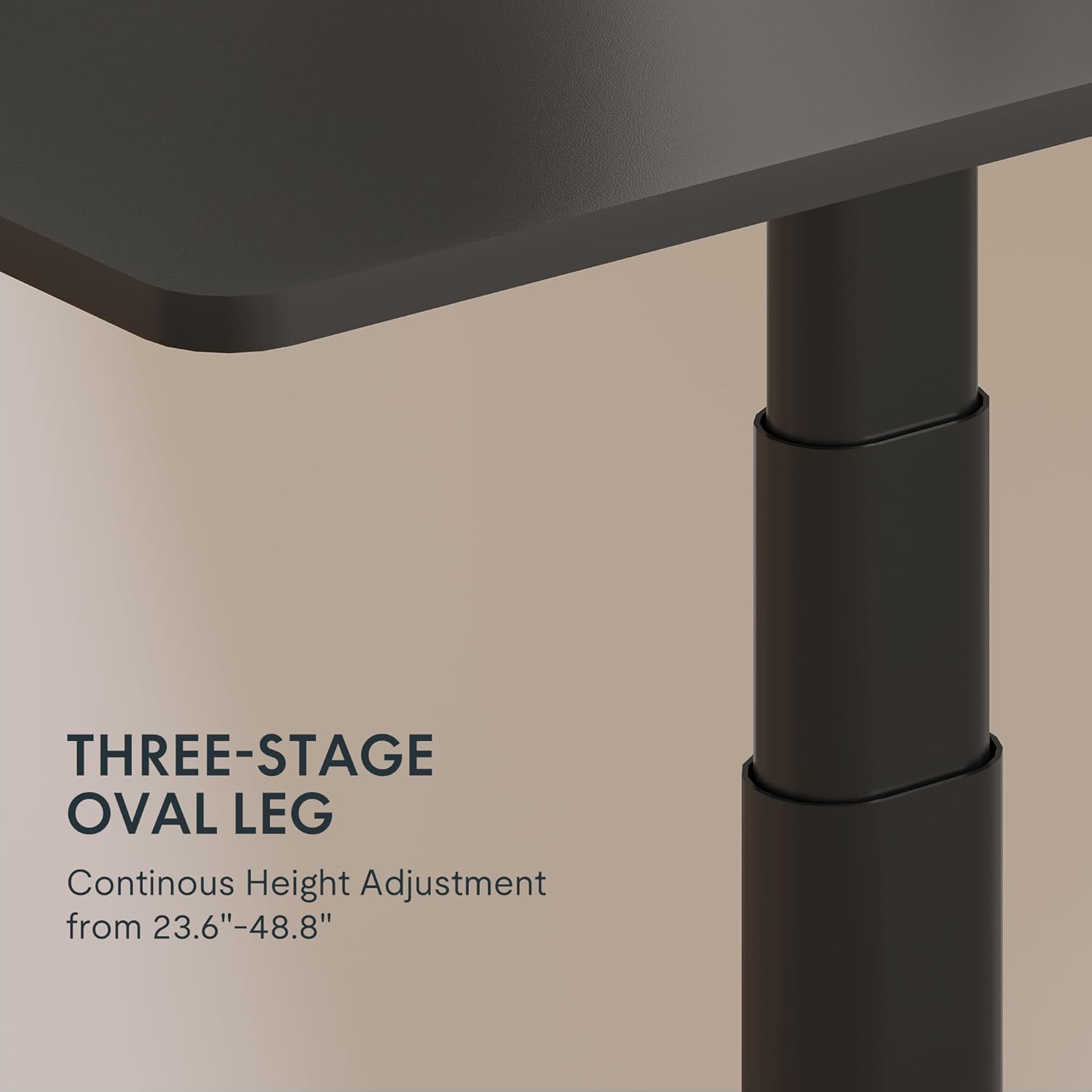
Figure 3: Close-up of the 3-stage oval leg mechanism.
4.2 LED Control Panel with Memory Presets and USB Port
The intuitive LED control panel allows for easy height adjustments and includes programmable memory presets for your preferred sitting and standing heights. It also features a convenient USB port for charging devices.
- Memoria aurrezarpenak ezartzea: Adjust the desk to your desired height using the Up/Down arrows. Press the M button, then press one of the numbered preset buttons ('1', '2', '3', edo '4') uneko altuera gordetzeko.
- Memoria aurrezarpenak berreskuratzea: Press any of the numbered preset buttons ('1', '2', '3', edo '4') mahaia automatikoki gordetako altuerara eramateko.
- USB kargatzeko ataka: Use the integrated USB port to conveniently charge your electronic devices.
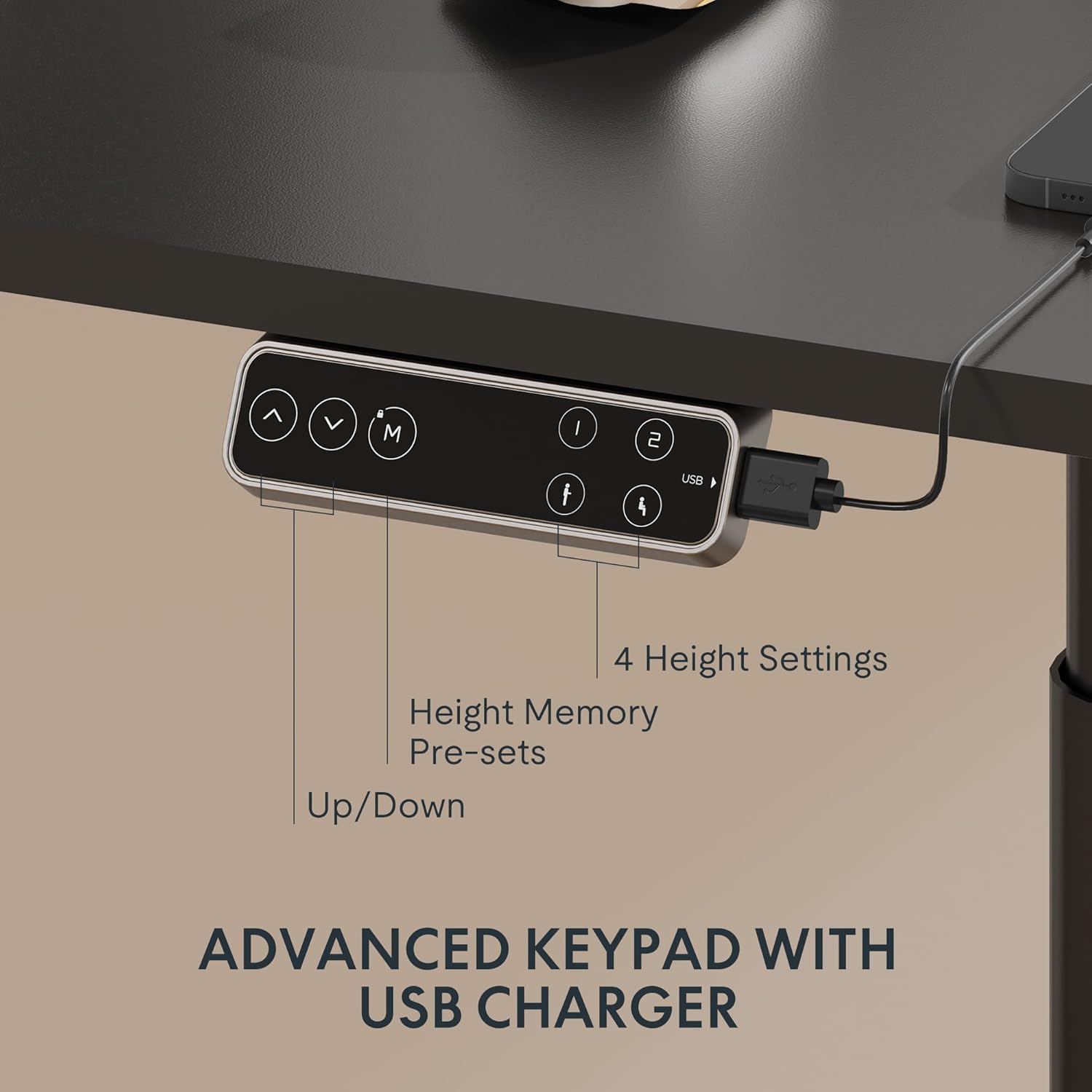
Figure 4: LED Control Panel with memory presets and USB port.
4.3 Dual Motor System
The E6 Pro is equipped with quiet dual motors that operate at less than 45dB, ensuring minimal disturbance in your workspace. These powerful motors can handle up to 330 lbs (150 kg) of weight, providing stable and reliable performance.
4.4 Talkaren aurkako sistema
For enhanced safety, the desk features an anti-collision system. If the desk encounters an obstruction during height adjustment, it will automatically stop and reverse slightly to prevent damage or injury. This system is designed to protect both the desk and its surroundings.
5. Zehaztapenak
| Ezaugarri | Xehetasuna |
|---|---|
| Marka | FLEXISPOT |
| Modelo zenbakia | E8 |
| Mahaiaren diseinua | Mahaiaren markoa zutik |
| Hanka Stages | 3 Stages Oval Leg |
| Altuera doitzeko tartea | 23.6" eta 48.8" artean |
| Motor Mota | Motor Bikoitza |
| Pisu Edukiera | Gehienez 330 lb (150 kg) |
| Zarata Maila | 45 dB baino gutxiago |
| Kontrol panela | LED with 4 Memory Presets & USB Port |
| Ezaugarri Berezia | Talkaren aurkako sistema |
| Oinarrizko materiala | Metala |
| Kolorea | Marko Beltza |
| Beharrezko muntaia | Bai |
6. Mantentzea
To ensure the longevity and optimal performance of your FLEXISPOT E6 Pro desk frame, regular maintenance is recommended:
- Garbiketa: Garbitu mahaiaren markoa zapi leun batekin,amp oihal. Saihestu akabera kaltetu dezaketen produktu kimiko gogorrak edo garbitzaile urratzaileak erabiltzea.
- Kableen kudeaketa: Periodically check and organize cables to prevent tangling or damage, especially during height adjustments.
- Loturaren egiaztapena: Every few months, inspect all screws and bolts to ensure they are tight. Re-tighten if necessary.
- Pisuaren banaketa: Banatu pisua mahaigainean uniformeki, egiturari eta motorrei gehiegizko tentsioa saihesteko.
7. Arazoak
If you encounter any issues with your desk frame, please refer to the following common troubleshooting steps:
- Mahaia ez da mugitzen: Check all cable connections to ensure they are securely plugged into the control box and power outlet. Verify the power adapter is functioning.
- Mugimendu irregularra: Ensure the desk is not overloaded and that weight is evenly distributed. Perform a reset procedure (refer to your specific user manual for reset instructions).
- Errore-kodeak pantailan: Consult your user manual for a list of error codes and their corresponding solutions.
- Talkaren aurkako sistema maiz aktibatzen da: Ensure there are no obstructions in the desk's path during movement.
If the problem persists after attempting these steps, please contact FLEXISPOT customer support for further assistance.
8. Bermea eta laguntza
FLEXISPOT provides a comprehensive warranty for your peace of mind:
- 5 Urteko Estaldura: Mahaiaren markoari eta motorrari aplikatzen zaio.
- 2 Urteko Estaldura: Kontrol-panelean eta elektronikan aplikatzen da.
For warranty claims, technical support, or any questions regarding your FLEXISPOT E6 Pro desk frame, please visit the official FLEXISPOT webwebgunera edo jarri harremanetan zuzenean bezeroarentzako arreta-zerbitzuarekin. Gorde erosketa-agiria erosketaren frogagiri gisa.
9. Produktuen bideoak
9.1 Why Choose FLEXISPOT E6
Video 1: This official FLEXISPOT video highlights the key features and benefits of the E6 series, including its robust construction and smooth operation.
9.2 Welcome to FLEXISPOT'S Mega Factory
Video 2: An inside look at the FLEXISPOT manufacturing facility, showcasing the precision and quality control involved in producing their products.