
Sarrera
This manual provides essential instructions for the setup, operation, and maintenance of your BLOW Portable Internet Radio RI 1. Please read this manual thoroughly before using the device to ensure proper functionality and to prevent damage.
Segurtasun informazio garrantzitsua
- Ez jarri gailua euri edo hezetasunera.
- Ez desmuntatu gailua. Mantendu konponketa guztiak langile kualifikatuen esku.
- Erabili emandako korronte-egokigailua soilik.
- Saihestu muturreko tenperaturak eta eguzki-argia zuzena.
- Mantendu gailua eremu magnetiko indartsuetatik urrun.
Paketearen edukia
Ziurtatu elementu guztiak paketean daudela:
- BLOW Internet Radio RI 1
- Elikatze-moldagailua
- User Manual (in Polish and English)

Image: The BLOW Internet Radio RI 1 packaging, showing the radio unit, power adapter, and user manual.
Produktua amaituview
The BLOW Portable Internet Radio RI 1 offers a wide range of features for an enhanced audio experience. It includes internet radio access, FM tuner, Bluetooth connectivity, and a clear LCD display.

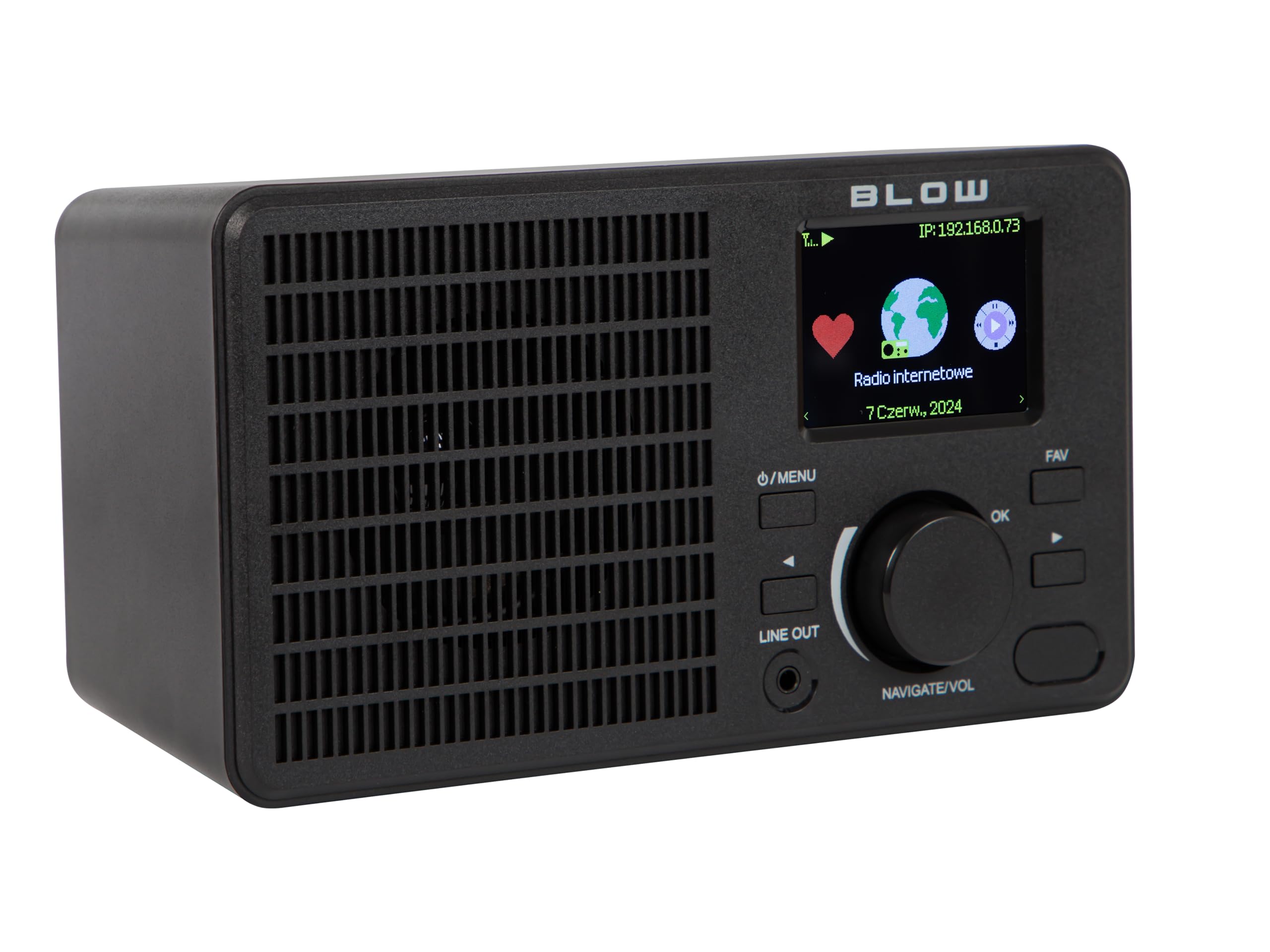
Irudia: Aurrealdea view of the BLOW Internet Radio RI 1, showcasing the display, speaker grille, and control buttons.
Ezaugarri nagusiak:
- Interneteko irratia: Access thousands of stations worldwide via Wi-Fi.
- Wi-Fi konexioa: Wireless access to internet radio and network features.
- Bluetootha: Stream music from mobile devices.
- 2.4-inch TFT Color Display: Shows station information and track details.
- Dual Alarm with Snooze: Wake up to music or news.
- Lerrokatu: Konektatu batera amplifier or external audio system.
- Diseinu trinkoa: Elegant black design suitable for various interiors.
- FM sintonizadorea: For local radio broadcasts.
Irudia: Atzealdea view of the BLOW Internet Radio RI 1, showing the DC 5V power input and product information label.
Konfigurazioa
1. Energia-konexioa
- Connect the provided power adapter to the DC 5V input port on the back of the radio.
- Entxufatu korronte-egokigailua entxufe elektriko estandar batean.
- The radio will power on automatically or enter standby mode.

Image: The power adapter included with the BLOW Internet Radio RI 1, showing the plug and DC connector.
2. Initial Wi-Fi Setup
- Upon first power-on, the radio will guide you through the initial setup process.
- Use the navigation dial and OK button to select your preferred language.
- Irratiak eskuragarri dauden Wi-Fi sareak bilatuko ditu. Hautatu zure sarea zerrendatik.
- Enter your Wi-Fi password using the navigation controls. Confirm with the OK button.
- Behin konektatuta, irratiak baieztapen mezu bat bistaratuko du.

Image: The BLOW Internet Radio RI 1 display showing the internet radio interface with network status.
Funtzionamendu-argibideak
Oinarrizko Kontrolak
- Pizteko/Menu botoia: Press to turn on/off or access the main menu.
- Navigate/Volume Dial: Rotate to navigate menus or adjust volume. Press to confirm selection.
- Ados botoia: Hautaketak berresten ditu.
- FAV botoia: Accesses favorite stations.
- Lerrokatu: 3.5mm jack for connecting to external audio systems.

Irudia: Gertutik view of the BLOW Internet Radio RI 1's control panel, highlighting the display and buttons.
Interneteko irrati modua
- From the main menu, select "Internet Radio".
- Arakatu irrati-kateak kokapenaren, generoaren edo izenaren arabera.
- Select a station and press OK to start playback.
- To save a station as a favorite, navigate to the station and press the FAV button.
FM irrati modua
- Menu nagusian, hautatu "FM irratia".
- Use the navigation dial to tune to a frequency or perform an auto-scan for stations.
- Press OK to select a station.
Bluetooth modua
- From the main menu, select "Bluetooth". The radio will enter pairing mode.
- On your mobile device (smartphone, laptop), enable Bluetooth and search for "BLOW RI 1".
- Select the radio to pair. Once connected, you can stream audio from your device to the radio.

Image: The BLOW Internet Radio RI 1 shown alongside a smartphone, illustrating Bluetooth connectivity for music streaming.
Erlojuaren funtzioa
- Access the "Alarm" settings from the main menu.
- Bi alarma independente konfiguratu.
- Configure alarm time, source (buzzer, internet radio, FM), and snooze duration.
- Ensure the radio is connected to power for the alarm to function reliably.
Mantentzea
- Garbiketa: Use a soft, dry cloth to clean the radio's surface. Do not use liquid cleaners or abrasive materials.
- Biltegiratzea: When not in use for extended periods, store the radio in a cool, dry place.
- Software eguneraketak: Periodically check for firmware updates through the radio's system settings to ensure optimal performance and access to new features.
Arazoak konpontzea
| Arazoa | Irtenbide posiblea |
|---|---|
| Botererik ez | Check if the power adapter is securely connected to the radio and the electrical outlet. Try a different outlet. |
| Ezin da wifira konektatu | Ensure your Wi-Fi password is correct. Check if your router is working. Try restarting the radio and your router. Ensure the radio is within range of your Wi-Fi signal. |
| Internet radio stations not playing | Verify your internet connection is active. Some stations may be temporarily offline. Try other stations. |
| Bluetooth parekatzeak huts egin du | Ensure the radio is in Bluetooth pairing mode. Make sure Bluetooth is enabled on your mobile device and it's within range. Try unpairing and re-pairing. |
| FM harrera eskasa | Adjust the radio's position. Ensure there are no strong interference sources nearby. |
Zehaztapenak
| Ezaugarri | Xehetasuna |
|---|---|
| Marka | Kolpea |
| Eredua | 5900804137467 |
| Konektibitate Teknologia | Wi-Fi, Bluetooth, Aux, Line Out |
| Tuner Teknologia | FM |
| Bistaratzeko mota | LCD (2.4-inch TFT Color Display) |
| Energia iturria | Corded Electric (AC: 100-240V, 50/60Hz; DC: 5V/1A) |
| Gailu bateragarriak | Smartphone, Laptop, Headphones |
| Ezaugarri bereziak | Lightweight, Portable, Dustproof, Built-in Clock, Dual Alarm with Snooze |
| Produktuaren neurriak | 19.4 cm (L) x 8.8 cm (W) x 11 cm (H) |
| Kolorea | Beltza |
Bermea eta Laguntza
For warranty information and technical support, please refer to the contact details provided in the separate warranty card included with your product or visit the official BLOW webgunea.
Fabrikatzailea: PURPETA
Webgunea: www.blow.pl