
Sarrera
The Linsoul Kiwi Ears Allegro Mini is a compact and portable Digital-to-Analog Converter (DAC) and amplifier designed to elevate your audio experience. It provides high-fidelity sound for your in-ear monitors (IEMs) and headphones, connecting seamlessly to various devices via USB-C. This manual will guide you through the setup, operation, and maintenance of your Allegro Mini to ensure optimal performance.

Image: The Kiwi Ears Allegro Mini, a compact silver DAC with a USB-C connector and audio output ports.
Kutxan dagoena
- Kiwi Ears Allegro Mini Portable IEM DAC
- Erabiltzailearen eskuliburua
Konfigurazioa
- Konektatu gailura: Insert the USB-C connector of the Allegro Mini into the USB-C port of your smartphone, tablet, or computer. Ensure a secure connection.
- Connect Headphones/IEMs: Plug your 3.5mm single-ended or 4.4mm balanced headphones/IEMs into the corresponding output port on the Allegro Mini.
- Aitorpen automatikoa: Most modern Android devices (version 5.1 and above), PCs, and other compatible devices will automatically recognize the Allegro Mini as an external audio output device. No additional drivers are typically required for basic functionality.
- Bolumenaren doikuntza: Doitu bolumena konektatutako gailuaren bolumen-kontrolak erabiliz.
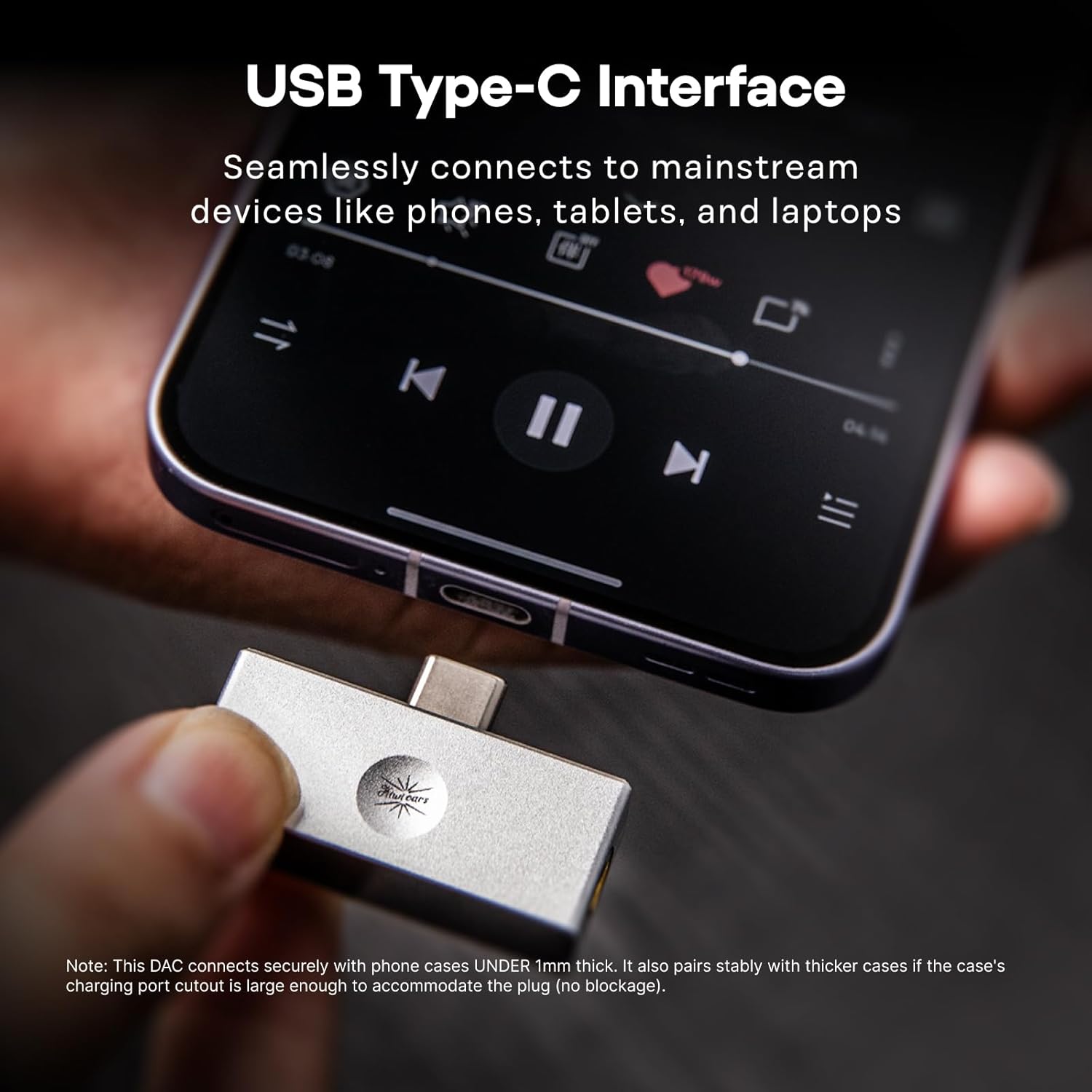
Image: The Allegro Mini connected to a smartphone via its USB-C port, with an IEM cable plugged into the 3.5mm output.
Funtzionamendu-argibideak
- Plug and Play: The Allegro Mini is designed for immediate use. Simply connect it to your source device and audio output.
- Audio erreprodukzioa: Begin playing audio from your device. Sound will be routed through the Allegro Mini to your connected headphones or IEMs.
- Bolumen kontrola: Use the volume buttons on your connected smartphone, tablet, or computer to adjust the playback volume.
- Irteera aukerak: The Allegro Mini features both 3.5mm single-ended and 4.4mm balanced output ports. Choose the appropriate port for your headphones or IEMs. The 4.4mm balanced output may offer improved sound quality and power for compatible headphones.

Image: The Allegro Mini connected to a smartphone, demonstrating its plug-and-play functionality for audio playback.
Ezaugarriak
- Diseinu trinkoa eta eramangarria: Inspired by the original Allegro, the Mini version offers high-fidelity sound in a smaller, all-aluminum alloy body for enhanced durability and a minimalist aesthetic.
- Flexible Output Options: Equipped with both 4.4mm balanced and 3.5mm single-ended outputs to accommodate a wide range of headphones and IEMs.
- High-Resolution Audio Performance: Supports PCM up to 32bit/384kHz and DSD up to DSD128, ensuring detailed and clear audio reproduction.
- Bateragarritasun Unibertsala: Features a USB Type-C interface for seamless plug-and-play connection with most modern Android devices (version 5.1 and above), as well as PCs and other compatible devices.
- Superior Audio Clarity: Achieves an ultra-low THD+N of 0.004% at 32 Ohms, providing pure, undistorted sound with a wide frequency response and excellent signal-to-noise ratio.

Image: The Allegro Mini highlighting its 3.5mm single-ended and 4.4mm balanced output options.
Zehaztapenak
| Atributua | Balioa |
|---|---|
| Marka | Linsoul |
| Ereduaren izena | Kiwi Ears Allegro Mini |
| Kolorea | Zilarrezkoa |
| Konektibitate Teknologia | Wired (USB Type-C input) |
| Irteera Portuak | 3.5 mm-ko mutur bakarrekoa, 4.4 mm-ko orekatua |
| PCM laguntza | Gehienez 32bit/384kHz |
| DSD laguntza | DSD128 arte |
| THD+N | 0.004% (at 32 Ohms) |
| Forma-faktorea | Mini eramangarria |
| Fabrikatzailea | Linsoul |
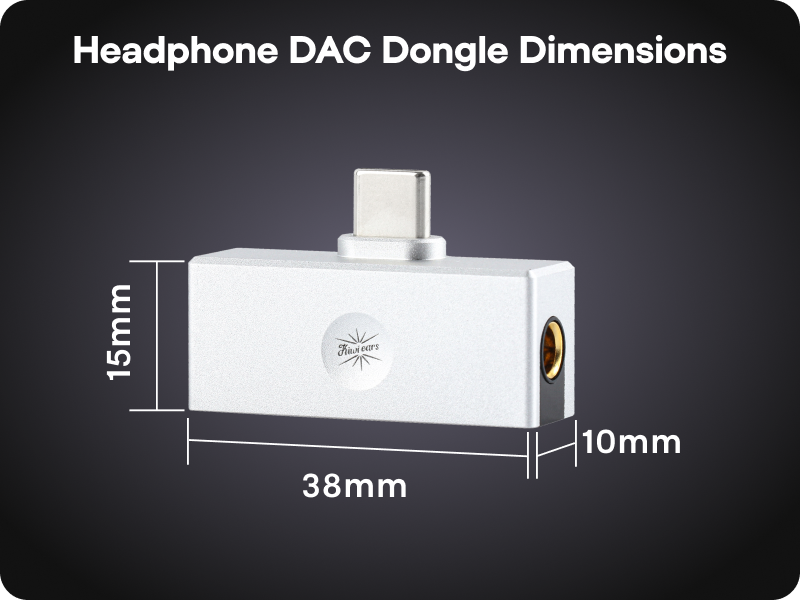
Image: A diagram illustrating the compact dimensions of the Kiwi Ears Allegro Mini.
Mantentzea
- Garbiketa: Use a soft, dry cloth to wipe the exterior of the Allegro Mini. Avoid using liquid cleaners or abrasive materials.
- Biltegiratzea: Gorde gailua leku fresko eta lehor batean, eguzki-argitik eta muturreko tenperaturetatik babestuta.
- Kontuz maneiatu: Iraunkorra den arren, saihestu gailua erortzea edo kolpe gogorren eraginpean jartzea.
- Portuaren babesa: When not in use, consider using dust caps for the USB-C and audio ports to prevent dust and debris accumulation.
Arazoak konpontzea
- Soinu-irteerarik ez:
- Ensure the Allegro Mini is securely connected to both your source device and headphones/IEMs.
- Egiaztatu gailuaren bolumen-ezarpenak eta ziurtatu ez dagoela isilarazita.
- Verify that your source device recognizes the Allegro Mini as the active audio output. This can usually be checked in your device's sound settings.
- Test with different headphones/IEMs to rule out an issue with your audio output device.
- Bolumen baxua edo soinu distortsionatua:
- Increase the volume on your source device.
- Ensure your headphones/IEMs are fully plugged into the Allegro Mini. A partial connection can cause distortion or sound only in one channel.
- If using a phone case, ensure it does not obstruct the USB-C connection, as this can prevent a full connection.
- For optimal performance, especially with demanding headphones, use the 4.4mm balanced output if your headphones support it.
- Ez da gailua ezagutzen:
- Disconnect and reconnect the Allegro Mini.
- Try connecting to a different USB-C port or a different compatible device to isolate the issue.
- Ziurtatu zure gailuaren sistema eragilea eguneratuta dagoela.
Produktu Ofizialaren Bideoak
Linsoul Kiwi Ears Allegro Mini Portable IEM DAC Overview
Bideoa: Ofizial bat amaitu daview of the Linsoul Kiwi Ears Allegro Mini Portable IEM DAC, showcasinbere ezaugarriak eta diseinua g.
Linsoul Kiwi Ears In-Ear Monitor Manufacturing Process
Video: A detailed look into the manufacturing process of Linsoul Kiwi Ears in-ear monitors, demonstrating the craftsmanship and quality control.
Bermea eta Laguntza
The Linsoul Kiwi Ears Allegro Mini comes with a 1 urteko bermea erosketa-datatik aurrera. Berme honek fabrikazio-akatsak eta erabilera normalaren ondoriozko arazoak estaltzen ditu.
For technical support, warranty claims, or any questions regarding your product, please contact Linsoul Audio customer service through their official website or the retailer where you purchased the product. Please retain your proof of purchase for warranty validation.
You can visit the Linsoul Store for more information: Linsoul Official Store