
Produktua amaituview
The Inefala Double Din Android 13 Car Radio Stereo is a state-of-the-art in-dash navigation and entertainment system designed to enhance your driving experience. Featuring a 9-inch HD 1080P capacitive touchscreen, this unit offers fast processing speeds and ample memory for your favorite applications. It integrates seamlessly with your smartphone via wireless/wired CarPlay and Android Auto, providing access to navigation, communication, and media functions.
Key features include built-in GPS with offline map support, WiFi connectivity for internet access and app downloads, FM/RDS radio, Bluetooth for hands-free calling and audio streaming, and advanced Hi-Fi audio technology. For added safety, a 170° viewing angle HD waterproof backup camera is included, along with support for your vehicle's steering wheel controls.
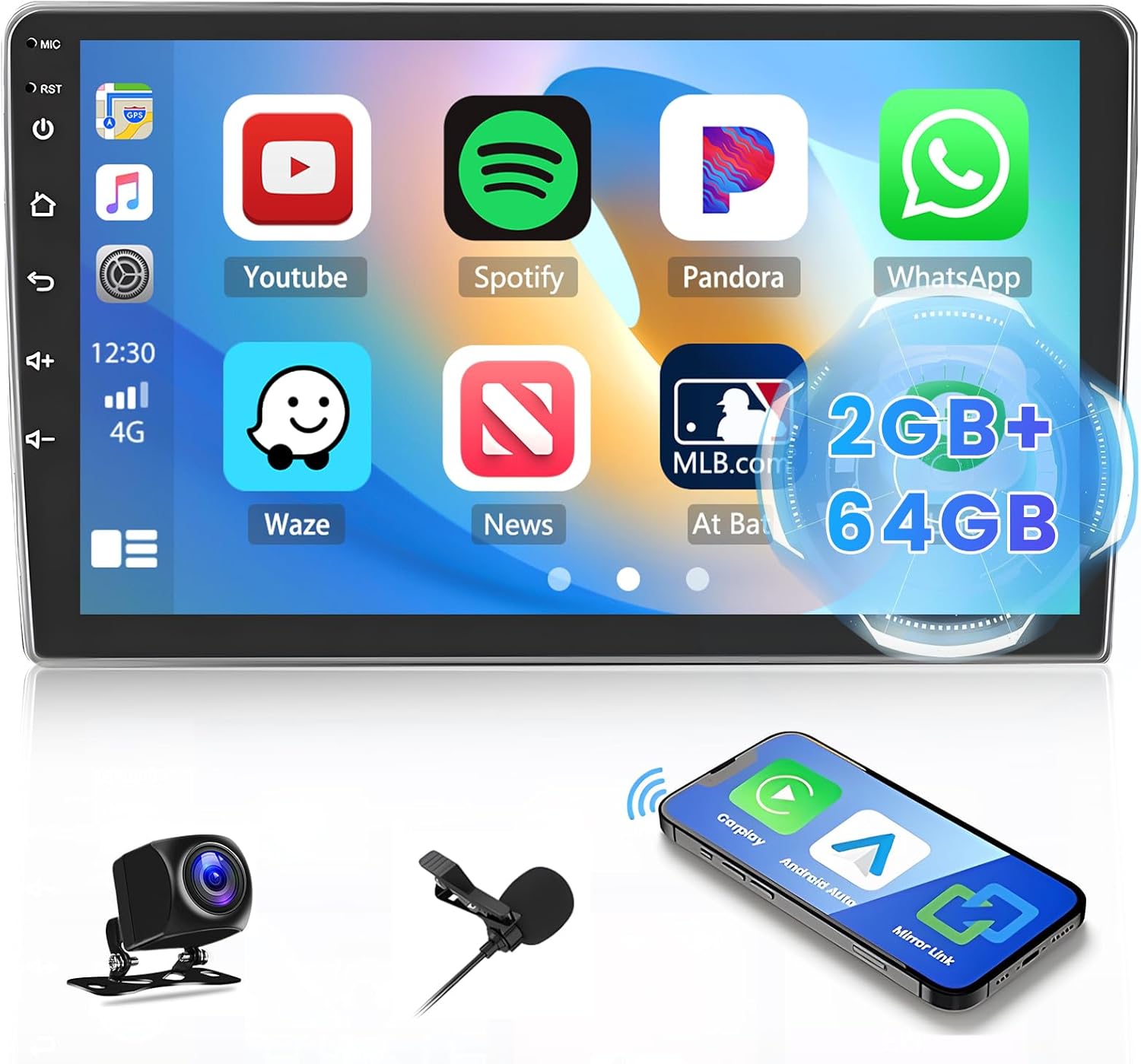
Figure 1: Inefala Double Din Android 13 Car Radio Stereo with accessories. This image displays the main unit's screen interface, along with the included backup camera, external microphone, and a smartphone illustrating wireless connectivity.
Paketearen edukia
Instalazioa hasi aurretik, egiaztatu osagai guztiak paketean daudela:
- 1 x Android Car Radio Unit
- 1 x Elikatze-kablea
- 1 x GPS antena
- 1 x Atzeko kameraren sarrera-kablea
- 1 x RCA kablea
- 2 x USB kableak
- 2 x euskarriak
- 4 x Torlojuak
- 1 x Users Manual (this document)
- 1 x babeskopia kamera
- 1 x Kanpoko Mikrofonoa
Konfigurazioa eta Instalazioa
Proper installation is crucial for optimal performance. It is recommended that installation be performed by a qualified professional. Ensure the vehicle's battery is disconnected before starting any wiring.
Instalazio fisikoa
The unit is designed for a double din dash opening. You may need a specific installation kit for your vehicle model to ensure a secure and flush fit. Use the provided mounting brackets and screws to secure the unit in the dashboard.

Figure 2: Installation comparison showing a standard car radio (top) and the Inefala 9-inch unit installed (bottom) in a vehicle's dashboard.

Figure 3: Visual comparison illustrating the appearance of the car dashboard before and after the installation of the Inefala Double Din Car Stereo Radio.
Kableatu konexioak
Refer to the wiring diagram for correct connections. Each cable is labeled for its specific function.
- Sare elektrikoa Connect to the vehicle's power supply (ACC, B+, GND).
- GPS Antena: Connect to the dedicated GPS port on the back of the unit. Position the antenna in a location with a clear view zeruaren seinalea modu optimoan jasotzeko.
- Rear Camera Input Cable: Connect the backup camera to this input. Ensure the reverse trigger wire is connected to the vehicle's reverse light circuit for automatic camera activation.
- RCA kablea: Used for audio/video output to external amplifiers or monitors.
- USB kableak: Connect external USB devices, such as flash drives or smartphones for wired CarPlay/Android Auto.
- Kanpoko mikrofonoa: Plug into the MIC input for improved call quality.

Figure 4: Detailed connection reference for the Inefala car stereo, illustrating the various ports on the back of the unit and the corresponding cables (Power, RCA, Camera Input, USB, GPS Antenna).

Figure 5: Dimensions of the 9-inch car stereo unit and a comprehensive wiring diagram for the included harness, detailing each wire's function.
Funtzionamendu-argibideak
Initial Power On and System Setup
After successful installation, turn on your vehicle's ignition. The unit will boot up, displaying the Inefala logo. Follow any on-screen prompts for initial setup, such as language selection and time zone.
Haririk gabeko CarPlay eta Android Auto
This unit supports both wireless and wired CarPlay/Android Auto. To connect wirelessly, enable Bluetooth and Wi-Fi on your smartphone and pair it with the car stereo. Follow the on-screen instructions to initiate CarPlay or Android Auto. For wired connection, use a USB cable to connect your phone to one of the unit's USB ports.

Figure 6: Connectivity options for Apple CarPlay, Android Auto, and Mirror Link, showing both wireless (Bluetooth/Wi-Fi) and wired (USB) methods.

Figure 7: Demonstration of wireless CarPlay and Mirror Link features, highlighting seamless integration between smartphone and car stereo.
GPS Navigation and WiFi
The unit has built-in GPS. You can use pre-installed offline maps or download navigation apps like Waze or Google Maps from the Play Store. Connect to a Wi-Fi hotspot (e.g., from your smartphone) to access online features, stream media, and download applications.

Figure 8: Illustration of the WiFi function, demonstrating the ability to connect to the internet and access various applications like YouTube, Spotify, and social media platforms.

Figure 9: Visual representation of the WiFi connection feature, enabling users to browse the web, stream content, and download apps directly on the car stereo.
FM/RDS Radio and Bluetooth
Tune into your favorite FM radio stations and save up to 30 presets. The RDS (Radio Data System) feature displays station information where available. Use Bluetooth for hands-free calling and to stream music from your paired smartphone. The built-in noise-canceling microphone and external microphone ensure clear call quality.

Figure 10: The FM/RDS Radio interface, displaying frequency tuning and radio station information.

Figure 11: The Bluetooth interface, demonstrating hands-free calling and music streaming capabilities from a connected smartphone.
Backup Camera Functionality
When the vehicle is shifted into reverse, the unit will automatically display the feed from the included HD backup camera. The 170° wide-angle view and waterproof design provide clear visibility for safe maneuvering.

Figure 12: Illustration of the Reverse Camera Input, detailing the connection of the backup camera and showing the clear, wide-angle view displayed on the car stereo screen when reversing.
Bolantearen kontrolak (SWC)
The unit supports integration with your vehicle's existing steering wheel controls. This allows you to manage audio, calls, and navigation functions without taking your hands off the wheel. Refer to the unit's settings menu to program and calibrate the SWC functions.

Figure 13: The Steering Wheel Controls (SWC) learning interface on the car stereo, demonstrating how to program the unit to recognize your vehicle's steering wheel buttons for convenient operation.

Figure 14: Visual representation of the Steering Wheel Control (SWC) functionality, highlighting how the car's steering wheel buttons can be used to control the stereo system.
Hi-Fi Sound Effect
The unit incorporates advanced Hi-Fi technology to deliver rich and immersive sound. Adjust equalizer settings and audio output modes through the system's sound settings to customize your listening experience.

Figure 15: Demonstration of the Hi-Fi Sound Effect feature, showing equalizer settings on the screen and illustrating optimized sound distribution within a car interior.
Funtzio anitzeko pantaila
The Android 13 operating system allows for multitasking, including split-screen functionality. You can run navigation and music applications simultaneously, enhancing convenience during your drive.

Figure 16: The "Multiple Functions, One Device" feature, showcasing the ability to run two applications side-by-side, such as navigation and a music player.
Mantentzea
To ensure the longevity and optimal performance of your Inefala car stereo, follow these maintenance guidelines:
- Pantaila garbitzea: Erabili zapi leun eta lihorik gabeko bat ukipen-pantaila astiro-astiro garbitzeko. Orban egoskorrak izanez gero, garbitu apur batampGarbitu zapi bat urarekin edo pantaila-garbitzaile batekin. Saihestu material urratzaileak edo produktu kimiko gogorrak.
- Software eguneraketak: Periodically check for system updates via the unit's settings menu (if available). Keeping the software updated can improve performance and add new features.
- Kable konexioak: Ensure all cables remain securely connected. Loose connections can lead to intermittent issues.
- Ingurumen-baldintzak: Saihestu unitatea tenperatura altuen, eguzki-argiaren eraginpean denbora luzez edo hezetasun gehiegizkoaren eraginpean jartzea.
Arazoak konpontzea
If you encounter issues with your Inefala car stereo, refer to the following common troubleshooting steps:
| Arazoa | Kausa posiblea | Irtenbidea |
|---|---|---|
| Unitatea ez da pizten. | Konexio elektriko askea, fusible erreta, ibilgailuaren bateriaren arazoa. | Check power cable connections. Inspect vehicle's fuse box and the unit's inline fuse. Verify vehicle battery voltage. |
| Bozgorailuetatik ez dago soinurik. | Incorrect speaker wiring, volume too low, mute activated, amparazte-gaia. | Verify speaker wire connections. Increase volume. Check if mute function is active. Ensure external ampLikidatzailea (erabiltzen bada) piztuta dago. |
| GPS seinalea ahula edo galduta. | GPS antenna improperly placed or disconnected. | Ensure GPS antenna is securely connected and placed in a location with a clear view zeruaren (adibidez, aginte-panela, haizetakoaren azpian). |
| Atzeko kamera ez da bistaratzen. | Camera input cable loose, reverse trigger wire not connected, faulty camera. | Check camera input cable connection. Verify the reverse trigger wire is correctly connected to the vehicle's reverse light power. Test camera if possible. |
| CarPlay/Android Auto ez da konektatzen. | Bluetooth/Wi-Fi off on phone, incorrect pairing, faulty USB cable. | Ensure Bluetooth and Wi-Fi are enabled on your phone. Delete existing pairings and re-pair. Try a different USB cable for wired connection. |
If the problem persists after attempting these solutions, please contact Inefala customer support for further assistance.
Zehaztapenak
| Ezaugarri | Xehetasuna |
|---|---|
| Sistema eragilea | Android 13 |
| Memoria | 2 GB RAM + 64 GB ROM |
| Bistaratzeko tamaina | 9 hazbete |
| Bistaratzeko mota | HD 1080P Capacitive Touchscreen |
| Konektibitatea | Bluetooth, Wi-Fi, USB |
| Autoen Integrazioa | Wireless/Wired CarPlay, Android Auto, Mirror Link |
| Nabigazioa | Built-in GPS, supports offline maps |
| Irratia | FM/RDS Radio (30 presets) |
| Audio irteera modua | Stereo, Hi-Fi technology |
| Backup Kamera | HD 170° viewing angle, waterproof |
| Mikrofonoa | Built-in noise-canceling, external microphone included |
| Bolantearen Kontrola (SWC) | Onartua |
| Produktuaren neurriak | 8.98 x 0.51 x 5.12 hazbete |
| Elementuaren pisua | 3.08 kilo |
| Jatorrizko Herrialdea | Txina |
Bermea eta Laguntza
Inefala provides a comprehensive warranty and dedicated customer support for your product.
- Berme Epea: Produktuak 24 hilabeteko berme batek ditu erosketa-egunetik aurrera.
- Laguntza: Online consultation support is available, with responses typically provided within 24 hours.
- Harremanetarako informazioa: For any quality issues or support inquiries, please contact Inefala-US directly at inefalatech@163.com.

Figure 17: Information on how to contact Inefala-US for assistance, including the direct email address for support inquiries.