
Anker A17C3
Anker SOLIX Balcony Power Plant User Manual
Model: E1600 Plus+890W
1. Produktua amaitu daview
The Anker SOLIX Balcony Power Plant with Storage is a comprehensive solar energy solution designed to maximize your energy independence and reduce electricity costs. It efficiently stores excess solar energy generated during the day for use at night or during periods of low sunlight, significantly increasing your self-consumption rate.
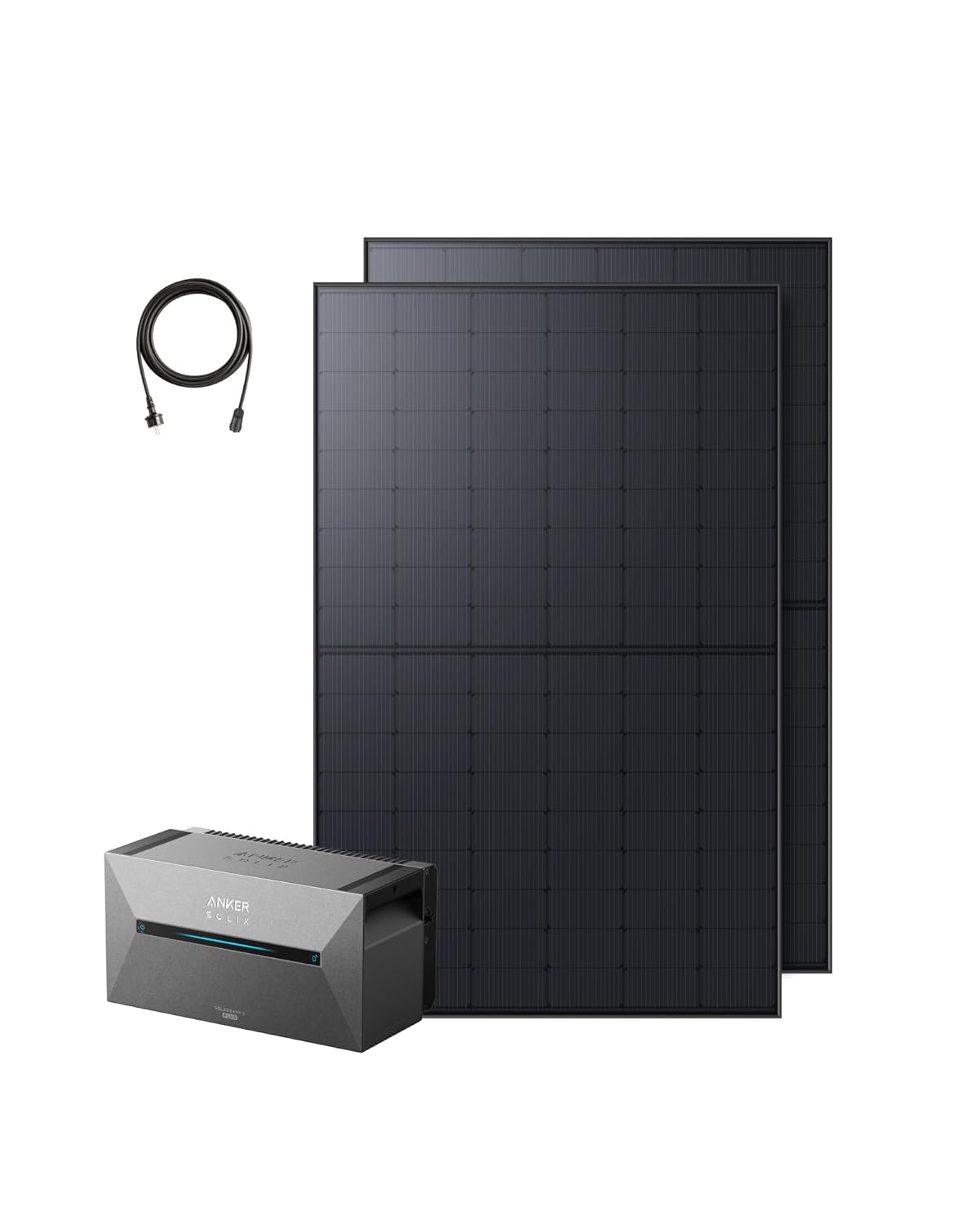
1 Irudia: Gainetikview of the Anker SOLIX Balcony Power Plant components, including the Solarbank 2 E1600 Plus, two RS40T solar panels, and the necessary charging cable.
2. Zer dago kutxan
Your Anker SOLIX Balcony Power Plant package includes the following components:
- 1x Solarbank 2 E1600 Plus Balcony Power Plant Storage Unit
- 2x RS40T Solar Panels
- 1x 5m Schuko Charging Cable
- 4x 3m Solar Panel Extension Cables
- Instalazio osagarriak
- Argibide eskuliburua (dokumentu hau)
3. Konfigurazioa eta instalazioa
The Anker SOLIX Balcony Power Plant is designed for Plug&Play installation, making setup straightforward. Follow these general steps for installation:
- Deskonprimitu osagaiak: Carefully remove all items from the packaging and verify against the 'What's in the Box' list.
- Eguzki-panelak kokatu: Place the RS40T solar panels in an area with maximum sun exposure. Ensure they are securely mounted according to local regulations and best practices.
- Connect Solar Panels to Solarbank: Use the provided solar panel extension cables to connect the solar panels to the Solarbank 2 E1600 Plus. The system features 2 MPPT inputs for efficient energy harvesting from up to two solar panels.
- Connect Solarbank to Grid: Plug the 5m Schuko charging cable from the Solarbank into a standard household outlet. This enables the system to feed power into your home grid.
- Aplikazioaren integrazioa: Download the Anker app on your smartphone. Follow the in-app instructions to connect your Solarbank 2 E1600 Plus for real-time monitoring and control.
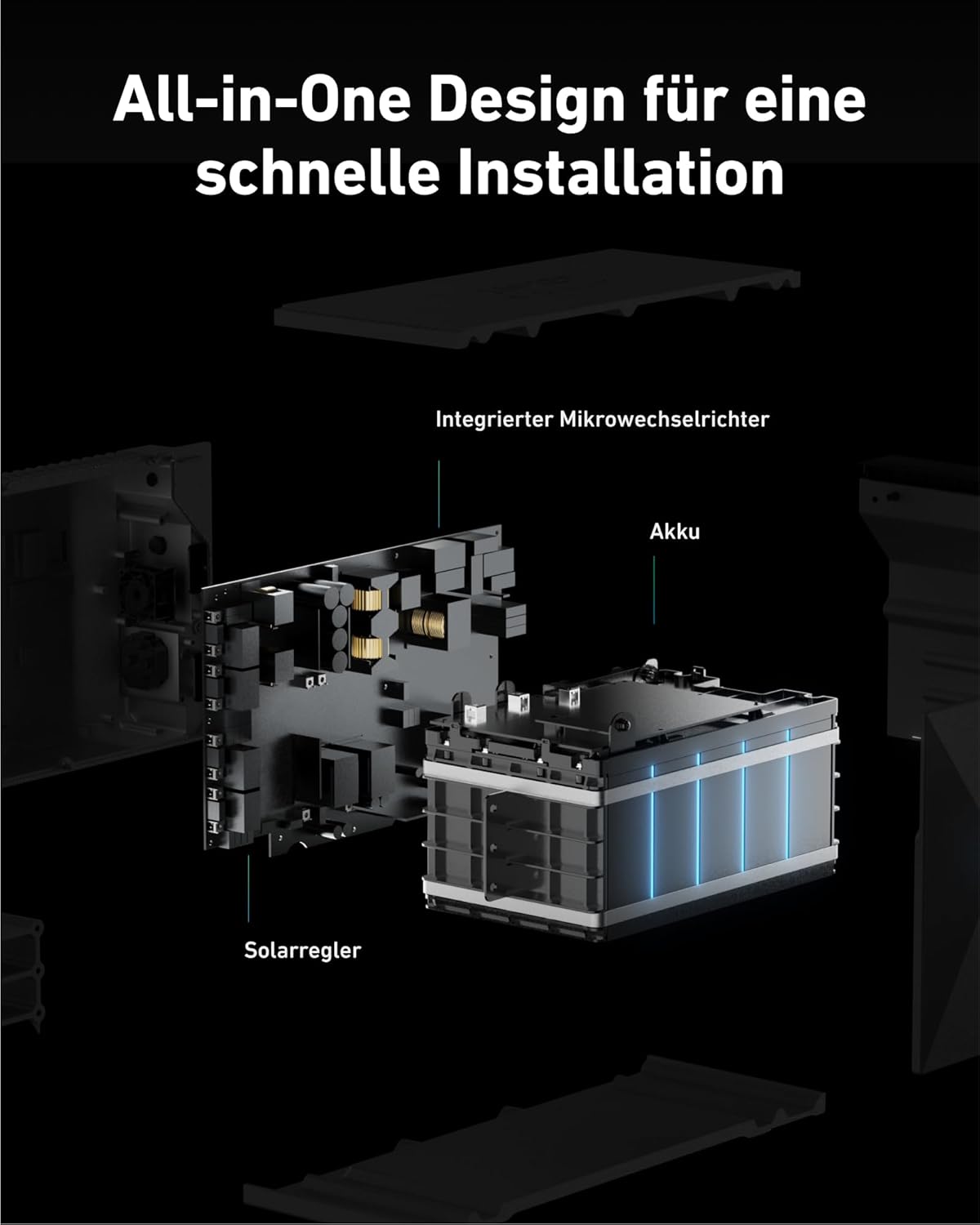
Figure 2: The all-in-one design simplifies installation by integrating the micro-inverter, battery, and solar controller into a single unit.

Figure 3: The modular design allows for easy expansion of storage capacity by stacking additional battery units.
4. Funtzionamendu-argibideak
The Anker SOLIX Balcony Power Plant is designed for intelligent energy management, optimizing your solar energy usage.
Energy Storage and Self-Consumption
The Solarbank 2 Plus automatically stores excess electricity generated by your solar panels during peak production hours. This stored energy is then discharged when solar production is low or demand is high, such as during the evening or night. This process significantly increases your self-consumption rate from approximately 40% to up to 97%, leading to substantial annual savings on your electricity bill.
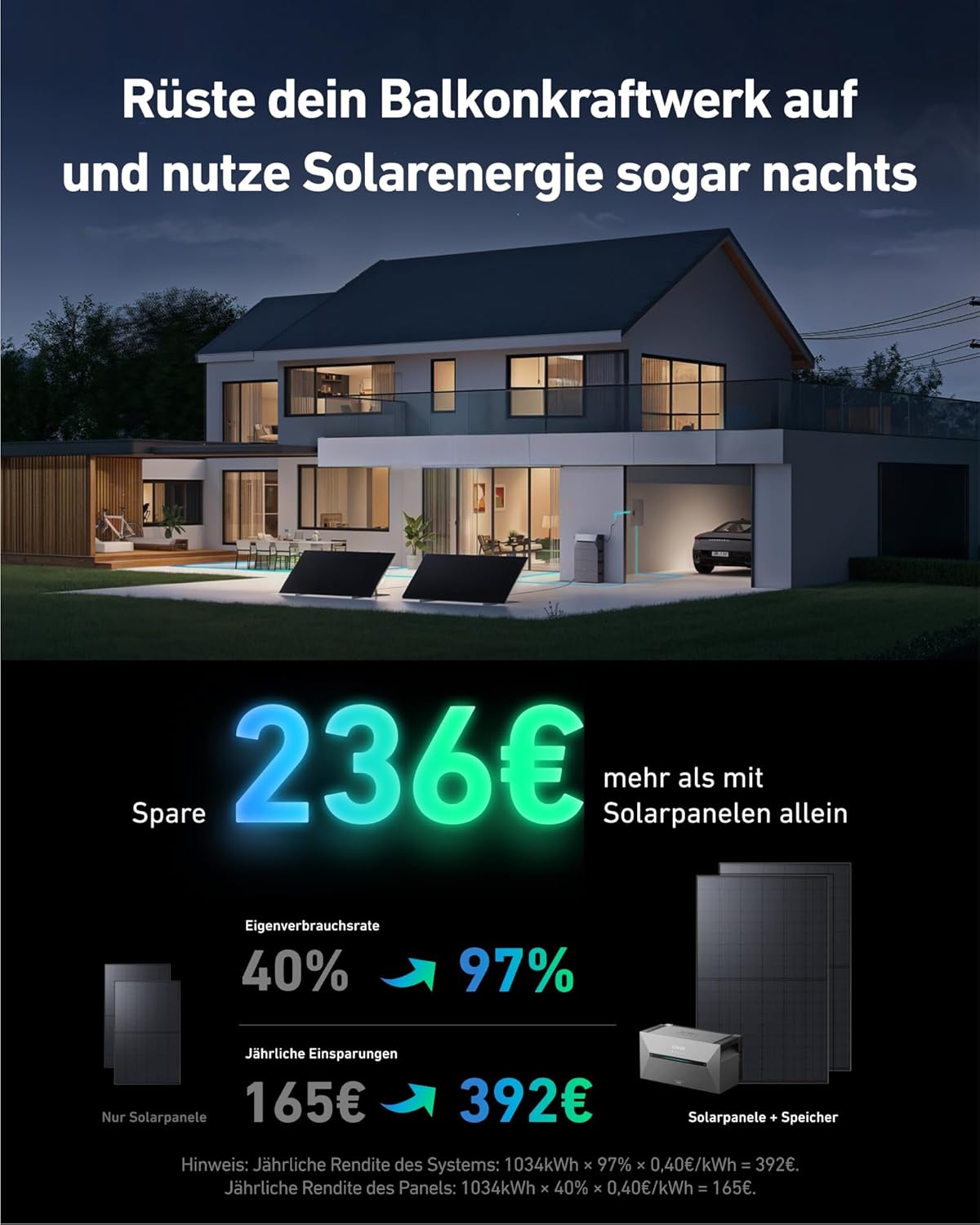
Figure 4: Utilize solar energy even at night, leading to increased savings.
Smart Energy Distribution
For optimal energy management and to prevent energy waste, the system can be integrated with an Anker SOLIX Smart Meter or Smart Plugs. The Smart Meter provides real-time electricity consumption monitoring (within 3 seconds), allowing the Solarbank to intelligently deliver power precisely when and where it's needed, ensuring zero energy waste.

Figure 5: Intelligent power distribution with Anker SOLIX Smart Meters and Smart Plugs.
Monitoring with the Anker App
The Anker app provides comprehensive control and monitoring capabilities. You can track your energy data, view real-time power generation and consumption, and manage system settings from anywhere.

Figure 6: Monitor and control your system with the Anker app.
5. Mantentzea
The Anker SOLIX Balcony Power Plant is designed for durability and minimal maintenance. Both the Solarbank 2 Plus and the RS40T solar panels are built to withstand various environmental conditions.
- Eguraldiarekiko erresistentzia: The Solarbank 2 Plus has an IP65 rating, making it water and dust resistant. The RS40T solar panels have an IP68 rating, offering superior water and dust protection.
- Tenperatura tartea: The system is designed to operate effectively in temperatures as low as -20°C.
- Garbiketa: Periodically clean the surface of the solar panels with a soft cloth and water to ensure optimal sunlight absorption. Ensure the Solarbank unit is free from dust and debris.
- Ikus-ikuskapena: Regularly inspect all cables and connections for any signs of wear or damage.

Figure 7: Durability features of the Anker SOLIX system, including IP65/IP68 ratings and long cycle life.
6. Arazoak
If you encounter any issues with your Anker SOLIX Balcony Power Plant, please refer to the following common troubleshooting steps:
| Arazoa | Kausa posiblea | Irtenbidea |
|---|---|---|
| No power output from Solarbank. | Solar panels not connected, insufficient sunlight, Solarbank not plugged in, or system error. | Check all cable connections. Ensure panels are in direct sunlight. Verify the Solarbank is plugged into a working outlet. Check the Anker app for error messages. |
| Low energy production. | Shading on panels, dirty panels, or cloudy weather. | Clear any shading. Clean solar panels. Production will naturally be lower on cloudy days. |
| App not connecting to Solarbank. | Bluetooth/Wi-Fi issues, incorrect pairing, or app outdated. | Ensure Bluetooth and Wi-Fi are enabled on your device. Restart the Solarbank and your device. Re-pair the device in the app. Update the Anker app to the latest version. |
Irtenbide hauek saiatu ondoren arazoa konpontzen ez bada, jarri harremanetan Anker bezeroarentzako arreta-zerbitzuarekin laguntza gehiago jasotzeko.
7. Zehaztapenak
| Ezaugarri | Zehaztapena |
|---|---|
| Fabrikatzailea | Anker |
| Modelo zenbakia | A17C3 |
| Elementuaren pisua | 21.2 kilogramo |
| Product Dimensions (Solarbank) | 46 x 25 x 25.4 cm |
| Kolorea | Gris Iluna |
| Materiala | Crystalline Silicon, Glass, Aluminum |
| Maximum Power (System) | 890 Watt |
| Storage Capacity (Solarbank 2 E1600 Plus) | 1600Wh |
| Gehienezko Edukiera Hedagarria | 9.6kWh (with additional batteries) |
| MPPT Inputs | 2 (up to 1200W total, 600W per MPPT) |
| Bateria mota | LiFePO4 |
| Bateriaren Zikloaren Bizitza | 6,000 ziklo |
| Water & Dust Resistance (Solarbank) | IP65 |
| Water & Dust Resistance (Solar Panels) | IP68 |
| Funtzionamendu-tenperatura | -20 °C-raino |
| Konektore mota | MC4 |

Figure 8: Detailed technical specifications and dimensions.
8. Bermea eta Laguntza
Anker stands behind the quality and durability of its products. Your Anker SOLIX Balcony Power Plant comes with comprehensive warranty coverage:
- Solarbank 2 Plus: 15 years product lifespan with 10 years manufacturer's warranty.
- RS40T Solar Panels: 30 years product lifespan with 15 years manufacturer's warranty.
For warranty claims, technical support, or any other inquiries, please contact Anker customer service. Refer to the contact information provided in your product packaging or visit the official Anker support webgunea.

Figure 9: Warranty and lifespan details for the Anker SOLIX system components.
Erlazionatutako dokumentuak - A17C3
 |
Anker SOLIX Solarbank 3 E2700 Pro Technical Specifications Technical specifications and package contents for the Anker SOLIX Solarbank 3 E2700 Pro, a 3600W solar storage system with 4 MPPT and bidirectional inverter. |
 |
Anker SOLIX Solarbank 2 E1600 Plus erabiltzailearen eskuliburua: instalazioa, funtzionamendua eta zehaztapenak Anker SOLIX Solarbank 2 E1600 Plus-erako erabiltzailearen eskuliburu osoa, non deskutxatzea, instalazioa, konexio elektrikoak, aplikazioaren erabilera, hasieratzea, energia moduak, energia planak, arazoak konpontzea eta zehaztapen teknikoak azaltzen diren. |
 |
Anker SOLIX Solarbank 2 E1600 Plus Erabiltzailearen eskuliburua eta instalazio gida This user manual provides comprehensive instructions for the Anker SOLIX Solarbank 2 E1600 Plus, covering unboxing, installation, electrical connections, app usage, initialization settings, firmware updates, power mode management, energy plans, and troubleshooting. It includes detailed specifications and safety guidelines for optimal operation of your home solar energy storage system. |
 |
Anker SOLIX Solarbank 3 E2700 Pro User Manual This manual provides comprehensive instructions for the Anker SOLIX Solarbank 3 E2700 Pro, covering unboxing, product overview, installation, electrical connections, device configuration, and troubleshooting. It details how to connect solar modules, set up the device using the Anker app, and utilize various power management modes. |
 |
Anker SOLIX Solarbank 2 E1600 AC erabiltzailearen eskuliburua eta instalazio gida Comprehensive guide for the Anker SOLIX Solarbank 2 E1600 AC, covering installation, setup, operation, app usage, troubleshooting, and specifications for efficient home solar energy management. |
 |
Anker SOLIX Solarbank 3 E2700 Pro - Instalazio eta erabilerarako gida Instalaziorako gida osoa, konfiguraziorako eta energia solar biltegiratzeko sistemaren erabilera Anker SOLIX Solarbank 3 E2700 Pro eta BP2700 luzapenaren bateria. |
Ask a question about this manual
Ask about setup, troubleshooting, compatibility, parts, safety, or missing instructions. Manuals+ will review the question and use this page’s manual context to help answer it.