
eppfun B0DF2M6ZYJ
eppfun Bluetooth 5.2 Transmitter Receiver User Manual
Model: B0DF2M6ZYJ
Produktua amaituview
The eppfun Bluetooth 5.2 Transmitter Receiver is a versatile audio adapter designed to enhance your audio experience. It functions as both a Bluetooth transmitter (TX) to send audio from non-Bluetooth devices to Bluetooth headphones/speakers, and a Bluetooth receiver (RX) to enable wired audio systems to receive Bluetooth audio from your smartphone or tablet. Featuring Bluetooth 5.2 technology and a Qualcomm chip, it supports various audio codecs including SBC, AAC, aptX, aptX-LL, aptX-HD, and aptX Adaptive, ensuring high-fidelity sound and low latency.

Image: The eppfun Bluetooth 5.2 Transmitter Receiver, shown in white, with its integrated 3.5mm audio jack and an included airplane audio adapter. The device features control buttons and LED indicators on its surface.
Ezaugarri nagusiak:
- Bluetooth 5.2 with Qualcomm Chip: Supports SBC, AAC, aptX, aptX-LL, aptX-HD, and aptX Adaptive for high-fidelity stereo sound.
- Latentzia baxuko modua: aptX-LL support in TX mode ensures audio-visual synchronization, ideal for movies and gaming.
- Konexio bikoitza: Connects two Bluetooth headphones/speakers simultaneously in TX mode, or two source devices in RX mode.
- Bateriaren iraupen luzea: Provides 20 hours or more of continuous playback on a full charge.
- Visual Codec Display: LED indicators show the active audio codec (SBC, AAC, aptX, LL, HD, AD) in both TX and RX modes.
- Erabilera polifazetikoa: Suitable for airplanes, TVs, gym equipment, car audio systems, computers, and home stereo systems.
Product Diagram and Package Contents

Image: A detailed diagram of the eppfun Bluetooth Transmitter Receiver, highlighting its various components including the 3.5mm Stereo Cable, Microphone, LED Indicators (for A/B, SBC, AAC, APTX, LL, HD, RX, TX), Multi-Function Button, Volume Down/Previous Track Button, Volume Up/Next Track Button, Type C Charging Port, Charging LED, Pairing/Reset Button, and TX/RX OFF Switch Button.
Paketearen edukia:

Image: The eppfun Bluetooth Transmitter Receiver package contents, including the main unit, a USB-C charging cable, a 3.5mm to RCA adapter, an airplane audio plug, and a 3.5mm to 3.5mm connector.
- eppfun Bluetooth Transmitter Receiver Unit
- USB-C kargatzeko kablea
- 3.5 mm-ra RCA audio kablea
- Airplane Audio Plug Adapter
- 3.5mm to 3.5mm Audio Connector
- Erabiltzailearen eskuliburua (dokumentu hau)
Konfigurazioa eta funtzionamendua
1. Hasierako konfigurazioa eta kargatzea
Before first use, fully charge the device. Connect the included USB-C charging cable to the Type C Charging Port on the device and the other end to a USB power source (e.g., computer USB port, wall adapter). The Charging LED will indicate charging status. A full charge takes approximately 2 hours. The device can be used continuously for 20 hours or more on a full charge.
Video: This video demonstrates the eppfun AK3040C Max Bluetooth Transmitter Receiver, showcasing its compact design, various ports, and LED indicators. It provides a visual overview of the device's physical features and how to connect the charging cable.
2. Selecting Operating Mode (TX/RX)
The eppfun device operates in two modes: Transmitter (TX) and Receiver (RX). Use the TX/RX OFF Switch Button on the side of the device to select the desired mode. Ensure the switch is set to the correct mode before connecting and pairing.

Image: This diagram illustrates the two primary modes of operation: Receiver Mode (RX) for upgrading wired audio systems (earphones, car audio, speakers) to wireless, and Transmitter Mode (TX) for wirelessly connecting non-Bluetooth devices (TV, airplane, gaming consoles) to Bluetooth headphones or speakers.
3. Igorlearen modua (TX)
In TX mode, the device transmits audio from a non-Bluetooth source (e.g., TV, airplane entertainment system, computer) to Bluetooth-enabled headphones or speakers.
- Set the TX/RX OFF switch to "TX".
- Connect the device's 3.5mm audio jack to the audio output port of your source device (e.g., headphone jack on a TV, airplane seat, or computer). Use the appropriate adapter if necessary (e.g., airplane audio plug).
- Jarri zure Bluetooth entzungailuak edo bozgorailuak parekatze moduan.
- The eppfun device will automatically search for and connect to nearby Bluetooth devices. The LED indicators will show pairing status and the active audio codec.
- For dual connection, after the first device is paired, put the second Bluetooth headphone/speaker into pairing mode. The eppfun device will attempt to connect to the second device.
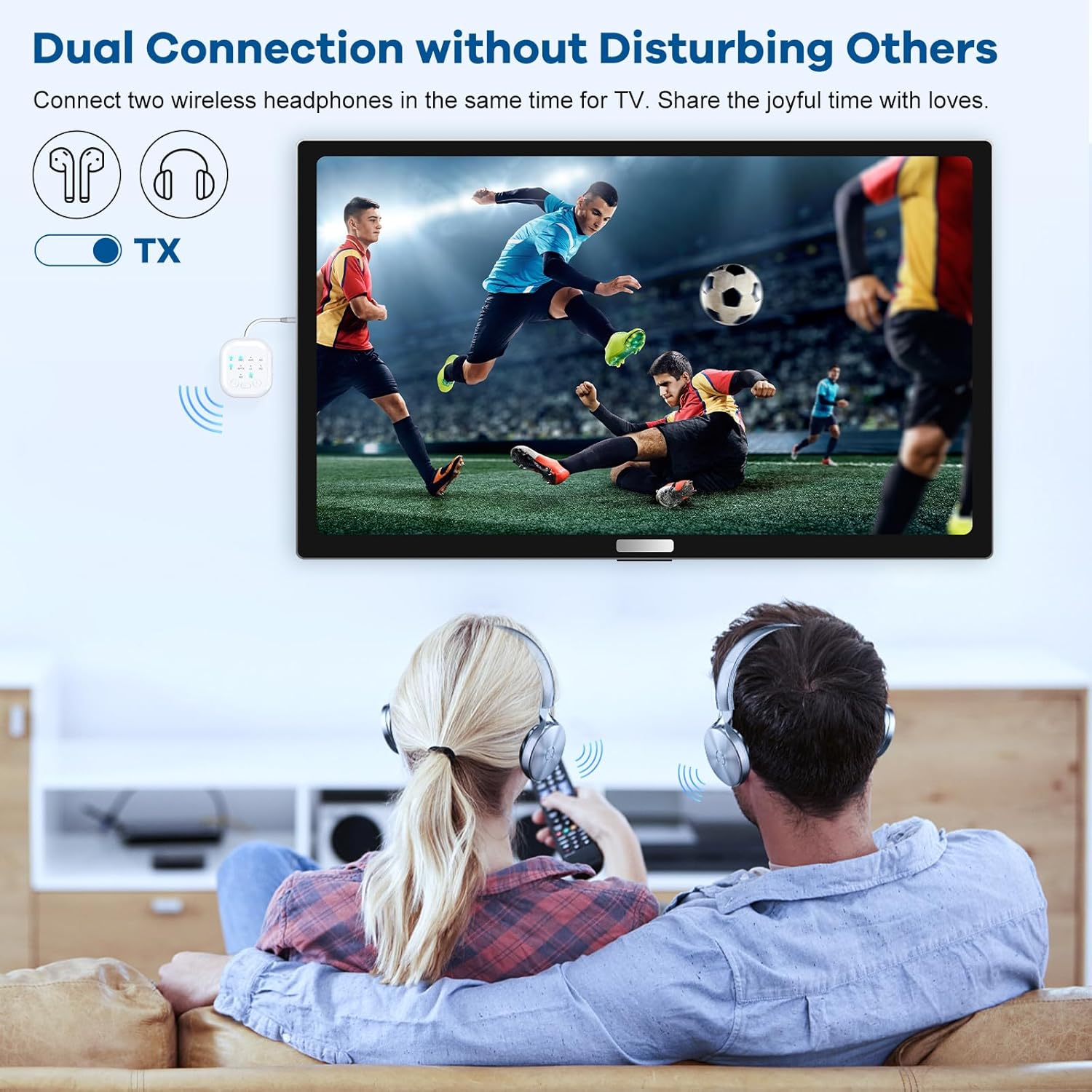
Image: A user enjoying wireless audio on an airplane by connecting the eppfun Bluetooth Transmitter Receiver to the in-flight entertainment system and pairing it with their personal wireless headphones.

Image: Two individuals are shown sharing audio from a television using the eppfun Bluetooth Transmitter Receiver, which is connected to two separate pairs of wireless headphones, allowing for shared listening without disturbing others.

Image: The eppfun Bluetooth Transmitter Receiver is connected to a laptop via its 3.5mm audio jack and a USB-C cable, demonstrating its ability to transmit PC audio wirelessly to Bluetooth headphones or speakers.
4. Hartzaile modua (RX)
In RX mode, the device receives Bluetooth audio from your smartphone, tablet, or other Bluetooth-enabled device and outputs it to a wired audio system (e.g., car stereo, wired headphones, home speakers).
- Set the TX/RX OFF switch to "RX".
- Connect the device's 3.5mm audio jack to the audio input port of your wired audio system (e.g., AUX-in jack in a car, input on a speaker). Use the 3.5mm to RCA cable if connecting to an RCA input.
- On your smartphone or tablet, enable Bluetooth and search for "eppfun AK3040C Max" (or similar name) in the list of available devices.
- Select the device to pair. Once connected, audio from your source device will play through your wired audio system.

Image: The eppfun Bluetooth Receiver is shown in a car, connected to the vehicle's audio system, enabling wireless music playback, hands-free calling, and navigation audio from a smartphone.
5. Kontrolak eta adierazleak
- Funtzio anitzeko botoia: Press and hold to power on/off. Short press for play/pause, answer/end calls.
- Bolumen botoiak (+/-): Short press to adjust volume. Long press to skip tracks (Next/Previous).
- P/R (Pairing/Reset) Button: Press to enter pairing mode or reset connections.
- LED adierazleak: Display current operating mode (RX/TX), connection status, and active audio codec (SBC, AAC, APTX, LL, HD, AD). Refer to the product diagram for specific indicator locations.
Mantentzea
To ensure the longevity and optimal performance of your eppfun Bluetooth Transmitter Receiver, follow these maintenance guidelines:
- Garbiketa: Garbitu gailua zapi leun eta lehor batekin. Ez erabili garbitzaile likidorik edo material urratzailerik.
- Biltegiratzea: Gorde gailua leku fresko eta lehor batean, eguzki-argitik eta muturreko tenperaturetatik babestuta.
- Bateria zaintzea:
- Saihestu bateria maiz erabat deskargatzea.
- Kargatu gailua aldizka, erabiltzen ez bada ere, bateriaren osasuna mantentzeko.
- Keep the battery away from excessive heat and moisture.
- Ez ezazu bateria zirkuitulaburrik egin.
- Bota bateria tokiko araudiaren arabera.
- Manipulazioa: Saihestu gailua erortzea edo kolpe gogorrak jasan.
Arazoak konpontzea
If you encounter issues with your eppfun Bluetooth Transmitter Receiver, please refer to the following common problems and solutions:
| Arazoa | Kausa posiblea | Irtenbidea |
|---|---|---|
| Gailua ez da pizten. | Bateria baxua. | Kargatu gailua guztiz emandako USB-C kablea erabiliz. |
| Ezin da Bluetooth gailu batekin parekatu. | Incorrect mode selected (TX/RX), device not in pairing mode, or too far apart. |
|
| Audioaren kalitatea eskasa edo tarteka gertatzen da. | Interference, distance, or non-optimal codec. |
|
| Soinurik ez. | Incorrect cable connection, volume too low, or device not paired. |
|
| Device stopped working after some time. | Hardware malfunction or severe battery degradation. | If troubleshooting steps do not resolve the issue, please contact eppfun customer support for assistance. |
Zehaztapenak
| Ezaugarri | Xehetasuna |
|---|---|
| Eredua | B0DF2M6ZYJ |
| Bluetooth bertsioa | 5.2 |
| Onartutako kodekak | SBC, AAC, aptX, aptX-LL, aptX-HD, aptX Adaptive |
| Funtzionamendu moduak | Igorlea (TX), Hartzailea (RX) |
| Bateria mota | 1 litio ioizko bateria (barne) |
| Kargatzeko Denbora | 2 ordu gutxi gorabehera |
| Erreprodukzio-denbora | 20 ordu edo gehiago |
| Konektibitatea | Bluetooth, 3.5mm Audio Jack, USB-C (charging) |
| Neurriak | 5.51 x 4.53 x 0.71 hazbete (Paketearen neurriak) |
| Elementuaren pisua | 3.17 ontza |
| Fabrikatzailea | shenzhen Innotide Technology Co.,Ltd. |
| Jatorrizko Herrialdea | Txina |
Segurtasun Informazioa
Please read and adhere to the following safety information for safe operation of the device:
- Bateriaren maneiua: Keep the battery away from excessive heat and moisture. Do not short-circuit. Dispose of the battery according to local regulations.
- Interferentzia Abisua: This device may interfere with other wireless devices. Follow instructions to minimize interference. Always follow local regulations regarding wireless device usage.
- Ingurune operatiboa: Do not expose the device to extreme temperatures, direct sunlight, or corrosive environments.
- Desmihiztatu: Do not attempt to disassemble, repair, or modify the device yourself. This may void the warranty and pose safety risks.
Bermearen informazioa
eppfun products are typically covered by a limited warranty. For specific warranty terms, conditions, and duration, please refer to the warranty card included with your purchase or visit the official eppfun webgunea. Gorde erosketaren egiaztagiria bermearen erreklamazioetarako.
Bezeroarentzako Arreta
For further assistance, technical support, or inquiries regarding your eppfun Bluetooth Transmitter Receiver, please contact eppfun customer service. You can often find contact information on the product packaging, the official eppfun website, or through the seller's store page on Amazon.
Visit the official eppfun Store on Amazon: eppfun Store
Ask a question about this manual
Ask about setup, troubleshooting, compatibility, parts, safety, or missing instructions. Manuals+ will review the question and use this page’s manual context to help answer it.