
1. Sarrera
This manual provides detailed instructions for the setup, operation, maintenance, and troubleshooting of your Trueque 2 Pack Backlit Wireless Full-Sized Ergonomic Keyboard and Mouse Combo. Please read this manual thoroughly before use to ensure optimal performance and longevity of your devices.
Paketearen edukia:
- Wireless Keyboard (x1)
- Wireless Mouse (x1)
- USB Receiver (x1)
- Type-C Adapter (x1)
- Erabiltzailearen eskuliburua (dokumentu hau)
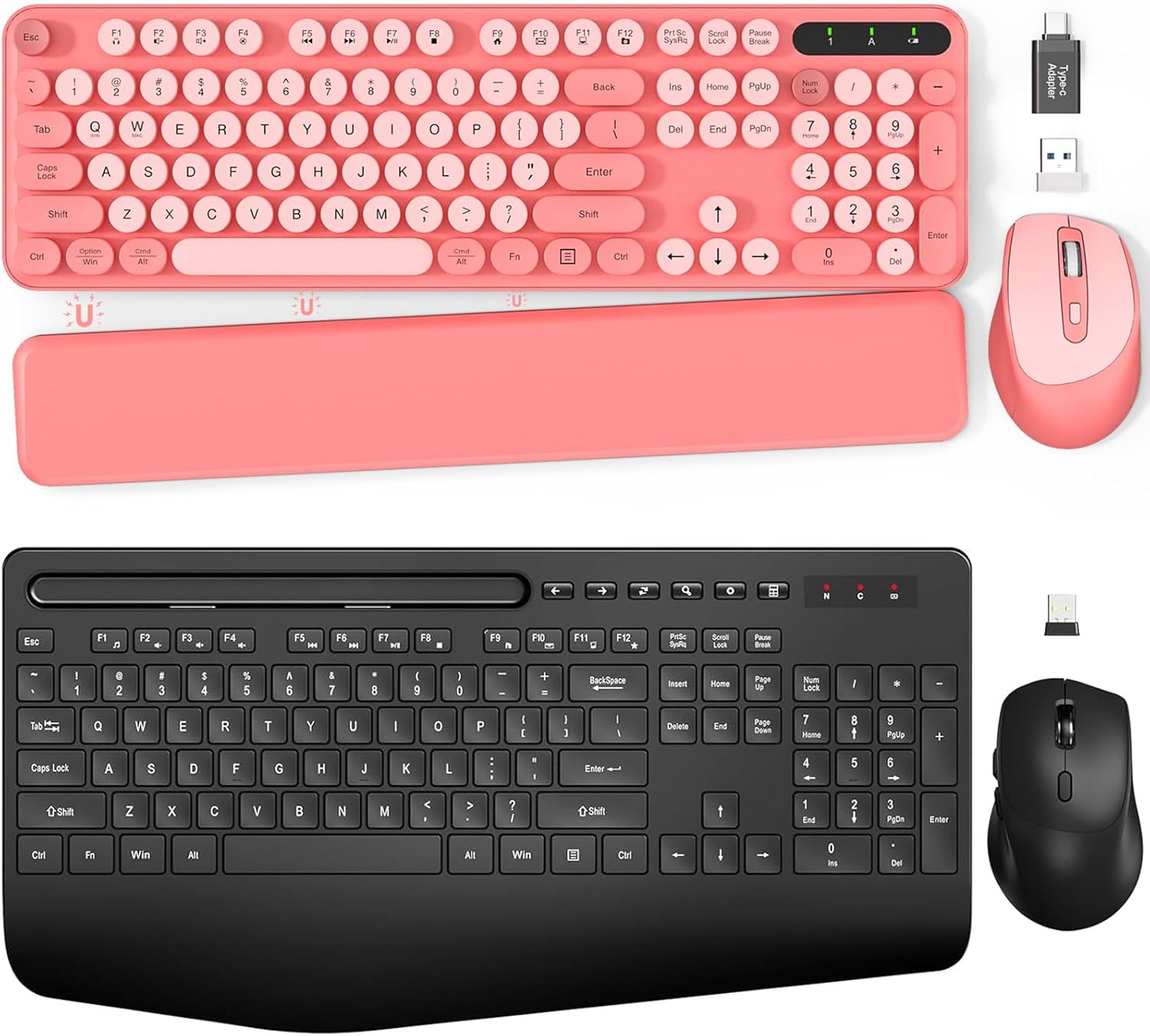
1.1. irudia: Amaituview of the Trueque Wireless Keyboard and Mouse Combo (Pink version).
2. Konfigurazioa
2.1 Bateriaren instalazioa
The keyboard requires two (2) AAA batteries, and the mouse requires one (1) AA battery (batteries are not included).
- Teklatuarentzat: Locate the battery compartment on the underside of the keyboard. Open the cover, insert two AAA batteries according to the polarity indicators (+/-), and close the cover.
- Saguarentzat: Locate the battery compartment on the underside of the mouse. Open the cover, insert one AA battery according to the polarity indicators (+/-), and close the cover.

Image 2.1: Battery compartments and ON/OFF switches for the keyboard and mouse.
2.2 USB hargailua konektatzea
The keyboard and mouse share a single 2.4GHz USB receiver for wireless connectivity.
- Locate the USB receiver, typically stored in the mouse's battery compartment or packaged separately.
- Plug the USB receiver into an available USB port on your computer (PC or Laptop). If your computer only has USB-C ports, use the provided Type-C adapter.
- Turn on the keyboard and mouse using their respective ON/OFF switches. The devices should automatically connect to your computer.

Image 2.2: USB receiver and Type-C adapter for wireless connection.
3. Funtzionamendu-argibideak
3.1 Teklatuaren ezaugarriak
- Atzeko argiztatutako teklak: The keyboard features backlighting for improved visibility in low-light conditions. Refer to the keyboard's function keys for backlight control (e.g., Fn + specific key for brightness adjustment or on/off toggle).
- Tekla biribil retroak: The keyboard is equipped with detachable round keycaps, offering a distinct tactile experience and ease of cleaning.
- Telefono/tableta euskarri integratua: A built-in cradle allows you to prop up your smartphone or tablet (under 11.9 inches) for convenient viewlanean ari den bitartean.

Image 3.1: Keyboard with a tablet securely placed in the integrated holder.
- Foldable Legs: The keyboard includes foldable legs on the underside, allowing you to adjust the typing angle for improved ergonomics.
- Magnetic Palm Rest: A detachable magnetic palm rest is provided to reduce wrist fatigue during extended use. It can be positioned to suit individual preferences.

Image 3.2: Foldable stands and magnetic palm rest for ergonomic adjustment.
3.2 Saguaren ezaugarriak
- Diseinu ergonomikoa: The mouse is contoured to fit the hand comfortably, promoting a natural grip and reducing strain.

Image 3.3: Ergonomic design of the keyboard and mouse for comfortable use.
3.3 Energia aurrezteko modua
To conserve battery life, both the keyboard and mouse feature an automatic sleep mode:
- Teklatua: Enters sleep mode after 15 minutes of inactivity. Press any key to reactivate.
- Sagua: Enters sleep mode after 10 minutes of inactivity. Double-click any button to reactivate.

Image 3.4: Details on smart power saving for extended battery life.
4. Mantentzea
4.1 Garbiketa
To clean your keyboard and mouse:
- Turn off both devices and disconnect the USB receiver from your computer.
- Use a soft, dry, lint-free cloth to wipe the surfaces of the keyboard and mouse.
- For the keyboard, the retro round keycaps are detachable for easier cleaning. Gently pull them off, clean as needed, and then firmly press them back into place.
- Saihestu produktu kimiko gogorrak, garbitzaile urratzaileak edo gehiegizko hezetasuna erabiltzea, hauek gailuak kaltetu baititzakete.
4.2 Bateria ordezkatzea
Replace batteries when performance degrades or devices become unresponsive. Follow the battery installation steps in Section 2.1. Always use new batteries of the specified type (AAA for keyboard, AA for mouse) and dispose of old batteries responsibly.
5. Arazoak
If you encounter issues with your Trueque wireless keyboard and mouse combo, please refer to the following common solutions:
| Arazoa | Irtenbide posiblea |
|---|---|
| Teklatua/Sagua ez da erantzuten |
|
| Konexio atzeratua edo etengabekoa |
|
| Teklatuaren atzeko planoa ez dabil |
|
6. Zehaztapenak
| Ezaugarri | Xehetasuna |
|---|---|
| Marka | Trukea |
| Modelo zenbakia | B0DFGXN2JX |
| Konektibitate Teknologia | 2.4 GHz haririk gabekoa (USB hargailua) |
| Wireless Range | Gehienez 33 oin (10 metro) |
| Teklatuaren bateria | 2 x AAA (ez dago barne) |
| Saguaren bateria | 1 x AA (ez dago barne) |
| Gailu bateragarriak | Ordenagailu eramangarria, ordenagailu pertsonala (Windows sistema eragilea) |
| Ezaugarri bereziak | Ergonomic Design, Foldable Legs, Wrist Rest, Backlit, Phone/Tablet Holder, Retro Round Keycaps |
7. Bermea eta Laguntza
For warranty information or technical support, please refer to the contact details provided with your purchase or visit the official Trueque webgunea. Gorde erosketa-agiria erosketaren frogagiri gisa, berme-erreklamazioetarako.