
1. Sarrera
This manual provides comprehensive instructions for the setup, operation, maintenance, and troubleshooting of your Lamzu Maya X Wireless Gaming Mouse. Please read this manual carefully to ensure proper use and to maximize the performance of your device.
2. Produktua amaitu daview
2.1 Ezaugarri nagusiak
- Diseinu ultra-arin: Weighs approximately 47g for extended comfort during use.
- Forma simetrikoa: Accommodates various grip styles including palm, claw, and fingertip.
- Konmutadore optikoak: Durable and responsive, rated for over 70 million clicks.
- Dust-Proof Encoder: 30-grid roller for precise and responsive scroll wheel actions.
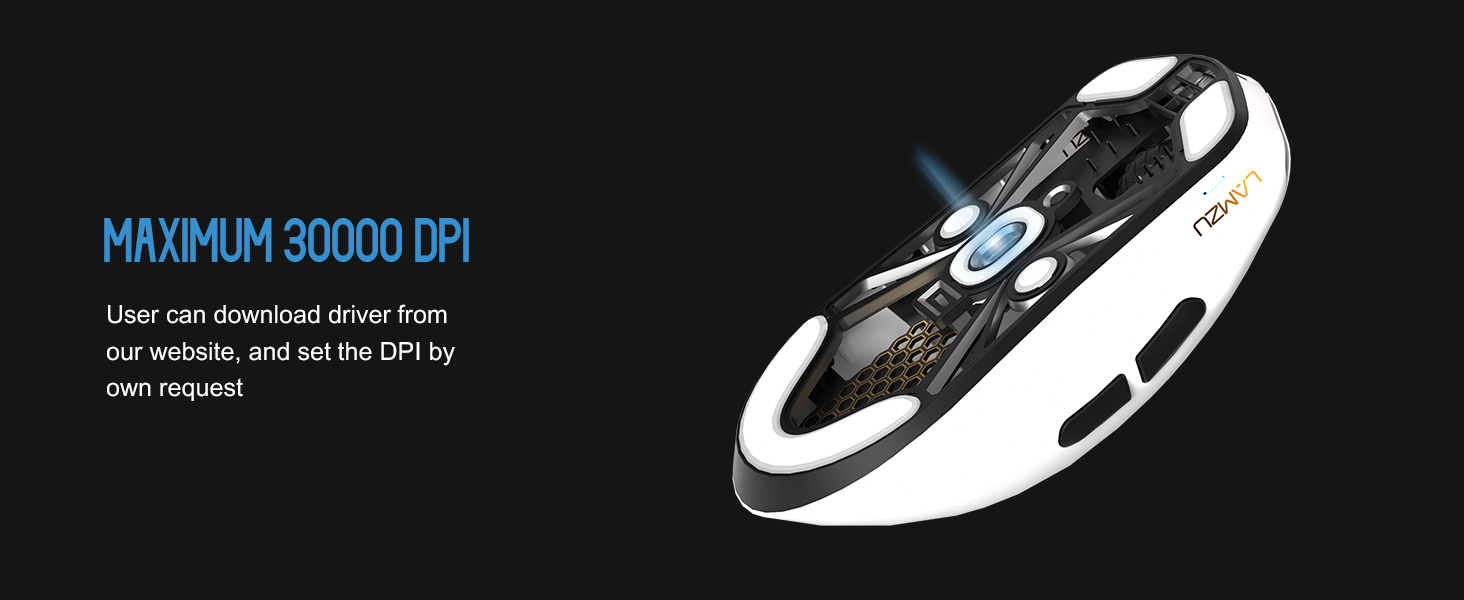
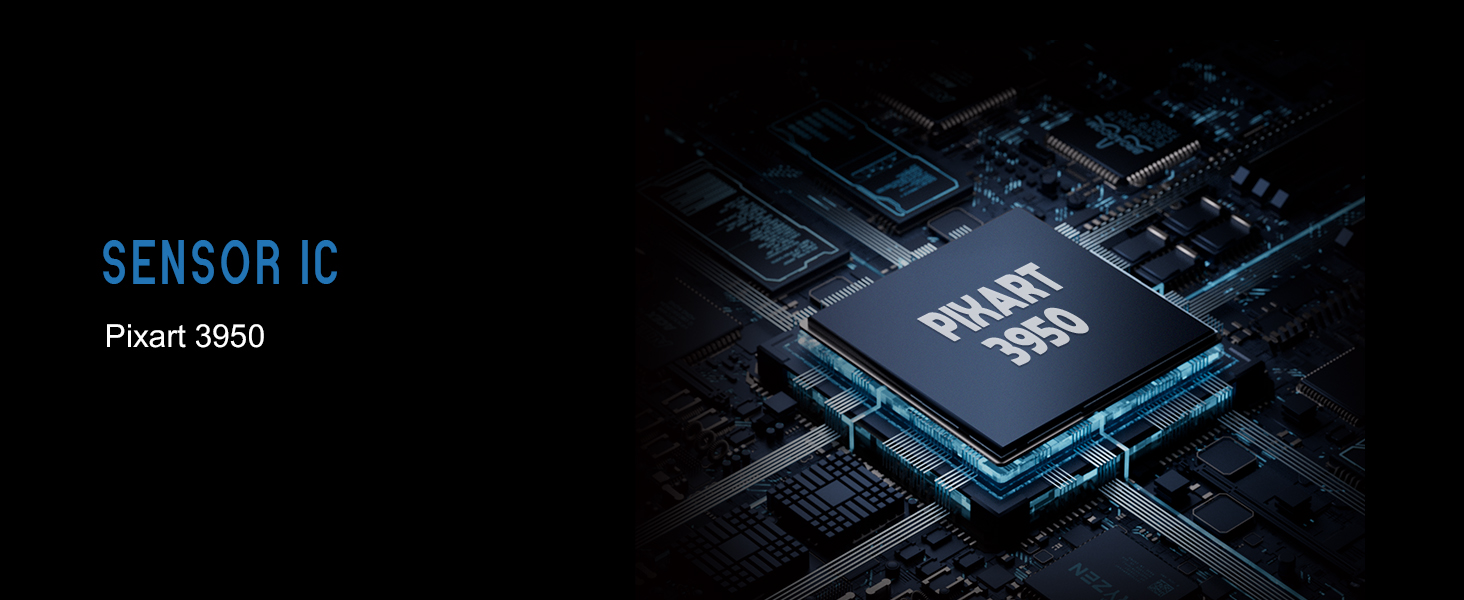
- Pixart PAW 3950 Sensor: Supports up to 30,000 DPI and 750 IPS.
- Nordic 52840 MCU: Ensures power efficiency, fast response times, and accurate motion tracking.
- Bozketa-tasa altua: Up to 8,000 Hz with the optional 8K dongle.
2.2 Paketearen edukia
- Lamzu Maya X Haririk gabeko Joko Sagua
- PTFE Skates (x1 set)
- 8K Dongle (x1)
- MAYA X Dustproof Seal
- 1.8m Type-C Paracord Cable
- Belusezko poltsa
- MAYA X Mouse Grip
2.3 Saguaren osagaiak
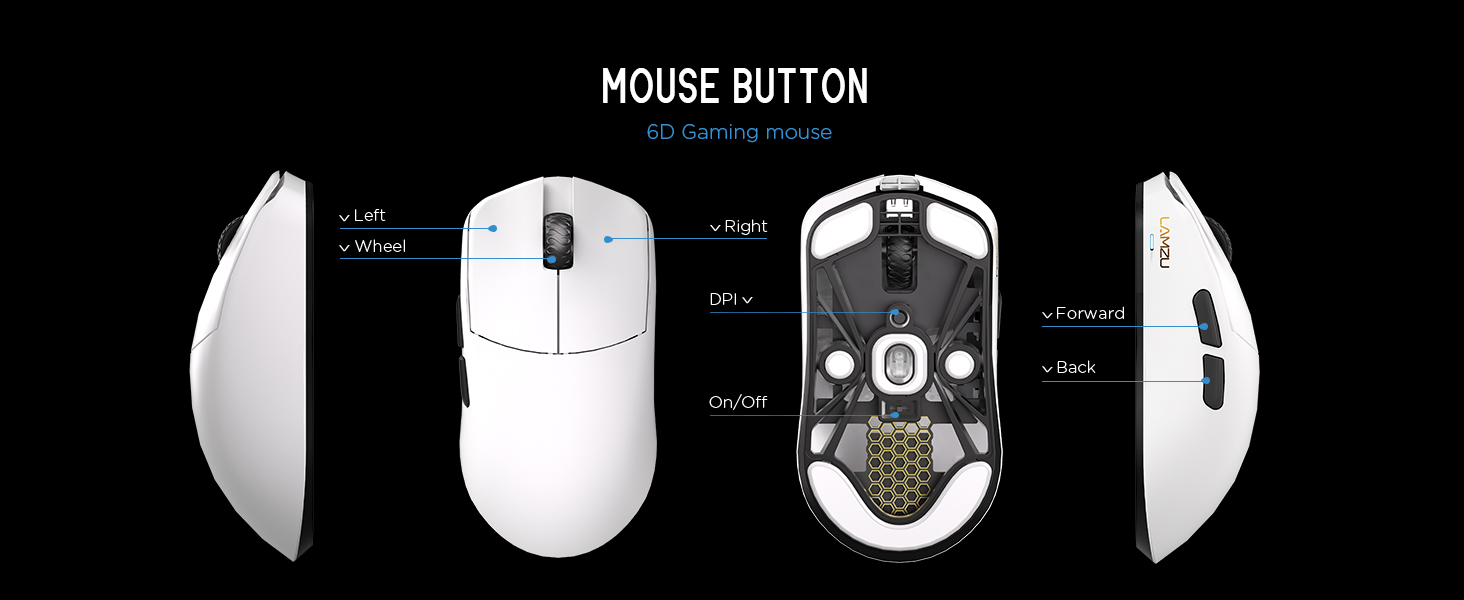
2.3.1. irudia: Diagram illustrating the various buttons and internal structure of the Lamzu Maya X mouse, including left click, right click, scroll wheel, DPI button, forward, back buttons, and the on/off switch.
- Ezkerreko botoia: Klik egiteko funtzio nagusia.
- Eskuineko botoia: Bigarren mailako klik funtzioa.
- Korritzeko gurpila: Korritzeko eta erdiko botoiarekin klik egiteko funtziorako.
- DPI botoia: Adjusts Dots Per Inch sensitivity.
- Aurrera egiteko botoia: Navigational function (e.g., browser forward).
- Atzera botoia: Navigational function (e.g., browser back).
- Piztu/Itzali etengailua: Sagua piztu edo itzaltzen du.
3. Konfigurazioa
3.1 Initial Connection and Charging
- Kargatu sagua: Connect the provided Type-C paracord cable to the mouse and a USB port on your computer. The mouse will charge while connected.
- Piztu: Locate the On/Off switch on the underside of the mouse and slide it to the "On" position.
- Connect Wireless Dongle: Insert the 8K wireless dongle into an available USB port on your computer. The mouse should automatically pair.
- Wired Mode (Optional): To use the mouse in wired mode, connect the Type-C paracord cable directly to the mouse and your computer. The mouse will function as a wired device and charge simultaneously.
3.1.1. irudia: The Lamzu Maya X mouse connected via its Type-C paracord cable, illustrating both wired operation and charging capabilities.
3.2 Gidariaren eta softwarearen instalazioa
The Lamzu Maya X mouse utilizes a web-based driver for customization. To access the software and update firmware:
- Bisitatu Lamzu ofiziala webgunea.
- Navigate to the support or downloads section for the Maya X model.
- Deskargatu web driver application. This application allows for DPI adjustment, polling rate settings, macro programming, and firmware updates.
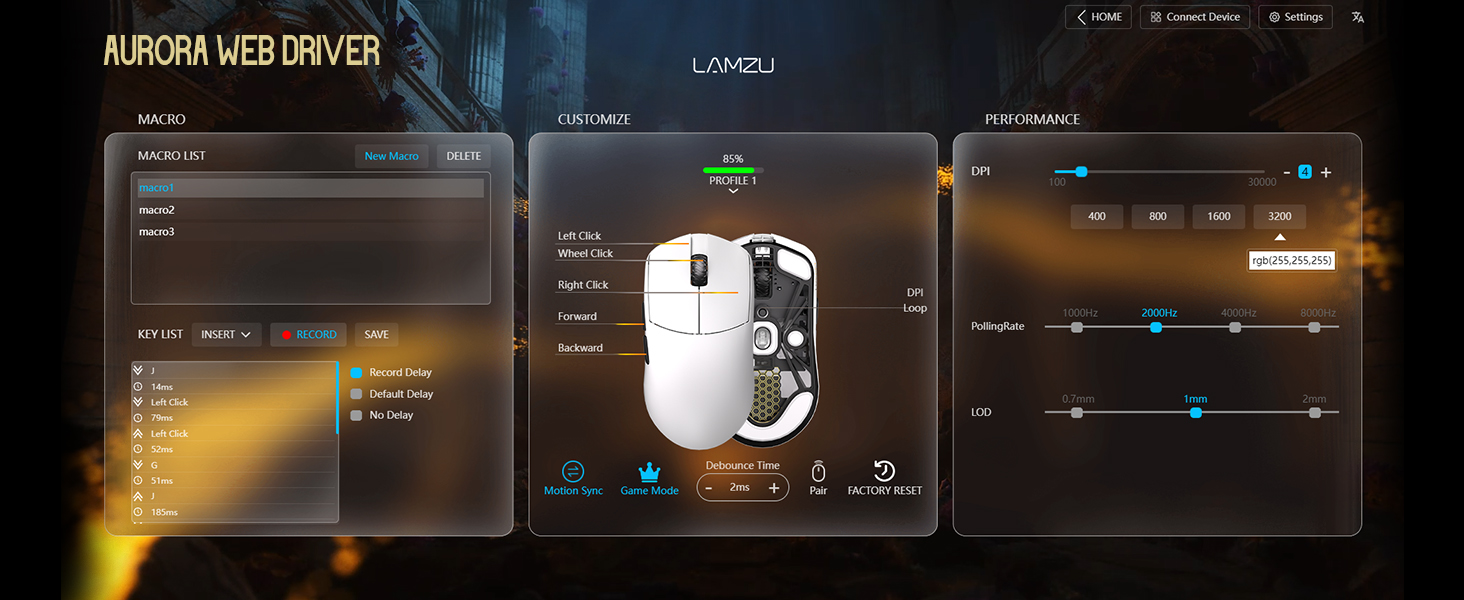
3.2.1. irudia: Screenshot of the Aurora Web Driver interface, displaying options for macro creation, button customization, DPI settings (up to 30000), polling rate selection (up to 8000Hz), and Lift-Off Distance (LOD).
4. Funtzionamendu-argibideak
4.1 DPI doikuntza
The DPI (Dots Per Inch) setting controls the mouse cursor's sensitivity. You can adjust the DPI using the dedicated DPI button on the mouse or through the Aurora Web Driver software. The Pixart PAW 3950 sensor supports up to 30,000 DPI.
4.1.1. irudia: Azpialde bat view of the Lamzu Maya X mouse, emphasizing its optical sensor and the capability to reach a maximum of 30,000 DPI, configurable via software.
4.2 Bozketa-tasa
The polling rate determines how often the mouse reports its position to the computer. The Maya X supports up to 8,000 Hz polling rate when using the included 8K dongle. Higher polling rates result in smoother cursor movement and reduced input lag.
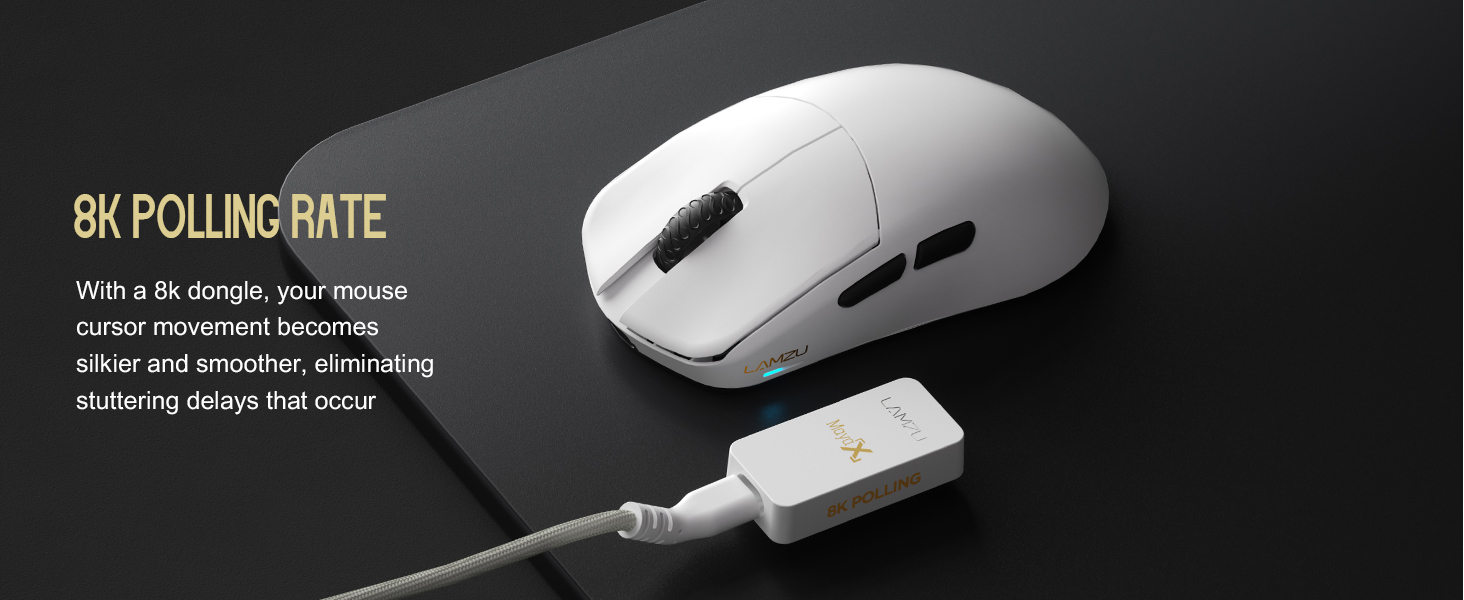
4.2.1. irudia: The Lamzu Maya X mouse positioned next to its 8K polling rate dongle, highlighting the benefit of smoother and more responsive cursor movement provided by high polling rates.
4.3 Grip Styles
The symmetrical design of the Maya X mouse is engineered to accommodate various common grip styles:
- Eskuko heldulekua: The entire palm rests on the mouse.
- Atzaparrentzako heldulekua: Fingers are arched, and the palm rests on the back of the mouse.
- Hatz-puntako heldulekua: Only the fingertips make contact with the mouse.
4.3.1. irudia: A visual guide demonstrating the three primary mouse grip styles—Palm Grip, Claw Grip, and Fingertip Grip—and how the Maya X mouse is designed to be compatible with each.
4.4 Wired and Wireless Modes
The Maya X mouse supports both 2.4G wireless and wired (USB Type-C) connectivity. You can switch between modes by connecting or disconnecting the Type-C cable. In wired mode, the mouse operates at a 1K polling rate, while wireless mode with the 8K dongle supports up to 8K polling.
5. Mantentzea
5.1 Garbiketa
- Ziurtatu sagua itzalita dagoela garbitu aurretik.
- Erabili lipurrik gabeko zapi leun bat dampSaguaren gainazala urarekin edo garbiketa-soluzio leun batekin garbitu.
- Saihestu produktu kimiko gogorrak, urratzaileak edo disolbatzaileak erabiltzea.
- Use compressed air to clear dust from crevices and around buttons.
- Sentsore optikorako, erabili kotoi-zapi bat arinki zipriztinduz.ampened with isopropyl alcohol to gently clean the lens.
5.2 Bateria zaintzea
- Bateriaren iraupena luzatzeko, saihestu sagua maiz erabat deskargatzea.
- Store the mouse at room temperature when not in use for extended periods.
- Denbora luzez gordetzen baduzu, kargatu bateria % 50era arte gutxi gorabehera gorde aurretik.
6. Arazoak
- Saguak ez du erantzuten:
- Ziurtatu sagua piztuta dagoela.
- Egiaztatu bateriaren maila eta kargatu behar izanez gero.
- Verify the wireless dongle is securely plugged into a USB port.
- Try connecting the mouse in wired mode to confirm functionality.
- Berrabiarazi ordenagailua.
- Etengabeko konexioa:
- Ensure the wireless dongle is not obstructed and is close to the mouse.
- Avoid placing the dongle near other wireless devices that may cause interference.
- Update mouse firmware via the Aurora Web Gidaria.
- Kurtsorearen jauziak edo atzerapena:
- Clean the optical sensor (refer to Section 5.1).
- Ensure the mousepad surface is clean and uniform.
- Adjust the polling rate in the software.
- Check for any background applications consuming excessive system resources.
- Botoiak ez funtzionatzen:
- Check button assignments in the Aurora Web Gidaria.
- Ziurtatu botoiak sakatzea eragozten ez duen oztopo fisikorik ez dagoela.
7. Zehaztapenak
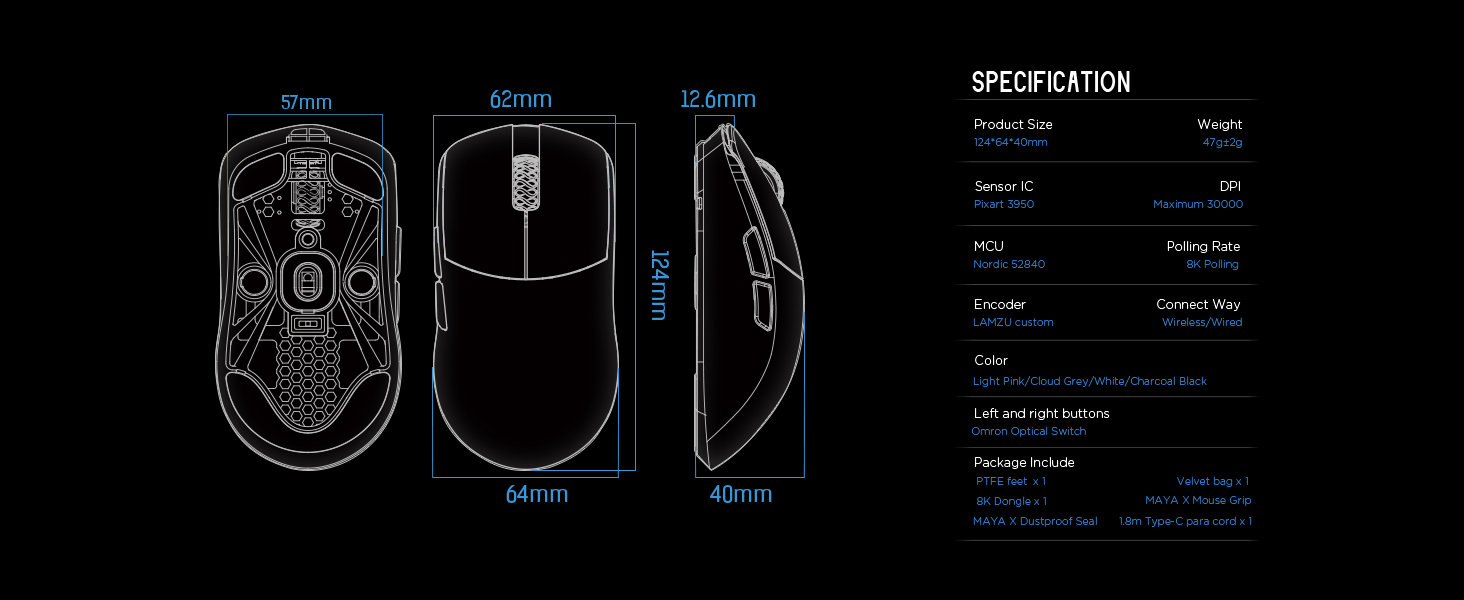
| Produktuaren neurriak | 4.88 x 2.52 x 0.04 hazbete (124 x 64 x 40 mm) |
| Elementuaren pisua | 1.66 ontza (47 g) |
| Sentsore IC | Pixart PAW 3950 |
| Gehienezko DPI | 30,000 |
| MCU | 52840 nordikoa |
| Bozketa-tasa | 8,000 Hz arte (8K donglearekin) |
| Konektibitate Teknologia | 2.4G Wireless, USB Type-C Wired |
| Etengailuak | Optical Switches (Left/Right buttons) |
| Kodetzailea | Dust-Proof Encoder |
| Bateria | 1 litio ioizko bateria (barne) |
| Fabrikatzailea | Lamzu |

7.1.1. irudia: A technical diagram detailing the dimensions (length, width, height) of the Lamzu Maya X mouse and a summary of its key specifications, including weight, sensor, MCU, DPI, and polling rate.
8. Bermea eta Laguntza
For warranty information and technical support, please refer to the official Lamzu website or contact their customer service directly. Details regarding product registration, warranty claims, and frequently asked questions can typically be found in the support section of the webgunea.
Ofiziala Webgunea: www.lamzu.com