
Lamzu Maya X
Lamzu Maya X Haririk gabeko Joko Saguaren Erabiltzaile Eskuliburua
Modeloa: Maya X
Sarrera
Thank you for choosing the Lamzu Maya X Wireless Gaming Mouse. This manual provides detailed instructions for setting up, operating, maintaining, and troubleshooting your new gaming mouse. Please read this manual thoroughly to ensure optimal performance and longevity of your device.

Image: The Lamzu Maya X Wireless Gaming Mouse, split to show its internal structure and accompanied by its 8K wireless dongle.
Ezaugarri nagusiak
- Ultra arina: Weighing just 47g, the MAYA X mouse is designed to be lightweight yet sturdy, providing ultimate comfort during long gaming sessions.
- Symmetrical Shape Design: It is flexible and equally accommodating for palm, claw, or fingertip grip styles.
- Equipped with Optical Switches and Dust-Proof Encoder: Optical switches last three times longer than mechanical ones and can handle over 70 million cycles, respond quickly, give tactile feedback, and act fast. The Dust-Proof wheel encoder with 30-grid roller outputs 15 pulse signals, making games more precise and responsive.
- Pixart PAW 3950 Sensor: Powered by the latest flagship sensor. It supports up to 30,000 DPI and 750 IPS, with a maximum polling rate of 8,000 Hz when using the 8K dongle.
- Nordic 52840 MCU: Making battery more power efficient, providing fast response times, accurate motion tracking, and seamless performance without any lags during gameplay.
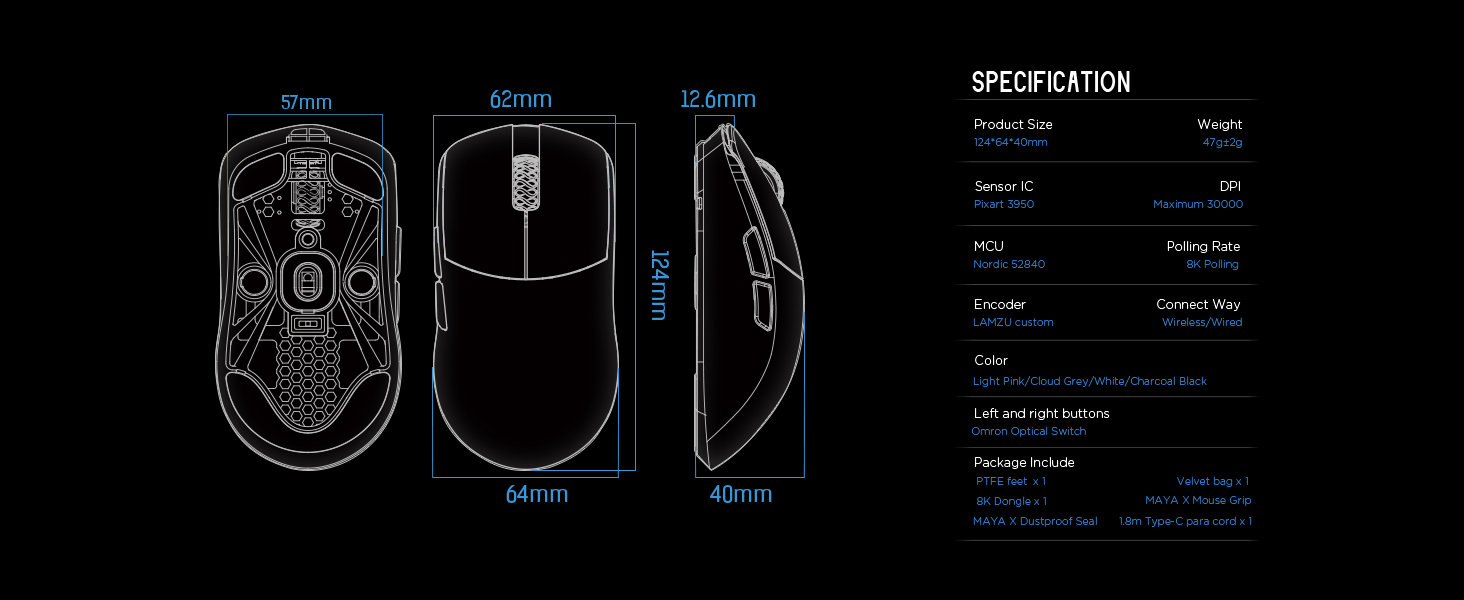
Image: Diagram illustrating the three common mouse grip types (palm, claw, fingertip) and how the symmetrical shape of the Maya X mouse accommodates them.

Irudia: Gertuko planoa view of the Pixart PAW 3950 sensor integrated circuit, highlighting its advanced technology.

Irudia: Xehetasun handikoa view of the Nordic 52840 Microcontroller Unit (MCU), emphasizing its role in efficient performance and 8K Polling Rate compatibility.
Konfigurazio Gida
Paketearen edukia
- Lamzu Maya X Haririk gabeko Joko Sagua
- PTFE Feet x 1 (extra set)
- 8K Dongle x 1
- Velvet Bag x 1
- MAYA X Mouse Grip
- MAYA X Dustproof Seal
- 1.8m Type-C Paracord x 1 (USB-C cable)
Hasierako konexioa
The Lamzu Maya X mouse supports both 2.4G wireless and wired connections.
2.4G haririk gabeko konexioa
- Insert the included 8K dongle into an available USB port on your computer.
- Piztu sagua saguaren azpialdean dagoen pizteko/itzaltzeko etengailua erabiliz.
- The mouse should automatically connect to the dongle. If not, refer to the software section for pairing instructions.
For optimal wireless performance, ensure the dongle is placed close to the mouse and away from sources of interference.
Kablezko konexioa
- Connect the provided 1.8m Type-C Paracord cable to the USB-C port on the front of the mouse.
- Konektatu kablearen beste muturra ordenagailuko USB ataka erabilgarri batera.
- The mouse will function immediately in wired mode with a 1KHz polling rate.

Image: The Lamzu Maya X mouse demonstrating its dual connectivity modes: 2.4G wireless via dongle and wired via USB-C cable.
Software Installation (Optional but Recommended)
To unlock the full potential of your Lamzu Maya X mouse, including custom DPI settings, macro programming, and polling rate adjustments up to 8000Hz, download the official driver software from the Lamzu website. The software is web-based, eliminating the need for a local installation.
Bisitatu: www.lamzu.com/support

Image: Screenshot of the Lamzu Aurora Web Driver interface, showing options for macro programming, button customization, DPI settings, polling rate, and LOD adjustment.
Sagua erabiltzea
Botoiaren funtzioak
The Lamzu Maya X is a 6-button gaming mouse. Refer to the diagram below for button identification:

Image: Diagram illustrating the six programmable buttons on the Lamzu Maya X mouse: Left Click, Right Click, Scroll Wheel, DPI button, Forward side button, and Back side button. Also shows the On/Off switch on the underside.
- Ezkerreko klik: Ekintza nagusirako botoia.
- Egin klik eskuineko botoiarekin: Bigarren mailako ekintza-botoia.
- Korritzeko gurpila: Korritzeko eta erdiko botoiarekin klik egiteko funtziorako.
- DPI botoia: Cycles through preset DPI levels. Customizable via software.
- Aurrerako alboko botoia: Default for forward navigation. Customizable.
- Back Side Button: Default for backward navigation. Customizable.
- Piztu/Itzali etengailua: Located on the underside of the mouse to power on/off.
DPI doikuntza
The mouse features a Pixart PAW 3950 sensor supporting up to 30,000 DPI. You can adjust DPI settings through the dedicated DPI button or more precisely using the Lamzu Aurora Web Gidari softwarea.

Image: A stylized view of the Lamzu Maya X mouse highlighting its capability for up to 30,000 DPI, indicating high precision.
Bozketa-tasa
The Lamzu Maya X supports a maximum polling rate of 8,000 Hz when using the included 8K dongle. This high polling rate ensures smoother cursor movement and reduced input lag.

Image: The Lamzu Maya X mouse and its 8K dongle, promoting the 8K Polling Rate with Aurora Technology for enhanced performance.
Mantentzea
Garbiketa
- Erabili zapi leun eta lehor bat saguaren gainazala garbitzeko.
- Zikinkeria egoskorrerako, apur bat lehortuampGarbitu zapi bat urarekin edo garbiketa-soluzio leun batekin. Saihestu produktu kimiko gogorrak.
- Clean the optical sensor area on the underside regularly with a cotton swab to ensure accurate tracking.
Bateria zaintzea
- The mouse uses a Lithium Ion battery. Avoid fully discharging the battery frequently to prolong its lifespan.
- Charge the mouse using the provided USB-C cable.
- Gorde sagua leku fresko eta lehor batean denbora luzez erabiltzen ez duzunean.
Replacing PTFE Feet
The package includes an extra set of PTFE feet. If the existing feet show significant wear, carefully peel them off and apply the new ones, ensuring the surface is clean and dry before application.

Irudia: Azpialdea view of the Lamzu Maya X mouse, showing the PTFE feet, optical sensor, and on/off switch.
Arazoak konpontzea
Saguak ez du erantzuten
- Egiaztatu potentzia: Ensure the mouse is turned on using the switch on the underside.
- Bateria maila: Charge the mouse if the battery is low.
- Haririk gabeko konexioa: Ensure the 8K dongle is securely plugged into a USB port and within range. Try a different USB port.
- Kable bidezko konexioa: Ziurtatu USB-C kablea ondo konektatuta dagoela saguari eta ordenagailura. Saiatu beste USB ataka bat erabiltzen.
- Parekatu berriro: If using wireless, try re-pairing the mouse with the dongle via the software.
Inconsistent Tracking or Cursor Jitter
- Garbitu sentsorea: Garbitu saguaren azpialdeko sentsore optikoa.
- Azalera: Use the mouse on a clean, uniform surface. Avoid highly reflective or transparent surfaces.
- DPI ezarpena: Adjust DPI settings in the software to a suitable level.
- Bozketa-tasa: Ensure the polling rate is stable and appropriate for your system.
Buttons Not Functioning Correctly
- Softwarearen egiaztapena: Verify button assignments in the Lamzu Aurora Web Gidari softwarea.
- Oztopo fisikoa: Check for any physical debris preventing button presses.
Zehaztapenak
| Ezaugarri | Xehetasuna |
|---|---|
| Produktuaren neurriak | 4.88 x 2.52 x 0.04 hazbete |
| Elementuaren pisua | 1.66 ontza (47 g) |
| Modelo zenbakia | Maia X |
| Pilak | 1 litio ioizko bateria (barne) |
| Eskuragarri dagoen lehen data | 28ko irailaren 2024a |
| Fabrikatzailea | Lamzu |
| Jatorrizko Herrialdea | Txina |
| Kolorea | Grisa |
| Konektibitate Teknologia | USB, 2.4G Wireless |
| Ezaugarri Berezia | Arinak |
| Mugimenduak detektatzeko teknologia | Optikoa (Pixart PAW 3950) |
| Gehienezko DPI | 30,000 DPI |
| Bozketa-tasa | 8,000 Hz arte (8K donglearekin) |
| MCU | 52840 nordikoa |
| Etengailuak | Optical Switches (Omron) |
| Kodetzailea | Dust-Proof Encoder (30-grid) |
Bermea eta Laguntza
Bermearen informazioa
Lamzu products typically come with a manufacturer's warranty. Please refer to the warranty card included in your product packaging or visit the official Lamzu webzure eskualdeko berme-baldintza zehatzak ikusteko, bisitatu webgunea.
Bezeroarentzako Arreta
For technical assistance, troubleshooting, or any inquiries regarding your Lamzu Maya X mouse, please contact Lamzu customer support:
- Webgunea: www.lamzu.com/support
- Posta elektronikoa: Jo ezazu ofiziala webharremanetarako helbide elektronikorako gunea.
When contacting support, please have your product model (Maya X) and purchase information ready.
Ask a question about this manual
Ask about setup, troubleshooting, compatibility, parts, safety, or missing instructions. Manuals+ will review the question and use this page’s manual context to help answer it.