
iWALK DBL4500NC
iWALK Portable Charger User Manual
Model: DBL4500NC | Brand: iWALK
Sarrera
Thank you for choosing the iWALK Portable Charger. This compact and powerful 4,500mAh power bank is designed to provide fast and convenient charging for your USB-C compatible devices, including the latest iPhone 15/16 series and various Android smartphones. Please read this manual thoroughly to ensure proper use and maintenance of your device.
Segurtasun Informazioa
- Ez jarri bateria eramangarria muturreko tenperaturen, eguzki-argiaren eraginpean edo hezetasun handiaren eraginpean.
- Ez desmuntatu, aldatu edo saiatu gailua konpontzen.
- Mantendu haurren eskura.
- Saihestu gailua kolpe gogorrak erortzea edo jasaten.
- Erabili jatorrizko edo ziurtatutako kableak soilik bateria eramangarria eta zure gailuak kargatzeko.
- Tokiko araudien arabera bota bateria eramangarria arduraz.
Paketearen edukia
Upon opening your iWALK Portable Charger package, you should find the following items:
- 1x iWALK 4,500 mAh Portable Power Bank
- 1 x USB-C USB-C kablea
- 1x Erabiltzailearen eskuliburua
Produktua amaituview
The iWALK Portable Charger features a compact design with a built-in USB-C connector for direct plug-and-charge functionality. It also includes LED indicator lights to show the remaining battery level and a USB-C input port for recharging the power bank itself.
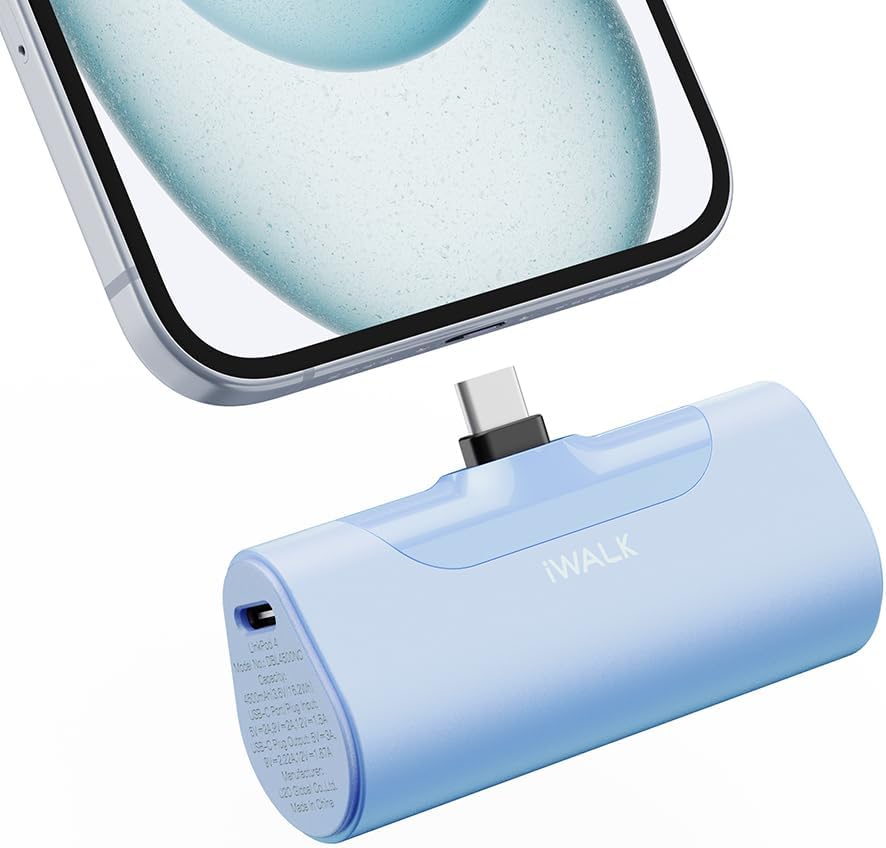
Image: The iWALK Portable Charger in baby blue, featuring its built-in USB-C connector plugged into the bottom of a smartphone. The charger is compact and designed for direct connection.

Image: A hand holding the iWALK Portable Charger next to a lipstick, illustrating its small and lightweight design, comparable in size to a lipstick.
Konfigurazioa
Before first use, it is recommended to fully charge your iWALK Portable Charger. Refer to the "Charging the Power Bank" section for detailed instructions.
Funtzionamendu-argibideak
Zure gailua kargatzen
- Ensure your iWALK Portable Charger has sufficient charge. You can check the battery level by pressing the power button; the LED indicators will light up.
- Carefully plug the built-in USB-C connector of the power bank directly into the USB-C charging port of your smartphone or compatible device.
- The power bank will automatically begin charging your device. The LED indicators on the power bank will show its remaining charge.
- Once your device is charged, or when you wish to stop charging, simply unplug the power bank from your device.

Image: An iPhone 15 Pro being fast-charged by the iWALK Portable Charger, demonstrating 20W PD output and the ability to charge from 0% to 50% in 30 minutes.
Bateriaren maila egiaztatzea
To check the remaining battery level of your iWALK Portable Charger, briefly press the power button located on the side of the device. The LED indicator lights will illuminate, showing the approximate charge level:
- Lau LED: %75-100eko karga
- Hiru LED: %50-75eko karga
- Bi LED: %25-50eko karga
- LED bat: % 0-25eko karga (laster kargatuko da)
Bateragarritasuna
The iWALK Portable Charger is equipped with a built-in USB-C port, making it compatible with a wide range of devices. This includes, but is not limited to:
- iPhone 16/15 Series: iPhone 16 Pro Max, iPhone 16 Pro, iPhone 16 Plus, iPhone 16, iPhone 15 Pro Max, iPhone 15 Pro, iPhone 15 Plus, iPhone 15.
- Android telefonoak: Samsung Galaxy S25/S24/S23 series, Pixel, OnePlus, Huawei, and other USB-C enabled Android devices.
- Beste gailu batzuk: iPad (USB-C models), AirPods (USB-C charging case), and other small electronic devices with a USB-C charging port.
Note: This charger is not applicable for older iPhone models (iPhone 14, 13, 12, 11, XS, XR, X, 8, 7, 6, SE) that use a Lightning connector.

Image: A detailed compatibility chart showing the iWALK Portable Charger's built-in USB-C connector and its compatibility with iPhone 16/15 series, various Samsung Galaxy models (S23, S22, S21, S20, S10, S9, S8, Note 10/9, Z Flip/Fold), Google Pixel phones (Pixel 8/8 Pro, Pixel 7/7 Pro), and iPad Pro/Air models.
Power Banka kargatzen
To recharge your iWALK Portable Charger:
- Connect the provided USB-C to USB-C cable to the USB-C input port on the side of the power bank.
- Connect the other end of the USB-C cable to a compatible USB-C wall adapter (not included) or a computer's USB-C port.
- The LED indicators will flash to show the charging progress. Once fully charged, all four LEDs will remain solid.
- Deskonektatu kablea kargatzen amaitutakoan.
The power bank supports high-speed 18W recharging.
Mantentzea
- Garbitu bateria eramangarria oihal leun eta lehor batekin. Ez erabili garbitzaile likidorik edo aerosolik.
- Gorde gailua leku fresko eta lehor batean, eguzki-argitik eta muturreko tenperaturetatik babestuta.
- Denbora luzez erabiltzen ez bada, kargatu bateriaren egoera mantentzeko gutxienez hiru hilabetean behin.
Arazoak konpontzea
| Arazoa | Kausa posiblea | Irtenbidea |
|---|---|---|
| Power bankuak ez du gailua kargatzen. | Low battery on power bank; incorrect connection; incompatible device. | Recharge power bank; ensure secure connection; verify device compatibility (USB-C). |
| Energia-bankua ez da berriro kargatzen. | Faulty cable or adapter; power source issue. | Try a different USB-C cable and wall adapter; ensure power source is active. |
| Karga motela. | Device drawing less power; cable issue; power bank not fully charged. | Ensure device supports fast charging; use original cable; fully charge power bank. |
| LED adierazleak ez dute funtzionatzen. | Gailuaren matxura. | Contact customer support if troubleshooting steps do not resolve the issue. |
Zehaztapenak
| Ezaugarri | Xehetasuna |
|---|---|
| Modelo zenbakia | DBL4500NC |
| Bateria Edukiera | 4,500 mAh |
| Irteera Potentzia | 20W-ko kargatze azkarra (USB-C) |
| Sarrerako potentzia | 18W Recharging (USB-C) |
| Produktuaren neurriak | 3.1 x 1 x 1.5 hazbete |
| Elementuaren pisua | 6.4 ontza |
| Konektore mota | USB C mota |
| Ezaugarri bereziak | Fast Charging, LED Indicator Lights, Lightweight, Pocket Size, Short Circuit Protection |
Bermea eta Laguntza
iWALK provides an 18-month after-sales service for this product. For any inquiries or support needs, please follow these steps:
- Visit the iWALK Direct seller page on Amazon.
- Click on the "Ask a Question" button located on the top right corner of the screen.
- Alternatively, if you are on the product details page, click on the "seller ID" (iWALK Direct) to access their store page, then look for contact options.
- Describe your problem in detail, including your order number for faster assistance.
The iWALK service team aims to provide a solution within 24 hours.

Image: A graphic detailing the 18-month after-sales service process, showing steps to contact iWALK Direct through Amazon for support.
Ask a question about this manual
Ask about setup, troubleshooting, compatibility, parts, safety, or missing instructions. Manuals+ will review the question and use this page’s manual context to help answer it.