
1. Sarrera
The M-VAVE Chocolate-Plus is a compact and versatile wireless MIDI pedal designed to provide musicians with advanced control over their digital audio workstations (DAWs), effects pedals, and amp modelers. This portable device offers seamless integration with Windows, Mac, iOS, and Android platforms, enhancing creative freedom in studio and live performance settings.
Its durable and lightweight design, combined with a long-lasting rechargeable battery, makes it an ideal companion for any musician seeking to streamline their setup and expand their control capabilities without the clutter of cables.

Irudia: Angelu formakoa view of the M-VAVE Chocolate-Plus Wireless MIDI Pedal, showcasing its compact design and footswitches.
2. Produktua amaitu daview
2.1. Paketearen edukia
Kutxa irekitzean, ziurtatu elementu guztiak bertan daudela:
- M-VAVE Chocolate-Plus Wireless MIDI Pedal
- USB motako C kargatzeko kablea
- Erabiltzailearen eskuliburua

Image: M-VAVE Chocolate-Plus package contents, including the pedal, user manual, USB-C cable, and product box.
2.2. Gailuaren diseinua
Familiarize yourself with the main components of the Chocolate-Plus pedal:
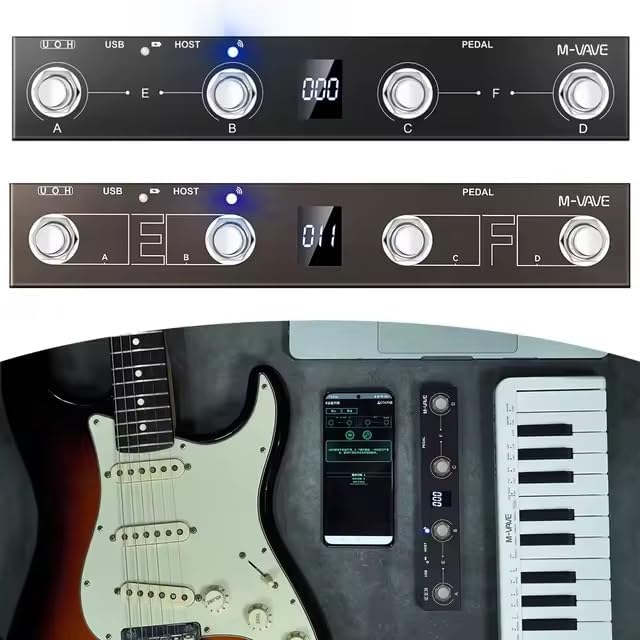
Irudia: Goian view of the M-VAVE Chocolate-Plus pedal, highlighting the four footswitches (A, B, C, D), the central digital display, and LED indicators for USB and HOST connections.
- Oin-etengailuak (A, B, C, D): Four programmable footswitches for triggering commands.
- Bistaratze digitala: Provides instant visual feedback on current settings, bank numbers, and other operational information.
- USB ataka: For wired connection to computers and charging.
- HOST ataka: For connecting and controlling other MIDI devices.
- Adierazpen pedalen sarrera: For connecting an external expression pedal for dynamic control.
- Switch potentziala: Gailua pizteko edo itzaltzeko.
3. Konfigurazioa
3.1. Gailua kargatzea
Before initial use, fully charge the Chocolate-Plus pedal. Connect the provided USB Type-C cable to the pedal's USB port and to a standard USB power adapter (not included) or a computer's USB port.
- Kargatzeko adierazlea: LED adierazlea piztuko da gorria kargatzen ari den bitartean.
- Karga osoaren adierazlea: The LED indicator will turn urdina kargatzen amaitutakoan.
- A full charge takes approximately 2.5 hours and provides up to 12 hours of continuous use.
3.2. Piztu/Itzaltzea
Locate the power switch on the side of the pedal. Slide it to the "ON" position to power on the device. Slide it to "OFF" to power off.
3.3. App Installation (for Wireless Control)
For wireless control via smartphone or tablet, download the official M-VAVE app from your device's app store (e.g., Apple App Store for iOS, Google Play Store for Android). Follow the in-app instructions for pairing and configuration.
3.4. Gailuetara konektatzea
3.4.1. Wireless Connection (Bluetooth MIDI)
- Ensure the Chocolate-Plus pedal is powered on.
- Open the M-VAVE app on your iOS/Android device.
- Navigate to the connection or device pairing section within the app.
- Select "Chocolate-Plus" from the list of available devices to establish a Bluetooth MIDI connection.
- The wireless connection LED indicator will blink when searching and become solid when connected.
3.4.2. Wired Connection (USB MIDI)
- Connect the USB Type-C cable from the Chocolate-Plus pedal to a USB port on your Windows or Mac computer.
- The pedal will be recognized as a standard MIDI device.
- Open your DAW or music software and select "M-VAVE Chocolate-Plus" as a MIDI input device in the software's preferences or settings.
3.4.3. MIDI Host Connection
The integrated MIDI host port allows you to connect and control other MIDI-compatible hardware devices directly from the Chocolate-Plus pedal. Refer to the specific MIDI device's manual for connection and configuration details.
4. Operating the Chocolate-Plus
4.1. Footswitch Functions
The four footswitches (A, B, C, D) are highly customizable. Each can be programmed to send specific MIDI messages or trigger keyboard shortcuts.
- Individual Triggers: Pressing a single footswitch (A, B, C, or D) will activate its assigned function.
- Combination Triggers: Pressing two adjacent footswitches simultaneously (A+B or C+D) can activate a second set of functions, effectively doubling your control options. This is useful for complex actions like activating a looper while changing an effect bank.

Irudia: Gertuko planoa view of the M-VAVE Chocolate-Plus pedal's footswitches and digital display, illustrating the control interface.
4.2. Pantaila digitala
The central digital display provides real-time feedback on the pedal's status, including:
- Current bank number.
- Active preset or mode.
- Konexioaren egoera.
4.3. Customization and Bank Switching
The Chocolate-Plus offers extensive customization options through its dedicated app or software interface:
- Advanced Customization Mode: Program each footswitch and combination trigger to send specific MIDI CC messages, Program Change messages, or keyboard shortcuts.
- Banku aldaketa: Organize your customized presets and effect configurations into different banks. This allows for quick and organized access to various setups for different songs, sets, or projects.
- Keyboard Shortcut Mapping: Map specific keyboard commands (e.g., for DAW functions) to the footswitches, providing physical control over software actions.
4.4. Expression Pedal Input
Connect an external expression pedal (not included) to the dedicated input jack to gain dynamic, continuous control over parameters such as volume, wah, or other effects within your software or connected MIDI devices.
5. Mantentzea
To ensure the longevity and optimal performance of your M-VAVE Chocolate-Plus pedal, follow these maintenance guidelines:
- Garbiketa: Use a soft, dry cloth to wipe the pedal's surface. Avoid abrasive cleaners, solvents, or excessive moisture.
- Biltegiratzea: Gorde gailua leku fresko eta lehor batean, eguzki-argitik, tenperatura muturrekoetatik eta hezetasun handitik babestuta.
- Bateria zaintzea:
- Saihestu bateria maiz erabat deskargatzea.
- Denbora luzez gordetzen baduzu, kargatu bateria % 50era arte gutxi gorabehera, hilabete batzuk behin.
- Ez jarri bateria bero edo hotz handien eraginpean.
- Saihestu kalte fisikoak: Protect the footswitches and display from heavy impacts.
6. Arazoak
If you encounter issues with your Chocolate-Plus pedal, refer to the following common problems and solutions:
- Gailua ez da pizten:
- Ensure the battery is charged. Connect the USB-C cable and check the charging indicator.
- Egiaztatu etengailua "ON" posizioan dagoela.
- Haririk gabeko konexiorik ez:
- Ziurtatu Bluetooth gaituta dagoela zure telefonoan/tabletan.
- Ensure the M-VAVE app is open and attempting to connect.
- Berrabiarazi pedala eta zure gailu mugikorra.
- Check if the pedal is already connected to another device.
- No Wired Connection (USB MIDI):
- Ensure the USB-C cable is securely connected to both the pedal and your computer.
- Probatu beste USB ataka bat zure ordenagailuan.
- Verify that the Chocolate-Plus is selected as a MIDI input device in your DAW/software settings.
- Probatu beste USB-C kable batekin.
- Footswitches Not Responding:
- Check the digital display to ensure the pedal is in the correct operating mode or bank.
- Verify that the footswitches are correctly mapped within the M-VAVE app or your DAW.
- Ensure the pedal is properly connected (wired or wireless) to your control device.
- Difficulty with Configuration:
- Refer to the detailed instructions within the M-VAVE app for advanced customization.
- Consult online resources or the manufacturer's support for specific software integration guides.
7. Zehaztapenak
| Marka | M-VAVE |
| Eredua | Chocolate-Plus |
| Konektibitate Teknologia | USB, Wireless (Bluetooth MIDI) |
| Ezaugarri bereziak | Digital display, Portable, Wireless connection |
| Neurriak (L x W x H) | 230 mm x 40 mm x 40 mm |
| Pisua | 250 gramo |
| Gailu bateragarriak | Computer (desktop/laptop), Smartphone, Tablet |
| Compatible Software/OS | Windows, Mac, iOS, Android |
| Kontrol mota | Buttons and pedal controller |
| Hardware interfazea | USB, USB 2.0 |
| Kontrol-metodoa | Aplikazioa |
| Bateriaren iraupena | Gehienez 12 ordu |
| Kargatzeko Denbora | Gutxi gorabehera 2.5 ordu (USB C motaren bidez) |
8. Bermea eta Laguntza
8.1. Berme mugatua
The M-VAVE Chocolate-Plus pedal comes with a limited warranty. Please refer to the manufacturer's official website or the warranty card included in your package for specific terms and conditions regarding warranty coverage and duration.
8.2. Bezeroarentzako arreta
For further assistance, technical support, or inquiries not covered in this manual, please visit the official M-VAVE webwebgunean edo jarri harremanetan bezeroarentzako arreta-zerbitzuarekin. Harremanetarako informazioa normalean produktuaren ontzian edo fabrikatzailearen eskuliburuan aurki daiteke. webgunea.