
Hoymiles MS-A2
Hoymiles MS-A2 Solar Battery Storage System User Manual
Comprehensive guide for installation, operation, and maintenance of your MS-A2 solar battery.
1. Produktua amaitu daview
The Hoymiles MS-A2 is an innovative 2.2 kWh LFP solar battery storage system designed for seamless integration with existing solar setups. It is the first AC-coupled balcony energy storage system on the market, offering perfect compatibility with all micro-inverters.
With an integrated battery capacity of up to 2240 Wh, the system allows for easy expansion by connecting two devices in series. Its plug-and-play design ensures flexibility and ease of installation, requiring only two steps for a hassle-free electrical connection.
The MS-A2 prioritizes safety, holding ETSI EN 303 645 cybersecurity certification to protect your personal data. It provides real-time monitoring and control through a dedicated application, putting energy management directly in your hands. Built with high-reliability LFP batteries, the MS-A2 complies with the IEC 62619 standard and supports over 6000 battery cycles, ensuring long-term durability and peace of mind.
Ezaugarri nagusiak:
- Integrated Energy Storage: 2.2 kWh LFP battery capacity.
- AC-Coupled Design: First of its kind for balcony systems, compatible with all micro-inverters.
- Edukiera hedagarria: Connect two units in series for increased storage.
- Plug and Play instalazioa: Simple, two-step electrical connection.
- Segurtasun aurreratua: ETSI EN 303 645 cybersecurity certified.
- Jarraipen adimenduna: Real-time control via the S-Miles Home application.
- Iraunkortasun handia: LFP battery technology with over 6000 charge cycles.
2. Konfigurazio gida
2.1 Paketatzea
Carefully remove the MS-A2 battery from its packaging. Inspect the unit for any signs of damage during transit. Ensure all components listed in the packing list are present.

2.1. irudia: Aurrealdea view of the Hoymiles MS-A2 solar battery, showing the control panel and battery indicator.

2.2. Irudia: Atzealdea view of the Hoymiles MS-A2 solar battery, showing the heat sink and connection ports.
2.2 Jartzea
The MS-A2 is designed for versatile placement, from balconies to outdoor areas. Choose a location that is dry, well-ventilated, and protected from direct sunlight and extreme temperatures. Ensure the mounting surface is stable and can support the weight of the unit (over 30kg).
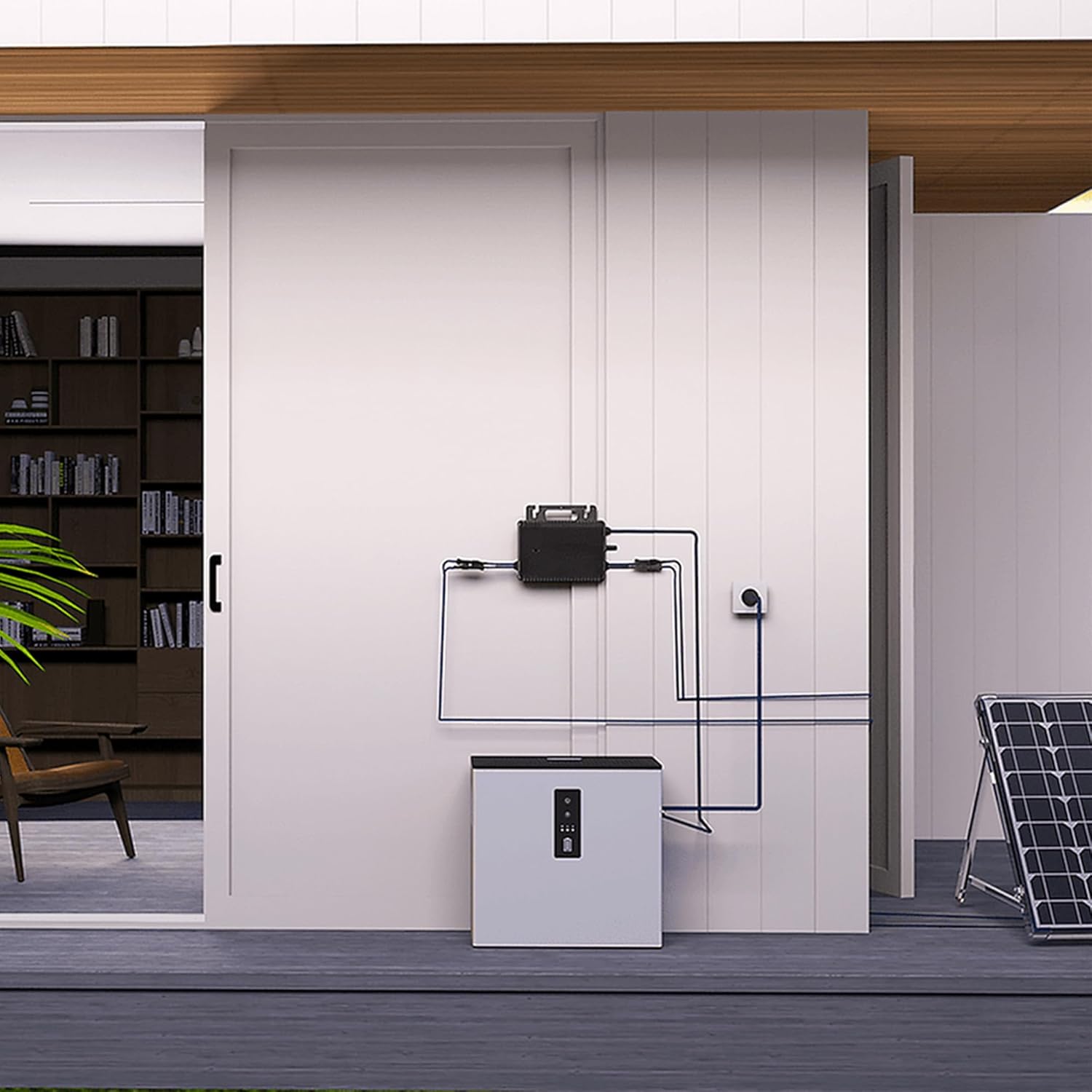
2.3. irudia: Adibample of an outdoor installation setup for the MS-A2 battery system.
2.3 Konexio elektrikoa
The MS-A2 features a plug-and-play design for straightforward electrical connection. It can be connected to a standard power outlet (Schuko) or directly integrated with your micro-inverter system using MC4 connectors. Ensure all connections are secure before powering on the device.
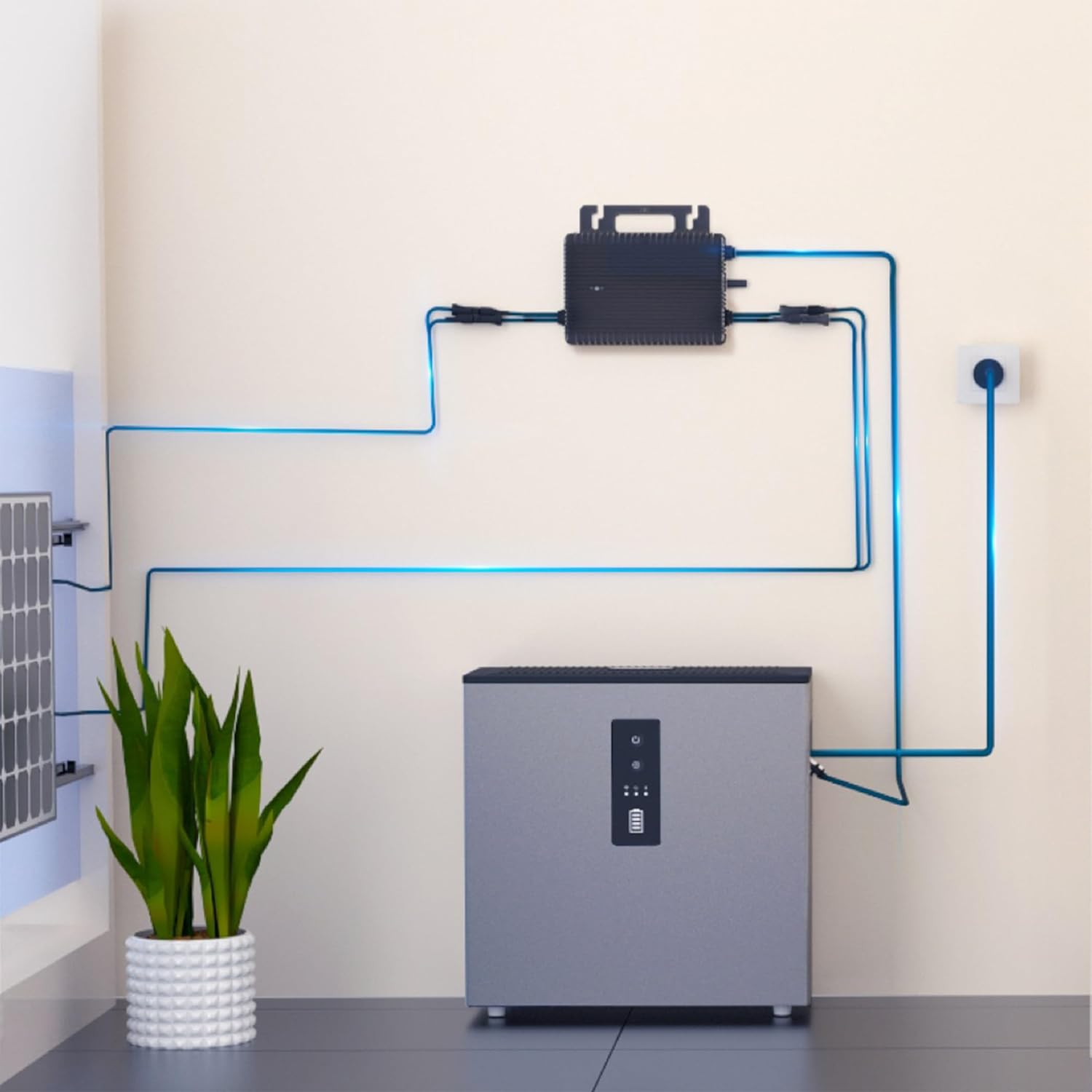
Figure 2.4: Diagram illustrating the connection of the MS-A2 battery with a solar panel and micro-inverter.
- Connect your solar micro-inverter (max. 1800W) to the designated input on the MS-A2.
- Plug the MS-A2 into a standard electrical outlet using the provided Schuko connector.
- For series connection of two MS-A2 units, follow the specific instructions provided in the separate expansion guide.
3. Funtzionamendua
3.1 Piztu/Itzaltzea
To power on the MS-A2, press and hold the power button on the control panel until the indicator lights illuminate. To power off, press and hold the power button again until the lights turn off.
3.2 Monitoring with S-Miles Home App
The MS-A2 offers real-time monitoring and control via the S-Miles Home application, available for iOS and Android devices. Download the app from your device's app store.
- Deskargatu eta instalatu S-Miles Home aplikazioa.
- Erregistratu kontu bat eta hasi saioa.
- Follow the in-app instructions to connect your MS-A2 unit via Wi-Fi. Ensure your Wi-Fi router name is not excessively long, as this may cause connection issues.
- Once connected, you can monitor energy production, consumption, battery status, and adjust settings.
3.3 Energiaren kudeaketa
The MS-A2 intelligently manages energy flow. It can store excess solar energy for later use, reducing reliance on the grid. The system supports up to 1000W charging power (adjustable from 100W to 1000W) and can feed up to 1000W into the home grid, with a maximum of 800W fed back to the utility grid.
The minimum discharge capacity configurable via the app is 10% (adjustable range 10% to 30%). This ensures the longevity of the LFP battery, which is rated for over 6000 cycles.
4. Mantentzea
4.1 Garbiketa
Regularly clean the exterior of the MS-A2 unit with a soft, dry cloth to prevent dust accumulation. Do not use abrasive cleaners or solvents. Ensure ventilation openings are clear of obstructions.
4.2 Firmware eguneraketak
Hoymiles regularly releases firmware updates to improve performance and add new features. These updates can typically be performed via the S-Miles Home application. Ensure your device is connected to a stable internet connection during updates.
4.3 Bateria zaintzea
The MS-A2 uses durable LFP (Lithium Iron Phosphate) batteries designed for long life. To maximize battery lifespan, avoid fully discharging the unit below the recommended minimum (10% via app settings). Store the unit in a cool, dry place if not in use for extended periods.
5. Arazoak
| Arazoa | Kausa posiblea | Irtenbidea |
|---|---|---|
| Cannot connect to Wi-Fi via S-Miles Home app. | Router SSID (network name) is too long. | Shorten your Wi-Fi router's SSID. Refer to your router's manual for instructions. |
| Lower than expected energy output/storage. | Conversion losses (AC to DC to AC); minimum discharge limit set. | Understand that approximately 15% of energy may be lost during conversion. The effective usable capacity is about 83% of 2.24 kWh due to the 10% minimum discharge setting and conversion losses. This is normal operation. |
| Unitatea ez da pizten. | No power supply; unit not properly connected. | Ensure the power cable is securely plugged into a working outlet. Check the power button operation. |
| App shows incorrect data or is unresponsive. | Poor Wi-Fi signal; app glitch; outdated firmware. | Check Wi-Fi signal strength. Restart the app. Restart the MS-A2 unit. Check for and install any available firmware updates. |
6. Zehaztapen Teknikoak
| Zehaztapena | Balioa |
|---|---|
| Marka | Hoymiles |
| Modelo zenbakia | MS-A2 |
| Kolorea | Grisa |
| Konektibitate Teknologia | Bluetooth konexioa, Wi-Fi |
| Konektore mota | MC4, Schuko |
| Gailu bateragarriak | Electronic devices (e.g., laptops, tablets, smartphones, etc.) |
| Telefono eredu bateragarriak | iOS, Android |
| Dakarten osagaiak | 1 egokitzailea |
| Sarrera boltage | 230 Volt |
| Muntatze Mota | Solairuaren mendia |
| Potentzia Irteera | 800 Watts (Max to grid), 1000 Watts (Max to home network) |
| Bateria Edukiera | 2.24 kWh (integrated) |
| Bateria mota | LFP (litio burdina fosfatoa) |
| Bateria Zikloak | 6000 ziklo |
| Jatorrizko Herrialdea | Txina |
| Eskuragarri dagoen lehen data | 30ko abuztuaren 2024a |
7. Bermea eta Laguntza
Hoymiles is committed to providing excellent customer service and support for the MS-A2 solar battery system. While specific warranty details should be confirmed with your purchase documentation, Hoymiles products are known for their reliability and long-term performance, backed by LFP battery technology supporting over 6000 cycles.
For technical assistance, troubleshooting, or warranty claims, please contact Hoymiles customer support through their official website or the S-Miles Home application. Regular firmware updates are provided to enhance system functionality and address potential issues.
Note: Information regarding spare parts availability and guaranteed software updates was not explicitly provided in the product details. Please refer to the official Hoymiles website or contact customer support for the most current information.