1. Sarrera
Eskerrik asko erosketagatik.asing the STN-28 Colorful Cat Ear Luminous Bluetooth Headset. This headset combines wireless audio technology with a unique luminous cat ear design, offering a comfortable and immersive listening experience. This manual provides essential information on how to set up, operate, and maintain your new headset.
2. Segurtasun informazioa
- Ez jarri entzungailuak muturreko tenperaturen, hezetasunaren edo substantzia korrosiboen eraginpean.
- Saihestu entzungailuak erortzea edo kolpe gogorren eraginpean jartzea.
- Ez desmuntatu edo konpontzen saiatu entzungailuak zeuk. Horrek bermea baliogabetuko du.
- Clean the headset with a soft, dry cloth. Do not use harsh chemicals or abrasive materials.
- Bolumen maila altuan denbora luzez entzuteak entzumen kalteak eragin ditzake. Egokitu bolumena maila seguru batera.
3. Paketearen edukia
- STN-28 Wireless Headset Body
- USB kargatzeko kablea
- Erabiltzailearen eskuliburua (dokumentu hau)
4. Produktua amaitu daview eta Kontrolak
Familiarize yourself with the headset's components and control buttons.
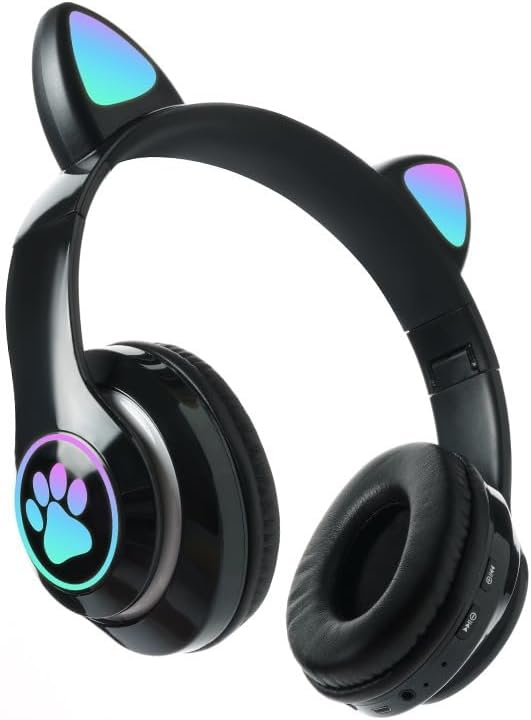
Irudia: Aurrealdea view of the STN-28 headset in black, showcasing the luminous cat ears and paw print design on the earcups.

Image: Two STN-28 headsets, one in purple and one in pink, displayed on a wooden stand, highlighting their colorful design and cat ear feature.
Control Buttons (Typical Layout - Refer to your specific model for exact placement):
- Pizteko botoia: Piztu/Itzali, Erreproduzitu/Pausatu, Deia erantzun/Amaitu.
- Bolumena igo (+): Bolumena igo, Hurrengo abestia (luze sakatuta).
- Bolumena jaitsi (-): Bolumena jaitsi, Aurreko abestia (luze sakatuta).
- Modu botoia (M): Switch between Bluetooth and TF Card mode.
- USB kargatzeko ataka: Entzungailua kargatzeko.
- TF txartelaren zirrikitua: Insert external TF card for music playback.
- LED adierazle argia: Shows power, connection, and charging status.
5. Konfigurazioa
5.1 Entzungailuak kargatzea
- Connect the USB charging cable to the headset's USB charging port.
- Konektatu kablearen beste muturra USB elikatze-iturri batera (adibidez, ordenagailuko USB ataka, USB hormako egokitzailea).
- The LED indicator light will show a red light during charging.
- A full charge takes approximately 2 hours. The red light will turn off when fully charged.
Note: Ensure the headset is fully charged before first use for optimal battery life.
5.2 Piztu/Itzaltzea
- Pizteko: Press and hold the Power button for a few seconds until the LED indicator lights flash red and blue.
- Itzaltzeko: Press and hold the Power button for a few seconds until the LED indicator light turns off.
5.3 Bluetooth parekatzea
- Ziurtatu entzungailuak guztiz kargatuta eta itzalita daudela.
- Press and hold the Power button until the LED indicator lights flash red and blue alternately. This indicates the headset is in pairing mode.
- Zure gailuan (smartphone-a, tableta, ordenagailu eramangarria), gaitu Bluetooth-a eta bilatu eskuragarri dauden gailuak.
- Select "STN-28" or "LX-B39C" from the list of found devices.
- Once successfully paired, the LED indicator light on the headset will flash blue slowly.
Note: The headset supports Bluetooth 5.0+EDR for stable and efficient connection.
6. Funtzionamendu-argibideak
6.1 Musika Erreprodukzioa (Bluetooth Modua)
- Erreproduzitu/Pausatu: Sakatu labur pizteko botoia.
- Bolumena igo: Sakatu labur "+" botoia.
- Bolumena jaitsi: Sakatu labur "-" botoia.
- Hurrengo ibilbidea: Sakatu luze "+" botoia.
- Aurreko pista: Sakatu luze "-" botoia.
6.2 Telefono deiak
- Erantzun deia: Short press the Power button when an incoming call rings.
- Amaitu deia: Sakatu labur pizteko botoia dei batean zehar.
- Deia baztertu: Sakatu luze pizteko botoia sarrerako dei bat jotzen duenean.
6.3 TF txartelaren erreprodukzioa
- Sartu MP3 audioa duen TF (MicroSD) txartel bat files TF txartelaren zirrikituan sartu.
- The headset will automatically switch to TF card playback mode, or you may need to short press the "M" (Mode) button to switch.
- Use the Play/Pause, Volume Up/Down, and Next/Previous Track buttons as described in section 6.1.
6.4 Luminous Cat Ear Feature
The cat ears and paw print on the earcups feature luminous accents. This feature is typically activated automatically when the headset is powered on. There is no specific control mentioned for this feature, implying it's always on when the headset is active.
7. Mantentzea eta Zainketa
- Garbiketa: Wipe the headset regularly with a soft, dry, lint-free cloth. Do not use liquid cleaners or sprays.
- Biltegiratzea: When not in use, store the headset in a cool, dry place away from direct sunlight and extreme temperatures.
- Bateria zaintzea: Bateriaren iraupena luzatzeko, saihestu bateria maiz erabat deskargatzea. Kargatu entzungailuak aldizka, denbora luzez erabiltzen ez badituzu ere.
- Uraren erresistentzia: The headset is listed as "Waterproof". While it offers protection against water, avoid submerging it in water or exposing it to heavy rain for prolonged periods to prevent damage.
8. Arazoak
| Arazoa | Kausa posiblea | Irtenbidea |
|---|---|---|
| Aurikularrak ez dira pizten. | Bateria baxua. | Charge the headset fully (approx. 2 hours). |
| Ezin da gailuarekin parekatu. | Aurikularrak ez daude parekatze moduan; Bluetooth-a itzalita gailuan; gailua urrunegi dago. | Ensure headset is flashing red/blue; enable Bluetooth on device; keep devices within 10 meters. Try forgetting the device on your phone and re-pairing. |
| Soinurik ez edo bolumen baxua. | Bolumena baxuegia da entzungailuetan edo gailuan; entzungailuak ez daude konektatuta. | Increase volume on both headset and connected device. Ensure headset is properly paired. |
| TF txartela ez da erreproduzitzen. | Txartela ez da behar bezala sartu; ez da bateragarria file format; headset not in TF card mode. | Reinsert TF card; ensure files are MP3; press 'M' button to switch to TF card mode. |
9. Zehaztapenak
| Eredua | STN-28 / LX-B39C |
| Janzteko metodoa | Head-mounted folding |
| Bluetooth bertsioa | Bluetooth 5.0+EDR |
| Supported Bluetooth Modes | A2DP 1.2, AVRCP 1.0, HSP, HSF 1.5 |
| Bateria Edukiera | 400mAh Polymer A-grade Lithium Battery |
| Speaker Size / Impedance | 40mm / 32Ω |
| Transmisio-barrutia | ≤10 meters (33 feet) |
| Kargatzeko Denbora | Gutxi gorabehera. 2 ordu |
| Musika erreproduzitzeko denbora | ≤6 ordu |
| Hitzaldi Denbora | ≤6 ordu |
| Egonean Denbora | 200 ordu |
| Maiztasun barrutia | 20 Hz - 20,000 Hz |
| Uraren Erresistentzia Maila | Iragazgaitza |
| Kontrol mota | Media Control, Touch (via buttons) |
| Ezaugarri bereziak | Luminous Cat Ears, TF Card Playback |
10. Bermea eta Laguntza
This product comes with a standard manufacturer's warranty. For specific warranty terms, conditions, and duration, please refer to the warranty card included with your purchase or contact the retailer where you purchased the product.
For technical support or inquiries, please contact your retailer or the manufacturer directly. Keep your purchase receipt as proof of purchase for warranty claims.


