
1. Sarrera
Thank you for choosing the KAISER KXB-3008 8-inch Studio Speaker. This manual provides essential information for the safe and efficient operation of your new portable speaker. Please read this manual thoroughly before use and retain it for future reference.
2. Produktua amaitu daview
2.1 Ezaugarri nagusiak
- Bluetooth Connectivity: Seamlessly connect your devices wirelessly.
- LED Lights: Enhance your audio experience with dynamic LED lighting.
- Karaoke Function: Enjoy singing along with built-in karaoke features.
- Voice Effects: Experiment with various voice effects for entertainment.
- Rechargeable Battery: Portable design with a long-lasting rechargeable battery.
- KSR-Link Technology: Connect with another compatible KAISER speaker for enhanced stereo sound.
2.2 Barne dauden osagaiak
- 1 x KAISER KXB-3008 Speaker
- 1 x kabledun mikrofonoa
- 1 x Erabiltzailearen eskuliburua
- 1 x Elikatze-kablea

1. irudia: Aurrealdea view of the KAISER KXB-3008 speaker, showcasing its grille and dynamic LED lighting.

Figure 2: The wired microphone provided with the speaker, featuring an on/off switch.
3. Konfigurazioa
3.1 Hasierako karga
Before first use, fully charge the speaker for at least 4 hours. Connect the power cable to the speaker's power input and a suitable power outlet. The charging indicator light will show the charging status.
3.2 Piztu/Itzaltzea
- To turn on the speaker, locate the ON/OFF switch on the control panel and slide it to the "ON" position.
- To turn off the speaker, slide the ON/OFF switch to the "OFF" position.

Figure 3: Top control panel showing the power switch and other function buttons.
4. Funtzionamendua
4.1 Bluetooth konexioa
- Piztu bozgorailua.
- Press the "MODE" button until "BLUE" appears on the display, indicating Bluetooth mode.
- Gaitu Bluetooth-a zure gailuan (telefono adimenduna, tableta, etab.).
- Bilatu "KXB-3008" in your device's Bluetooth list and select it to pair.
- Baieztapen-soinu batek parekatzea arrakastatsua dela adieraziko du.
4.2 KSR-Link Technology (True Wireless Stereo)
KSR-Link allows you to connect two KAISER KXB-3008 speakers wirelessly for a stereo sound experience.
- Ensure both KXB-3008 speakers are powered on and in Bluetooth mode.
- On one speaker (this will be the master speaker), press and hold the "MODE" button for a few seconds until you hear a pairing tone.
- Bi bozgorailuak automatikoki konektatuko dira elkarri.
- Once connected, pair your device to the master speaker via Bluetooth as described in section 4.1.
4.3 Using USB/Micro SD
Insert a USB flash drive or Micro SD card into the respective port on the control panel. The speaker will automatically switch to USB/SD mode and begin playing compatible audio fileak (adibidez, MP3).
4.4 Irratia FM
Press the "MODE" button to switch to FM radio mode. Use the playback control buttons (previous/next track) to scan for stations. The display will show the current frequency.
4.5 Karaoke funtzioa
Connect the wired microphone to the "MIC" input. Adjust the microphone volume and echo effects using the dedicated knobs on the control panel. Play your music and sing along.
Video 1: Demonstration of a Kaiser 8-inch speaker, highlighting its features and controls. Note: This video features a similar 8-inch Kaiser speaker model.
5. Kontrolak eta konexioak
5.1 Kontrol-panela amaituview
The top panel of the speaker features various buttons and knobs for controlling playback, volume, and other functions.
4. irudia: Xehetasuna view of the top control panel, including volume, mode, playback, and bass controls.
- VOL (Volume Knob): Bozgorailuen bolumen nagusia doitzen du.
- MIC VOL (Microphone Volume Knob): Konektatutako mikrofonoaren bolumena doitzen du.
- ECHO (Echo Knob): Mikrofonoaren oihartzun efektua doitzen du.
- BASS (Bass Button): Activates or adjusts the bass boost.
- MODE botoia: Sarrera moduen artean aldatzen du (Bluetooth, FM irratia, USB, Mikro SD, AUX).
- Argiaren botoia: Toggles or changes the LED light patterns.
- Erreprodukzio kontrolak: Erreproduzitu/Pausatu, Aurreko pista, Hurrengo pista.
5.2 Sarrera/Irteera Portuak
The rear panel of the speaker provides various ports for connectivity.
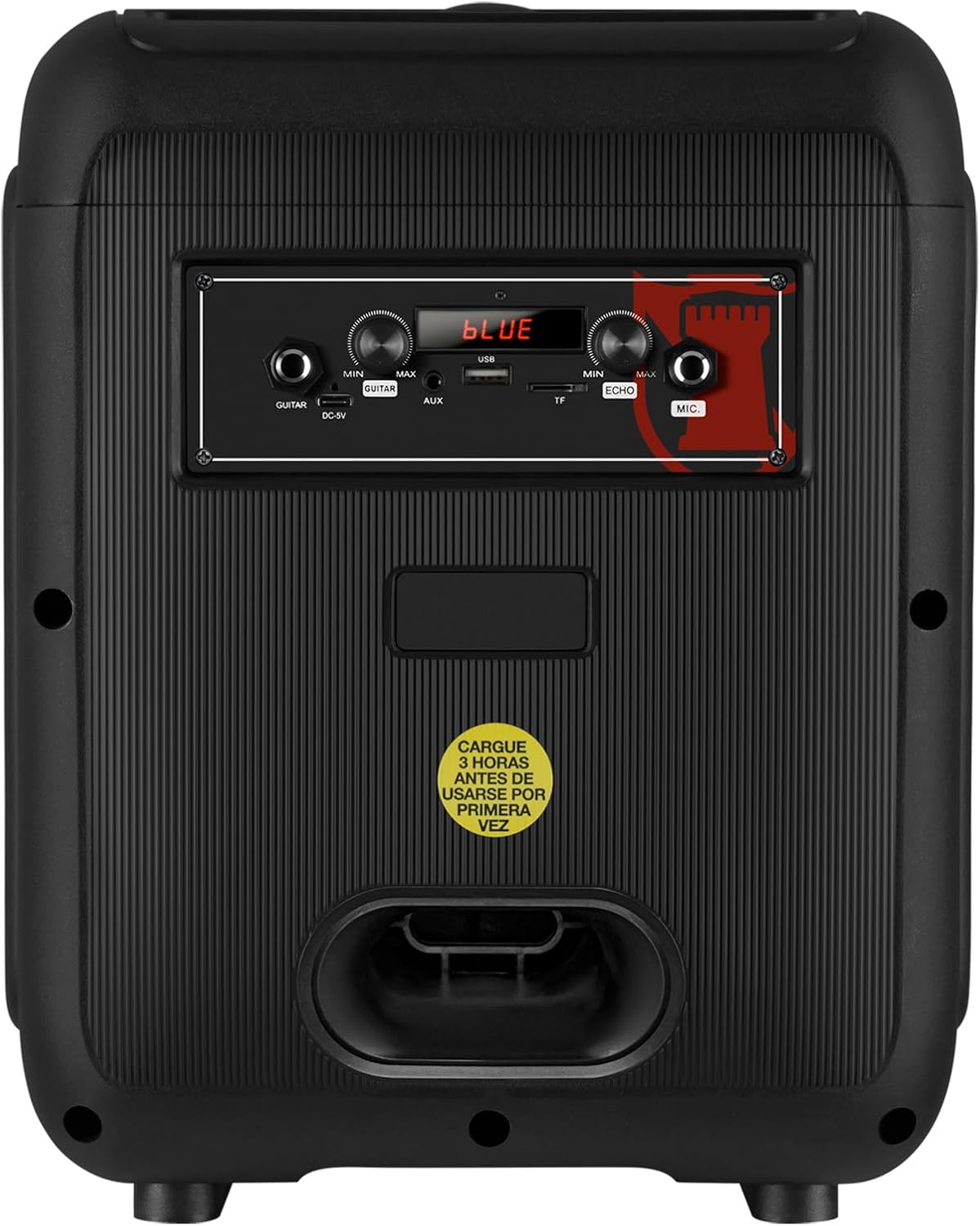
Figure 5: Rear panel showing the AUX, USB, Micro SD, and Microphone input ports, along with the power input.
- AUX sarrera: Konektatu kanpoko audio gailuak 3.5 mm-ko audio kable bat erabiliz.
- USB ataka: Insert a USB flash drive for MP3 playback.
- Mikro SD zirrikitua: Sartu Mikro SD txartel bat MP3 erreproduzitzeko.
- Mikroaren sarrera: Connect a wired microphone for karaoke or announcements.
- DC-9V Input: Bozgorailua kargatzeko sarrera.
6. Zehaztapenak
| Ezaugarri | Deskribapena |
|---|---|
| Ereduaren izena | KXB-3008 |
| Hizlari mota | Hizlari eramangarria |
| Ezaugarri bereziak | Lightweight, LED Light, Karaoke Function |
| Gomendatutako Erabilerak | Gaming Consoles, Laptops, Smartphones, Tablets |
| Gailu bateragarriak | Smartphone, Tablet, Laptop, Gaming Console |
| Subwoofer-aren diametroa | 8 hazbete |
| Kolorea | Beltza |
| Produktuaren neurriak | 31cm (Depth) x 29cm (Width) x 42cm (Height) |
| Produktuaren pisua | 5 kilogramo |
| Iragazgaitza | Gezurra |
| Kontrol-metodoa | Urruneko Kontrola |
| Haririk gabeko Teknologia | Bluetootha |
| Energia iturria | Bateria |
| Bozgorailuen irteera maximoa | 30 Watt |
| Bateriaren batez besteko iraupena | 6 ordu |
| Audio irteera modua | Estereoa, Inguratzailea |
| Muntatze Mota | Floor Mount, Table Mount |
7. Mantentzea
- Garbiketa: Erabili zapi leun eta lehor bat bozgorailuen kanpoaldea garbitzeko. Ez erabili garbitzaile edo disolbatzaile urratzailerik.
- Biltegiratzea: Gorde bozgorailua leku fresko eta lehor batean, eguzki-argitik eta muturreko tenperaturetatik babestuta.
- Bateria zaintzea: Bateriaren iraupena luzatzeko, saihestu bateria maiz erabat deskargatzea. Kargatu bozgorailua aldizka, denbora luzez erabiltzen ez bada ere.
- Saihestu ura: This speaker is not waterproof. Keep it away from liquids to prevent damage.
8. Arazoak
| Arazoa | Irtenbide posiblea |
|---|---|
| Bozgorailua ez da pizten. | Ensure the battery is charged. Connect the power cable and try again. Check the power switch position. |
| Soinurik ez. | Check the volume level on both the speaker and your connected device. Ensure the correct input mode is selected (Bluetooth, AUX, USB/SD). |
| Bluetooth parekatzeak huts egiten du. | Ensure the speaker is in Bluetooth mode. Make sure your device's Bluetooth is enabled and within range. Forget previous pairings on your device and try pairing again. |
| Mikrofonoa ez dabil. | Ensure the microphone is properly connected to the MIC input. Check the microphone's ON/OFF switch and adjust the MIC VOL knob. |
| KSR-Link connection issues. | Ensure both speakers are KXB-3008 models and are in Bluetooth mode. Try re-initiating the KSR-Link pairing process. |
9. Bermea eta Laguntza
This product comes with a Limited Warranty. Please refer to the warranty card included in the packaging for detailed terms and conditions.
For technical support or customer service, please visit the official Kaiser webgunera edo jarri harremanetan tokiko saltzailearekin.