
Sarrera
Thank you for choosing the KLIM K7 Cassette Tape Player and MP3 Converter. This device allows you to enjoy your classic cassette tapes and convert them into digital MP3 files for modern playback. It features a built-in microphone for recording, an integrated speaker, and a rechargeable battery for portability. This manual provides detailed instructions for setup, operation, and maintenance of your KLIM K7.
Produktua amaituview
Ezaugarri nagusiak
- Cassette to MP3 Converter: Effortlessly convert cassette tapes to digital MP3 files directly onto an SD card.
- Diseinu eramangarria: Lightweight and compact for on-the-go listening.
- Mikrofono integratua: Record audio directly to the SD card.
- Bozgorailu integratua: Share your audio without external devices.
- Bateria kargagarria: Integrated 1000mAh battery provides extended playback.
- SD Card Player: Erreproduzitu MP3 fileSD txartelean gordeta dago.
- 3.5 mm-ko aurikularretarako konektua: For private listening with included earphones.
Gailuaren osagaiak eta kontrolak
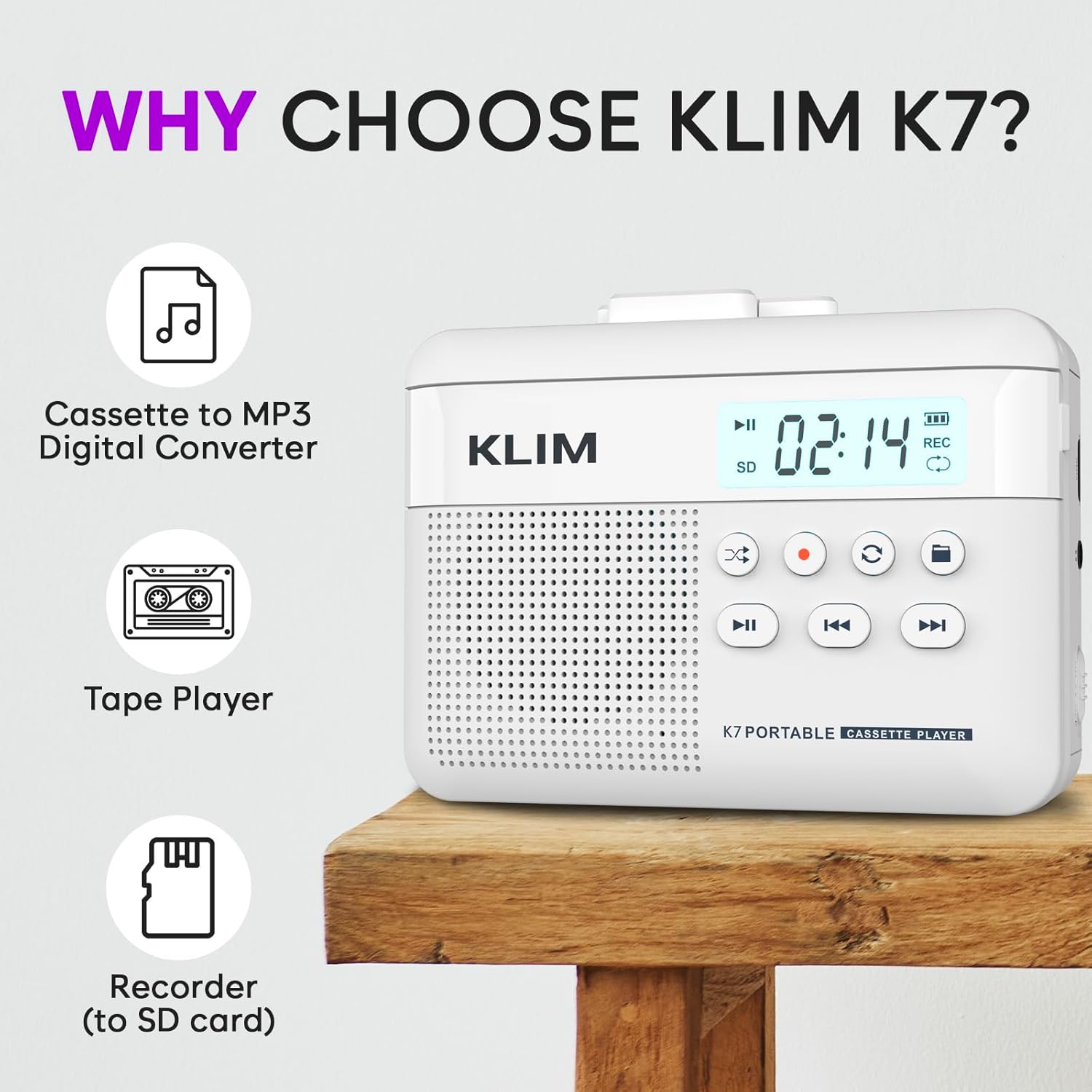
1. irudia: Aurrealdea view of the KLIM K7 Cassette Player, showing the speaker grille, LCD display, and control buttons (Play/Pause, Rewind, Fast Forward, Stop, Record, Mode, Folder, Loop).
- LCD pantaila: Shows track number, recording status, and battery level.
- Hizlaria: Bozgorailu integratua audioa erreproduzitzeko.
- Play/Pause Button (►▮): Erreprodukzioa hasten edo eten egiten du.
- Rewind Button (◀◀): Rewinds the cassette tape or navigates backward through MP3 tracks.
- Fast Forward Button (►►): Fast forwards the cassette tape or navigates forward through MP3 tracks.
- Gelditzeko botoia (■): Erreprodukzioa edo grabazioa gelditzen du.
- Record Button (●): Initiates or stops recording.
- Modu botoia (↻): Switches between cassette playback and SD card MP3 playback.
- Folder Button (🖿): Navigates through folders on the SD card.
- Loop Button (⟳): Uneko pista edo pista guztiak errepikatzen ditu.

2. irudia: Aldea view of the KLIM K7 Cassette Player, highlighting the SD card slot, 3.5mm headphone jack, and On/Off switch.
- SD txartelaren zirrikitua: Insert your Micro SD card here for recording and MP3 playback.
- 3.5 mm aurikularretarako konektua: Connect the included earphones or other standard headphones.
- Piztu/Itzali etengailua: Gailua piztu edo itzaltzen du.
- Bolumen kontrola: Audio irteera-maila doitzen du.

3. irudia: Goiena view of the KLIM K7 Cassette Player with the cassette compartment open, showing the tape mechanism.
- Kasete konpartimentua: Insert your cassette tapes here.
- Cassette Door Release: Opens the cassette compartment.
Konfigurazioa
1. Bateria kargatzea
Before first use, fully charge the KLIM K7. The device comes with a 1000mAh rechargeable battery.
- Locate the Type-C USB charging port on the side of the device.
- Connect the included Type-C USB cable to the charging port and the other end to a USB power adapter (not included) or a computer's USB port.
- The charging indicator on the LCD display will show charging status. A full charge typically takes approximately 2 hours.

4. irudia: The KLIM K7 connected to a Type-C USB cable for charging.
2. SD txartel bat sartzea
An SD card (16GB included) is required for converting tapes to MP3 and for recording with the built-in microphone.
- Locate the SD card slot on the side of the device (refer to Figure 2).
- Sartu mikro SD txartela zirrikituan astiro, urrezko kontaktuak behera begira dituela, klik egin arte.
- To remove, push the SD card inward until it clicks, then release, and it will eject.

5. irudia: Inserting the Micro SD card into the KLIM K7.
3. Kasete bat sartzea
- Press the Cassette Door Release button to open the cassette compartment.
- Insert your cassette tape with the open side facing upwards and the tape reels aligned with the player's mechanism.
- Close the cassette compartment door firmly until it clicks.
Funtzionamendu-argibideak
1. Kaseteak erreproduzitzen
- Ensure the device is powered on using the On/Off switch.
- Insert a cassette tape as described in the Setup section.
- Sakatu Play/Pause (►▮) botoia erreproduzitzen hasteko.
- Doitu bolumena bolumen-kontrola erabiliz.
- Erabili Rewind (◀◀) eta Aurrerapen azkarra (►►) botoiak zintan nabigatzeko.
- Sakatu Gelditu (■) botoia erreprodukzioa amaitzeko.
2. Converting Cassette Tapes to MP3
The KLIM K7 allows direct conversion of cassette audio to MP3 files on the inserted SD card, without needing a computer or additional software.
- Ensure an SD card is inserted and the device is powered on.
- Insert the cassette tape you wish to convert.
- Sakatu Play/Pause (►▮) button to start playing the tape.
- Prentsa luzea du Erregistroa (●) button. The 'REC' indicator on the LCD display will illuminate, indicating that recording has started.
- Grabaketa gelditzeko, sakatu Erregistroa (●) button again. The 'REC' indicator will turn off. The recorded audio will be saved as an MP3 file SD txartelean.
- You can then remove the SD card and use the included SD card reader to transfer the MP3 files to a computer or other device.

6. irudia: Visual guide for converting cassette audio to MP3 files.
3. Using the Built-in Microphone for Recording
The KLIM K7 can also record audio directly from its built-in microphone to the SD card.
- Ensure an SD card is inserted and the device is powered on.
- Sakatu Mode (↻) button until the device is in SD card mode (no cassette playing).
- Prentsa luzea du Erregistroa (●) button. The 'REC' indicator will light up, and the device will start recording audio from its microphone.
- Grabaketa gelditzeko, sakatu Erregistroa (●) button again. The 'REC' indicator will turn off, and the recording will be saved as an MP3 file.

7. irudia: Using the KLIM K7's built-in microphone for recording.
4. Playing MP3 Files from SD Card
- Ensure an SD card with MP3 files is inserted and the device is powered on.
- Sakatu Mode (↻) button to switch to SD card playback mode. The LCD display will show track information.
- Sakatu Play/Pause (►▮) botoia erreproduzitzen hasteko.
- Erabili Rewind (◀◀) eta Aurrerapen azkarra (►►) pistak saltatzeko botoiak.
- The Folder (🖿) button allows navigation through different folders on the SD card.
- The Loop (⟳) button can be used to repeat the current track or all tracks.
- Doitu bolumena bolumen-kontrola erabiliz.
- Sakatu Gelditu (■) botoia erreprodukzioa amaitzeko.

8. irudia: Enjoying audio with the KLIM K7 and included earphones.
Mantentzea
Proper maintenance ensures the longevity and optimal performance of your KLIM K7.
- Garbiketa: Erabili zapi leun eta lehor bat gailuaren kanpoaldea garbitzeko. Ez erabili garbitzaile likidorik edo disolbatzailerik.
- Kasete konpartimentua: Aldian-aldian garbitu zinta-buruak eta pintza-arrabolak kotoi-zapi batekin, arinki garbituz.ampened with isopropyl alcohol to prevent audio quality degradation. Ensure the device is off and dry before use.
- Biltegiratzea: Gorde gailua leku fresko eta lehor batean, eguzki-argitik eta muturreko tenperaturetatik babestuta.
- Bateria zaintzea: For long-term storage, charge the battery to about 50% every few months to maintain battery health.
Arazoak konpontzea
If you encounter any issues with your KLIM K7, please refer to the following common solutions:
| Arazoa | Kausa posiblea | Irtenbidea |
|---|---|---|
| Gailua ez da pizten. | Bateria agortuta dago. | Charge the device using the provided Type-C USB cable. |
| No sound during cassette playback. | Bolumena baxuegia da edo entzungailuak ez daude behar bezala konektatuta. | Increase the volume. Ensure headphones are fully plugged into the 3.5mm jack. |
| Recording to MP3 fails or produces no file. | SD txartela beteta dago, ez dago behar bezala sartuta edo hondatuta dago. | Check SD card insertion. Ensure sufficient space on the SD card. Try reformatting the SD card (this will erase all data). |
| Poor audio quality from cassette. | Dirty tape heads or worn-out cassette tape. | Clean the tape heads and pinch rollers. Try a different cassette tape to determine if the issue is with the tape itself. |
| Gailua blokeatu egiten da edo ez du erantzuten. | Softwarearen aldi baterako akatsa. | Turn the device off and then on again. If the issue persists, allow the battery to fully discharge and then recharge. |
Zehaztapenak
- Produktuaren neurriak: 4.76 x 3.61 x 1.56 hazbete
- Elementuaren pisua: 9.9 ontza
- Bateria: Litio-ioizko bateria 1 (barne), 1000 mAh
- Kargatzeko denbora: 2 ordu gutxi gorabehera
- Biltegiratzea: Supports Micro SD card (16GB included)
- Audio irteera: Built-in speaker, 3.5mm headphone jack
- Grabaketa formatua: MP3

9. irudia: Dimensions of the KLIM K7 Cassette Player.
Bermea eta Laguntza
KLIM is committed to producing quality electronics. The KLIM K7 Cassette Tape Player comes with a Urtebeteko bermea. If you encounter any problems with your device, please contact KLIM customer support for assistance.
Babes-plan gehigarriak eros daitezke:
- 2 Urteko Babes Plana: 3.99 $ (behin bakarrik)
- 3 Urteko Babes Plana: 5.99 $ (behin bakarrik)
- NEW Complete Protect: $16.99 (monthly)
Laguntza gehiago lortzeko, bisitatu KLIM denda Amazonen.