
1. Sarrera
The Radtel RT16 FRS Two Way Radio is designed for reliable, license-free communication across 16 channels. Featuring a durable build, USB-C charging, and VOX functionality, it is suitable for various environments from outdoor activities to commercial settings.
Paketearen edukia
Your Radtel RT16 package includes:
- 2x Radtel RT16 Two Way Radios
- 2x Rechargeable Lithium-Ion Batteries (2000mAh)
- 2x Gerriko klipak
- 2x USB-C Charger Cables
- 2x Earpieces
- 1x Erabiltzailearen eskuliburua
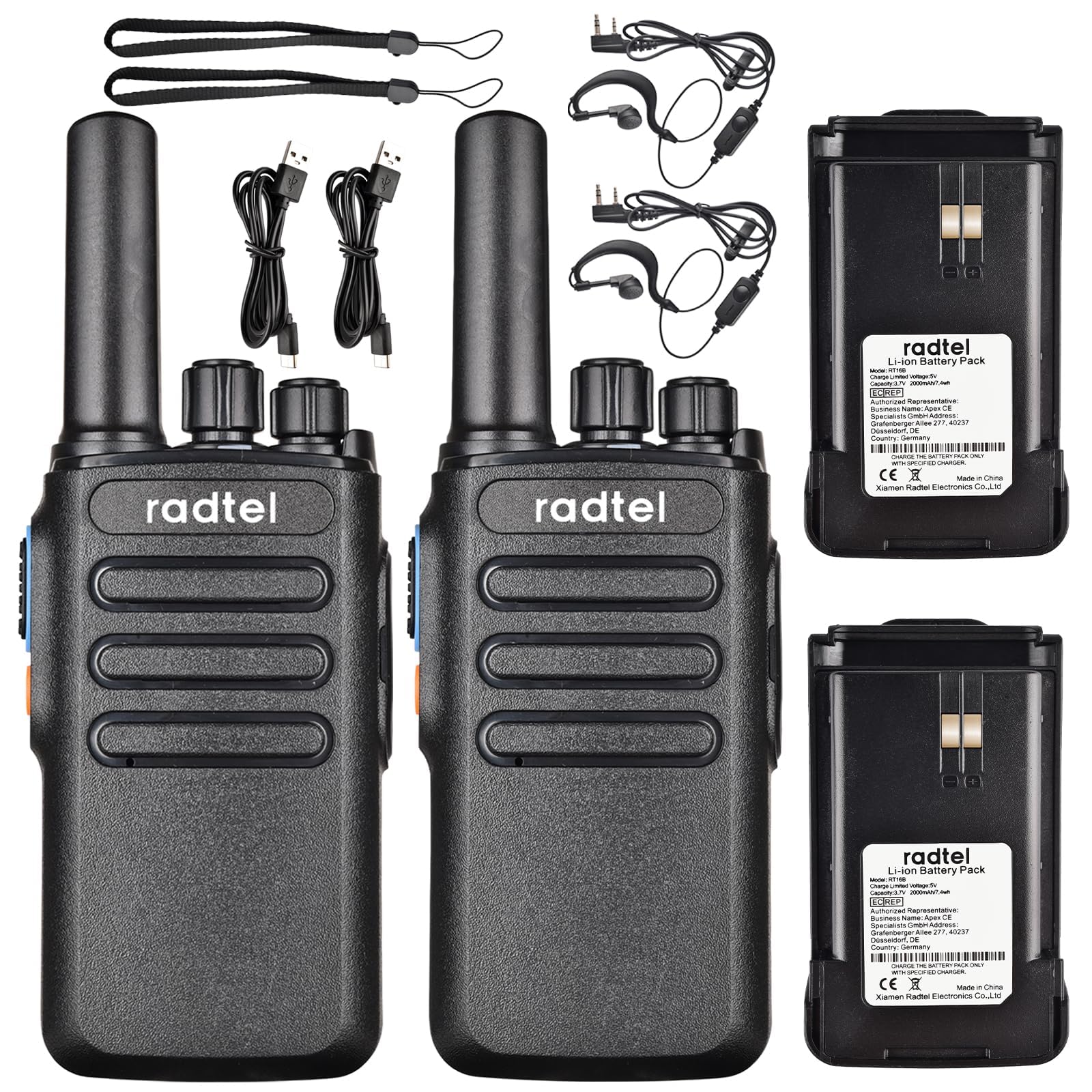
Image 1.1: Radtel RT16 Two Way Radios and included accessories.
2. Konfigurazioa
2.1 Bateriaren instalazioa
- Ziurtatu irratia itzalita dagoela.
- Kokatu bateriaren konpartimendua irratiaren atzealdean.
- Irristatu bateria konpartimentuan, ondo sartu arte klik egin arte.

Image 2.1: Battery compartment and belt clip attachment.
2.2 Gerrikoko kliparen eranskina
- Align the belt clip with the designated slots on the back of the radio.
- Push the clip firmly until it locks into position.
2.3 Bateria kargatzea
The RT16 radios feature convenient USB-C charging. Use the provided USB-C cable to charge the radio. The charging port is located at the bottom of the radio.
- Connect the USB-C cable to the charging port on the radio.
- Connect the other end of the cable to a compatible USB power source (e.g., phone charger, power bank, car adapter).
- The indicator light on the radio will show charging status (refer to the LED indicator section for details).

Image 2.2: USB-C charging options for the RT16.
3. Funtzionamendu-argibideak
3.1 Piztea/Itzaltzea eta Bolumenaren Kontrola
To power on the radio, rotate the top-left knob clockwise until you hear a click and a voice prompt indicating the current channel. Continue rotating to adjust the volume. To power off, rotate the knob counter-clockwise until it clicks off.
3.2 Kanalaren hautaketa
The RT16 has 16 available channels. To select a channel, rotate the top-right knob. The radio will announce the selected channel number.

3.1. irudia: Goian view of the RT16 showing power/volume and channel knobs.
3.3 Push-To Talk (PTT) botoia
To transmit your voice, press and hold the large button on the side of the radio. Release the button to listen.
3.4 Entzungailuen konexioa
The radio supports a 2-pin K-connector headset for hands-free operation. Open the rubber cover on the side of the radio and plug in the headset connectors.

Image 3.2: Headset connection port on the RT16.
3.5 Voice Operated Exchange (VOX) Function
The VOX function allows for hands-free transmission without pressing the PTT button. The radio will automatically transmit when it detects your voice. This feature requires software activation for first use and offers 9 adjustable levels.

Image 3.3: Illustration of VOX function for hands-free use.
Activating VOX Mode
To activate VOX mode, hold down the small side button while powering on the radio. Continue holding until you hear a beep indicating activation.
Video 3.1: Demonstrates how to activate the voice control (VOX) mode on the Radtel RT16 radio.
Deactivating VOX Mode
To deactivate VOX mode, hold down the small side button while powering on the radio. Continue holding until you hear two beeps, confirming deactivation.
Video 3.2: Demonstrates how to deactivate the voice control (VOX) mode on the Radtel RT16 radio.
3.6 Language Switch Operation
The radio supports both Chinese and English voice prompts. To switch the language, turn the channel knob to channel 16. Then, power off the radio. While powering on, hold down the small side button until you hear a beep. This will switch the language mode.
Video 3.3: Instructions for switching between Chinese and English voice prompts on the Radtel RT16 radio.
4. Mantentzea
- Keep the radio clean by wiping it with a soft, damp oihal. Saihestu produktu kimiko edo disolbatzaile gogorrak erabiltzea.
- Do not immerse the radio in water as it is not water resistant.
- Gorde irratia leku fresko eta lehor batean erabiltzen ez duzunean.
- Ensure the USB-C port cover is securely closed to prevent dust and moisture ingress.
5. Arazoak
| Arazoa | Kausa posiblea | Irtenbidea |
|---|---|---|
| Botererik ez | Bateria baxua edo behar bezala instalatuta ez. | Kargatu bateria edo instalatu berriro segurtasunez. |
| Ezin da beste irratiekin komunikatu | Irratiak kanal desberdinetan edo estaldura-eremutik kanpo daude. | Ensure both radios are on the same channel. Move closer to the other radio. Check for obstructions. |
| Audio kalitate eskasa | Weak signal, interference, or low volume. | Adjust volume. Move to an area with fewer obstructions. Change channel if interference is present. |
| VOX ez dabil | VOX not activated or sensitivity too low. | Activate VOX mode (see Section 3.5). Adjust VOX sensitivity level via programming software. |
6. Zehaztapenak
| Ezaugarri | Xehetasuna |
|---|---|
| Marka | Radtel |
| Modelo zenbakia | RT16 |
| Kanal kopurua | 16 |
| Maiztasun barrutia | 462/467 MHz (FRS Band) |
| Hitz egiteko tartea gehienez | Up to 5 Kilometers (open outdoor areas) |
| Irteera Potentzia | 2W |
| Bateria mota | Litio ioia (2000 mAh) |
| Kargatzen | USB-C |
| Ezaugarri bereziak | Long Range, Type-C rechargeable battery, VOX Function, Channel Scan |
| Uraren Erresistentzia Maila | Ez Urarekiko Erresistentea |
| Produktuaren neurriak | 1.37" L x 2.16" W x 5.9" H |
| Elementuaren pisua | 0.39 kilo |
| Gailu bateragarriak | Other FRS two-way radios, Standard earpieces |
7. Bermea
The Radtel RT16 FRS Two Way Radio comes with a 1-Year Warranty from the manufacturer, Xiamen Radtel Electronics Co.,Ltd.
8. Laguntza
For further assistance or to explore other Radtel products, please visit the official Radtel Store: