
WiFi Extender Seinale Booster
User Manual for WiFi Extender Signal Booster
Model: WiFi Extender Signal Booster
1. Sarrera
Thank you for choosing the WiFi Extender Signal Booster. This manual provides detailed instructions on how to set up, operate, and maintain your device to ensure optimal performance and extend your wireless network coverage effectively. Please read this manual thoroughly before using the product.
2. Produktua amaitu daview
The WiFi Extender Signal Booster is designed to eliminate Wi-Fi dead zones and expand the reach of your existing wireless network. Featuring 6 powerful antennas and dual-band technology (2.4GHz and 5GHz), it delivers stable and high-speed internet connectivity across a wide area, supporting up to 45 devices simultaneously.

Figure 2.1: The WiFi Extender Signal Booster with its six antennas, shown plugged into a standard wall outlet, illustrating its compact design and signal broadcasting capability.
3. Paketearen edukia
Mesedez, egiaztatu elementu guztiak zure paketean daudela:
- 1 x WiFi Extender Signal Booster Unit
- 1 x 10-foot Ethernet Cable
- 1 x Erabiltzailearen eskuliburua (dokumentu hau)
4. Ezaugarri nagusiak
- Estaldura Hedatua: Designed to cover areas up to 10,000 sq. ft., effectively eliminating Wi-Fi dead zones.
- Powerful Antennas: Equipped with 6 external high-gain antennas for strong, stable signal and improved penetration.
- Banda bikoitzeko teknologia: Supports both 2.4GHz (up to 300Mbps) and 5GHz (up to 866Mbps) bands for versatile and high-speed connections.

Figure 4.1: Illustration of the dual-band capabilities, showing 5.0GHz (867Mbps) for high-bandwidth activities like streaming and gaming, and 2.4GHz (300Mbps) for general internet use.
- Strong Penetrability: Advanced design allows signals to pass through walls more effectively, ensuring consistent coverage throughout your home or office.
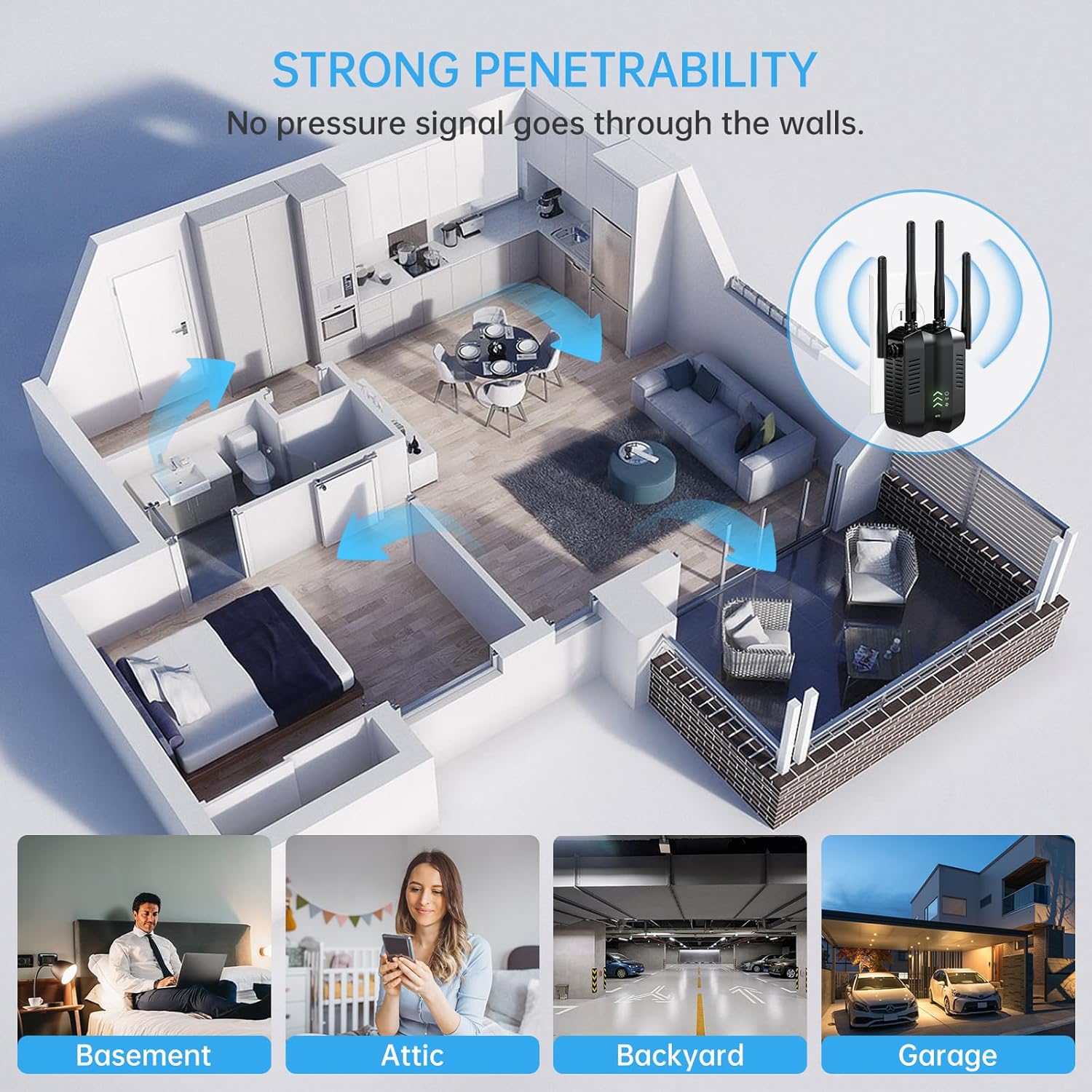
Figure 4.2: Depiction of the extender's strong penetrability, demonstrating how the signal can reach different areas of a multi-story home, including basements, attics, backyards, and garages.
- Bateragarritasun zabala: Connects with any brand of router or access point and supports up to 45 devices, including smartphones, laptops, gaming consoles, smart home devices, and more.

Figure 4.3: Visual representation of the extender's wide compatibility, showing multiple users and a range of devices that can connect simultaneously.
- Segurtasun hobetua: Utilizes bank-grade financial security smart chip and supports WPA/WPA2 security protocols to protect your network and data.
- Errendimendu polifazetikoa: Offers better wireless performance for streaming HD video and online gaming.

Figure 4.4: The extender providing improved wireless performance, suitable for activities like streaming and online fitness.
5. Konfigurazio gida
The WiFi Extender Signal Booster offers three primary operating modes: AP Mode, Repeater Mode, and Router Mode. Choose the mode that best suits your network needs.

5.1 Irudia: Gainetikview of the 3-in-1 mode application, detailing AP Mode, Repeater Mode, and Router Mode connections.
5.1. Hasierako konfigurazioa (Web Browser Method)
- Piztu: Plug the WiFi Extender into a power outlet near your main router. Wait for the indicator lights to stabilize.
- Konektatu luzagailura: On your computer or smartphone, connect to the extender's default Wi-Fi network (e.g., "WiFi_Extender" or similar, check the label on the device). No password is required for the initial connection.
- Sarbide Konfigurazio Orria: Ireki a web browser (e.g., Chrome, Firefox, Safari) and enter the default IP address or web address provided in the quick start guide (often 192.168.1.1 or extender.local).
- Saioa hasi: Sartu erabiltzaile-izen eta pasahitza lehenetsiak (normalean "admin" bietarako, egiaztatu gailuaren etiketa edo hasiera azkarreko gida).
- Aukeratu modua: Follow the on-screen instructions to select your desired operating mode (Repeater, AP, or Router).
- Konfiguratu ezarpenak:
- Errepikagailu modua: Select your existing Wi-Fi network from the list, enter its password, and choose a new name for your extended network (or keep the same name).
- AP modua: Connect the extender to your router via the provided Ethernet cable. Configure a new Wi-Fi network name (SSID) and password for the extender.
- Router modua: Connect the extender to your modem via the Ethernet cable. Configure your internet connection type (e.g., PPPoE, Dynamic IP) and set up your new Wi-Fi network name (SSID) and password.
- Aplikatu ezarpenak: Save your settings. The extender will restart.
- Tokiz aldatu luzatzailea: Once configured, unplug the extender and move it to a location halfway between your router and the Wi-Fi dead zone. Ensure the signal indicator lights show a good connection.
5.2. WPS Button Setup (Repeater Mode Only)
For a quick setup in Repeater Mode, you can use the WPS (Wi-Fi Protected Setup) button:
- Piztu: Plug the WiFi Extender into a power outlet near your main router.
- Sakatu WPS luzagailuan: Press the WPS button on the WiFi Extender. The WPS indicator light will start blinking.
- Sakatu WPS bideratzailean: Within two minutes, press the WPS button on your main router.
- Konexioaren zain: The extender will automatically connect to your router. The indicator light will turn solid when the connection is established.
- Tokiz aldatu luzatzailea: Unplug the extender and move it to an optimal location between your router and the area needing coverage.
6. Operating Modes Explained
Understanding the different operating modes will help you optimize your network setup:
- Repeater Mode (Range Extender Mode):
This is the most common mode. The extender wirelessly connects to your existing router and amplifies its signal, extending Wi-Fi coverage to areas with weak or no signal. It uses the same SSID (network name) or a new one, providing seamless roaming or a distinct extended network.
- AP modua (Access Point Mode):
In AP mode, the extender connects to your router via an Ethernet cable and transforms your wired network connection into a wireless one. This is ideal for adding Wi-Fi capability to a wired-only network or creating a new Wi-Fi hotspot in a specific area.
- Router modua:
When set to Router Mode, the device functions as a primary router, connecting directly to your modem via an Ethernet cable. It creates a new private network with its own SSID and password, providing internet access to all connected devices. This mode is suitable if you don't have an existing router or want to replace an old one.
7. Mantentzea
To ensure the longevity and optimal performance of your WiFi Extender Signal Booster, consider the following maintenance tips:
- Kokapen egokiena: Position the extender in an open area, away from obstructions like large metal objects, concrete walls, or other electronic devices that may cause interference. A central location between your router and the desired coverage area is usually best.
- Mantendu aireztatuta: Ensure the device has adequate ventilation. Do not cover the ventilation holes or place it in an enclosed space to prevent overheating.
- Ohiko garbiketa: Gently wipe the exterior of the device with a soft, dry cloth to remove dust. Do not use liquid cleaners or abrasive materials.
- Firmware eguneraketak: Aldian-aldian egiaztatu fabrikatzailearen website for firmware updates. Keeping the firmware updated can improve performance, add new features, and enhance security.
- Potentzia-zikloa: If you experience connectivity issues, try power cycling the extender (unplug it for 10 seconds, then plug it back in). This can often resolve minor glitches.
8. Arazoak
If you encounter issues with your WiFi Extender Signal Booster, refer to the following common problems and solutions:
| Arazoa | Balizko Kausa / Irtenbidea |
|---|---|
| Extender not showing up in Wi-Fi settings / Cannot connect to extender's network. |
|
| No internet access after connecting to the extended network. |
|
| Slow internet speed on the extended network. |
|
| Konexioa maiz galtzen da. |
|
9. Zehaztapenak
| Ezaugarri | Xehetasuna |
|---|---|
| Marka | Generikoa |
| Eredua | WiFi Extender Seinale Booster |
| Haririk gabeko estandarrak | IEEE802.11b/g/n |
| Maiztasun Bandak | 2.4GHz and 5GHz Dual Band |
| Abiadura maximoa (2.4 GHz) | Gehienez 300 Mbps |
| Abiadura maximoa (5 GHz) | Gehienez 866 Mbps |
| Antenak | 6 Kanpoko Irabazpen Handiko Antena |
| Estaldura Eremua | Gehienez 10,000 sq. |
| Gailu bateragarriak | Up to 45 devices (smartphones, laptops, Xbox/PS, IoT devices, etc.) |
| Segurtasun-protokoloak | WPA/WPA2 |
| Dakarten osagaiak | WiFi Extender, 10-foot Ethernet Cable |
| Fabrikatzailea | Shenzhen Lingchuangxun Technology Co., Ltd |
| Eskuragarri dagoen lehen data | 13ko irailaren 2024a |
10. Bermea eta Laguntza
This WiFi Extender Signal Booster comes with a 1-Year Warranty Policy. The manufacturer, Edtiske (as mentioned in feature bullets), provides lifelong technical support for this product. For any technical assistance or warranty claims, please refer to the contact information provided with your purchase or visit the manufacturer's official support channels.
Ask a question about this manual
Ask about setup, troubleshooting, compatibility, parts, safety, or missing instructions. Manuals+ will review the question and use this page’s manual context to help answer it.