
Sarrera
This instruction manual provides detailed guidance for the Anderic RR787T Replacement Remote Control. Designed as a direct replacement for RH787T and UC787T remotes, it offers comprehensive control for Casablanca DC motor ceiling fans and other compatible high-end models. Features include six fan speeds, reverse airflow, and dimmable light control (for incandescent bulbs). This remote is specifically engineered for ceiling fans utilizing receivers with 4 dip switches, including those originally paired with the RH786R receiver.
Paketearen edukia
Egiaztatu elementu guztiak zure paketean daudela:
- Anderic RR787T urrutiko agintea
- Horma-muntatzeko euskarria
- Muntatzeko torlojuak eta hormako aingurak
- Note: Two AAA batteries are required and not included.

Image: Anderic RR787T remote control securely placed in its wall mount holder.
Konfigurazioa
Follow these steps to set up your new remote control:
- Instalatu bateriak: Open the battery compartment on the back of the remote. Insert two AAA batteries (not included), ensuring correct polarity.
- Set Dip Switches: Locate the 4 dip switches inside the battery compartment. Match the dip switch settings on your new Anderic RR787T remote to the settings on your existing ceiling fan receiver or old remote. This step is crucial for proper communication between the remote and the fan.
- Muntatu horma-euskarria: Use the provided screws and wall anchors to securely mount the wall bracket in a convenient location.
- Insert Remote: Slide the remote control into the mounted wall bracket.

Irudia: Atzealdea view of the Anderic RR787T remote, highlighting the battery compartment and dip switches for configuration.
Konfigurazio erakustaldi bideoa
Video: A demonstration of a similar Anderic remote (UC7225T) showing its features and operation, which can provide general guidance for setup and use. Note that this video is for a different model (UC7225T) but from the same brand.
Funtzionamendu-argibideak
The Anderic RR787T remote offers intuitive control over your ceiling fan and light:
- Piztu/Itzali: Sakatu pizteko botoia haizagailua eta argia pizteko edo itzaltzeko.
- Fan abiadura kontrola: Use the fan speed buttons (typically marked I, II, III, IV, V, VI or Low, Med, High) to adjust the fan's rotation speed. The RR787T supports 6 fan speeds.
- Alderantzizko aire-fluxua: Press the reverse button to change the direction of the fan blades, allowing for seasonal comfort (downward airflow for cooling, upward for circulating warm air).
- Argiaren kontrola:
- Sakatu argiaren botoia argia pizteko edo itzaltzeko.
- To dim the light (with incandescent bulbs), press and hold the light button. Release when the desired brightness is reached.
- Note: For LED, CFL, or other non-incandescent bulbs, the dimming function can be disabled inside the battery compartment to prevent issues.
- Tenporizadorearen funtzioa: The remote includes timer buttons (e.g., 1H, 2H, 4H, 8H) to set the fan to operate for a specific duration before automatically turning off.
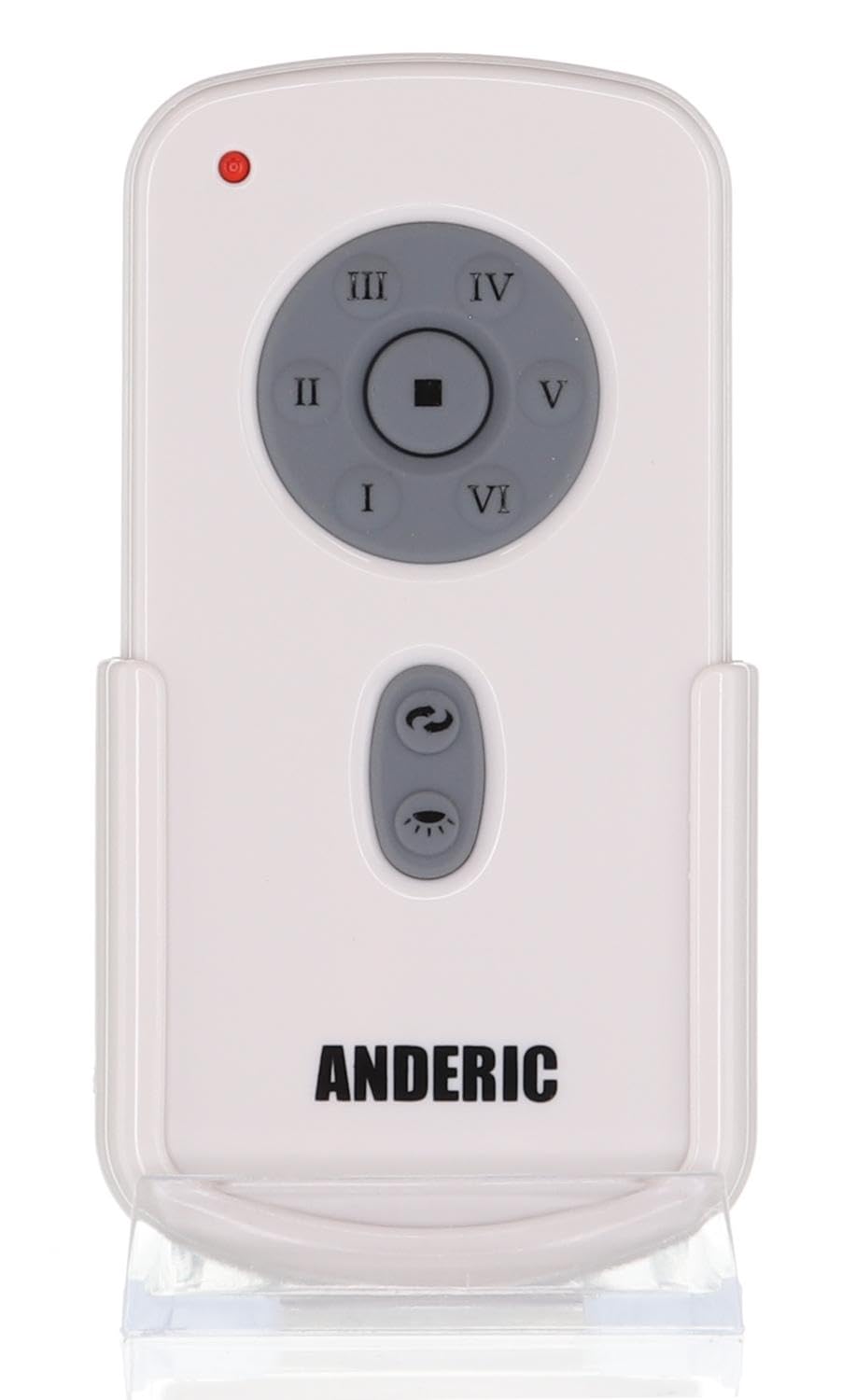
Irudia: Aurrealdea view of the Anderic RR787T remote control, displaying its intuitive button layout for easy operation.
Bateragarritasuna
The Anderic RR787T is designed for broad compatibility with specific ceiling fan systems:
- Hartzaileak: Designed for ceiling fans that use receivers with 4 dip switches, including models originally paired with RH786R, RH787T, and UC787T remotes.
- Fan Brands: Compatible with high-end ceiling fans from brands such as Casablanca, Monte Carlo, Fanimation, Regency, and Home Decorators Collection.
- Onartutako ereduak: Includes Casablanca Panama, Stealth, Stingray, Fellini, and Monte Carlo Vision, Arcade, Hicks, and Dover series.
- Ohar garrantzitsua: Not compatible with Fanimation Slinger fans (especially newer models), fans requiring 5 dip switch receivers, or 315 MHz systems like Harbor Breeze ZJF-HH-YK-A008. Always verify your fan's receiver type before purchase.
Mantentzea
Zure urrutiko agintearen iraupena eta errendimendu optimoa bermatzeko, jarraitu mantentze-jarraibide hauek:
- Bateria ordezkatzea: Replace batteries when the remote's performance diminishes. Ensure correct battery type (2 AAA) and polarity.
- Garbiketa: Garbitu urrutiko agintea oihal leun eta lehor batekin. Saihestu produktu kimiko gogorrak edo garbitzaile urratzaileak erabiltzea.
- Biltegiratzea: Gorde urrutiko agintea leku fresko eta lehor batean, eguzki-argitik eta muturreko tenperaturetatik babestuta.
Arazoak konpontzea
Urrutiko agintearekin arazoak badituzu, jo ezazu honako ohiko irtenbide hauetara:
- Urrunekoek ez dute erantzuten:
- Egiaztatu bateriaren maila eta ordeztu behar izanez gero.
- Ensure the dip switch settings on the remote match the receiver.
- Verify the fan's power supply is active.
- Light Not Dimming:
- Confirm that incandescent bulbs are being used.
- Check if the dimming function is enabled inside the battery compartment.
- Fan Not Changing Speed/Direction:
- Ziurtatu urrutiko agintea hargailuaren irismen-eremuan dagoela.
- Re-check dip switch settings.
Zehaztapenak
| Marka | Anderikoa |
| Modelo zenbakia | RR787T (replaces RH787T) |
| Paketearen neurriak | 4.96 x 4.92 x 2.8 hazbete |
| Elementuaren pisua | 3.2 ontza |
| Pilak | 2 AAA bateria (ez daude barne) |
| Ezaugarri Berezia | Hormako mendia barne |
| Kolorea | Zuria |
| Onartutako gailuen gehienezko kopurua | 1 |
| Gailu bateragarriak | Fan |
Bermea eta Laguntza
For warranty information or technical support, please refer to the product packaging or contact Anderic customer service directly. Keep your proof of purchase for any warranty claims.