
1. Produktua amaitu daview
The ANJIELO SMART Tuya Smart Video Intercom System provides enhanced security and communication for apartment buildings and homes. This system includes an outdoor call panel, multiple indoor monitors, and a Power over Ethernet (POE) switch for efficient connectivity. It supports various access control methods and integrates with the Tuya Smart APP for remote management.

Figure 1: Complete ANJIELO SMART Tuya Smart Video Intercom System components.
Ezaugarri nagusiak:
- Handsfree Dual-Way Intercom: Enables seamless communication between the indoor monitor and outdoor camera.
- High-Definition Night Vision: Equipped with a high-definition camera and infrared night monitoring for clear visibility in low light.
- Versatile Unlocking Options: Supports password entry, IC card swapping, and Tuya Smart APP control for secure access.
- Robust IP65 Waterproof Rating: Designed for reliable outdoor operation in various weather conditions.
- Multi-Apartment Support: Capable of supporting up to 999+ indoor monitors, suitable for large residential complexes.

Figure 2: The system supports multiple individual units within a building.
2. Sistemaren konfigurazioa
This section outlines the basic steps for setting up your ANJIELO SMART Video Intercom System. Ensure all components are present before beginning installation.
2.1 Osagaien identifikazioa

Figure 3: Outdoor Call Panel and Indoor Monitor dimensions and labeled components.
2.2 Konexio-diagrama
The system utilizes a CAT5 network cable for digital communication. The POE switch facilitates power and data transfer to the indoor monitors and outdoor unit.
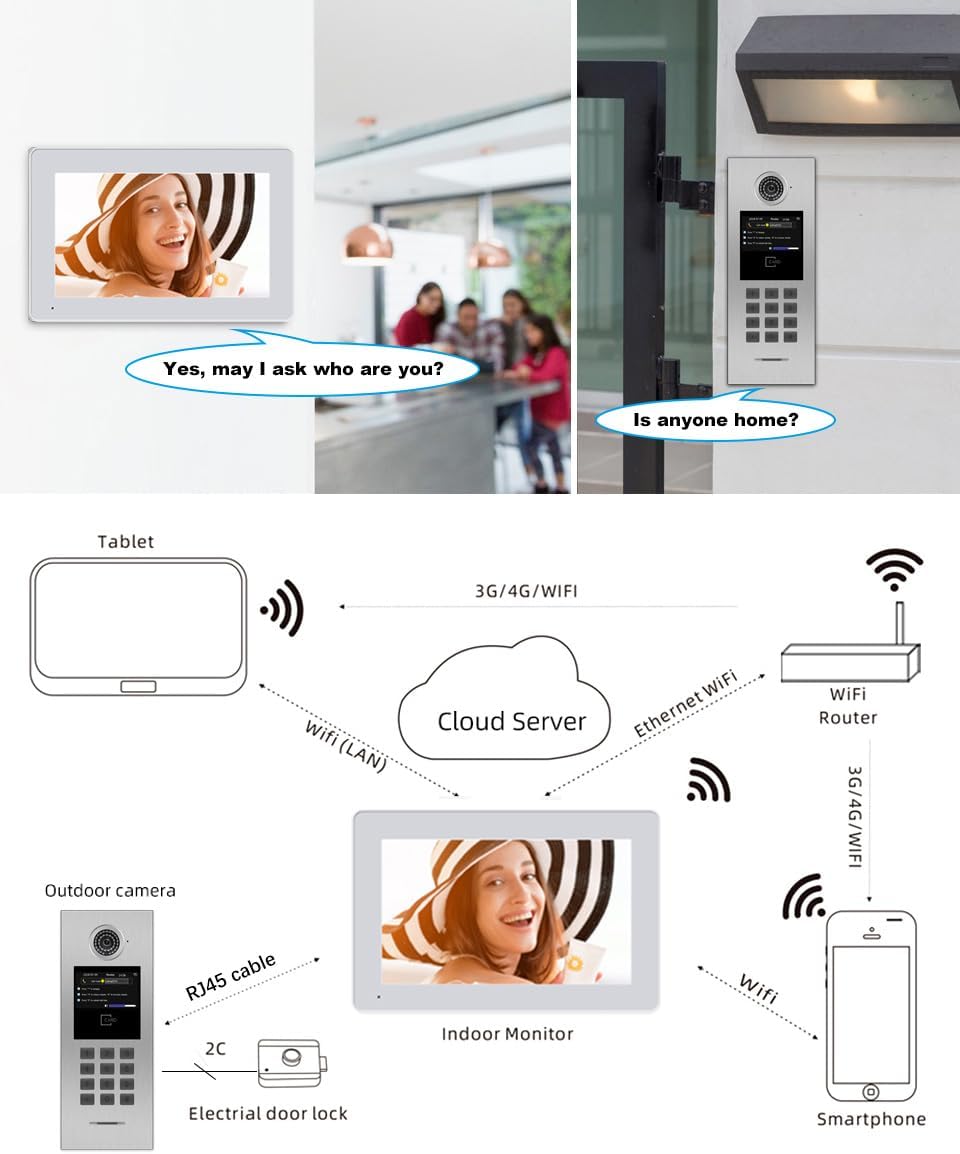
4 Irudia: Gainetikview of system connections.
2.3 Kableatzeko jarraibideak
- Connect the outdoor call panel to the POE switch using an RJ45 Ethernet cable.
- Connect each indoor monitor to the POE switch using RJ45 Ethernet cables.
- Ensure the POE switch is powered on.
- Connect the electrical door lock to the outdoor call panel as per the wiring diagram (2C connection).
- For remote access, connect the POE switch to your network router.
Video 1: Detailed connection guide for the ANJIELO SMART IP Building Video Intercom System, demonstrating wiring of indoor monitors, outdoor unit, and POE switch.

5. irudia: Adibample of multiple indoor monitors connected via a POE switch.
3. Sistemaren funtzionamendua
3.1 Deiak egitea eta jasotzea
- From Outdoor Panel: A visitor can enter the flat number on the digital keypad and press the call button.
- Barruko monitorearen gainean: When a call is received, the indoor monitor will ring and display the visitor's video feed. You can accept the call to initiate two-way communication.
- If no one answers within 30 seconds, the call can be transferred to a smartphone via the Tuya Smart APP.
3.2 Access Control and Unlocking
The system offers multiple secure ways to unlock the door:
- Pasahitza sartzea: Enter a pre-set password on the outdoor call panel's digital keypad.
- IC Card Swapping: Present a registered IC card to the card reader on the outdoor panel.
- Tuya Smart APP Control: Remotely unlock the door using the Tuya Smart APP on your smartphone.
- Barruko monitore batetik: During a call, an unlock option will be available on the indoor monitor screen.
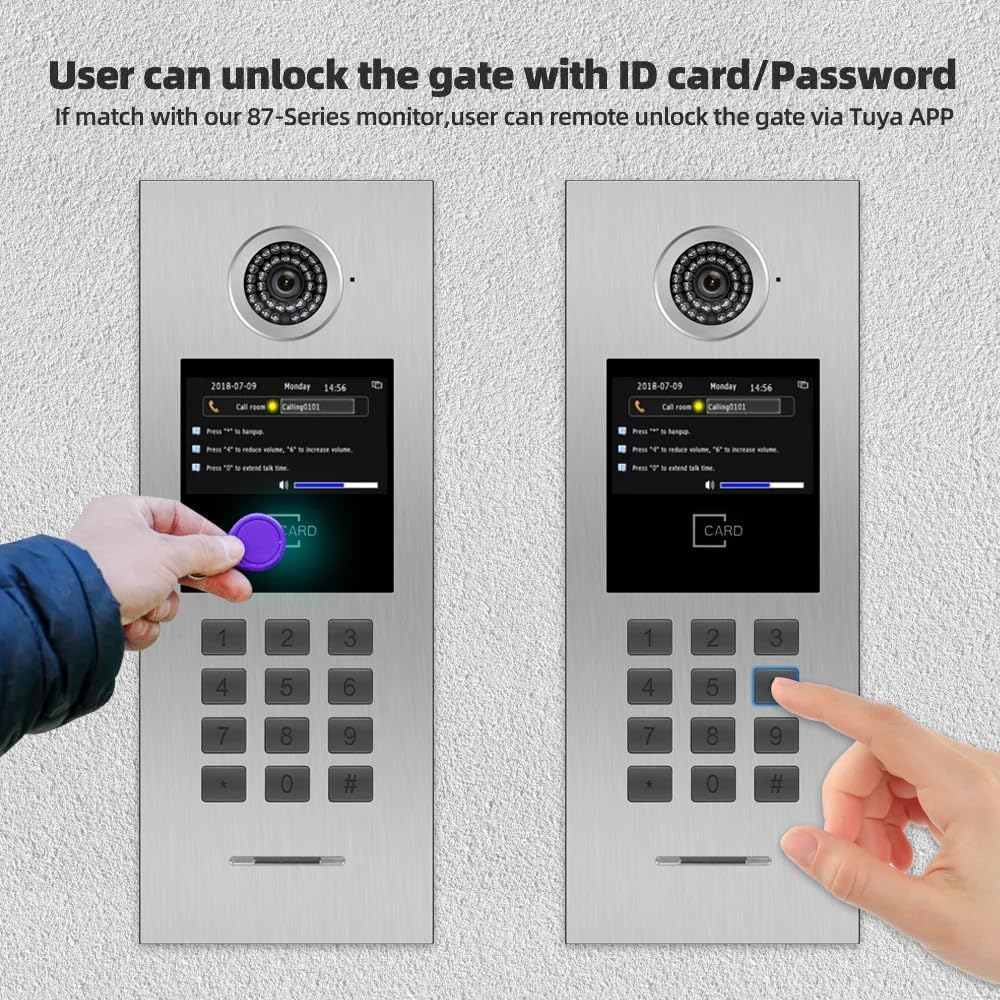
Figure 6: Unlocking the gate using an IC card or password.
3.3 Night Vision and Monitoring
The outdoor call panel is equipped with a 110-degree wide-angle camera and white LED offset lighting, providing clear 960P video quality even in low-light conditions or at night.

Figure 7: Day and Night vision capabilities of the outdoor unit.
3.4 Tuya Smart APP Integration
The Tuya Smart APP allows for remote monitoring, intercom, video recording, doorbell unlock, channel switching, and monitor unlock functionalities. This provides convenient control over your intercom system from anywhere.

Figure 8: Tuya Smart App integration for remote control and monitoring.
4. Mantentzea
To ensure optimal performance and longevity of your ANJIELO SMART Video Intercom System, follow these general maintenance guidelines:
- Outdoor Call Panel: The outdoor unit features an IP65 waterproof and dustproof design. Regularly wipe the camera lens and screen with a soft, damp oihal bat erabili zikinkeria edo orbanak kentzeko. Saihestu produktu kimiko gogorrak erabiltzea.
- Indoor Monitors: Clean the monitor screens with a soft, dry, or slightly damp cloth. Do not spray cleaning solutions directly onto the screen.
- Kableatzea: Periodically check all network and power cables for secure connections and any signs of damage.
- Software eguneraketak: Ensure your Tuya Smart APP and intercom system firmware are updated to the latest versions for improved functionality and security.

Figure 9: The outdoor unit's IP65 rating ensures durability in various weather conditions.
5. Arazoak
If you encounter issues with your intercom system, consider the following general troubleshooting steps:
- Potentziarik gabe: Check all power connections to the POE switch and ensure the power outlet is functional.
- Bideorik/audiorik ez: Verify all RJ45 network cables are securely connected between the outdoor panel, indoor monitors, and the POE switch. Ensure the network is active.
- Urruneko sarbidearen arazoak: Confirm your POE switch is connected to a working internet router. Check your smartphone's internet connection and Tuya Smart APP settings.
- Unlocking Problems: Ensure the correct password or registered IC card is being used. Verify the electrical door lock is properly wired and receiving power.
- Etengabeko konexioa: Check for network interference or congestion. Ensure all cables are in good condition.
For persistent issues, please refer to the detailed troubleshooting guide available on the ANJIELO SMART webwebgunean edo jarri harremanetan bezeroarentzako laguntzarekin.
6. Produktuaren zehaztapenak
| Ezaugarri | Xehetasuna |
|---|---|
| Marka | ANJIELO SMART |
| Modelo zenbakia | 87202S-87721 |
| Estiloa | 1 Doorbell + 6 Monitor + 1 POE |
| Kolorea | Zuria |
| Energia iturria | Kable elektrikoa |
| Gailu bateragarriak | Ordenagailu pertsonala, Smartphone |
| Elementuaren neurriak (L x W x H) | 5 x 3 x 1 hazbete |
| Bideo Harrapaketa Ebazpena | 1080p |
| Konektibitate Teknologia | Kableatua |
| Instalazio mota | Torlojua |
| Alerta mota | Audioa eta Mugimendua |
| Elementuaren pisua | 1 kilo |
| Kontrol-metodoa | Aplikazioa, ukitu |
| Gomendatutako Erabilerak | Barruan, Kanpoan |
| Dakarten osagaiak | 1 Doorbell, 1 POE, 6 Monitor |
| Sensor Teknologia | CMOS, RFID |
| Konektore mota | RJ45 |
7. Bermea eta Laguntza
For warranty information, technical support, or service inquiries regarding your ANJIELO SMART Video Intercom System, please contact the manufacturer directly or refer to the official ANJIELO SMART website. Keep your purchase receipt and product model number (87202S-87721) readily available when contacting support.
You can visit the ANJIELO SMART Store for additional resources and contact information: ANJIELO SMART Store