
Sarrera
Thank you for choosing the Ninestars 13 Gallon Automatic Motion Sensor Trash Can. This touchless trash bin is designed for convenience and hygiene in various indoor environments such as kitchens, bedrooms, living rooms, offices, and hotels. Featuring a motion sensor for hands-free operation and a durable stainless steel body, this D-shaped trash can offers a large 13-gallon (50-liter) capacity.
This manual provides detailed instructions for setup, operation, maintenance, and troubleshooting to ensure optimal performance and longevity of your product. Please read it carefully before use and retain it for future reference.
Kutxan dagoena
Kontu handiz desontziratu osagai guztiak eta ziurtatu elementu hauek jaso dituzula:
- Zaborrontziaren gorputza
- Trash Can Lid (with motion sensor)
- Liner Ring
Konfigurazioa
1. Bateriaren instalazioa
The trash can operates on 2 D-sized batteries (not included). For optimal performance, use new, high-quality alkaline batteries.
- Kokatu bateriaren konpartimendua estalkiaren beheko aldean.
- Ireki bateriaren konpartimenduaren estalkia.
- Insert 2 D-sized batteries, ensuring the correct polarity (+/-) as indicated inside the compartment.
- Itxi bateriaren konpartimenduaren estalkia ondo.

Image: Battery compartment for 2 D-sized batteries, located on the lid.
2. Trash Bag Installation
Follow these steps to properly install a trash bag using the liner ring:
- Remove the lid from the trash can body.
- Place the trash bag into the trash can body.
- Fit the top edge of the trash bag over the liner ring, ensuring it is securely held in place.
- Insert the liner ring with the trash bag into the trash can body, tucking any excess bag material neatly.
- Place the lid back onto the trash can body, aligning it properly.

Image: Step-by-step guide for trash bag installation.
Funtzionamendu-argibideak
Mugimendu-sentsorearen funtzionamendua
The Ninestars trash can features an infrared motion sensor for hands-free operation.
- When an object or hand is within 10 inches (25 cm) of the sensor window, the lid will automatically open.
- The lid will remain open as long as the object is within the sensor range.
- Once the object moves away from the sensor range, the lid will close automatically after approximately 3-5 seconds.
- The lid features a soft-closing mechanism for quiet operation.
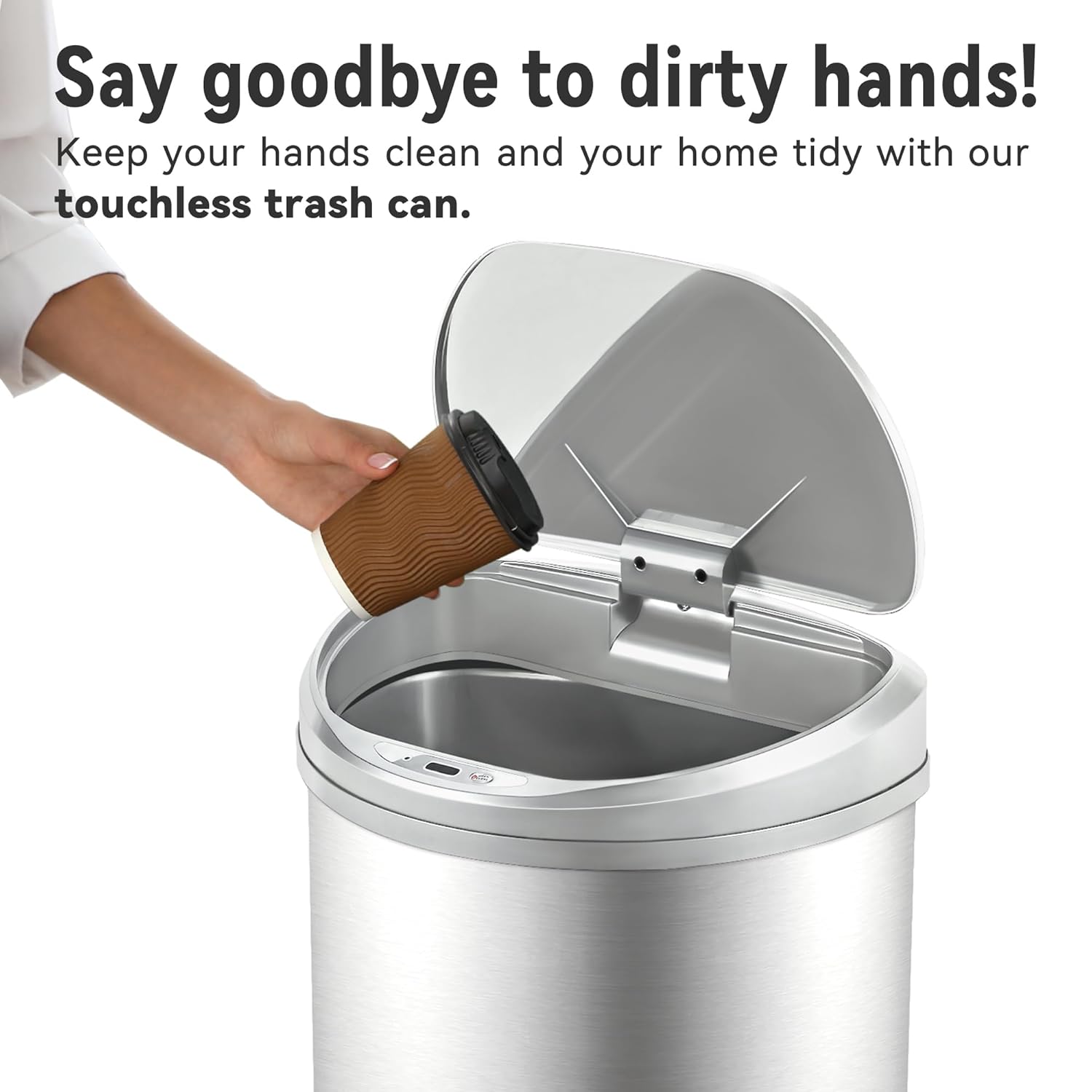
Image: Demonstrating touchless operation with the motion sensor.
Manual Open/Close Button
For extended opening or manual control, use the 'OPEN/CLOSE' buttons located on the lid.
- Press the 'OPEN' button to keep the lid open indefinitely.
- Press the 'CLOSE' button to close the lid. The motion sensor will reactivate after the lid is closed manually.
Mantentzea
Garbiketa
To maintain the appearance and functionality of your trash can:
- Garbitu altzairu herdoilgaitzezko gorputzaren kanpoaldea oihal leun eta lehor batekinamp oihal. Saihestu garbitzaile urratzaileak edo akabera kaltetu dezaketen produktu kimiko gogorrak.
- The stainless steel is designed to be fingerprint, scratch, and oil resistant.
- Clean the sensor window on the lid with a soft, dry cloth to ensure proper function.
- Do not immerse the lid in water or place it under running water, as this can damage the electronic components.
- The interior of the trash can body can be cleaned with mild soap and water. Ensure it is completely dry before reinserting the liner ring and lid.

Image: Stainless steel construction features for easy maintenance.
Bateria ordezkatzea
When the lid's operation becomes slow or inconsistent, it is time to replace the batteries. Refer to the 'Battery Installation' section for detailed steps.
Arazoak konpontzea
If you encounter issues with your Ninestars Automatic Motion Sensor Trash Can, please refer to the following common problems and solutions:
| Arazoa | Kausa posiblea | Irtenbidea |
|---|---|---|
| Lid does not open when sensor is activated. | Bateria agortuta edo gutxituta. Sensor window is dirty or obstructed. Estalkia ez dago behar bezala lerrokatuta. | Replace batteries with new D-sized batteries. Garbitu sentsorearen leihoa zapi leun eta lehor batekin. Ensure the lid is correctly seated on the trash can body. |
| Lid opens or closes slowly. | Bateria baxua. | Replace batteries with new D-sized batteries. |
| Lid remains open or opens randomly. | Sensor is continuously detecting an object. Sensor is exposed to direct sunlight or strong artificial light. | Ensure no objects are within the sensor's range. Relocate the trash can to an area with less direct light interference. |
| Tapak zarata ezohikoak egiten ditu. | Mekanismoaren oztopoa. | Check for any debris or foreign objects obstructing the lid's opening/closing mechanism. |
Zehaztapenak
- Marka: Ninestars
- Eredua: 13 Gallon D-Shaped
- Edukiera: 13 litro (50 litro)
- Irekitze mekanismoa: Mugimendu-sentsorea
- Materiala: Plastikoa, altzairu herdoilgaitza
- Forma: D formakoa
- Akabera mota: Eskuilatua
- Potentzia: 2 x D-sized batteries (not included)
- Produktuaren neurriak: 15.12"L x 12.13"Z x 26.61"A (38.4cm L x 30.8cm Z x 67.6cm A)
- Gomendatutako erabilerak: Kitchen, Indoor Room, Home Office, Laundry Room, Garage, Lobby, Classroom
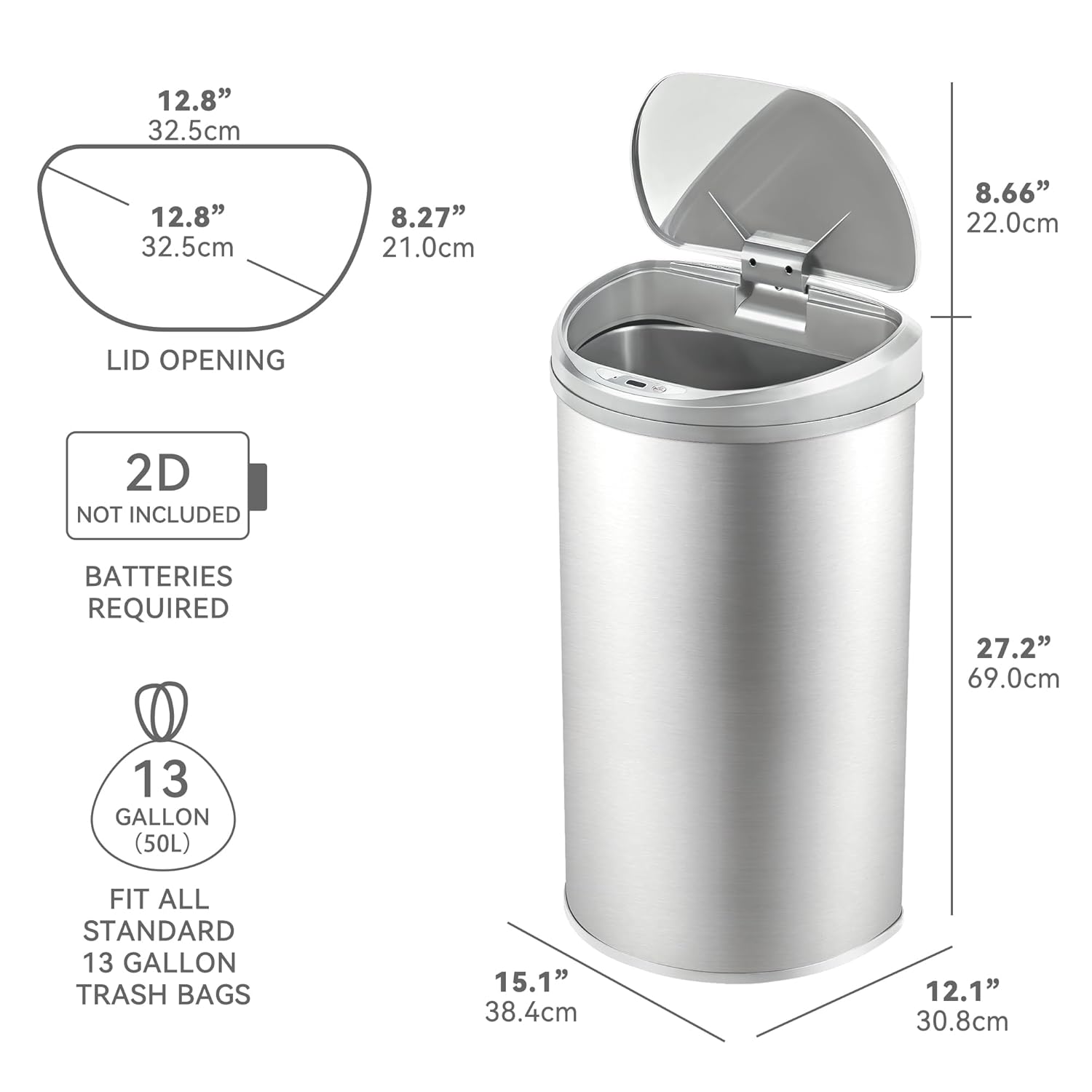
Image: Product dimensions and battery requirement.
Bermea eta Laguntza
Bermearen informazioa
This Ninestars product typically comes with a 2-year warranty. Please refer to your purchase documentation or the manufacturer's official webwebgunean bermearen baldintza eta zehaztapen zehatzak ikusteko.
Bezeroarentzako Arreta
For further assistance, troubleshooting not covered in this manual, or warranty claims, please contact Ninestars customer support through their official webwebgunea edo zure erosketarekin emandako harremanetarako informazioa.


