
Sarrera
Thank you for choosing the K-FEE Twins II Single Serve Coffee & Espresso Machine and Lattaero 4-in-1 Milk Frother Bundle. This manual provides essential information for the safe and efficient operation, maintenance, and troubleshooting of your new appliance. Please read these instructions carefully before first use and keep them for future reference.

Image: The K-FEE Twins II Single Serve Coffee & Espresso Machine and Lattaero 4-in-1 Milk Frother Bundle in Black and Chrome.
Segurtasun-argibide garrantzitsuak
- Irakurri argibide guztiak aparatua erabili aurretik.
- Ez sartu aparatua, kablea edo entxufea uretan edo beste likido batzuetan.
- Gainbegiratzea beharrezkoa da aparaturen bat umeek edo umeen ondoan erabiltzen dutenean.
- Deskonektatu entxufetik erabiltzen ez duzunean eta garbitu aurretik. Utzi hozten piezak jarri edo kendu aurretik, eta aparatua garbitu aurretik.
- Ez erabili aparaturik kablea edo entxufea hondatuta dagoenean, edo aparatuak gaizki funtzionatzen duenean edo nolabait hondatu ondoren.
- Gailuaren fabrikatzaileak gomendatzen ez dituen osagarri osagarriak erabiltzeak sua, deskarga elektrikoa edo pertsonetan zauriak eragin ditzake.
- Ez erabili kanpoan.
- Ez utzi kablea mahaiaren edo erakusmahaiaren ertzetik zintzilik zintzilik, ezta gainazal beroak ukitu ere.
- Ez jarri gas edo erregailu elektriko bero baten gainean edo inguruan, edo berotutako labe batean.
- Beti konektatu entxufea lehenik etxetresna elektrikora, eta gero konektatu kablea hormako entxufean. Deskonektatzeko, jarri edozein kontrol "itzali" posizioan, eta gero atera entxufea hormako entxufetik.
- Ez erabili aparatua aurreikusitako erabilera ez den beste baterako.
- Garatze-zikloan estalkia kentzen bada erretzea gerta daiteke.
Produktuaren osagaiak
K-FEE Twins II Coffee & Espresso Machine
- Ur depositua (kentzeko modukoa)
- Brew Burua
- Kapsularen euskarria
- Drip Tray & Grid
- Control Panel (Espresso, Coffee, Hot Water buttons)
- Pizteko botoia
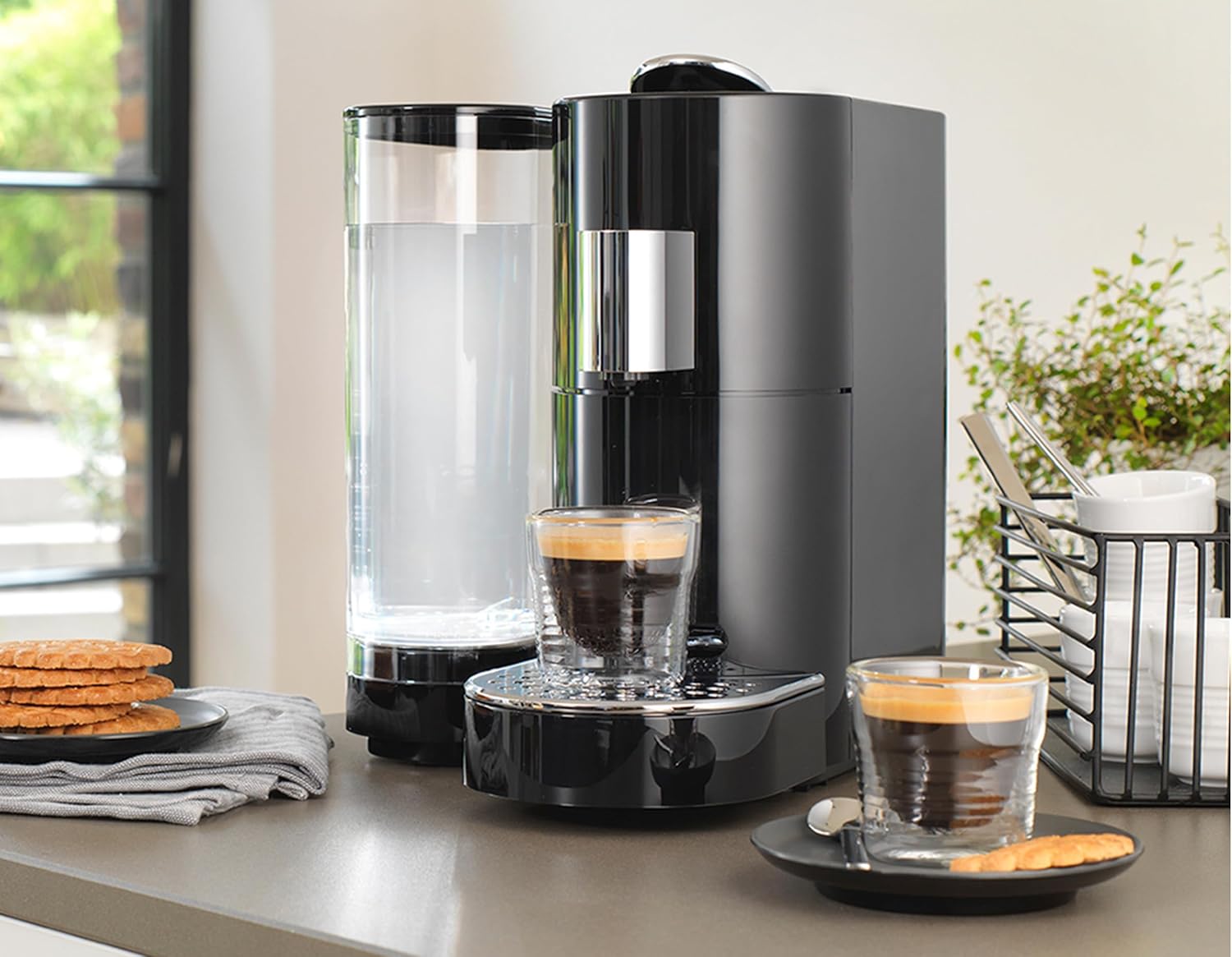
Irudia: Xehetasun handikoa view of the K-FEE Twins II machine, highlighting the water tank and brewing area.
Lattaero 4-in-1 Milk Frother
- Frother Jug
- Estalkia
- Whisk (for frothing)
- Stirrer (for warming milk)
- Base with Control Buttons (Warm Thick Foam, Warm Creamy Foam, Warm Milk, Cold Foam)

Image: The K-FEE Lattaero 4-in-1 Milk Frother, showing its sleek design and control buttons.
Konfigurazioa
Initial Setup for K-FEE Twins II Machine
- Despaketatzea: Kontu handiz atera osagai guztiak ontzitik. Gorde ontzia etorkizunean garraiatzeko edo biltegiratzeko.
- Lekua: Jarri makina gainazal egonkor, lau eta beroarekiko erresistente batean, ur iturrietatik eta bero iturrietatik urrun.
- Garbiketa: Before first use, wash the water tank, drip tray, and capsule holder with warm soapy water. Rinse thoroughly and dry.
- Ur depositua bete: Fill the water tank with fresh, cold drinking water up to the MAX level. Place it back onto the machine.
- Piztu: Plug the machine into a grounded electrical outlet. Press the power button. The buttons will flash as the machine heats up.
- Lehenengo garbiketa zikloa: Place a large cup under the brew head. Press the "Coffee" button (larger cup icon) to run a rinse cycle without a capsule. Repeat this process 2-3 times to prime the system and clean internal components.
Initial Setup for Lattaero Milk Frother
- Despaketatzea: Remove the frother and its accessories from the packaging.
- Garbiketa: Wash the frother jug and whisk/stirrer with warm soapy water. Rinse and dry thoroughly. The base should only be wiped with a damp oihal.
- Muntaia: Insert the desired whisk (frothing or stirring) onto the spindle at the bottom of the jug.
- Lekua: Place the frother jug onto its power base.
Funtzionamendu-argibideak
Brewing Coffee or Espresso with K-FEE Twins II
- Ensure Water: Make sure the water tank is filled with fresh water.
- Piztu: Press the power button if the machine is off. Wait for the buttons to stop flashing, indicating it's ready.
- Txertatu kapsula: Lift the lever to open the brew head. Insert a K-FEE compatible capsule into the capsule holder. Close the lever firmly.
- Kopa jarri: Place your desired cup on the drip tray.
- Aukeratu edari-tamaina:
- For Espresso: Press the "Espresso" button (smaller cup icon).
- For Coffee: Press the "Coffee" button (larger cup icon).
- Eject Capsule: After brewing, lift the lever to eject the used capsule into the internal collection bin. Close the lever.
- Ur beroaren funtzioa: To dispense hot water, ensure no capsule is inserted, and press the "Hot Water" button (steam icon).
Programming Brew Volume: You can customize the brew volume for each button.
- Ensure the machine is ready (buttons solid).
- Insert a capsule (or no capsule for hot water).
- Press and hold the desired brew button (Espresso, Coffee, or Hot Water).
- Release the button when your cup reaches the desired fill level. The machine will remember this setting for future brews.

Image: The K-FEE Twins II machine actively brewing coffee into a glass cup.
Using the Lattaero 4-in-1 Milk Frother
- Prepare Jug: Ensure the frother jug is clean and the correct whisk/stirrer is inserted.
- Gehitu esnea: Pour cold milk into the jug. Do not exceed the MAX fill lines indicated inside the jug (lower line for frothing, upper line for warming).
- Aukeratu funtzioa: Place the lid on the jug and place the jug on the power base. Press the desired button on the base:
- Warm Thick Foam: For dense, rich foam.
- Warm Creamy Foam: For lighter, smoother foam.
- Esne epela: For heated milk without foam (use stirrer).
- Apar hotza: For cold, frothed milk.
- Osatzea: The frother will automatically stop when the cycle is complete. Carefully remove the jug from the base and pour the frothed or warmed milk.

Image: The K-FEE Lattaero Milk Frother pouring frothed milk into a glass, ready for a latte or cappuccino.
Mantentzea
Daily Cleaning (K-FEE Twins II)
- Drip Tray & Capsule Bin: Empty and rinse the drip tray and used capsule collection bin daily. Wash with warm soapy water, rinse, and dry.
- Ur depositua: Rinse the water tank daily and refill with fresh water. Clean with warm soapy water weekly.
- Kanpoaldea: Garbitu makinaren kanpoaldea leun batekin, damp oihalik. Ez erabili garbitzaile urratzailerik eta ez sartu makina uretan.
Daily Cleaning (Lattaero Milk Frother)
- Frother Jug & Whisk: Immediately after each use, rinse the frother jug and whisk with water. For thorough cleaning, wash with warm soapy water, rinse, and dry. The jug is not dishwasher safe.
- Oinarria: Wipe the frother base with a soft, damp oihal. Ez sartu inoiz oinarria uretan.
Descaling (K-FEE Twins II)
Descaling is essential to maintain machine performance and extend its lifespan. The frequency depends on water hardness and usage. It is recommended every 3-6 months.
- Prestatu disoluzioa: Use a K-FEE approved descaling solution mixed with water according to the descaler's instructions. Fill the water tank with this solution.
- Hasi deskalifikatzen: Place a large container (at least 1 liter) under the brew head.
- Korrika egiteko zikloa: Press and hold the "Coffee" and "Espresso" buttons simultaneously for 3 seconds to enter descaling mode. The buttons will flash alternately.
- Ziklo osoa: The machine will dispense the descaling solution in intervals. This process can take up to 20 minutes.
- Garbitu: Once the tank is empty, rinse the water tank thoroughly and fill it with fresh water. Run at least two full rinse cycles (using the "Coffee" button) to flush out any remaining descaling solution.
- Exit Descaling: The machine will automatically exit descaling mode after the rinse cycles.
Arazoak konpontzea
| Arazoa | Kausa posiblea | Irtenbidea |
|---|---|---|
| Makina ez da pizten. | Ez dago konektatuta; arazoa da entxufearekin. | Ziurtatu korronte-kablea ondo konektaturik dagoela laneko entxufe batean. |
| Ez da kaferik banatzen. | Water tank empty; machine not primed; brew head not closed properly; clogged needle. | Fill water tank. Run a rinse cycle. Ensure lever is fully closed. Clean the brew head needle (refer to maintenance). |
| Coffee is cold or lukewarm. | Machine not preheated; cups not preheated. | Allow machine to fully preheat (buttons solid). Pre-warm your cup with hot water. |
| Frother not frothing milk. | Incorrect whisk; milk level too high/low; milk type; jug not clean. | Ensure frothing whisk is used. Check milk levels (between MIN/MAX frothing lines). Use cold, fresh milk (dairy or plant-based suitable for frothing). Clean jug thoroughly. |
| Makina isurtzen. | Ur-depositua ez dago ondo kokatuta; tanta-erretilua beteta; barneko zigiluaren arazoa. | Ensure water tank is firmly in place. Empty drip tray. If leaking persists, contact customer support. |
| Buttons flashing continuously. | Machine heating up; descaling required. | Wait for buttons to become solid. If flashing persists after heating, descaling may be needed. |
If you encounter issues not listed here or if solutions do not resolve the problem, please contact K-FEE customer support.
Zehaztapenak
- Eredua: K-FEE Twins II
- Marka: K-FEE
- Dimensions (Coffee Machine): 13" L x 8" W x 11" H
- Weight (Coffee Machine): 14.4 kilo inguru
- Ur deposituaren edukiera: 78 ontza fluidoa
- Ezaugarri bereziak: Auto Shut-Off, Dual Pressure System, Programmable Brew Volume, Removable Water Tank
- Frother Model: Lattaero 4-in-1 Milk Frother
- Frother Functions: Warm Thick Foam, Warm Creamy Foam, Warm Milk, Cold Foam
- Potentzia: 120V, 60Hz, 1400W (Typical for similar appliances, specific wattage not provided in input)
Bermea eta laguntza
K-FEE products are manufactured with high-quality materials and are subject to rigorous quality control. This appliance is warranted against manufacturing defects for a period of urtebete from the date of purchase. This warranty does not cover damage caused by misuse, neglect, accident, alteration, or improper installation.
For warranty claims, technical support, or to purchase replacement parts, please contact K-FEE customer service:
- Webgunea: www.k-fee.us
- Posta elektronikoa: support@k-fee.us (Example email, actual not provided)
- Telefonoa: 1-800-XXX-XXXX (Adib.ample phone, actual not provided)
Please have your model number (Twins II) and proof of purchase ready when contacting support.