1. Sarrera
The Groov-e Lisbon Portable DAB & FM Digital Radio offers a versatile listening experience with its dual-band radio capabilities and Bluetooth connectivity. Designed for portability, it features an intuitive LCD display, a built-in alarm clock, and a headphone jack for private listening. This manual provides detailed instructions for setup, operation, and maintenance of your Lisbon radio.

Irudia: Gainetikview of the Groov-e Lisbon radio highlighting its key features like DAB/FM, Bluetooth, LCD display, alarm clock, and headphone socket.
2. Produktuaren ezaugarriak
- DAB/FM Digital Stations & Bluetooth Streaming: This portable digital radio comes with DAB & FM technology, so tune into preset stations with auto-scan and manual tuning. Plus use Bluetooth to turn your radio into a speaker and stream your music on the go.
- Blue LCD Display: The LCD screen features a blue background light that notifies you of the radio station that you're tuned into and can be dimmed or turned off, while the easy front-on buttons are simple to use for easy tuning and navigation.
- Built-In Alarm Clock: The handy built-in alarm clock allows you to set your alarm clock as to when you want it to go off so you can stay organised and also features a snooze and timer function.
- 3.5mm Headphone Input: Thanks to the 3.5mm jack input you can easily plug in your own earphones so you can listen quietly and in peace while the expanding telescopic antenna allows for crystal clear signal.
- Designed to Travel: Portable, sleek, and sized to fit on a shelf or table, this radio can be powered using a USB cable or batteries (not included); a convenient travel companion that can be easily carried or tucked into your backpack or luggage.
3. Paketearen edukia
Mesedez, egiaztatu elementu guztiak bertan daudela:
- Groov-e Lisbon Portable DAB & FM Digital Radio
- USB energia kablea
- Erabiltzailearen eskuliburua (dokumentu hau)
4. Kontrolak eta pantaila
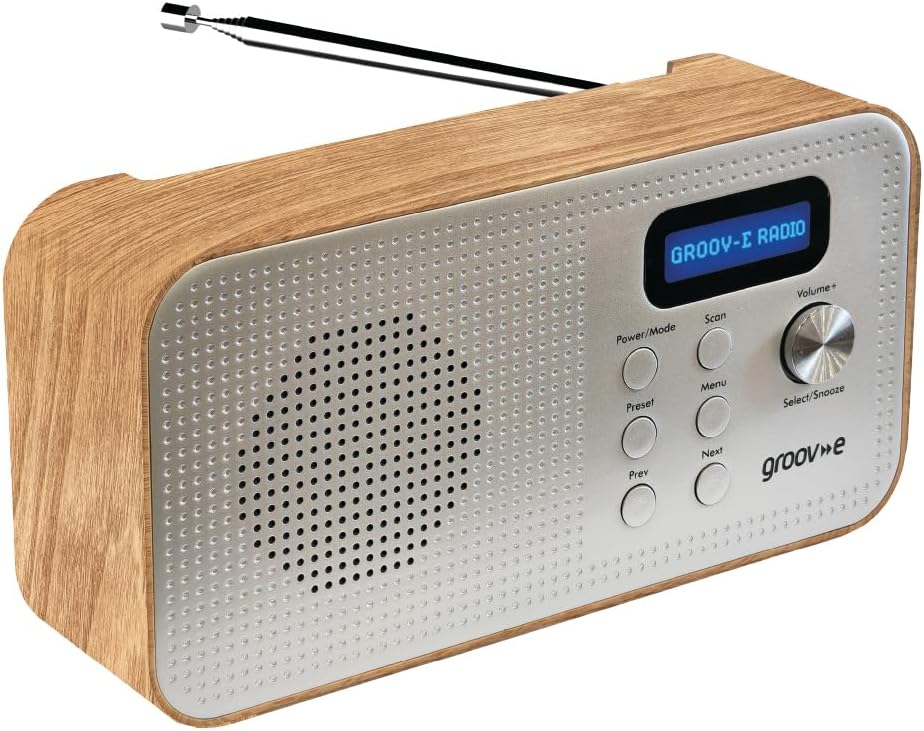
Image: Front panel of the Groov-e Lisbon radio, detailing the layout of buttons, the volume knob, and the LCD screen.
Aurreko paneleko kontrolak:
- Pizteko / Modua botoia: Press to turn the radio on or off. Press repeatedly to cycle through DAB, FM, and Bluetooth modes.
- Eskaneatu botoia: Initiates an auto-scan for available radio stations in DAB or FM mode.
- Menuko botoia: Accesses the menu options for the current mode.
- Aurrez ezarritako botoia: Used to save and recall your favorite radio stations.
- Prev Button: Navigates to the previous station, menu option, or track.
- Hurrengo botoia: Navigates to the next station, menu option, or track.
- Volume+ / Select/Snooze Knob: Rotate to adjust volume. Press to select a menu option or to activate the snooze function when an alarm sounds.
LCD pantaila:
The blue backlit LCD display shows current station information, time, alarm status, and menu options. It can be dimmed or turned off to conserve power or for nighttime use.

Image: A graphic icon symbolizing an LCD display, indicating the presence of a digital screen on the radio.
5. Konfigurazioa
Powering Your Radio:
The Groov-e Lisbon radio can be powered in two ways:
- USB Power: Connect the supplied USB cable to the radio's USB port and plug the other end into a compatible USB power adapter (not included) or a powered USB port.
- Bateria Potentzia: For portable use, insert 4 x AA batteries (not included) into the battery compartment located on the back of the unit. Ensure correct polarity.
Antena:
Extend the telescopic antenna fully for optimal DAB and FM radio reception.

Image: A woman enjoying the Groov-e Lisbon radio outdoors, illustrating its portable design and ease of use for travel.
6. Funtzionamendu-argibideak
6.1 Piztea/Itzaltzea eta Moduaren Hautaketa
- To turn on the radio, press the Potentzia/Modua botoia.
- Irratia itzaltzeko, luze sakatu Potentzia/Modua botoia.
- To switch between DAB, FM, and Bluetooth modes, press the Potentzia/Modua botoia behin eta berriz.
6.2 DAB Radio Operation
- Bilaketa automatikoa: DAB moduan, sakatu Eskaneatu button to automatically search for and store all available DAB stations.
- Eskuzko sintonizazioa: Erabili Aurrekoa or Hurrengoa buttons to browse through available stations.
- Aurrez aurreko ezarpenak gordetzea: Sintonizatu nahi duzun irratia. Sakatu eta eutsi botoiari Aurrez ezarritakoa button until "Preset Store" appears. Use Aurrekoa / Hurrengoa aurrezarritako zenbaki bat (1-20) hautatzeko, eta ondoren sakatu Select/Snooze botoia baieztatzeko.
- Aurrezarpenak gogoratzen: Sakatu labur Aurrez ezarritakoa botoia. Erabili Aurrekoa / Hurrengoa nahi duzun aurrezarritako zenbakia hautatzeko, eta ondoren sakatu Select/Snooze botoia baieztatzeko.
6.3 FM irratiaren funtzionamendua
- Bilaketa automatikoa: FM moduan, sakatu Eskaneatu button to automatically search for and store available FM stations.
- Eskuzko sintonizazioa: Erabili Aurrekoa or Hurrengoa botoiak maiztasuna fintzeko.
- Aurrez aurreko ezarpenak gordetzea: Sintonizatu nahi duzun irratia. Sakatu eta eutsi botoiari Aurrez ezarritakoa button until "Preset Store" appears. Use Aurrekoa / Hurrengoa aurrezarritako zenbaki bat (1-20) hautatzeko, eta ondoren sakatu Select/Snooze botoia baieztatzeko.
- Aurrezarpenak gogoratzen: Sakatu labur Aurrez ezarritakoa botoia. Erabili Aurrekoa / Hurrengoa nahi duzun aurrezarritako zenbakia hautatzeko, eta ondoren sakatu Select/Snooze botoia baieztatzeko.

Image: The Groov-e Lisbon radio displayed with text emphasizing its DAB/FM digital station capabilities and Bluetooth streaming functionality.
6.4 Bluetooth konexioa
- Aldatu irratia Bluetootha modua erabiliz. Potentzia/Modua button. The display will show "Bluetooth Pairing".
- On your Bluetooth-enabled device (smartphone, tablet, etc.), search for "Groov-e Lisbon" in the Bluetooth settings.
- Select "Groov-e Lisbon" to pair. Once connected, the radio will indicate successful pairing.
- You can now stream audio from your device to the radio. Use the Aurrekoa / Hurrengoa buttons on the radio to skip tracks, and the Bolumena+ bolumena doitzeko botoia.
6.5 Alarma-erlojuaren funtzioa
- Alarma ezartzea: Sakatu Menua botoia, gero erabili Aurrekoa / Hurrengoa to navigate to "Alarm Setup". Press Select/Snooze to enter. Follow the on-screen prompts to set the alarm time, source (DAB/FM/Buzzer), and volume.
- Atzeratu: Alarmak jotzen duenean, sakatu Select/Snooze knob to activate snooze. The alarm will temporarily stop and sound again after a set interval.
- Alarma gelditzea: Press any other button (except Snooze) to turn off the alarm for the day.
- Lo egiteko tenporizadorea: Sakatu Menua button, then navigate to "Sleep Timer". Use Aurrekoa / Hurrengoa to set the desired sleep duration (e.g., 15, 30, 60 minutes). The radio will automatically turn off after the set time.

Image: A graphic icon symbolizing an alarm clock, indicating the radio's built-in alarm functionality.
6.6 Entzungailuen erabilera
- Plug any standard 3.5mm headphones into the headphone jack located on the side or back of the radio.
- Irratiaren barneko bozgorailua automatikoki isilaraziko da entzungailuak konektatzen direnean.
- Doitu bolumena Bolumena+ botoia.

Image: A graphic icon symbolizing headphones, indicating the radio's headphone jack for private listening.
7. Mantentzea
- Garbiketa: Erabili zapi leun eta lehor bat irratiaren gainazala garbitzeko. Ez erabili garbitzaile edo disolbatzaile urratzailerik.
- Bateria zaintzea: Bateriak erabiltzen badituzu, kendu itzazu irratia denbora luzez erabiliko ez baduzu, isuriak saihesteko.
- Biltegiratzea: Gorde irratia leku fresko eta lehor batean, eguzki-argitik eta muturreko tenperaturetatik babestuta.
- Antena: Kontuz ibili antena teleskopikoa tolestu edo haustea saihesteko.
8. Arazoak
| Arazoa | Kausa posiblea | Irtenbidea |
|---|---|---|
| Irratia ez da pizten. | No power, flat batteries, or USB cable not connected properly. | Ensure USB cable is securely connected or replace batteries. |
| Irrati-harrera eskasa (DAB/FM). | Antenna not extended, weak signal area, or interference. | Fully extend the telescopic antenna. Try repositioning the radio. Avoid placing near other electronic devices. |
| Soinurik ez. | Volume too low, headphones connected, or incorrect mode. | Increase volume. Disconnect headphones if not needed. Ensure correct mode (DAB/FM/Bluetooth). |
| Bluetooth parekatzeak huts egiten du. | Radio not in pairing mode, device too far, or already paired. | Ensure radio is in Bluetooth mode and "Pairing" is displayed. Move device closer. Unpair from other devices if necessary. |
| Alarmak ez du jotzen. | Alarma ez dago konfiguratuta, alarmaren bolumena baxuegia da edo alarma itzalita dago. | Verify alarm settings (time, source, volume) in the menu. Ensure alarm is enabled. |
9. Zehaztapenak
- Eredua: Lisbon (5060108299435)
- Produktuaren neurriak: 18.1L x 7W x 10H zentimetro
- Pisua: 360 g
- Konektibitate Teknologia: Bluetootha
- Tuner Teknologia: DAB, FM
- Energia iturria: Battery Powered (4 x AA, not included), AC Adapter (via USB cable)
- Onartutako irrati-taldeak: DAB, FM
- Ezaugarri bereziak: Portable, Headphone Socket, Alarm Clock, Bluetooth Connectivity, LCD Display
- Kolorea: Marroia
- Fabrikatzailea: Rashmian Ltd.
10. Bermea eta Laguntza
For warranty information and technical support, please refer to the documentation provided at the time of purchase or visit the official Groov-e webgunea. Zure saltzailearekin ere harremanetan jar zaitezke laguntza eskatzeko.
Groov-e Official Webgunea: www.groov-e.co.uk