
1. Sarrera
The Hello Kitty Sunrise Alarm Clock is designed to provide a gentle and natural waking experience with its sunrise simulation feature. This digital alarm clock includes multicolor lights, an LED display showing time, date, and temperature, a USB charging port, and a convenient snooze function. Its charming Cinnamoroll design adds a whimsical touch to any room.

Image 1: Hello Kitty Cinnamoroll Sunrise Alarm Clock with multicolor lighting.
2. Segurtasun informazioa
- Ez jarri gailua tenperatura altuen, eguzki-argiaren eraginpean edo hezetasun handiaren eraginpean.
- Erabili emandako USB kablea edo baliokide ziurtatu bat soilik.
- Mantendu gailua uretatik edo beste likidoetatik urrun.
- Ez saiatu gailua zeuk desmuntatzen edo konpontzen. Jarri harremanetan zerbitzu-langile kualifikatuekin.
- Ziurtatu gailua gainazal egonkor eta lau batean dagoela.
3. Paketearen edukia
Mesedez, egiaztatu paketea elementu hauek dituen:
- Hello Kitty Sunrise Alarm Clock (Cinnamoroll design)
- USB energia kablea
- Erabiltzailearen eskuliburua (dokumentu hau)
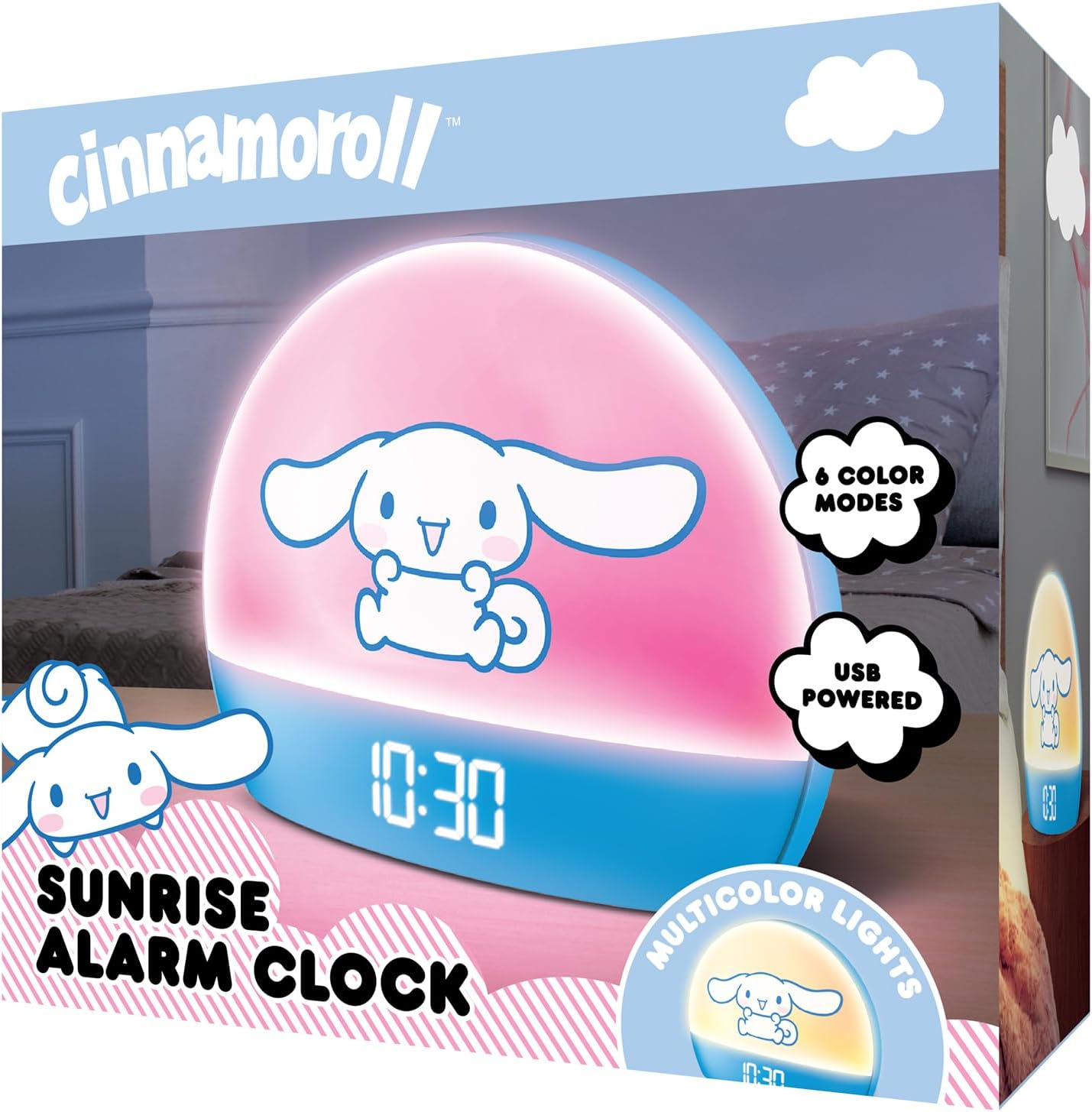
Image 2: Front packaging of the Hello Kitty Cinnamoroll Sunrise Alarm Clock.
4. Produktua amaitu daview
Ezagutu zure erlojuaren iratzargailuaren osagai nagusiak.
- LED pantaila: Shows time, date, and temperature.
- Argi panela: Emits multicolor and sunrise simulation lights.
- Kontrol-botoiak: Located on the back or bottom for setting time, alarm, and light functions.
- USB kargatzeko ataka: For powering the device and charging external devices.
- Errepikatzeko botoia: Typically a prominent button on the top or front.

Image 3: Hello Kitty Cinnamoroll Sunrise Alarm Clock in a bedroom setting.
5. Konfigurazioa
5.1 Energia-konexioa
- Konektatu emandako USB kablea iratzargailuaren atzealdeko USB atakara.
- Konektatu USB kablearen beste muturra USB elikatze-egokitzaile bateragarri batera (ez dago barne) edo USB ataka elikagarri batera.
- The LED display will light up, indicating the device is powered on.
5.2 Ordua eta data ezartzea
Specific button names are not provided, so general instructions are given. Refer to the physical device for exact button labels.
- Press the "SET" or "TIME" button to enter time setting mode.
- Use the "UP" and "DOWN" buttons to adjust the hour. Press "SET" again to confirm.
- Adjust the minute using "UP" and "DOWN" buttons. Press "SET" to confirm.
- Jarraitu prozesu hau urtea, hilabetea eta eguna ezartzeko.
- The clock may offer 12-hour or 24-hour format selection. Follow on-screen prompts or consult the device's specific button functions.
6. Funtzionamendu-argibideak
6.1 Alarma ezartzea
- Press the "ALARM" button to enter alarm setting mode.
- Use "UP" and "DOWN" buttons to set the desired alarm hour. Press "ALARM" to confirm.
- Adjust the alarm minute. Press "ALARM" to confirm.
- Some models may allow setting alarm volume or sound. Follow prompts if available.
- To activate/deactivate the alarm, look for an "ALARM ON/OFF" button or a toggle within the alarm setting menu.
6.2 Egunsentiaren simulazioa
The sunrise simulation feature gradually increases light intensity before your set alarm time, mimicking a natural sunrise.
- This feature is typically linked to the alarm function. When the alarm is active, the light will begin to brighten a set period (e.g., 30 minutes) before the alarm sounds.
- Consult the device's specific controls for adjusting the duration or intensity of the sunrise simulation, if applicable.
6.3 kolore anitzeko argiak
The clock offers various color modes for ambient lighting.
- Press the "LIGHT" or "COLOR" button to cycle through different color options or activate a color-changing mode.
- Press and hold the "LIGHT" button to turn off the ambient light.
- Brightness of the display and ambient light can often be adjusted using dedicated buttons or by holding the "LIGHT" button.
6.4 Snooze funtzioa
When the alarm sounds, press the large "SNOOZE" button (usually on top) to temporarily pause the alarm. The alarm will sound again after a short interval (e.g., 5-10 minutes).
6.5 USB kargatzeko ataka
The integrated USB port can be used to charge small electronic devices like smartphones or tablets. Simply connect your device's charging cable to the USB port on the alarm clock.
6.6 Tenperatura bistaratzea
The LED display shows the current room temperature. No specific action is usually required to view this, as it cycles with time and date or is displayed continuously.
7. Mantentzea
- Garbitu erlojua zapi leun eta lehor batekin. Ez erabili garbitzaile edo disolbatzaile urratzailerik.
- Ensure the USB port is free from dust and debris.
- Store the clock in a cool, dry place when not in use for extended periods.
8. Arazoak
| Arazoa | Kausa posiblea | Irtenbidea |
|---|---|---|
| Erlojua ez da pizten. | USB cable not connected properly or power source issue. | Check USB cable connection. Try a different USB power adapter or port. Ensure the cable is securely inserted. |
| Time is incorrect or drifts. | Time not set correctly or internal clock issue. | Re-set the time following Section 5.2. If the issue persists, try disconnecting and reconnecting power. |
| Alarmak ez du jotzen. | Alarma ez dago aktibatuta edo gaizki konfiguratuta. | Verify the alarm is set and activated (check for an alarm icon on the display). Ensure the volume is not set to zero if adjustable. |
| Botoiek ez dute erantzuten. | Temporary software glitch or physical button issue. | Disconnect power for a few seconds and reconnect to reset the device. If buttons remain unresponsive, contact support. |
| USB kargatzeko ataka ez dabil. | Cable issue, device not fully powered, or port malfunction. | Ensure the clock is properly powered. Try a different USB charging cable. Check if the port is clean and free of debris. |
9. Zehaztapenak
| Marka | Kaixo Kitty |
| Modelo zenbakia | HKCLK01CR-MFN |
| Kolorea | Kanela-opiltxoa |
| Bistaratzeko mota | Digitala |
| Ezaugarri bereziak | Adjustable Brightness, Alarm, Charging Port, LED Display, Temperature Display, Sunrise Simulation, Multicolor Lights |
| Produktuaren neurriak | 7"Z x 6"A |
| Energia iturria | Kable elektrikoa (USB) |
| Materiala | Plastikoa |
| Elementuaren pisua | 0.4 kilogramo (14 ontza) |
| Konektibitate Teknologia | USBa |
| Fabrikatzailea | Hegoaldeko Telekomunikazioa |
10. Bermea eta Laguntza
For warranty information or technical support, please refer to the contact details provided on the product packaging or visit the official Hello Kitty product support webgunea. Gorde erosketa-agiria berme-erreklamazioetarako.