
CNYST 02024102002
CNYST Rebar Corrosion Meter User Manual
Eredua: 02024102002
1. Sarrera
This user manual provides detailed instructions for the operation, maintenance, and troubleshooting of the CNYST Rebar Corrosion Meter. This instrument is designed to measure the probability of corrosion of steel reinforcement within concrete structures such as walls, beams, and columns.
The meter utilizes advanced technology to provide accurate and reliable data for structural integrity assessment. Please read this manual thoroughly before operating the device to ensure proper usage and to maximize its lifespan.
2. Segurtasun informazioa
Always adhere to the following safety guidelines to prevent injury and damage to the instrument:
- Do not expose the instrument to extreme temperatures or direct sunlight for prolonged periods.
- Ensure the working environment is free from strong alternating electromagnetic fields, which can interfere with measurements.
- Handle the electrodes and sensors with care. The permanent fixed metal electrodes eliminate the need for copper sulfate solution, reducing chemical exposure risks.
- Keep the device dry and clean. Avoid contact with water or other liquids.
- Only use the provided power adapter and cables for charging and data transfer.
- Do not attempt to disassemble or repair the instrument yourself. Refer to qualified service personnel.
3. Produktuaren osagaiak
The CNYST Rebar Corrosion Meter package includes the following components:
- Main Host Unit
- Potential Electrode Sensor
- Gradient Electrode Sensor
- Connecting Cables (2)
- Parentesia
- Transmisio linea
- Software CD-ROMa
- Eramateko zorroa
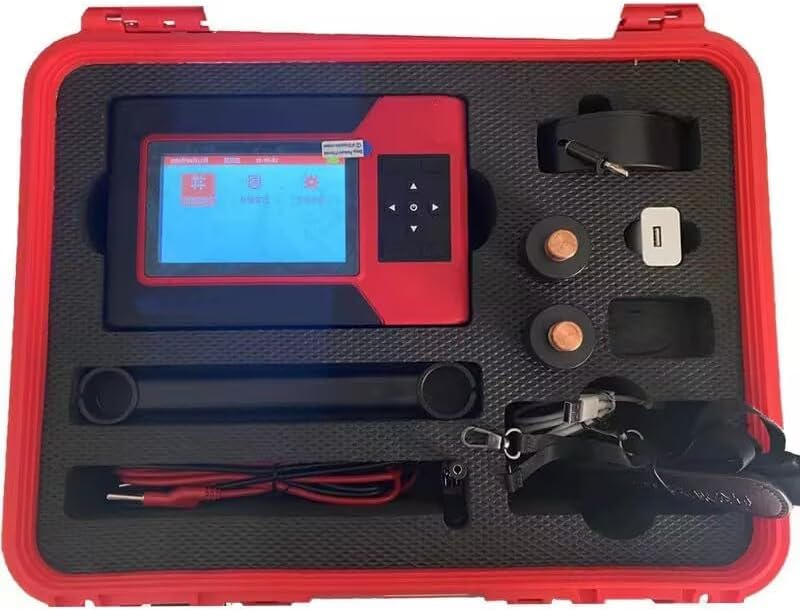
Figure 3.1: Complete set of the CNYST Rebar Corrosion Meter and its accessories, neatly organized within the protective red carrying case.
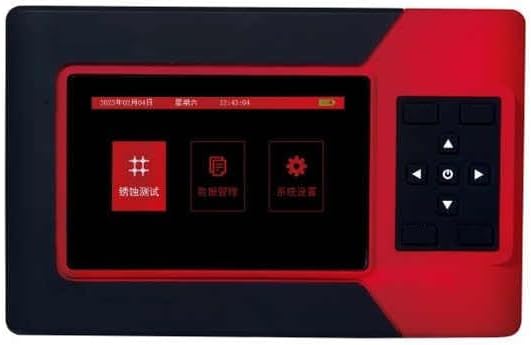
Figure 3.2: The main host unit of the corrosion meter, featuring its display screen and control buttons.

Figure 3.3: The main unit shown with one of the specialized sensors, likely the gradient electrode, used for specific measurement methods.

Figure 3.4: The main unit displayed with another sensor, possibly the potential electrode, essential for potential method measurements.
4. Konfigurazioa
- Despaketatzea: Carefully remove all components from the protective carrying case. Inspect for any visible damage.
- Bateria kargatzea: The main host unit contains a built-in rechargeable lithium battery. Connect the provided power adapter to the charging port on the unit and plug it into a suitable power outlet. Allow the battery to fully charge before first use (up to 50 hours of operation on a full charge).
- Sentsoreak konektatzea: Identify the appropriate sensor (Potential or Gradient) for your measurement method. Connect the sensor to the main host unit using the provided connecting cables. Ensure connections are secure.
- Softwarearen instalazioa (aukerakoa): If you plan to transfer data to a computer, install the software from the included CD-ROM onto your WinXP, Win7, or Win8 operating system.
5. Funtzionamendu-argibideak
5.1 Piztu/Itzaltzea
- Pizteko: Press and hold the power button on the main host unit until the display screen illuminates.
- Itzaltzeko: Press and hold the power button until the unit shuts down.
5.2 Interfazean nabigatzea
Use the directional buttons and the 'OK' button on the control panel to navigate through the menu options on the LCD display (160 x 128 resolution).
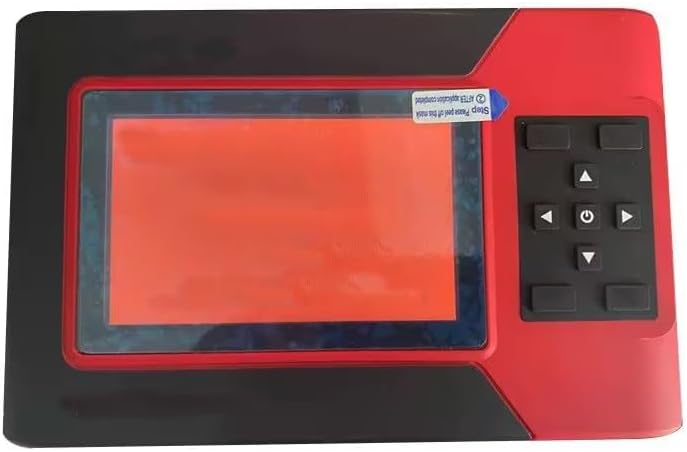
Figure 5.1: The meter's user interface and navigation buttons.
5.3 Neurketa-metodoak
The instrument supports two primary measurement methods:
- Potential Method: This method measures the potential difference to assess corrosion probability. Connect the potential electrode sensor for this measurement.
- Gradient Method: This method measures the gradient of potential for corrosion detection. Connect the gradient electrode sensor for this measurement.
Refer to the on-screen prompts and the software manual for detailed steps on performing each measurement type.
5.4 Datuen biltegiratzea eta transferentzia
The device has a large data storage capacity, capable of storing data from 5400 measurement areas and 228,000 measurement points. Data can be transferred to a computer using the provided transmission line and software for further analysis and reporting.
6. Mantentzea
- Garbiketa: Use a soft, dry cloth to clean the main unit and sensors. Do not use abrasive cleaners or solvents.
- Biltegiratzea: When not in use, store the instrument and all accessories in the provided protective carrying case in a cool, dry place, away from direct sunlight and extreme temperatures.
- Bateria zaintzea: To prolong battery life, avoid fully discharging the battery frequently. Recharge the battery regularly, even if the device is not in active use.
- Sentsoreen ikuskapena: Periodically inspect the sensors and connecting cables for any signs of wear or damage. Replace damaged components immediately.
7. Arazoak
| Arazoa | Kausa posiblea | Irtenbidea |
|---|---|---|
| Gailua ez da pizten. | Battery is discharged or faulty. | Connect the power adapter and charge the battery. If the problem persists, contact support. |
| Irakurketa okerrak. | Loose sensor connection; strong electromagnetic interference; damaged sensor. | Ensure all cables are securely connected. Move to an area free from strong electromagnetic fields. Inspect sensors for damage. |
| Datuen transferentziaren hutsegitea. | Incorrect cable connection; software not installed or corrupted; incompatible operating system. | Verify transmission line connection. Reinstall software from CD-ROM. Ensure your OS is WinXP, Win7, or Win8. |
| Pantaila hutsik edo izoztuta dago. | System error; low battery. | Recharge the battery. Perform a hard reset by holding the power button for 10 seconds. If issue persists, contact support. |
8. Zehaztapenak
| Parametroa | Balioa |
|---|---|
| Measuring Potential | ±1000 mV |
| Proba zehaztasuna | ±1 mV |
| Measurement Point Spacing | 1-100 cm |
| Datuak biltegiratzeko ahalmena | 5400 measurement areas, 228,000 measurement points |
| Neurtzeko Eremua | 8100 m² |
| Giro-tenperatura | -10 °C ~ +50 °C |
| Hezetasun erlatiboa | ≤ %90 RH |
| Elikatze Hornidura | Built-in rechargeable lithium battery (up to 50 hours) |
| LCD bereizmena | 160 × 128 |
| Host Volume (Dimensions) | 220 mm × 162 mm × 91 mm |
| Elementuaren pisua | 14.3 kilo |
9. Bermea eta Laguntza
For warranty information, technical support, or service inquiries, please refer to the documentation included with your purchase or contact CNYST customer service. Keep your purchase receipt as proof of purchase.
Fabrikatzailea: CNYST
Modelo zenbakia: 02024102002
Lehen eskuragarri dagoen data: 19ko urriaren 2024a
Ask a question about this manual
Ask about setup, troubleshooting, compatibility, parts, safety, or missing instructions. Manuals+ will review the question and use this page’s manual context to help answer it.