
Sarrera
This manual provides comprehensive instructions for the Akko MG75 ABNT2 Mechanical Keyboard. Designed for efficiency and customization, this 75% layout keyboard features Akko Silver V3 Pro mechanical switches, full RGB backlighting, and hot-swappable switch sockets. Please read this manual carefully to ensure proper use and maintenance of your device.
1. Konfigurazioa
1.1 Paketearen edukia
- Akko MG75 ABNT2 Mechanical Keyboard
- USB-C Cable (Removable)
- Keycap tiratzailea
- Switch Puller
- etengailu gehigarriak
- Erabiltzailearen eskuliburua (dokumentu hau)
1.2 Teklatua konektatzea
- Bilatu USB-C ataka teklatuaren atzealdean.
- Konektatu emandako USB-C kablea teklatura.
- Konektatu USB-C kablearen beste muturra zure ordenagailuko USB ataka libre batera.
- Teklatua automatikoki ezagutuko du zure sistema eragileak. Oinarrizko funtzionalitaterako ez da normalean beharrezkoa izaten gidari gehigarririk.

Image: USB-C port for connecting the keyboard.
1.3 Teklatuaren altuera doitzea
The Akko MG75 keyboard features three levels of adjustable height. Flip out the feet located on the underside of the keyboard to select your preferred typing angle.
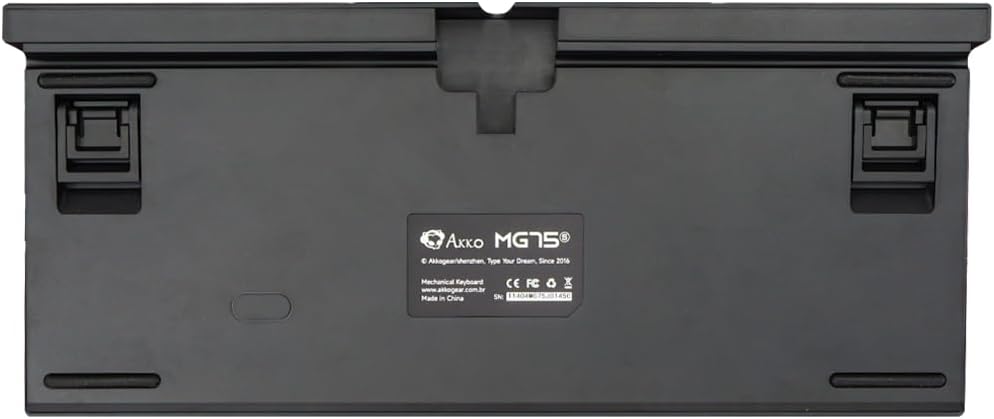
Image: Underside of the keyboard with adjustable feet.
2. Funtzionamendu-argibideak
2.1 RGB argiztapenaren kontrola
The Akko MG75 keyboard features full RGB backlighting with multiple effects and customization options. Refer to the included quick guide or the official Akko software for detailed instructions on changing lighting modes, colors, and brightness. Typically, lighting effects can be cycled using specific key combinations (e.g., Fn + certain keys).
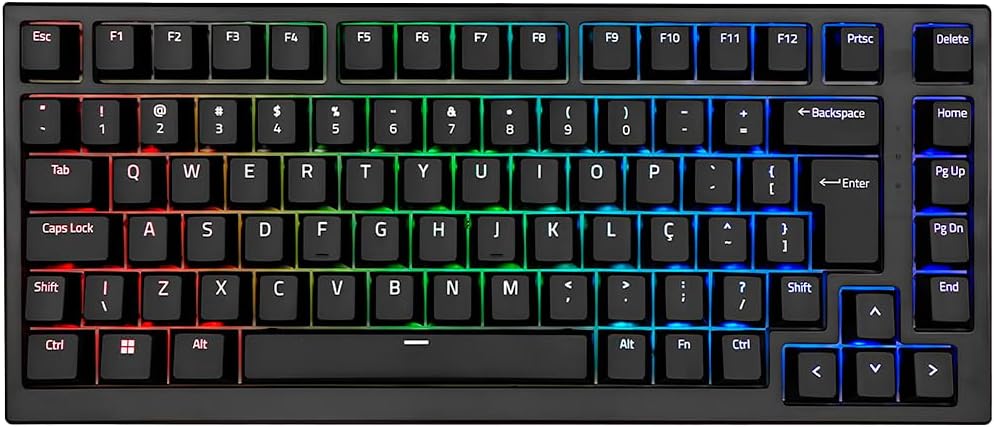
Image: Akko MG75 keyboard displaying RGB lighting.
2.2 Beroan alda daitezkeen etengailuak
The Akko MG75 supports hot-swappable mechanical switches, compatible with both 3-pin and 5-pin switches. This allows for easy customization of your typing experience without soldering.
Changing Switches:
- Use the provided switch puller to carefully remove the desired switch from the keyboard. Grip the switch firmly and pull straight up.
- Lerrokatu etengailu berriaren pinak PCBko zuloekin. Ziurtatu pinak zuzen daudela.
- Gently press the new switch into place until it clicks securely. Do not force the switch if it does not go in easily; check pin alignment.

Image: Akko mechanical switches, illustrating their design for hot-swapping.
2.3 ABNT2 Layout
This keyboard features the ABNT2 layout, which includes specific keys for Portuguese language characters and punctuation, such as 'Ç' and dedicated keys for accents. This layout is standard for Brazilian Portuguese users.

Irudia: Goitik behera view of the Akko MG75 keyboard, highlighting the ABNT2 layout.
3. Mantentzea
3.1 Teklatua garbitzea
- Deskonektatu teklatua ordenagailutik garbitu aurretik.
- Erabili eskuila leun bat edo aire konprimatua teklak estalkien arteko hautsa eta hondakinak kentzeko.
- Zikinkeria egoskorra izanez gero, garbitu teklak eta teklatuaren gainazala astiro-astiro eskuila batekin.amp cloth (water only). Avoid excessive moisture.
- Ez erabili produktu kimiko gogorrik edo garbigailu urratzailea.
3.2 Tekla-tapoien ordezkapena
To replace keycaps, use the provided keycap puller. Gently hook the puller onto the keycap and pull straight up. To install a new keycap, align it with the switch stem and press down firmly until it is seated.
4. Arazoak
4.1 Teklatuak ez du erantzuten
- Ziurtatu USB-C kablea ondo konektatuta dagoela teklatura eta ordenagailura.
- Try disconnecting and reconnecting the USB-C cable multiple times. Some users have reported this resolves initial connection issues.
- Test the keyboard on a different USB port on your computer.
- If possible, test the keyboard on another computer to rule out system-specific issues.
- Check if the cable itself is damaged by trying a different USB-C cable if available.
4.2 RGB Lighting Not Working Correctly
- Ziurtatu teklatua behar bezala konektatuta dagoela eta energia jasotzen duela.
- Refer to the quick guide for key combinations to cycle through lighting modes and adjust brightness.
- If using Akko software, ensure it is up-to-date and correctly configured.
5. Zehaztapenak
| Ezaugarri | Xehetasuna |
|---|---|
| Marka | Akko |
| Eredua | MG75 |
| Diseinua | 75% ABNT2 |
| Etengailuak | Akko Silver V3 Pro Mechanical |
| Bero-trukea | Yes (3-pin and 5-pin compatible) |
| Konektibitatea | USB-C (Removable Cable) |
| Atzeko argiztapena | RGB |
| Ghostingaren aurkakoa | N-keys Rollover |
| Giltzak | ABS Laser |
| Altuera erregulagarria | Bai, 3 maila |
| Gailu bateragarriak | PC |
| Kolorea | Beltza |
| Gako kopurua | 84 |
| Pisu Gordina | 1582 g |
| Pisu garbia | 1451 g |
| Package Dimensions (L x H x D) | 350 mm x 250 mm x 50 mm |
6. Bermea eta Laguntza
6.1 Produktuaren bermea
The Akko MG75 Mechanical Keyboard comes with a 12 hilabeteko bermea against manufacturing defects from the date of purchase. Please retain your proof of purchase for warranty claims. This warranty does not cover damage caused by misuse, accidents, unauthorized modifications, or normal wear and tear.
6.2 Bezeroarentzako laguntza
For technical assistance, warranty claims, or further inquiries, please visit the official Akko website or contact your local retailer. You may find additional resources, FAQs, and software downloads on the manufacturer's support page.
Akko ofiziala Webgunea: www.akkogear.com