
Zyxel NR7302
Zyxel 5G NR Outdoor Router User Manual
Model Series: NR7301 / NR7302 / NR7303
1. Sarrera
This manual provides essential information for the installation, operation, and maintenance of your Zyxel 5G NR Outdoor Router. The NR7301, NR7302, and NR7303 series routers are designed to deliver high-speed, low-latency 5G connectivity for both residential and service provider applications, offering robust outdoor performance and reliable coverage.
For optimal performance and safety, please read this manual thoroughly before beginning installation or operation.
2. Segurtasun informazioa
Always observe the following safety precautions to reduce the risk of injury, electric shock, fire, or damage to the device:
- Ensure the power source meets the device's requirements (802.3af/at PoE).
- Ez ireki gailua casing. Konponketa guztiak langile kualifikatuen esku utzi.
- Instalatu gailua tokiko araudia betetzen duen eta aireztapen egokia eskaintzen duen leku batean.
- Avoid installing during a lightning storm.
- Use only accessories and cables specified by the manufacturer.
- The device is IP67 certified for outdoor use, but avoid submerging it in water.
3. Paketearen edukia
Egiaztatu elementu guztiak zure paketean daudela:
- Zyxel 5G NR Outdoor Router (NR7301, NR7302, or NR7303 model)
- Installation Kit (mounting brackets, screws, etc.)
- Quick Start Guide / Documentation
- Access to Zyxel Mobile Application (for setup)
4. Produktua amaitu daview
The Zyxel 5G NR Outdoor Router is a compact, weather-resistant unit designed for external deployment. It features integrated 4x4 MIMO 4G/5G antennas for optimal signal reception.

4.1. irudia: Aurrealdea view of the Zyxel 5G NR Outdoor Router, showing its sleek white casing and Zyxel branding.

4.2. irudia: Aurrealdea view of the router, highlighting the Zyxel logo.
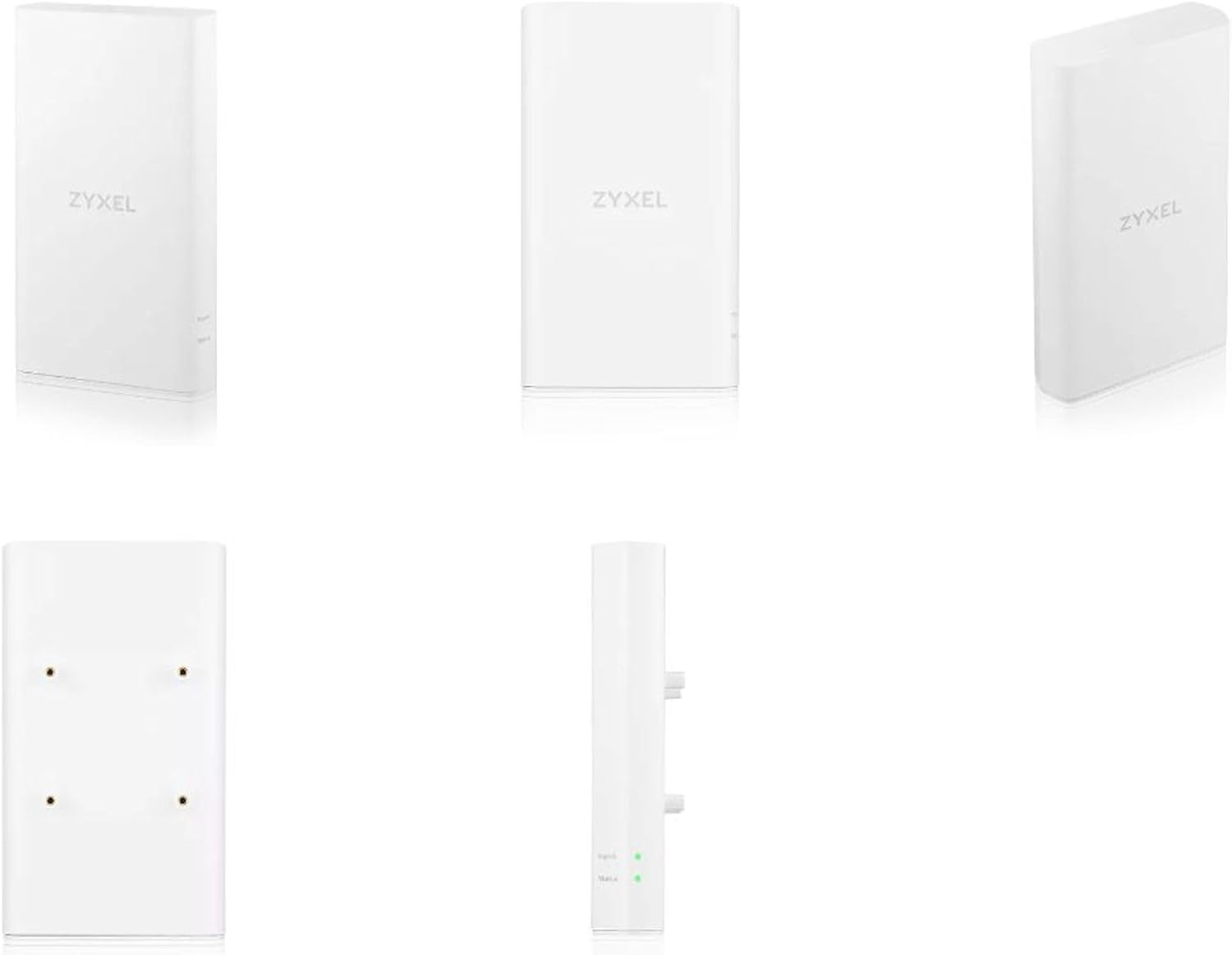
4.3. irudia: Aldea view of the router, showing its slim profile.

4.4. irudia: Atzekoa view of the router, displaying the mounting points for wall or pole installation.

4.5. irudia: Behean view of the router, showing the LAN (PoE) port, SIM card slot, and Reset (RST) button.
4.1. Portuak eta adierazleak
- LAN (PoE) Port: Connects to your indoor network and receives power via Power over Ethernet (PoE).
- SIM txartelaren zirrikitua: Insert your 5G/4G SIM card here.
- RST botoia: Reset button for factory defaults or reboot.
- LED adierazleak: Typically for Power, Signal Strength, and Network Status. (Note: Specific LED behavior details can be found in the Quick Start Guide.)
5. Konfigurazioa eta instalazioa
The Zyxel 5G NR Outdoor Router is designed for easy self-installation using the Zyxel mobile application.

5.1. irudia: Typical deployment scenario, illustrating the outdoor router connecting to a 5G/4G base station and providing internet to a residential gateway and connected devices.
5.1. Instalazio aurreko kontrol-zerrenda
- Ensure you have a valid 5G/4G SIM card with an active data plan.
- Identify a suitable outdoor location for installation, preferably with clear line-of-sight to the nearest cellular tower.
- Have necessary tools for mounting (e.g., drill, screwdriver) and an Ethernet cable for PoE connection.
- Download the Zyxel mobile application on your smartphone.
5.2. SIM txartelaren txertatzea
- Locate the SIM card slot cover on the bottom of the router (refer to Figure 4.5).
- Kontu handiz ireki estalkia.
- Insert your Nano-SIM card into the slot until it clicks into place. Ensure correct orientation.
- Close the SIM card slot cover securely to maintain IP67 weather resistance.
5.3. Bideratzailea muntatzea
- Attach the mounting bracket from the installation kit to the rear of the router (refer to Figure 4.4).
- Mount the router to a pole or wall using the provided hardware. Ensure it is securely fastened and stable.
- Orient the router for optimal signal reception. The Zyxel mobile application can assist in finding the best signal strength.
5.4. Power and Network Connection (PoE)
- Connect one end of an Ethernet cable to the LAN (PoE) port on the router (refer to Figure 4.5).
- Connect the other end of the Ethernet cable to a PoE injector or a PoE-enabled switch indoors.
- Ensure the PoE source is powered on. The router will power up automatically.
5.5. Initial Configuration with Zyxel App
- Open the Zyxel mobile application on your smartphone.
- Follow the on-screen instructions to detect and configure your router. This typically involves scanning a QR code on the device or entering its serial number.
- The app will guide you through network settings, including APN configuration (if required by your carrier) and initial Wi-Fi setup for your indoor gateway.
6. Routerraren funtzionamendua
Once installed and configured, the Zyxel 5G NR Outdoor Router operates as your primary internet gateway, converting 5G/4G cellular signals into a usable network connection for your home or office.
6.1. Sare-konektibitatea
- The router provides internet access via its LAN (PoE) port, which should be connected to your indoor network (e.g., a residential gateway, switch, or Wi-Fi router).
- It supports Wi-Fi standards 802.11a, 802.11g, and 802.11n, operating on a 5 GHz frequency band for wireless communication with your indoor network components if configured as such.
6.2. Urruneko kudeaketa
The router supports remote management, allowing service providers or advanced users to monitor and configure the device from a centralized location. Refer to the Zyxel documentation or your service provider for details on remote management access.
7. Mantentzea
Regular maintenance ensures the longevity and optimal performance of your Zyxel 5G NR Outdoor Router.
- Garbiketa: Periodically wipe the exterior of the router with a soft, damp oihal. Ez erabili produktu kimiko gogorrak edo garbitzaile urratzaileak.
- Firmware eguneraketak (FOTA): The router supports Firmware Over-The-Air (FOTA) updates. Ensure your device is connected to the internet to receive critical updates that improve performance, security, and add new features. Check the Zyxel mobile app or web interface for available updates.
- Ingurumen-kontrola: Periodically inspect the mounting and cabling for any signs of wear or damage, especially after severe weather conditions.
8. Arazoak
This section addresses common issues you might encounter with your Zyxel 5G NR Outdoor Router.
8.1. Ez dago Interneteko konexiorik
- Egiaztatu SIM txartela: Ensure the SIM card is correctly inserted and has an active data plan.
- Egiaztatu PoE konexioa: Verify that the Ethernet cable is securely connected to the LAN (PoE) port on the router and to a powered PoE source indoors.
- Seinalearen indarra: Use the Zyxel mobile app to check the 5G/4G signal strength. If the signal is weak, consider adjusting the router's orientation or location.
- APN ezarpenak: Confirm that the Access Point Name (APN) settings are correctly configured for your mobile carrier. This can usually be done via the Zyxel app or web interfazea.
8.2. Abiadura motelak
- Seinalearen indarra: Weak cellular signal is a common cause of slow speeds. Optimize router placement.
- Sare-pilaketak: Cellular network performance can vary based on time of day and local network traffic.
- Firmwarea: Ziurtatu bideratzailearen firmwarea eguneratuta dagoela.
8.3. Routerrak ez du pizten
- PoE Source: Verify that your PoE injector or switch is powered on and functioning correctly.
- Kableen osotasuna: Check the Ethernet cable for any damage.
8.4. Resetting the Router
If you encounter persistent issues, you may need to reset the router. Locate the RST button (refer to Figure 4.5). Use a paperclip to press and hold the button for approximately 10 seconds until the LED indicators change, then release. This will restore the router to factory default settings.
9. Zehaztapenak
| Ezaugarri | Deskribapena |
|---|---|
| Marka | Zyxel |
| Ereduaren izena | NR7302 (Series: NR7301/NR7302/NR7303) |
| Konektibitate Teknologia | 5G, Wi-Fi |
| Haririk gabeko komunikazio estandarra | 802.11a, 802.11g, 802.11n |
| Maiztasun Banda Klasea | Dual Band (5 GHz mentioned for Wi-Fi) |
| Ezaugarri Berezia | Waterproof (IP67 certified) |
| Sistema eragilea | ZyNOS |
| Gailu bateragarriak | Unibertsala |
| Dakarten osagaiak | Application, Installation Kit, Router |
| Potentzia Sarrera | 802.3af/at 2.5G PoE |
| Antenak | 4x4 MIMO 4G/5G antennas |
10. Bermea eta Laguntza
For detailed warranty information, please refer to the warranty card included with your product or visit the official Zyxel webgunea. Bermearen baldintzak eskualdearen eta saltzailearen arabera alda daitezke.
For technical support, firmware updates, and additional resources, please visit the Zyxel support portal or contact your local Zyxel representative. The Zyxel mobile application also provides support features and access to documentation.
Note: Information regarding spare parts availability and guaranteed software updates is not available in the provided product data. Please consult Zyxel's official support channels for the most current information.
Erlazionatutako dokumentuak - NR7302
 |
Zyxel 5G NR/4G LTE CPE Salmenta Gida Azkarra: Produktua Amaitu daview eta Zehaztapenak Zyxel-en 5G NR eta 4G LTE CPE gailuen salmenta gida osoa, produktuen zorroak, ezaugarri nagusiak eta maiztasun-banden alderaketak zehaztuz kanpoko, barruko eta eramangarri diren CPE irtenbideetarako. |
 |
Zyxel NR7302/NR7303 5G NR Outdoor Router Quick Start Guide This guide provides instructions for setting up and installing the Zyxel NR7302/NR7303 5G NR Outdoor Router, including package contents, mounting options, SIM card installation, and initial configuration via the Zyxel Air app or web interfazea. |
 |
Zyxel NR Outdoor Series User's Guide Comprehensive user's guide for Zyxel's NR Outdoor Series 5G NR Outdoor Routers, covering setup, configuration, technical specifications, and troubleshooting. |
 |
Zyxel NR7302/NR7303 5G NR Outdoor Router Quick Start Guide Concise guide for installing and configuring the Zyxel NR7302/NR7303 5G NR Outdoor Router, covering package contents, setup steps, mounting options, and LED indicators. |
 |
Zyxel NR Outdoor Series 5G NR Outdoor Router User's Guide Comprehensive user's guide for Zyxel NR Outdoor Series 5G NR Outdoor Routers, covering setup, configuration, technical reference, and troubleshooting for models like NR7101, NR7102, and others. |
 |
Zyxel LTE3301-M209 4G LTE Barruko Routerraren Erabiltzailearen Gida Erabiltzailearen gida honek Zyxel LTE3301-M209 4G LTE barruko bideratzailearen argibide eta informazio tekniko osoa eskaintzen du, konfigurazioa, konfigurazioa eta arazoak konpontzea barne hartzen dituena. |
Ask a question about this manual
Ask about setup, troubleshooting, compatibility, parts, safety, or missing instructions. Manuals+ will review the question and use this page’s manual context to help answer it.