1. Sarrera
This manual provides detailed instructions for the installation, operation, and maintenance of your ENS PDN4EI825H-GR-APV Diamond 4K IP PTZ Security Camera. Please read this manual thoroughly before using the product to ensure proper functionality and safety. Keep this manual for future reference.
The PDN4EI825H-GR-APV is a high-performance 8MP 4K PTZ camera designed for versatile surveillance applications. It features a 1/2.8″ STARVISTM CMOS sensor and an impressive 25x optical zoom, delivering exceptional image clarity and detail for both indoor and outdoor monitoring. Advanced Starlight technology ensures vibrant color images even in low-light conditions, complemented by full-time color illumination, infrared capabilities, and a built-in LED. The camera supports auto-tracking 3.0, perimeter protection, active deterrence, face detection, and Smart Motion Detection (SMD) 4.0 to enhance security and reduce false alarms. With an IP66 rating, it is built to withstand environmental elements.
2. Segurtasun informazioa
- Elikatze-iturria: Use only the specified power adapter. Incorrect voltage may damage the camera and void the warranty.
- Instalazioa: Installation should be performed by qualified personnel. Ensure the mounting surface can support the camera's weight.
- Ingurumena: Do not expose the camera to extreme temperatures, humidity, or corrosive environments. While rated IP66, avoid direct high-pressure water jets.
- Garbiketa: Erabili zapi leun eta lehor bat garbitzeko. Ez erabili detergente indartsurik edo material urratzailerik.
- Desmihiztatu: Ez saiatu kamera desmuntatzen edo aldatzen. Honek bermea baliogabetuko du eta kalteak eragin ditzake.
- Kableak: Protect power and network cables from being walked on or pinched.
3. Paketearen edukia
Egiaztatu elementu guztiak daudela eta egoera onean daudela paketea irekitzean. Elementuren bat falta bada edo hondatuta badago, jarri harremanetan zure saltzailearekin.
- ENS PDN4EI825H-GR-APV Diamond 4K IP PTZ Security Camera
- Muntatzeko hardwarea (torlojuak, aingurak)
- Hasierako gida azkarra
- Iragazgaitza den konektore-kit
4. Produktua amaitu daview
The ENS PDN4EI825H-GR-APV is a robust PTZ camera designed for comprehensive surveillance. Key components and features are highlighted below.
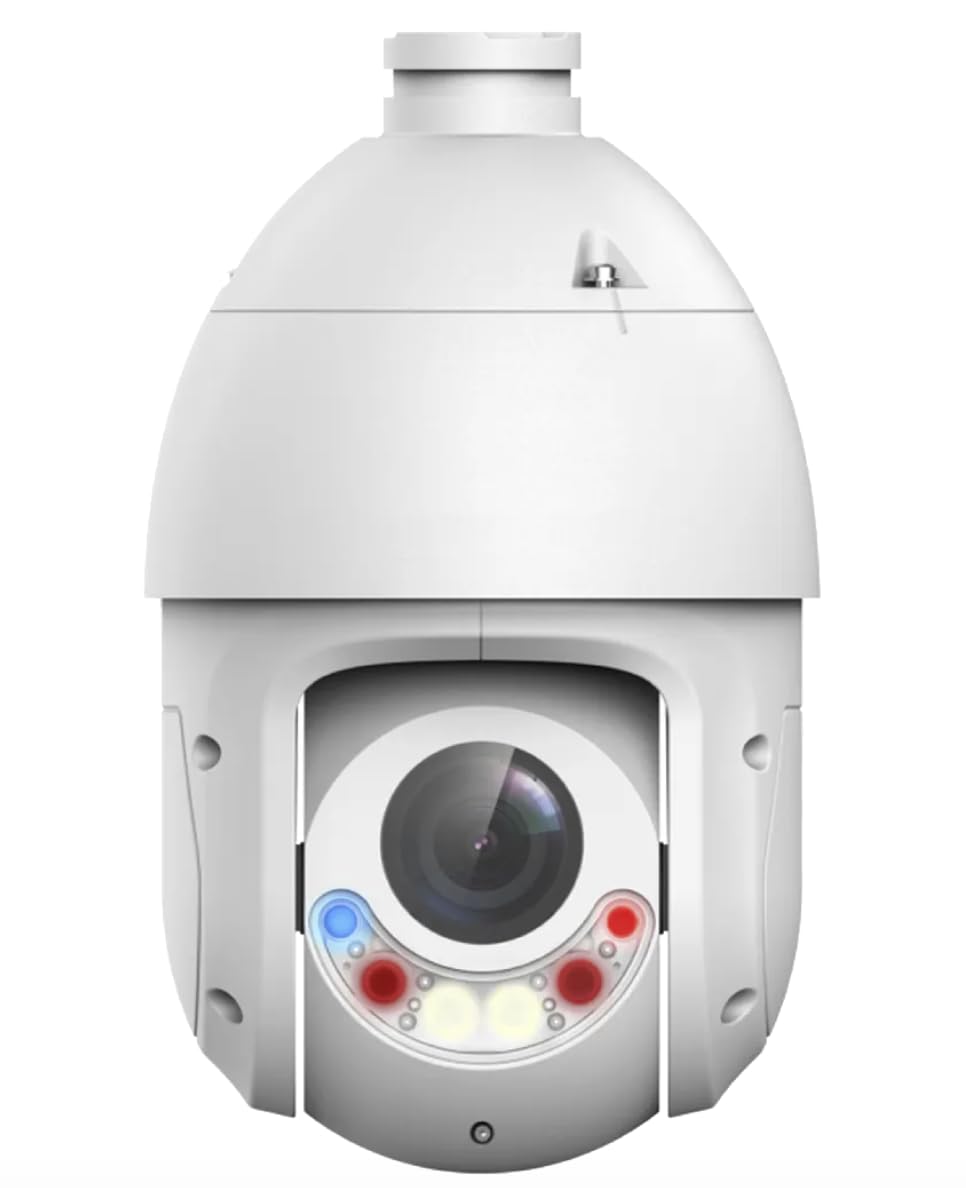
Figure 1: ENS PDN4EI825H-GR-APV Diamond 4K IP PTZ Security Camera. This image shows the white dome-shaped camera with its lens assembly visible at the bottom, featuring multiple light emitters (red, blue, yellow) around the central lens.
Ezaugarri nagusiak:
- Sentsore: 1/2.8″ 8MP STARVISTM CMOS for superior image quality.
- Zoom optikoa: 25x optical zoom for detailed monitoring.
- Gaueko ikuspegia: Full-time color, infrared, and LED illumination with Starlight technology.
- Iraunkortasuna: IP66 rating for water and dust resistance.
- Jarraipen automatikoa: Auto tracking 3.0 for real-time subject tracking.
- Perimetroaren babesa: Advanced intrusion detection capabilities.
- Mugimendu adimenduna hautematea: SMD 4.0 for accurate human detection and reduced false alarms.
- Aurpegien detekzioa: Advanced facial recognition capabilities.
- Konektibitatea: Ethernet for reliable network connection.
5. Konfigurazioa
5.1 Instalazio fisikoa
- Aukeratu muntaketa-kokapen bat: Select a suitable indoor or outdoor location. The camera supports wall mounting. Ensure the chosen location provides a clear field of view and is within reach of power and network connections. The camera dimensions are 6.3 x 6.3 x 10.63 inches.
- Prestatu Muntatzeko Azalera: Use the provided mounting template (if applicable) to mark drilling points. Drill pilot holes for the mounting screws.
- Seguru kamera: Attach the camera securely to the mounting surface using the provided screws and anchors. Ensure the camera is stable and properly oriented.
- Kableen kudeaketa: Route the power and Ethernet cables. Use the waterproof connector kit for outdoor installations to protect connections from moisture.
5.2 Energia eta sare konexioa
- Konektatu energia: Connect the camera to a suitable power source using the provided power adapter. The camera operates on corded electric power.
- Konektatu sarea: Connect an Ethernet cable from the camera to your network switch or router. This camera uses an Ethernet connectivity protocol.
5.3 Hasierako konfigurazioa
- Sartu kamerara: Use the ENS App or a compatible Digital Video Recorder (DVR) to discover and access the camera on your network. Refer to the ENS App or DVR manual for specific instructions on device discovery.
- Konfiguratu sarearen ezarpenak: Configure IP address, subnet mask, gateway, and DNS settings as required by your network.
- Aldatu lehenetsitako pasahitza: For security, immediately change the default administrator password to a strong, unique password.
- Firmware eguneratzea: Check for and install any available firmware updates to ensure optimal performance and security.
6. Funtzionamendua
6.1 Oinarrizko PTZ Kontrola
The camera's Pan-Tilt-Zoom (PTZ) functions can be controlled remotely via the ENS App or a connected DVR/NVR interface. Use the directional controls to pan (horizontal movement) and tilt (vertical movement) the camera. Use the zoom controls to adjust the 25x optical zoom for wider or more detailed views.
6.2 Night Vision and Illumination
The camera features Starlight technology for enhanced low-light performance, providing color images in minimal ambient light. It also includes infrared (IR) illumination for complete darkness and built-in LEDs for full-time color illumination when needed. These modes can typically be configured for automatic switching based on ambient light conditions.
6.3 Ezaugarri adimendunak
- Auto Tracking 3.0: Enable auto-tracking to allow the camera to automatically follow moving subjects within its field of view. Configure tracking sensitivity and duration in the camera settings.
- Perimetroaren babesa: Set up virtual tripwires or intrusion zones to detect unauthorized entry into specific areas. Alarms can be triggered upon detection.
- Aurpegien detekzioa: Configure the camera to detect human faces. This feature can be used for event triggering or recording specific incidents.
- Smart Motion Detection (SMD) 4.0: SMD 4.0 intelligently distinguishes between human and vehicle movements and other environmental factors (e.g., animals, leaves), significantly reducing false alarms. Adjust sensitivity and target types in the settings.
7. Mantentzea
- Lentea garbitzea: Gently wipe the camera lens with a soft, clean, lint-free cloth. If necessary, use a mild lens cleaning solution. Avoid abrasive materials.
- Etxebizitzen garbiketa: Clean the camera housing with a soft, damp oihal. Ez erabili produktu kimiko gogorrak.
- Firmware eguneraketak: Aldian-aldian egiaztatu fabrikatzailearen website or the ENS App for firmware updates. Keeping the firmware updated ensures optimal performance, security, and access to new features.
- Kableen ikuskapena: Periodically inspect all cables for signs of wear, damage, or corrosion, especially for outdoor installations.
8. Arazoak
| Arazoa | Kausa posiblea | Irtenbidea |
|---|---|---|
| Ez dago irudi/bideo jariorik | Argindarrik ez; Sare konexio arazoa; IP helbide okerra. | Check power supply; Verify Ethernet cable connection; Ensure camera is powered on; Check network settings and IP address. |
| Irudi kalitate eskasa | Lente zikina; Argiztapen eskasa; Kameraren ezarpen okerrak. | Clean the lens; Adjust lighting or enable night vision features; Check resolution and compression settings. |
| PTZ control unresponsive | Network latency; Firmware issue; Mechanical obstruction. | Check network stability; Restart the camera; Update firmware; Inspect for physical obstructions. |
| Mugimendu detekzioaren alarma faltsuak | High sensitivity; Environmental factors (e.g., moving branches, animals). | Adjust SMD 4.0 sensitivity; Configure detection zones to exclude irrelevant areas; Ensure SMD 4.0 is enabled for human/vehicle filtering. |
| Ezin da kamerara urrunetik sartu | Network configuration (port forwarding, firewall); Incorrect app settings. | Verify router settings for port forwarding; Check firewall rules; Ensure correct remote access settings in the ENS App. |
9. Zehaztapenak
| Ereduaren izena | PDN4EI825H-GR-APV |
| Sentsore | 1/2.8″ 8MP STARVISTM CMOS |
| Bideo Harrapaketa Ebazpena | 4K (8MP) |
| Zoom optikoa | 25x |
| Gaueko Ikusmenaren Teknologia | Starlight, Infrared, LED Illumination |
| Konektibitate Teknologia | Ethernet |
| Energia iturria | Kable elektrikoa |
| Kontrolagailu mota | ENS App, Remote |
| Muntatze Mota | Hormako Muntaia |
| Barruko/Kanpoko erabilera | Barruan, Kanpoan |
| Nazioarteko Babesteko Balorazioa | IP66 (Uraren eta hautsaren aurkakoa) |
| Produktuaren neurriak (L x W x H) | 6.3 x 6.3 x 10.63 hazbete |
| Elementuaren pisua | 10 kilo |
| Ezaugarri bereziak | Face Detection, Night Vision, PTZ Technology, Wide Dynamic Range, Auto Tracking 3.0, Perimeter Protection, Smart Motion Detection 4.0 |
10. Bermea eta Laguntza
For warranty information and technical support, please refer to the documentation provided with your purchase or visit the official ENS webgunea. Gorde erosketa-agiria erosketaren frogagiri gisa berme-erreklamazioetarako.
If you encounter any issues not covered in this manual, please contact ENS customer support for assistance.


