
Sarrera
Thank you for choosing the TORRAS MiniMag 10000mAh MagSafe Compatible Mobile Battery. This manual provides essential information for the safe and efficient use of your new power bank. Please read it thoroughly before use and retain it for future reference.

Image: The TORRAS MiniMag 10000mAh mobile battery in desert color, showcasinbere diseinu trinkoa eta dotorea dela eta.
Konfigurazioa
1. Hasierako kargatzea
Before first use, fully charge your TORRAS MiniMag mobile battery. Connect the included USB-C cable to the power bank's USB-C port and a compatible power adapter (not included). The LED indicators will show the charging progress.
2. Attaching to Your Device (MagSafe)
For MagSafe compatible devices, simply align the TORRAS MiniMag with the back of your smartphone. The powerful magnets will securely attach the power bank, initiating wireless charging automatically. Ensure your phone case is MagSafe compatible for optimal magnetic adhesion.

Image: The TORRAS MiniMag magnetically attaching to the back of a smartphone, illustrating the MagSafe connection for wireless charging.
Funtzionamendu-argibideak
1. Haririk gabeko kargatzea
Once securely attached via MagSafe, your device will begin charging wirelessly. The power bank supports up to 15W wireless charging (7.5W for iPhones).

Image: A person holding a smartphone with the TORRAS MiniMag attached, demonstrating wireless charging during a phone call.
2. Hari bidezko kargatzea (USB-C)
Connect your device to the power bank's USB-C port using a compatible charging cable. The power bank supports up to 22.5W wired fast charging.
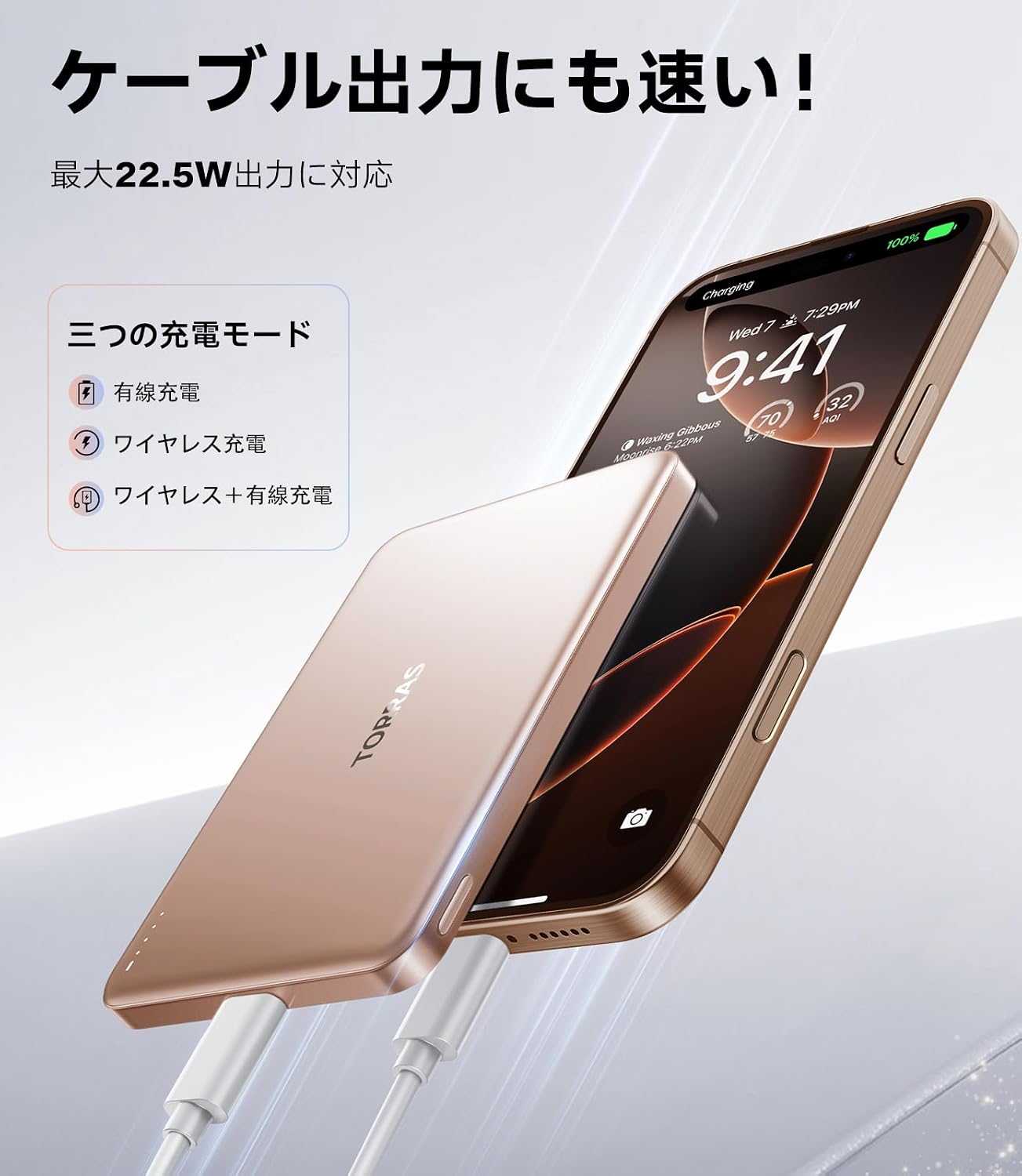
Image: The TORRAS MiniMag connected to a smartphone via a USB-C cable, illustrating wired charging capability.
3. Aldibereko kargatzea
The TORRAS MiniMag can charge two devices simultaneously: one wirelessly via MagSafe and another via the USB-C port. The combined maximum output is 15W.

Image: The TORRAS MiniMag simultaneously charging a smartphone wirelessly and another device via its USB-C port.
4. Bateriaren maila egiaztatzea
The LED indicators on the side of the power bank display the remaining battery charge. Refer to the product packaging or a quick start guide for specific LED patterns.
Mantentzea
1. Garbiketa
Wipe the power bank with a soft, dry cloth. Do not use harsh chemicals or abrasive materials. Keep the charging ports free from dust and debris.
2. Biltegiratzea
Store the power bank in a cool, dry place away from direct sunlight and extreme temperatures. For long-term storage, it is recommended to charge the battery to about 50% every three months to maintain battery health.
3. Bateria zaintzea
The TORRAS MiniMag uses high-quality lithium polymer cells designed for longevity, maintaining performance even after 500+ charge cycles. Avoid fully discharging the battery frequently to extend its lifespan. The device includes NTC temperature management and over-discharge protection to safeguard your smartphone's battery.
Arazoak konpontzea
- Issue: Power bank is not charging.
- Irtenbidea: Ensure the charging cable is securely connected to both the power bank and the power adapter. Verify that the power adapter is functioning correctly and connected to a live power outlet. Try a different cable or adapter.
- Issue: Device is not charging wirelessly.
- Irtenbidea: Ensure your device is MagSafe compatible and properly aligned with the power bank. Remove any non-MagSafe compatible cases that might interfere with the magnetic connection or wireless charging. Check if the power bank has sufficient charge.
- Issue: Slow charging speed.
- Irtenbidea: For optimal wired charging speed, use a cable and adapter that support 22.5W output. For wireless charging, ensure your device supports fast wireless charging. Background apps or high device usage during charging can affect speed.
- Issue: Power bank feels warm during use.
- Irtenbidea: It is normal for the power bank to generate some heat during charging or discharging. The MiniMag features NTC temperature management for safety. If it becomes excessively hot, disconnect it immediately and contact support.
Zehaztapenak
| Ezaugarri | Xehetasuna |
|---|---|
| Modelo zenbakia | PB4A |
| Edukiera | 10000mAh |
| Konektore mota | USB C mota |
| Irteera kableatua | Gehienez 22.5W |
| Haririk gabeko irteera | Max 15W (7.5W for iPhone) |
| Aldibereko Irteera | Max 15W (Wireless + USB-C) |
| Ezaugarriak | Slim Design, Wireless Charging, MagSafe Compatible |
| Energia iturria | Kable elektrikoa |
| Portu kopurua | 1 (USB-C) |
| Gailu bateragarriak | Smartphones (MagSafe compatible iPhones, Android) |
| Produktuaren neurriak | 10.2 x 6.6 x 0.8 cm |
| Elementuaren pisua | 190 gramo |
| Jatorrizko Herrialdea | Txina |

Image: An illustration showing the TORRAS MiniMag's compatibility with various smartphone models, including iPhones and Android devices.
Bermea eta Laguntza
TORRAS offers an 18-month manufacturer's warranty for this product. This warranty covers manufacturing defects and ensures product quality.
Laguntzarekin harremanetan jartzea
If you have any questions or encounter issues during use, please contact TORRAS customer support. You can typically reach support through your purchase platform:
- Go to "Account Services"
- Select "Order History"
- Find your order and click "Contact Seller"
TORRAS aims to respond to inquiries within 24 hours.

Image: An infographic highlighting TORRAS's 18-month quality assurance, lifetime service, and free reshipment policy, along with contact instructions.
