
1. Sarrera
This manual provides essential instructions for the setup, operation, and maintenance of your GOBOULT Drift+ Smart Watch. Please read this guide thoroughly to ensure proper use and to maximize the device's features.

Image 1.1: The GOBOULT Drift+ Smart Watch.
The GOBOULT Drift+ Smart Watch features a 1.85-inch HD display, Bluetooth calling capabilities, IP68 water resistance, and comprehensive health monitoring functions.

1.2. irudia: Amaituview of GOBOULT Drift+ Smart Watch features.
2. Zer dago kutxan
Egiaztatu elementu hauek guztiak zure produktuaren ontzian daudela:
- GOBOULT Drift+ Smart Watch
- Kargatzeko kablea
- Erabiltzailearen eskuliburua (dokumentu hau)
- Berme Txartela
3. Konfigurazioa
3.1 Hasierako karga
Before first use, fully charge your GOBOULT Drift+ Smart Watch. Connect the provided charging cable to the charging port on the back of the watch and to a standard USB power adapter (not included). The watch typically takes approximately 2.5 hours to fully charge.

Image 3.1: Charging the GOBOULT Drift+ Smart Watch.
3.2 Zure telefonoarekin parekatzea
- Deskargatu GOBOULT aplikazio ofiziala zure telefonoaren aplikazio dendatik (iOS eta Androidekin bateragarria).
- Ziurtatu Bluetootha gaituta dagoela zure telefonoan.
- Open the GOBOULT app and follow the on-screen instructions to create an account or log in.
- Select 'Add Device' or a similar option within the app and choose 'Drift+' from the list of available devices.
- Berretsi parekatze eskaera zure telefonoan eta erloju adimendunean.
4. Funtzionamendu-argibideak
4.1 Oinarrizko nabigazioa
The GOBOULT Drift+ Smart Watch features a 1.85-inch HD touchscreen display. Swipe left, right, up, or down to navigate through menus and functions. Press the side button to return to the home screen or access the app list.
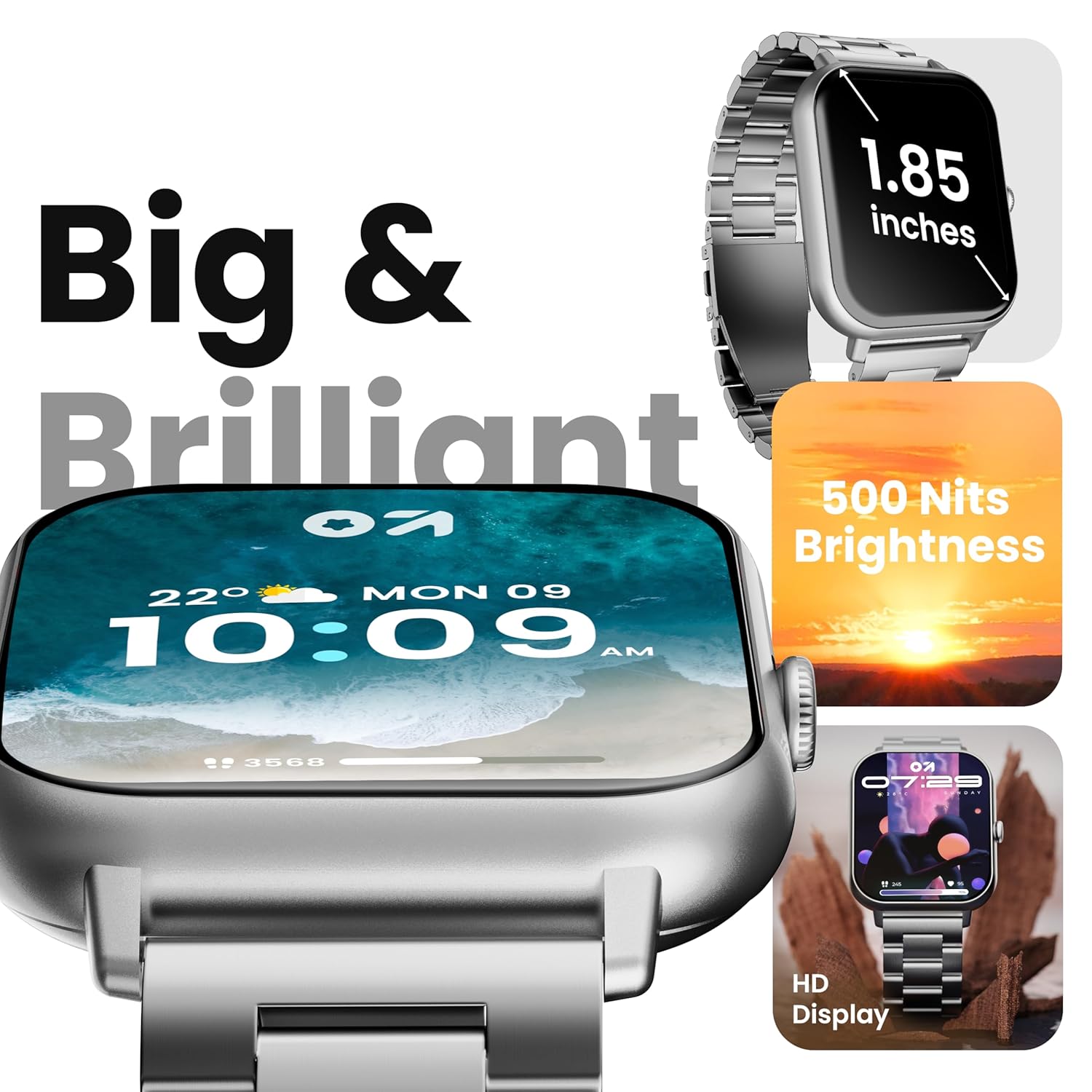
Image 4.1: The 1.85-inch HD display of the smart watch.
4.2 Bluetooth bidezko deiak
Once paired with your smartphone, the Drift+ Smart Watch allows you to make and receive calls directly from your wrist. The watch is equipped with a built-in speaker and microphone for clear audio communication.
- Deiak erantzutea: Dei bat jasotzen duzunean, sakatu erlojuaren pantailan dagoen erantzun ikono berdea.
- Deiak egitea: Access the dialer or contacts through the watch menu to initiate a call.

Image 4.2: Bluetooth calling feature in use.
4.3 Erlojuaren aurpegiak pertsonalizatzea
The watch supports over 150 cloud-based watch faces and custom watch face options. To change your watch face:
- Long-press on the current watch face on your watch.
- Swipe left or right to browse pre-installed watch faces.
- For more options, open the GOBOULT app on your smartphone and navigate to the 'Watch Faces' section to download and apply new designs.

Image 4.3: Customizing watch faces.
4.4 Kirol Modu
The GOBOULT Drift+ offers over 100 sports modes to track various physical activities. To access and use sports modes:
- From the watch's main menu, select the 'Sports' or 'Workout' icon.
- Choose your desired activity from the list (e.g., running, cycling, walking).
- Tap to start tracking. The watch will record data such as steps, distance, calories burned, and heart rate.
- To end a workout, swipe right or press the side button and select 'End'.

Image 4.4: Tracking activities with sports modes.
4.5 Osasunaren Zaintza
The watch provides comprehensive health insights, including:
- 24/7 bihotz-maiztasunaren jarraipena: Zure bihotz-maiztasuna etengabe kontrolatzen du.
- SpO2 Blood Oxygen Tracking: Odoleko oxigeno saturazio mailak neurtzen ditu.
- Odol-presioaren kontrola: Odol-presioaren irakurketa estimatuak ematen ditu.
- Emakumezkoen hilekoaren zikloaren jarraipena: Helps track and predict menstrual cycles.
- Ura edateko abisuak: Hidratatuta egoteko eskatzen dizu.
- Sedentarioen abisuak: Encourages movement after periods of inactivity.
Access these features through the health menu on the watch or view detailed data in the GOBOULT app.

4.5 irudia: Osasunaren monitorizazio funtzioak.
4.6 AI Ahots Laguntzailea
Activate the AI voice assistant on your watch for hands-free assistance. This feature allows you to perform tasks, ask questions, and control certain functions using voice commands. Ensure your watch is connected to your smartphone for full functionality.
4.7 Jakinarazpen adimendunak
Receive notifications from your favorite social apps, messages, and calls directly on your watch. Configure notification settings within the GOBOULT app on your smartphone.
5. Mantentzea
5.1 Urarekiko erresistentzia
The GOBOULT Drift+ Smart Watch is IP68 water resistant, meaning it is protected against dust and can withstand immersion in water up to 1.5 meters for up to 30 minutes. It is suitable for daily use, such as hand washing or light rain exposure. However, it is not recommended for swimming, diving, or exposure to hot water/steam.

Image 5.1: IP68 Water Resistance.
5.2 Garbiketa
Zure erloju adimenduna garbitzeko, garbitu pantaila eta uhala astiro-astiro zapi leun eta lehor batekin.amp, oihal lihorik gabekoa. Saihestu produktu kimiko gogorrak edo material urratzaileak erabiltzea, hauek gailua kaltetu baitezakete.
5.3 Bateria zaintzea
Bateriaren iraupena luzatzeko:
- Saihestu muturreko tenperaturak.
- Charge the watch regularly, but avoid leaving it fully charged or fully depleted for extended periods.
- Reduce screen brightness and disable unnecessary features when not in use.
The watch offers up to 7 days of battery life in regular mode, 2-3 days with heavy Bluetooth calling, and an impressive 25 days in standby mode.
6. Arazoak
| Gaia | Irtenbide posiblea |
|---|---|
| Erlojua ez pizten | Ziurtatu erlojua guztiz kargatuta dagoela. Konektatu kargagailura gutxienez 30 minutuz. |
| Ezin da telefonoarekin parekatu | Check if Bluetooth is enabled on your phone. Restart both the watch and phone. Ensure the GOBOULT app is updated. |
| Bluetooth deiak ez du funtzionatzen | Verify that the watch is properly connected for both media and call audio in your phone's Bluetooth settings. Check app permissions. |
| Osasun-datu zehaztugabeak | Ensure the watch is worn snugly on your wrist, not too tight or too loose. Clean the sensors on the back of the watch. Note that smart watch data is for reference and not for medical diagnosis. |
| Bateriaren iraupen laburra | Reduce screen brightness, disable 'Always-On Display' if active, limit frequent heart rate monitoring, and turn off unnecessary notifications. |
7. Zehaztapenak
| Ezaugarri | Xehetasuna |
|---|---|
| Ereduaren izena | Drift+ |
| Bistaratzeko tamaina | 1.85 hazbeteko HD |
| Distira | 500 nit |
| Uraren Erresistentzia | IP68 |
| Haririk gabeko mota | Bluetooth 5.1 |
| Sistema eragileen bateragarritasuna | iOS, Android |
| Bateria mota | Litio Polimeroa |
| Bateria kargatzeko denbora | Gutxi gorabehera. 2.5 ordu |
| Bateriaren iraupen tipikoa | Gehienez 7 egun |
| Heavy Usage (BT Calling) Battery Life | 2-3 egun |
| Egonean Denbora | Gehienez 25 egun |
| Elementuaren pisua | 38 g |
| Dakarten osagaiak | Erloju adimenduna, kargatzeko kablea, erabiltzailearen eskuliburua, berme txartela |
8. Bermea eta Laguntza
Your GOBOULT Drift+ Smart Watch comes with a manufacturer's warranty. Please refer to the included Warranty Card for detailed terms and conditions, including warranty period and coverage.
For technical support, service, or further inquiries, please visit the official GOBOULT website or contact customer service using the information provided on your Warranty Card or the product packaging.
Manufacturer: Exotic Mile Private Limited, Boult Audio, B-67 Wazirpur Industrial Area, New Delhi 110052, India.