
NOILLER ZY-BB2
NOILLER 4.3" Video Baby Monitor User Manual
Model: ZY-BB2
Sarrera
Thank you for choosing the NOILLER 4.3" Video Baby Monitor. This device is designed to provide a reliable and convenient way to monitor your baby, offering both a dedicated monitor unit and smartphone app connectivity. Please read this manual thoroughly before use to ensure proper operation and safety.
Paketearen edukia
- Baby Camera Unit
- 4.3" LCD Monitor Unit
- Power Adapter for Camera
- Monitorearen korronte egokitzailea
- USB kargatzeko kablea
- Erabiltzailearen eskuliburua (dokumentu hau)
Produktua amaituview
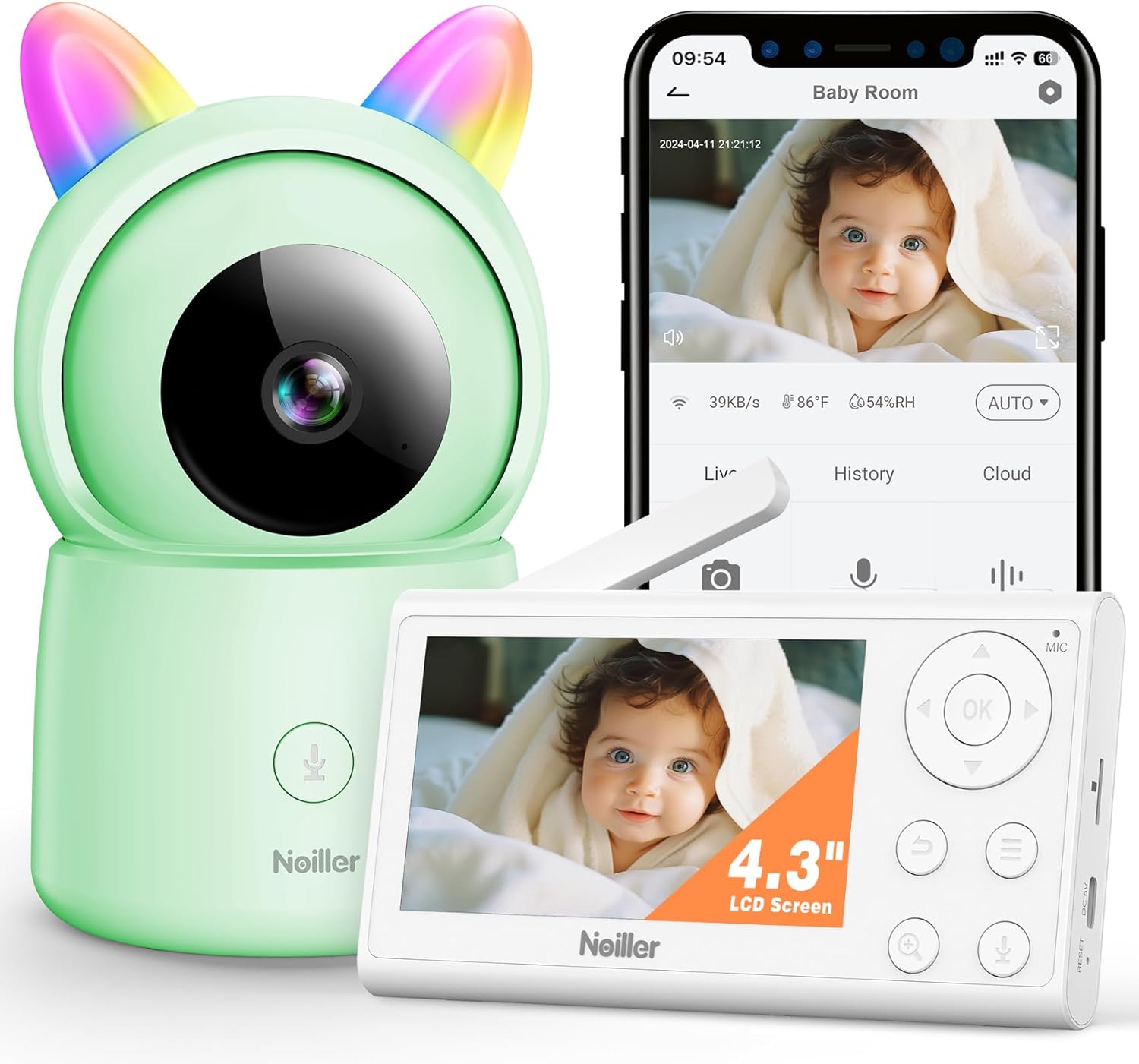
Irudia: The NOILLER 4.3" Video Baby Monitor system, featuring the green camera unit with rainbow ears, the white 4.3-inch LCD monitor, and a smartphone displaying the "Safeview" app interface with a live baby feed. The monitor shows control buttons for navigation, microphone, and zoom. The camera has a microphone button on its base.
The NOILLER Baby Video Monitor system consists of two main components: the Camera Unit and the Monitor Unit. It also supports a smartphone application for remote viewing.
Camera Unit Features:
- 1080P HD Camera Lens
- Gaueko ikusmenerako LED infragorriak
- Microphone and Speaker for Two-Way Talk
- Tenperatura eta Hezetasun Sentsoreak
- RGB Night Lights (on ears)
- Potentzia Sarrerako Ataka
- Berrezarri botoia
Monitor Unit Features:
- 4.3 hazbeteko LCD pantaila
- Navigation Buttons (Up, Down, Left, Right, OK)
- Mikrofonoa eta bozgorailua
- Bolumen kontrola
- Zoom funtzioa
- Menu botoia
- Two-Way Talk Button
- Potentzia Sarrerako Ataka
- Antena
Konfigurazio Gida
1. Powering On the Units
- Connect the camera unit to a power outlet using its dedicated power adapter. Ensure the adapter is securely plugged in.
- Connect the monitor unit to a power outlet using its dedicated power adapter. The monitor unit has a built-in rechargeable battery for portable use, but it is recommended to charge it fully before first use.
- Press and hold the power button on the monitor unit to turn it on.
2. Pairing the Camera and Monitor
The camera and monitor units are pre-paired at the factory. If they do not connect automatically, or if you need to add another camera (sold separately), follow these steps:
- On the monitor unit, press the Menua botoia.
- Nabigatu Kamera icon and select it.
- Choose an available camera channel (e.g., Camera 1, Camera 2).
- Hautatu Parekatzea option. The monitor will begin searching for a camera.
- 30 segundo barru, sakatu Parekatzea button on the back of the camera unit.
- Once paired, the monitor will display the camera's live feed.
3. Smartphone App Setup (Optional)
Urrunekorako viewing and additional features, download the "Safeview" app:
- Scan the QR code provided in the package or search for "Safeview" in your smartphone's app store (iOS/Android).
- Erregistratu kontu berri bat lortzeko edo hasi saioa dagoeneko baduzu.
- Follow the in-app instructions to add your camera device. This typically involves connecting the camera to your 2.4G Wi-Fi network.
- Ensure your smartphone is connected to a 2.4G Wi-Fi network during the initial setup process.
4. Kameraren kokapena
Place the camera on a flat, stable surface such as a dresser or shelf, ensuring it has a clear, unobstructed view of the baby's crib or play area. Keep the camera and its power cord out of reach of children (at least 3 feet / 1 meter away from the crib).
Funtzionamendu-argibideak
Zuzenean View
Once the camera and monitor are paired, the monitor will automatically display the live video feed. On the smartphone app, select the camera from your device list to view zuzeneko jarioa.
Bi norabidetako solasaldia
- Monitor Unitatea: Press and hold the microphone button on the monitor unit to speak. Release the button to hear your baby.
- Smartphone aplikazioa: Tap the microphone icon on the app interface to speak.
Gaueko Ikusmena
The camera automatically switches to infrared night vision in low-light conditions, providing clear black and white images. No manual adjustment is required.
Zoom funtzioa
On the monitor unit, press the Zoomatu button to digitally zoom in or out on the video feed.
Lo egiteko
The monitor unit allows you to play pre-programmed lullabies through the camera's speaker. Access this feature via the Menua on the monitor unit.
RGB Night Lights
The camera unit features RGB night lights on its "ears." These can be controlled via the monitor unit's menu or the smartphone app to provide a soothing glow in the baby's room.
Tenperatura eta hezetasuna kontrolatzea
The monitor unit and smartphone app display the real-time temperature and humidity of the baby's room, as detected by the camera's sensors.
VOX Mode (Voice Activated)
The monitor can be set to VOX mode, where the screen and audio activate only when sound is detected from the baby's room. You can adjust the sensitivity level in the monitor's settings.
Mantentzea
Garbiketa
Wipe the camera and monitor units with a soft, dry, lint-free cloth. Do not use cleaning agents, solvents, or abrasive cleaners. Avoid getting moisture into any openings.
Battery Care (Monitor Unit)
- Bateriaren iraupena luzatzeko, saihestu bateria maiz erabat deskargatzea.
- Charge the monitor unit regularly, especially if it will not be used for an extended period.
- Gorde unitatea leku fresko eta lehor batean erabiltzen ez duzunean.
Biltegiratzea
If storing the device for a long period, ensure both units are powered off and stored in a dry, dust-free environment.
Arazoak konpontzea
| Arazoa | Kausa posiblea | Irtenbidea |
|---|---|---|
| Ez dago irudi/seinalerik monitorearen gainean |
|
|
| Irudi kalitate eskasa |
|
|
| Soinurik edo soinu distortsionaturik |
|
|
| App cannot connect to camera |
|
|
Zehaztapenak
| Ezaugarri | Xehetasuna |
|---|---|
| Ereduaren izena | ZY-BB2 |
| Monitorearen pantailaren tamaina | 4.3 hazbeteko LCDa |
| Bideo Harrapaketa Ebazpena | 1080p |
| Konektibitate Teknologia | Wireless Monitor & 2.4G WiFi Smartphone APP |
| Energia iturria | Battery Powered Monitor & Corded Electric Camera |
| Barruko/Kanpoko erabilera | Barruan |
| Kontrolagailu mota | Mobile Phone APP, LCD Monitor |
| Muntatze Mota | Mahai gaineko muntaia |
| Elementuaren neurriak (L x W x H) | 5 x 3 x 2 hazbete |
| Elementuaren pisua | 1.43 kilo |
| Pilak | 1 litio ioi bateria behar da (barne) |
| UPC | 750961862307 |
Bermea eta Laguntza
NOILLER products are designed for reliability and performance. For warranty information, please refer to the warranty card included in your product packaging or visit the official NOILLER website. If you encounter any issues or have questions regarding your product, please contact our customer support team:
- Posta elektronikoa: support@noiller.com
- Webgunea: www.noiller.com
- Please have your model number (ZY-BB2) and purchase details ready when contacting support.
Ask a question about this manual
Ask about setup, troubleshooting, compatibility, parts, safety, or missing instructions. Manuals+ will review the question and use this page’s manual context to help answer it.