
CHIQ L32M9E
CHIQ L32M9E Smart TV User Manual
Model: L32M9E | Brand: CHIQ
Sarrera
This manual provides essential information for setting up, operating, and maintaining your CHIQ L32M9E 32-inch Smart TV. Please read this manual thoroughly before using the product to ensure proper and safe operation.

Figure 1: CHIQ L32M9E Smart TV
Kutxan dagoena
Upon unpacking, please verify that all components listed below are included and in good condition:
- CHIQ L32M9E Smart TV Unit
- Urruneko Kontrola
- Alkaline Batteries (for remote control)
- Stand Feet (2 pieces)
- Erabiltzailearen eskuliburua (dokumentu hau)
- Berme Txartela
Konfigurazioa
1. Euskarria lotzea
- Kontu handiz jarri telebistaren pantaila beherantz gainazal bigun eta lau batean, kalterik ez egiteko.
- Align the stand feet with the corresponding screw holes on the bottom of the TV.
- Securely fasten the stand feet using the provided screws.

Figure 2: TV Dimensions and Remote Control Layout. The image illustrates the TV's dimensions with and without the stand, and provides a detailed view urrutiko agintearen botoien.
2. Potentzia konektatzea
Plug the power cord into the TV's power input, then connect the other end to a suitable wall outlet. Ensure the power supply matches the TV's voltage eskakizunak.
3. Hasierako konfigurazioa
Upon first power-on, the TV will guide you through the initial setup process, including language selection, network connection (Wi-Fi), and Google account sign-in for Google TV features.

Figure 3: Google TV Home Screen. This image displays the user interface of Google TV, showing various streaming app icons and content recommendations.
4. Horman muntatzea (aukerakoa)
The CHIQ L32M9E supports VESA mounting type MIS-F with a hole spacing of 20 x 20 cm. Use a compatible wall mount bracket (sold separately) and follow the instructions provided with the bracket for safe installation.

Figure 4: TV Wall Mounted. This image shows the CHIQ L32M9E TV elegantly mounted on a wall in a modern living room setting.
Telebista erabiltzea
Urruneko Kontrola
The included remote control allows full navigation and control of your Smart TV. Insert the provided Alkaline batteries into the remote, ensuring correct polarity. Refer to Figure 2 for the button layout.
The remote features dedicated buttons for popular streaming services like Netflix, Amazon Prime Video, and YouTube for quick access.
Google TV interfazea
Google TV organizes your favorite content from various streaming services into a single, personalized interface. Recommendations are tailored to your viewing habits. Navigate using the remote's directional pad and OK button.

Figure 5: Rich Content on Google TV. This image highlights the wide array of streaming applications and content available through the Google TV platform.
Google Laguntzailea Ahots Kontrola
Activate the built-in Google Assistant by pressing the dedicated button on your remote. Use voice commands to search for content, control playback, adjust volume, and manage smart home devices.

Figure 6: Google Assistant in Use. A user is shown interacting with the TV using voice commands for tasks like checking the weather or finding movies.
Chromecast integratua
Easily cast movies, TV shows, photos, and more from your smartphone, tablet, or laptop directly to your TV screen for a larger, more immersive viewesperientzia.
Input Sources and Connectivity
Your TV is equipped with multiple input ports for connecting external devices:
- USB 2.0 x 2: USB unitateetatik multimedia erreproduzitzeko.
- HDMI 1.4 x 2: For connecting devices like game consoles, Blu-ray players, or set-top boxes.
- AV IN (mini AV) x 1: Bideo konposatua erabiltzen duten gailu zaharretarako.
- RF x 2: For antenna or cable connections (DVB-C/T/T2/S/S2).
- WLAN (Wi-Fi): Interneteko konexiorako.
- Bluetootha: For connecting wireless accessories like headphones or speakers.

Figure 7: Connectivity Ports. This image illustrates the various input and output ports available on the CHIQ L32M9E TV, including USB, HDMI, AV, and RF.
Picture and Audio Features
The TV features HDR10 technology for enhanced contrast and vibrant colors, providing rich color depth and fine details in both bright and dark scenes.
Experience crystal-clear audio with Dolby Audio and dbx-tv technologies, delivering exceptional sound quality for an immersive cinematic experience.

Figure 8: Dynamic Noise Reduction (DNR). This image demonstrates the effect of DNR, showing a clearer picture with DNR enabled compared to without, reducing visual noise.
The TV also includes Dynamic Noise Reduction (DNR) to optimize the input signal source, resolving potential issues with input noise and ensuring a clear, flawless picture.
Choose from seven picture modes (Sports, Standard, Vivid, User, Game, Energy Saving, Film) to optimize your viewedukietan oinarritutako esperientzia.
Mantentzea
Pantaila garbitzea
Garbitu pantaila astiro-astiro zapi leun eta pelusik gabeko batekin. Orbanik egoskorrak izanez gero, garbitu astiro-astiro.ampGarbitu zapi bat urarekin edo pantaila-garbitzaile espezializatu batekin. Saihestu produktu kimiko gogorrak edo material urratzaileak erabiltzea.
Armairua garbitzea
Garbitu telebistaren armairua oihal leun eta lehor batekin. Ez erabili garbitzaile likidorik zuzenean armairuan.
Arazoak konpontzea
Telebistarekin arazoak badituzu, jo ezazu honako arazo eta irtenbide ohikoenei:
- Potentziarik gabe:
Ensure the power cord is securely plugged into both the TV and the wall outlet. Check if the outlet is functional by plugging in another device. Try a different power outlet.
- Irudi/soinurik ez:
Verify that the correct input source is selected. Check all cable connections (HDMI, AV, antenna) to external devices. If using an antenna, ensure it is properly connected and tuned.
- Urruneko kontrola ez dabil:
Check and replace the batteries in the remote control. Ensure there are no obstructions between the remote and the TV's IR sensor. Point the remote directly at the TV.
- Sareko konexio arazoak:
Restart your Wi-Fi router. Ensure the TV is within range of your Wi-Fi signal. Re-enter your Wi-Fi password in the TV's network settings. For persistent issues, try connecting via an Ethernet cable if available (though this model primarily uses Wi-Fi).
- Picture Quality Issues (e.g., blurry, grainy):
Check the resolution of the input source. Adjust picture settings (brightness, contrast, sharpness) in the TV menu. Ensure Dynamic Noise Reduction (DNR) is enabled if desired.
If the problem persists after attempting these solutions, please contact CHIQ customer support.
Zehaztapenak
| Ezaugarri | Xehetasuna |
|---|---|
| Ereduaren izena | L32M9E |
| Marka | CHIQ |
| Pantailaren tamaina | 32 hazbete (80 cm) |
| Bistaratzeko Teknologia | HD |
| Ebazpena | 720p (1366 x 768 pixel) |
| Freskatze tasa | 60 Hz |
| Sistema eragilea | Google TV |
| Ezaugarri bereziak | HDR10, Google Assistant, Chromecast built-in, Metal frameless design |
| Audio Teknologia | Dolby Audio, DBX-tv |
| Konektibitatea | Bluetooth, USB (x2), HDMI (x2), WLAN (Wi-Fi), AV In (mini AV), RF (x2) |
| Neurriak (euskarriarekin) | 718 x 180 x 1467.5 mm |
| Neurriak (euskarririk gabe) | 718 x 84.2 x 421.6 mm |
| Pisua | 3.7 kilogramo |
| VESA muntaketa | MIS-F, 20 x 20 cm |
| Energia Eraginkortasun Klasea | F (27 kWh/1000h) |
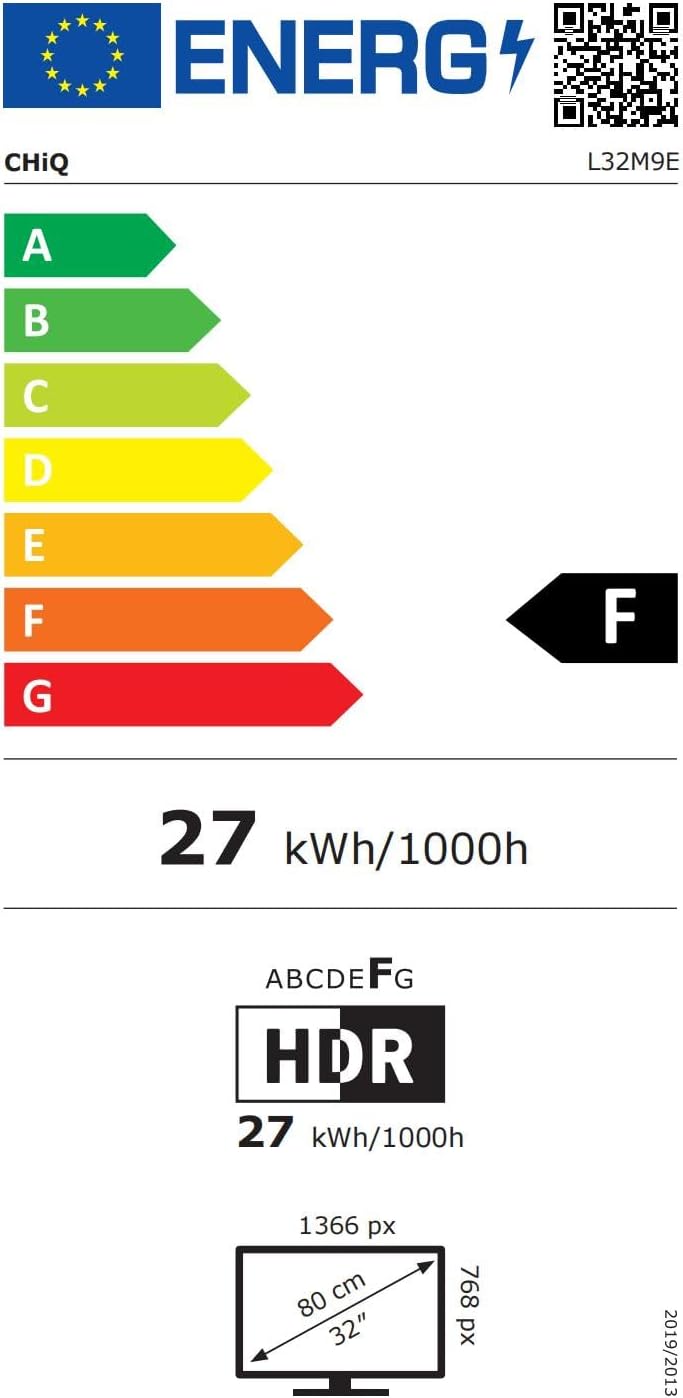
Figure 9: Energy Efficiency Label. This label indicates the energy consumption and efficiency class of the CHIQ L32M9E TV. For more details, visit the EPREL datu basea.

Figure 10: Product Data Sheet. This sheet provides detailed technical specifications and regulatory information for the CHIQ L32M9E TV.
Bermea eta Laguntza
Bermearen informazioa
Your CHIQ L32M9E Smart TV comes with a 2 urteko bermea on all products. Please retain your proof of purchase for warranty claims.
Itzultzeko politika
Products purchased from Amazon are eligible for a 30 eguneko itzulketa epea without specific reason, with returns handled by Amazon.
Bezeroarentzako Arreta
For technical assistance or support, an online hotline is available and staffed by professional personnel on weekdays. For manufacturer contact, refer to the Product Data Sheet (Figure 10) or visit the official CHIQ webgunea.
Manufacturer: Changhong Europe Electric S.r.o.
Webgunea: https://www.chiq.com/
Erlazionatutako dokumentuak - L32M9E
 |
CHIQ U65QM8V Erabiltzailearen Eskuliburua: Konfigurazioa, Ezaugarriak eta Arazoak Konpontzea CHIQ U65QM8V telebistarako erabiltzailearen eskuliburu osoa, segurtasun-argibideak, konfigurazioa, Smart TV, PVR, Bluetooth, Google Assistant, Chromecast, dbx-tv soinua bezalako funtzioak eta arazoak konpontzeko aholkuak biltzen dituena. |
 |
CHIQ U43G7H Erabiltzailearen eskuliburua Erabiltzailearen eskuliburu honek CHiQ U43G7H telebistarako argibide osoak eskaintzen ditu, konfigurazioa, funtzionamendua, segurtasun neurriak eta arazoak konpontzea jorratzen dituena. |
 |
CHiQ L32G7P Erabiltzailearen Eskuliburua: Konfigurazioa, Funtzionamendua eta Arazoak Konpontzea CHiQ L32G7P telebistarako erabiltzailearen eskuliburu osoa, konfigurazioa, konexioak, oinarrizko eragiketak, telebista adimendunaren funtzioak, arazoak konpontzea eta segurtasun argibideak biltzen dituena. |
 |
CHiQ L40M10 Erabiltzailearen Eskuliburua CHiQ L40M10 telebistaren erabiltzailearen eskuliburua, konfigurazioari, funtzionamenduari, segurtasun neurriei, arazoak konpontzeari eta Google Assistant eta Chromecast integratua bezalako funtzioei buruzko argibide zehatzak ematen dituena. |
 |
CHiQ U55G7H Smart TV erabiltzailearen eskuliburua CHiQ U55G7H Smart TV-rako erabiltzailearen eskuliburu osoa, konfigurazioa, funtzionamendua, segurtasun-argibideak, gailuak konektatzea, arazoak konpontzea eta Google Assistant eta Chromecast bezalako funtzio aurreratuak biltzen dituena. |
 |
CHiQ L32G7H Erabiltzailearen Eskuliburua: Konfigurazioa, Funtzionamendua eta Arazoak Konpontzea CHiQ L32G7H telebistarako erabiltzailearen eskuliburu osoa, konfigurazioa, segurtasun argibideak, urrutiko agintearen funtzioak, telebista adimendunaren ezaugarriak, arazoak konpontzea eta horman muntatzea biltzen dituena. |
Ask a question about this manual
Ask about setup, troubleshooting, compatibility, parts, safety, or missing instructions. Manuals+ will review the question and use this page’s manual context to help answer it.