Produktua amaituview
The 2.4G Wireless Gamestick Lite offers a vast collection of over 20,000 built-in retro games, providing an immersive gaming experience without the need for downloads or installations. It features 4K HDMI output for high-definition picture quality and comes with two responsive 2.4GHz wireless controllers for multi-player fun. This plug-and-play console supports 10 major emulators, including PS1, Atari2600, ATARI7800, SFC, FC, GBA, GB, GBC, MD, and Arcade, and allows for saving game progress.
Kutxan dagoena
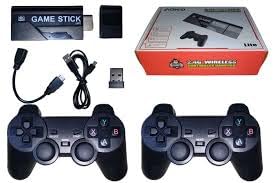
1. irudia: Contents of the Gamestick Lite package. This includes the main gamestick unit, two wireless controllers, a USB receiver for the controllers, an HDMI extension cable, and a USB power cable. The product box is also visible.
- 1 x 2.4G Wireless Gamestick Lite Console
- 2 x 2.4GHz Wireless Controllers
- 1 x USB hargailua
- 1 x HDMI Extension Cable
- 1 x USB Power Cable
- 1 x Erabiltzailearen eskuliburua (dokumentu hau)
Konfigurazio Gida
- Connect the Gamestick: Plug the Gamestick Lite directly into an available HDMI port on your TV or monitor. If space is limited, use the provided HDMI extension cable.
- Power the Gamestick: Connect the USB power cable to the Gamestick Lite and then plug the other end into a USB power source (e.g., a USB port on your TV, a USB wall adapter, or a power bank).
- Insert Controller Batteries: Each wireless controller requires 2 AAA batteries (not included). Open the battery compartment on the back of each controller and insert the batteries, ensuring correct polarity.
- Konektatu USB hargailua: Insert the small USB receiver (dongle) into the USB port on the Gamestick Lite. This receiver enables wireless communication with the controllers.
- Hautatu HDMI Sarrera: Turn on your TV or monitor and switch the input source to the HDMI port where the Gamestick Lite is connected. The game list screen should appear.
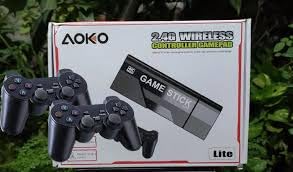
2. irudia: The Gamestick Lite packaging, showing the main unit and two wireless controllers. This illustrates the primary components of the system.
Funtzionamendu-argibideak
Menuan nabigatzea
Once powered on, the Gamestick Lite will display the main game selection menu. Use the directional pad (D-pad) on your wireless controller to navigate through the game list. Press the 'A' button (or equivalent action button) to select a game or menu option.
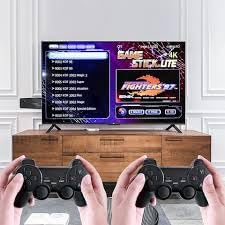
3. irudia: The Gamestick Lite menu interface displayed on a TV screen. Users can browse through the extensive game library using the wireless controllers shown in the foreground.
Jolasetan jolasten
- Selecting a Game: Browse the game list and press the 'A' button to start your desired game.
- In-Game Controls: Controls will vary depending on the emulator and game. Most games will utilize the D-pad for movement and the action buttons (A, B, X, Y) for actions.
- Saving Game Progress: The retro stick supports saving game progress. Refer to the specific emulator's instructions or in-game prompts for saving options. This feature allows you to resume your game at a later time.
- Exiting a Game: To exit a game and return to the main menu, typically press a combination of buttons (e.g., SELECT + START simultaneously) or refer to the emulator's specific exit command.
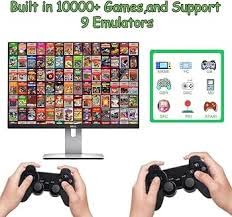
4. irudia: An illustration of the vast game library and supported emulators. The screen shows numerous game covers, indicating the wide variety of titles available, alongside icons representing the 10 supported emulators.
Mantentzea
- Garbiketa: Use a soft, dry cloth to clean the Gamestick Lite and controllers. Do not use liquid cleaners or abrasive materials.
- Biltegiratzea: Gorde gailua leku fresko eta lehor batean, eguzki-argitik eta muturreko tenperaturetatik babestuta.
- Bateria ordezkatzea: When controller performance degrades, replace the AAA batteries in both wireless controllers. Ensure proper polarity when inserting new batteries.
- Saihestu tantoak: Handle the Gamestick and controllers with care to prevent damage from drops or impacts.
Arazoak konpontzea
| Arazoa | Kausa posiblea | Irtenbidea |
|---|---|---|
| Ez da telebistan/monitorean bistaratzen. | Incorrect HDMI input selected; Gamestick not powered; Loose HDMI connection. |
|
| Controllers not responding. | Low or dead batteries; USB receiver not connected; Controllers not paired. |
|
| Game performance issues (lag, freezing). | Overheating; Software glitch. |
|
Zehaztapenak
| Ezaugarri | Xehetasuna |
|---|---|
| Ereduaren izena | RM Lite |
| Marka | Generikoa |
| Konektibitatea | 2.4G Wireless (controllers), HDMI (output) |
| Irteera Ebazpena | 4K HDMI, 1080P |
| Joko integratuak | 21000+ |
| Onartutako emuladoreak | 10 (PS1, Atari2600, ATARI7800, SFC, FC, GBA, GB, GBC, MD, Arcade) |
| Kontrolagailu mota | Wireless Gamepad (requires 2x AAA batteries per controller) |
| Materiala | Plastikoa |
| Produktuaren neurriak | 24 x 17 x 17 cm |
| Elementuaren pisua | 160 g |
| Jatorrizko Herrialdea | Txina |
Segurtasun Informazioa
Abisua: Children under 10 years of age should be accompanied by an adult while installing or operating this device.
- Ez jarri gailua uraren edo gehiegizko hezetasunaren eraginpean.
- Saihestu gailua desmuntatzea edo aldatzea, horrek bermea baliogabetu eta segurtasun arriskuak sor ditzakeelako.
- Erabili emandako kableak eta osagarriak soilik.
- Mantendu gailua bero-iturrietatik eta eguzki-argitik urrun.
Bermea eta Laguntza
Information regarding product warranty and customer support contact details is not provided in the available product data. Please refer to your purchase receipt or the seller's information for specific warranty terms and support channels.