
podofo 4Core 2G+64G with Knob
PODOFO Car Stereo User Manual
Model: 4Core 2G+64G with Knob
1. Sarrera
This manual provides comprehensive instructions for the installation, operation, and maintenance of your PODOFO 2G 64G Car Stereo. This advanced car stereo system is designed for select Ford models, offering a 7-inch IPS touchscreen with Wireless CarPlay, Android Auto, Bluetooth, DAB+, OBD2, WiFi, FM/RDS, GPS, SWC, and backup camera support. Please read this manual thoroughly before use to ensure proper installation and optimal performance.

Figure 1.1: PODOFO 7-inch Car Stereo (4Core 2G+64G with Knob) with included accessories and smartphone integration icons.
2. Ibilgailuen bateragarritasuna
This car stereo is compatible with various Ford models. Please verify your vehicle's make, model, and year against the list below to ensure proper fitment.

Figure 2.1: Visual comparison of a Ford dashboard before and after the installation of the PODOFO car stereo, demonstrating seamless integration.
2.1 Compatible Ford Models:
- Ford F150 (2004-2008)
- Ford F250/F350 (2006-2014)
- Ford E250/E350 (2009-2014)
- Ford Edge (2007-2010)
- Ford Taurus/Sable (2008-2009)
- Ford Fusion/Milan (2006-2009)
- Ford Focus/Montego/Freestyle (2005-2007)
- Ford Explorer (U251) (2006-2010)
- Ford Escape (2008-2012)
- Ford Espedizioa (2007-2014)
- Lincoln MKX (2007-2009)
- Lincoln Mark LT (2006-2008)
- Ford Mustang (2005-2009)

Figure 2.2: Comprehensive list of compatible Ford models and years, alongside visual examples of various Ford dashboards.

Figure 2.3: Visual guide indicating which Ford dashboard configurations are suitable for installation and which are not.
3. Zer dago kutxan
Upon opening the package, please ensure all the following components are present and in good condition:
- PODOFO Car Stereo Unit
- Elikatze-kablea
- RCA Kablea
- 3.8Pin Canbus Plug
- USB kablea
- Atzeko kameraren sarrera-kablea
- Irrati Antena
- GPS antena
- Canbus deskodetzailea
- Kanpoko Mikrofonoa
- Backup Camera (if included in package variant)
- Erabiltzailearen eskuliburua
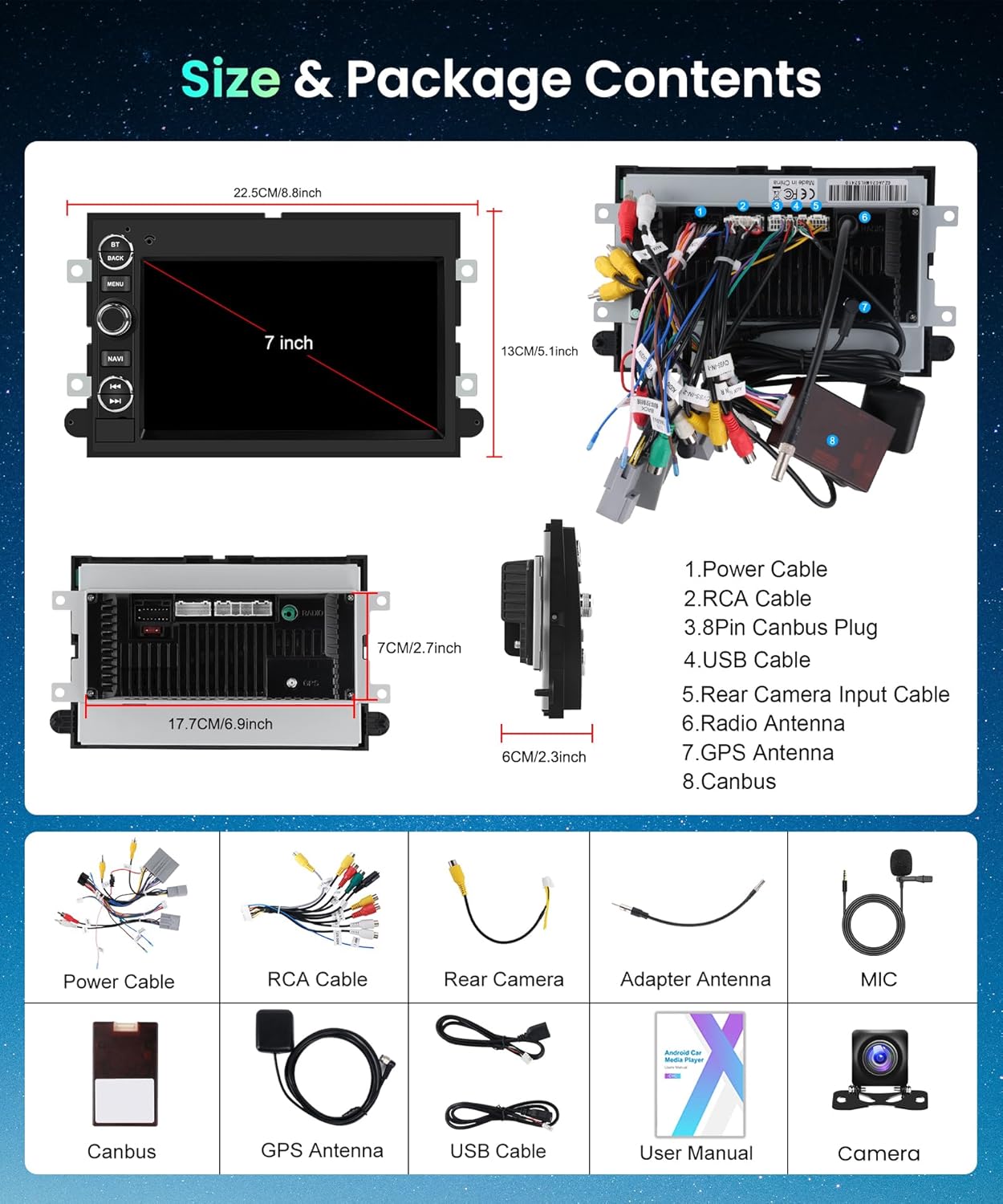
3.1 Irudia: Gainetikview of the PODOFO car stereo's dimensions and a visual representation of all components included in the package.
4. Konfigurazioa eta instalazioa
Proper installation is crucial for the optimal performance of your car stereo. It is recommended that installation be performed by a qualified professional. Always disconnect the vehicle's battery before beginning any electrical work.
4.1 Kableatu-diagrama
Refer to the following diagrams for correct wiring connections. Ensure all connections are secure to prevent malfunctions.

Figure 4.1: Comprehensive wiring diagrams illustrating connections for power, RCA cables, and other peripheral inputs for the car stereo system.
4.2 Backup Camera Installation (If Applicable)
If your package includes a backup camera, follow these steps for installation and wiring. The camera provides a 170-degree ultra-angle view with 1280 x 720 resolution and IP67 waterproof rating.

4.2. irudia: hurbileko planoa view of the AHD reverse camera, highlighting its HD image quality, night vision capabilities, wide-angle lens, and waterproof design.

Figure 4.3: Step-by-step wiring guide for connecting the backup camera to the car stereo system, showing cable routing and connections.
- Mount the backup camera securely at the rear of your vehicle.
- Connect the camera's video output cable to the "Rear Camera Input" on the stereo unit.
- Connect the camera's power wire to your vehicle's reverse light circuit (typically the positive wire of the reverse light) to enable automatic display when shifting into reverse.
- Route all cables safely and discreetly to avoid interference or damage.
5. Funtzionamendu-argibideak
Your PODOFO car stereo offers a wide range of features for an enhanced driving experience. This section covers the basic operation of key functions.
5.1 Haririk gabeko CarPlay eta Android Auto
Connect your smartphone wirelessly or via USB to access navigation, music, calls, and more directly on the 7-inch IPS touchscreen.

Figure 5.1: Display of the car stereo interface showing various CarPlay and Android Auto applications, demonstrating both wireless and wired connectivity options.
- Ziurtatu Bluetootha gaituta dagoela zure telefonoan.
- On the stereo, navigate to the CarPlay/Android Auto icon and select it.
- Follow the on-screen prompts to pair your device. For wired connection, simply connect your phone via a USB cable.
5.2 Mirror Link & Split Screen
Mirror your phone's screen onto the stereo display or use the split-screen function to run two applications simultaneously, such as navigation and music.

Figure 5.2: Illustration of the car stereo's capabilities including CarPlay, Android Auto, Mirror Link, and Split Screen, with an emphasis on voice control functionality.

Figure 5.3: Demonstration of Mirror Link and Split Screen features, displaying a video playing on one side and a navigation map on the other.

5.4. irudia: Adibample of the Split Screen mode, showing three different applications (FM radio, music player, and another app) running concurrently on the display.
5.3 Bluetooth konexioa
Enjoy hands-free calling and wireless audio streaming via Bluetooth 5.0. An external microphone ensures clear call quality.

Figure 5.5: The car stereo's Bluetooth interface, showing options for making calls and streaming music wirelessly from a connected smartphone.
- Go to the Bluetooth menu on the stereo.
- Gaitu Bluetooth-a telefonoan eta bilatu eskuragarri dauden gailuak.
- Select "PODOFO Car Stereo" from the list and confirm pairing.
5.4 FM/RDS irratia
Tune into your favorite radio stations with FM/RDS functionality, providing station information and enhanced signal reception.

Figure 5.6: The car stereo's interface for Bluetooth and FM Radio, showing frequency tuning and station presets.
- Select the "Radio" application from the main menu.
- Use the tuning controls to find desired stations or use the auto-scan function.
- Save frequently listened stations to presets for quick access.
5.5 GPS Navigation & WiFi
Utilize offline maps with the included GPS antenna or connect to WiFi for online navigation apps like Google Maps and Waze. Stay updated with global weather information.

Figure 5.7: The car stereo's GPS navigation display, showing a map with route guidance and various navigation app icons.

Figure 5.8: The car stereo's WiFi/Hotspot interface, displaying available networks and various application icons that can be downloaded and used with internet access.
- For offline maps, ensure the GPS antenna is properly connected and maps are downloaded.
- To use online features, connect to a WiFi network via your phone's hotspot or a dedicated WiFi source.
- Access navigation apps from the main menu.
5.6 Bolantearen kontrola (SWC)
Program your vehicle's steering wheel controls to manage stereo functions for safe and convenient operation.

Figure 5.9: The car stereo's interface for learning and configuring steering wheel controls, showing various assignable functions.
- Navigate to the "Steering Wheel Control" settings in the stereo menu.
- Follow the on-screen instructions to assign functions to your vehicle's steering wheel buttons.
6. Zehaztapenak
| Ezaugarri | Zehaztapena |
|---|---|
| Sistema eragilea | Android |
| RAM | 2 GB |
| ROM | 64 GB |
| Bistaratzeko tamaina | 7 hazbete |
| Bistaratzeko ebazpena | 1080P (for video playback) |
| Konektibitatea | Bluetooth 5.0, USB, Wi-Fi |
| Ezaugarri bereziak | Wireless CarPlay, Android Auto, DAB+, OBD2, GPS, SWC, Backup Camera Support |
| Audio irteera modua | APE/FLAC/WAV/MP3/WMA etc. |
| Muntatze Mota | Arbelaren mendia |
| Elementuaren pisua | 1.76 kilo |
| Paketearen neurriak | 9.84 x 5.91 x 3.94 hazbete |
7. Arazoak
Atal honek aurki ditzakezun arazo ohikoenei irtenbideak eskaintzen ditu. Arazoak jarraitzen badu, jarri harremanetan bezeroarentzako arreta-zerbitzuarekin.
| Arazoa | Kausa posiblea | Irtenbidea |
|---|---|---|
| Botererik ez | Konexio elektriko askea, fusible erreta, ibilgailuaren bateriaren arazoa. | Check all power cables and connections. Inspect vehicle fuses. Ensure vehicle battery is charged. |
| Soinurik ez | Speaker wires disconnected, volume too low, incorrect audio source selected. | Verify speaker wire connections. Increase volume. Select the correct audio input source (e.g., FM, Bluetooth, CarPlay). |
| CarPlay/Android Auto ez da konektatzen | Bluetooth/USB connection issue, phone settings, incompatible phone. | Ensure Bluetooth is on and paired. Try a different USB cable. Restart phone and stereo. Check phone's CarPlay/Android Auto settings. |
| Atzeko kamera ez da bistaratzen | Camera wiring issue, incorrect input selected, camera malfunction. | Check camera power and video signal connections. Ensure vehicle is in reverse. Verify camera is functional. |
| GPS seinalea ahula/galduta | GPS antenna placement, environmental interference. | Ziurtatu GPS antenak argia duela view of the sky. Avoid placing near metal objects. |
8. Mantentzea
To ensure the longevity and optimal performance of your PODOFO car stereo, follow these simple maintenance guidelines:
- Pantaila garbitzea: Erabili pantaila elektronikoetarako bereziki diseinatutako zapi leun eta lint-gabea. Ez erabili garbitzaile edo disolbatzaile urratzailerik. Garbitu pantaila astiro hautsa eta hatz-markak kentzeko.
- Garbiketa orokorra: Wipe the exterior of the unit with a soft, dry cloth. Avoid spraying liquids directly onto the unit.
- Software eguneraketak: Periodically check for software updates from the manufacturer (if available) to ensure the system runs efficiently and has the latest features. Updates can typically be performed via WiFi.
- Ingurumen-baldintzak: Saihestu unitatea tenperatura altuen, eguzki-argiaren eraginpean denbora luzez edo hezetasun gehiegizkoaren eraginpean jartzea.
- Kable konexioak: Aldian-aldian egiaztatu kable-konexio guztiak ondo finkatuta daudela eta korrosiorik edo kalterik ez dutela ziurtatzeko.
9. Bermea eta Laguntza
PODOFO is committed to providing high-quality products and excellent customer service. Your car stereo comes with the following support:
- Bermea: 2-Year Replacement Warranty.
- Dirua itzultzeko bermea: 30-day Money-Back Guarantee.
- Laguntza teknikoa: Bizitza osorako laguntza teknikoa.
- Bezeroarentzako arreta: Professional technical support and customer service are available. For questions regarding installation or use, please contact Podofo Tech directly.
To contact support, you can typically find contact information on the seller's page or through the official Podofo webgunea. Mesedez, eduki zure produktuaren modeloa eta erosketaren xehetasunak prest laguntzarekin harremanetan jartzean.

9.1 Irudia: Gainetikview of Podofo's customer service commitments, including quick reply times, return policy, replacement period, and lifetime technical support.
Ask a question about this manual
Ask about setup, troubleshooting, compatibility, parts, safety, or missing instructions. Manuals+ will review the question and use this page’s manual context to help answer it.