
1. Sarrera
This manual provides essential instructions for the safe and efficient operation of your Saooer Solar Charge Controller. This device is designed to manage the power flow from your solar panel to your battery, ensuring optimal charging and protecting your battery from overcharge and over-discharge. It is compatible with both 12V and 24V solar systems and features a 30A discharge current capacity.
2. Segurtasun-argibideak
Please read all safety instructions carefully before installation and operation. Failure to follow these instructions may result in damage to the controller, battery, or other components, and may cause personal injury.
- Ziurtatu bateria boltage is sufficient for the controller to recognize the battery type before the first installation.
- The charge controller is suitable for lead-acid batteries (OPEN, AGM, GEL) and lithium-ion batteries. Do not use it for other battery types.
- Install the charge controller indoors, away from direct sunlight, high temperatures, and humid environments.
- Kontrolatzailea berotu egingo da funtzionamenduan zehar; ziurtatu aireztapen ona dagoela.
- The controller's positive and negative terminals should be connected correctly. Reverse connection may damage the device.
- Always connect the battery first, then the solar panel, and finally the load. Disconnect in the reverse order: load, then solar panel, then battery.
3. Produktuaren ezaugarriak
- Sistema Boltage Bateragarritasuna: Automatically detects 12V or 24V systems.
- Deskarga-korrontea: 30A edukiera.
- Integrated Micro Controller: Manages solar panel and battery operation efficiently.
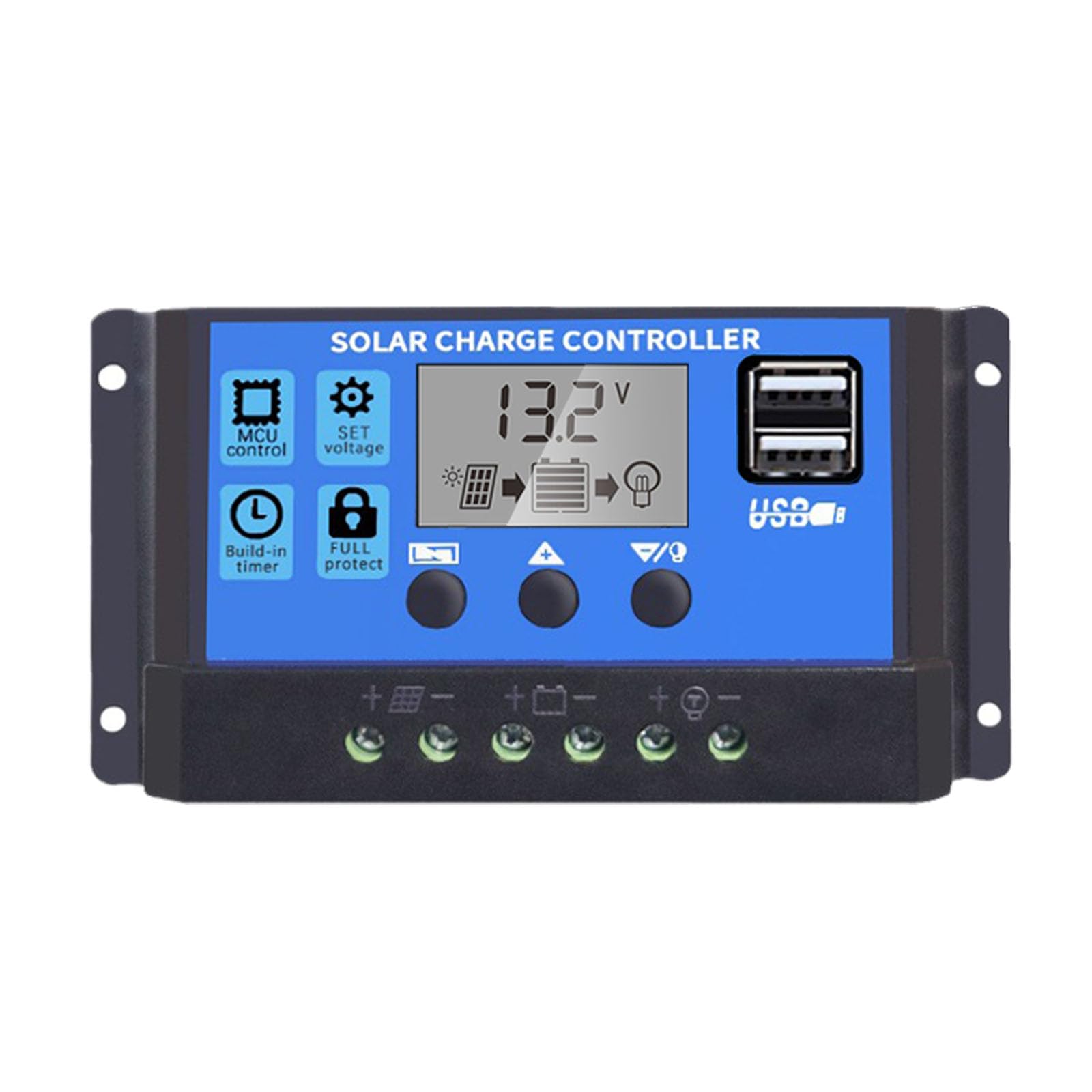
- USB portu bikoitzak: Supports mobile phone charging (5V/2A output).
- Babes integrala: Includes short-circuit protection, open-circuit protection, reverse polarity protection, and over-load protection to enhance system efficiency and battery lifespan.
- LCD pantaila: Provides clear indication of status and data, allowing for convenient mode switching and parameter configuration.
- Parametro erregulagarriak: User-configurable settings for various battery types and operational needs.
- Tenporizadorea: For load control.
4. Paketearen edukia
- 1x Saooer Solar Charge Controller (30A)
5. Konfigurazioa eta instalazioa
Follow these steps for proper installation of the solar charge controller. Incorrect connection order can damage the controller.
- Konektatu bateria: Connect the battery to the charge regulator first. Ensure correct polarity (positive to positive, negative to negative). This allows the controller to recognize the battery voltage.
- Konektatu eguzki-panela: Connect the solar panel to the solar charge controller. Ensure correct polarity.
- Karga konektatu: Connect the consumer or load to the charge controller regulator. Ensure correct polarity.
Important Disconnection Note:
When disconnecting the system, always remove the solar panel connection first, then the load connection, and finally the battery connection. This prevents potential damage to the controller.

6. Funtzionamendu-argibideak
The controller features an LCD display and three buttons for operation: MENUA, UP, eta BEHERA.
6.1. LCD pantaila
The LCD display shows real-time system status and data, including battery voltage, charging current, discharging current, and various parameter settings.
6.2. Botoiaren funtzioak
- MENU botoia: Press to cycle through different display modes and enter parameter setting mode. Long press to exit setting mode.
- GORA botoia: In setting mode, press to increase the parameter value.
- BEHERA botoia: In setting mode, press to decrease the parameter value.
6.3. Parametroen ezarpenak
To adjust parameters (e.g., battery type, charge/discharge voltage limits, load timer settings):
- Sakatu MENUA button until the desired parameter display appears.
- Luze sakatu MENUA button until the displayed value starts flashing.
- Erabili UP eta BEHERA botoiak balioa doitzeko.
- Once the desired value is set, long press the MENUA button again to save the setting and exit the flashing state.
Refer to the specific icons on the LCD for detailed parameter identification.

7. Mantentzea
Mantentze-lan erregularrak zure eguzki-karga-kontrolagailuaren iraupena eta errendimendu optimoa bermatzen ditu.
- Garbitasuna: Mantendu kontrolatzailea garbi eta hautsik eta hondakinik gabe. Erabili zapi lehor bat garbitzeko.
- Konexioak: Periodically check all wiring connections to ensure they are tight and free from corrosion. Loose connections can cause power loss and overheating.
- Aireztapena: Ensure the installation area has adequate ventilation to prevent overheating of the controller.
- Ikuskapena: Inspect the controller for any signs of physical damage or unusual operation.
8. Arazoak
If you encounter issues with your solar charge controller, consider the following common troubleshooting steps:
- Pantailarik ez/Energiarik ez: Egiaztatu bateriaren konexioak eta ziurtatu bateriak nahikoa bolumen duelatage. Verify all wiring is correct and secure.
- Bateria ez da kargatzen: Check solar panel connections and ensure the panel is receiving adequate sunlight. Verify solar panel voltage and current. Ensure the controller's charging parameters are correctly set for your battery type.
- Karga ez dabil: Check load connections. Ensure the load is not exceeding the controller's rated current. Check the load timer settings if applicable. The controller may have entered protection mode due to over-discharge or over-load; check the display for error codes or indicators.
- Gehiegizko bolumenatage/Voltage Alarms: Egiaztatu bateria bolumenatage. Ensure solar panel open-circuit voltage does not exceed the controller's maximum input voltage.
If the problem persists after performing these checks, please contact customer support.
9. Zehaztapenak
| Ezaugarri | Zehaztapena |
|---|---|
| Marka | Saooer |
| Eredua | 30A Eguzki-karga kontrolagailua |
| Sistema Boltage | 12V / 24V-ko detekzio automatikoa |
| Deskarga Korrontea | 30A |
| Materiala | Metala, Plastikoa |
| Bistaratzeko mota | LCDa |
| USB irteera | Dual USB, 5V/2A |
| Dakarten osagaiak | 1x Solar Charge Controller |

10. Bermea eta Laguntza
For warranty information, please refer to the documentation provided with your purchase or contact your retailer. For technical support or inquiries, please contact Saooer customer service through their official channels.